
1. Product Overview
The BAKON BK5600S Anti-Static Ion Fan is an advanced static eliminator designed to neutralize static electricity on surfaces, crucial for electronic manufacturing, scientific research laboratories, and chip packaging. This device ensures a static-free environment, protecting sensitive components and improving process efficiency.
Key Features:
- Meets international standards ANSI/ESDS20.20-2021 and IEC61340 anti-static system standards.
- Low power consumption with rapid static neutralization.
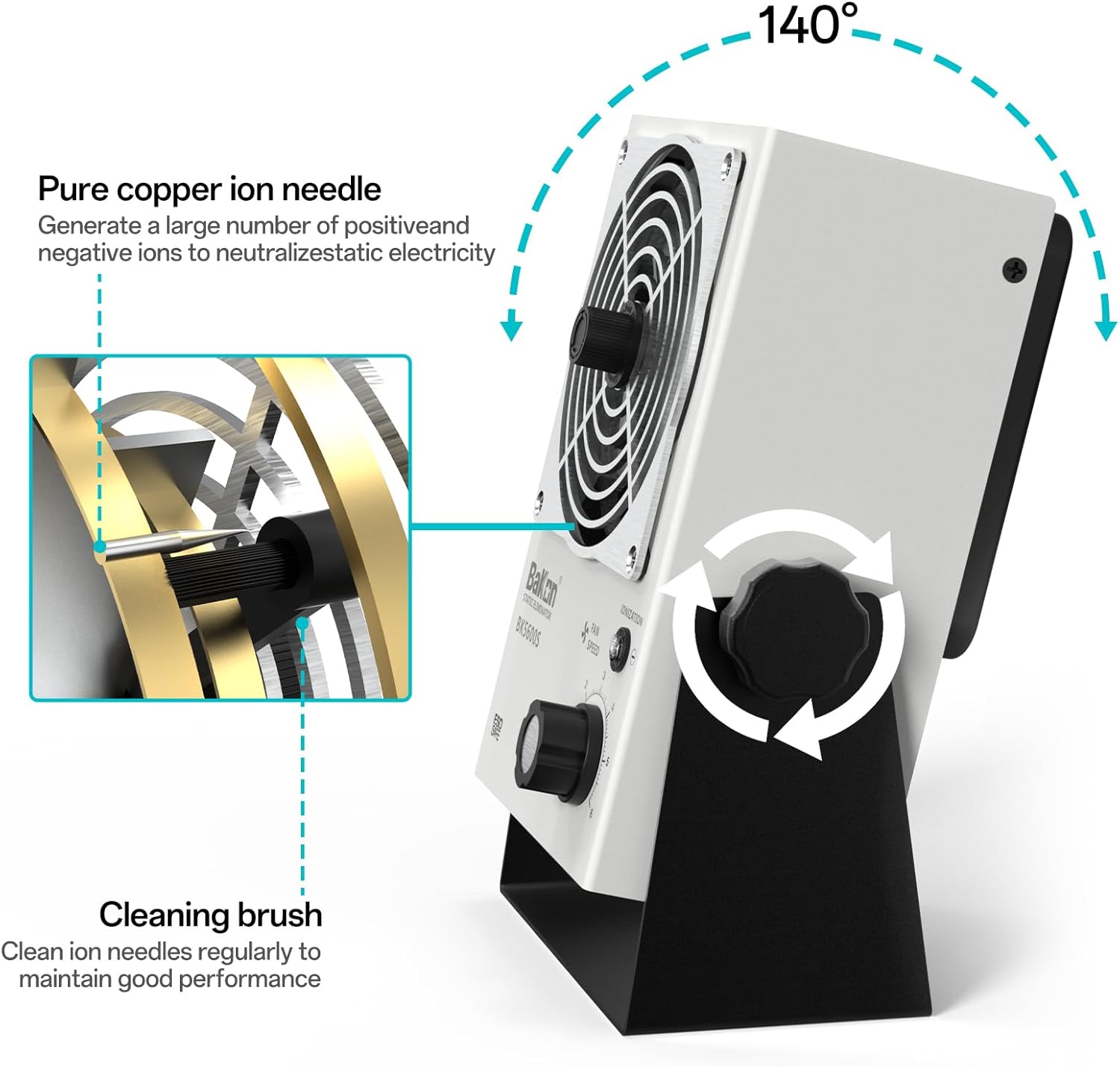
- Features a convenient ion needle cleaning device for simple and efficient maintenance.
- Metal shielding net at the air outlet ensures stable and reliable ion output and equalizes ion paranoia voltage.
- Wide ion wind output coverage for broad electrostatic elimination.
- Soft and comfortable wind volume.
- CCC standard power cord for reliable grounding.
- Supports US 110V standard voltage.
2. Product Components
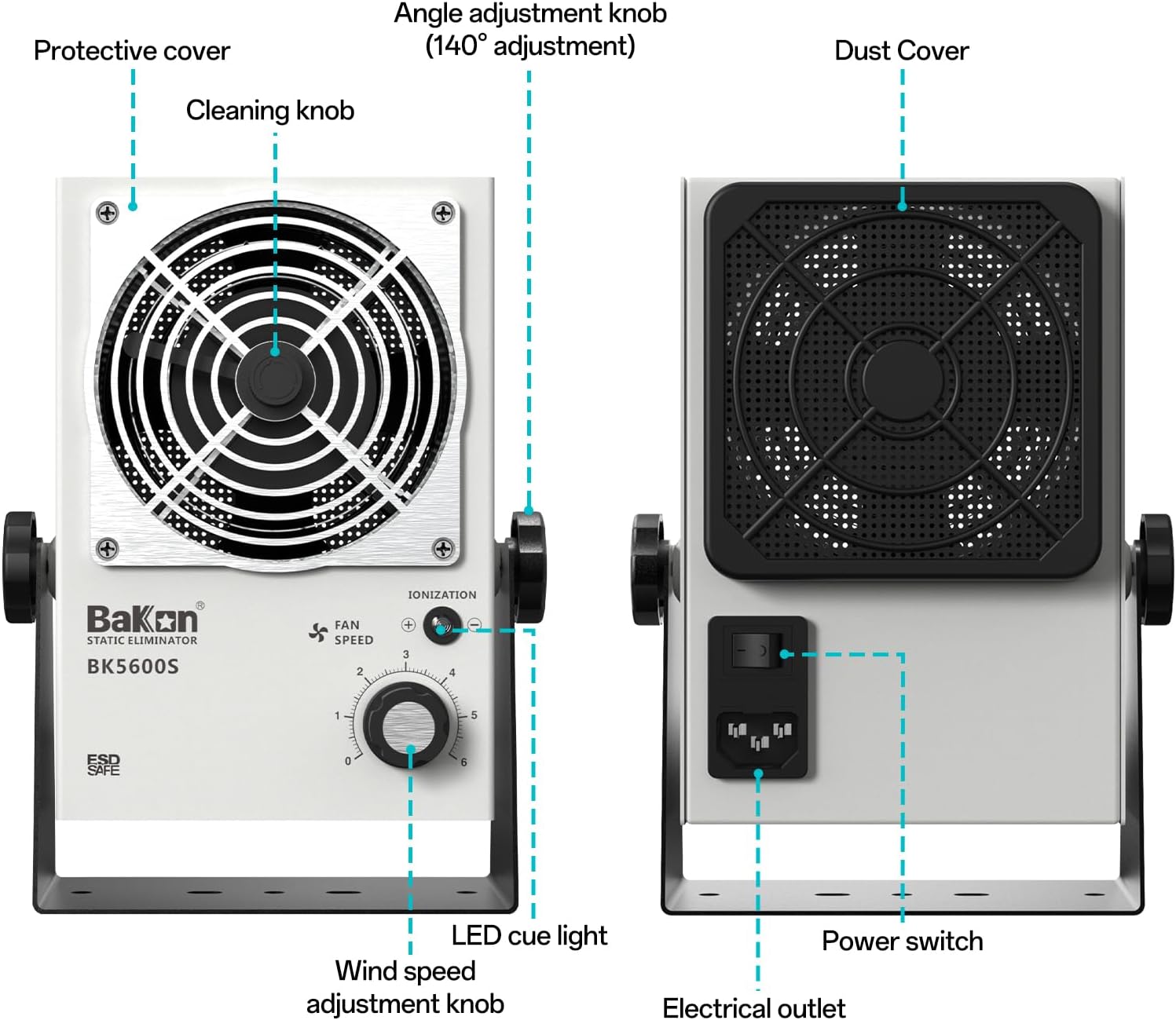
Familiarize yourself with the main components of your BAKON BK5600S Anti-Static Ion Fan:

- Ion Blower Unit: The core device responsible for generating ionized air.
- Protective Covers: Front and rear covers protecting the fan and internal components.
- Dustproof Cotton: Filters air intake, preventing dust accumulation.
- Power Cord: Connects the unit to a 110V power source.
- Angle Adjustment Knob: Allows for up to 140° adjustment of the fan's angle.
- Mounting Bracket: Provides stable support for the ion fan.
3. Setup Instructions
3.1 Unpacking and Inspection
- Carefully remove the ion fan and all accessories from the packaging.
- Inspect the unit for any signs of damage during transit. If damage is found, do not use the device and contact customer support.
- Ensure all components listed in Section 2 are present.
3.2 Assembly
- Attach the ion fan unit to the mounting bracket using the provided angle adjustment knobs on both sides. Ensure it is securely fastened.
- Place the assembled unit on a stable, flat surface or mount it as desired.
3.3 Power Connection
- Connect the provided power cord to the electrical outlet on the back of the ion fan unit.
- Plug the other end of the power cord into a standard US 110V AC power outlet.

4. Operating Instructions
4.1 Powering On/Off
- Ensure the power cord is securely connected.
- Flip the main power switch located on the back panel to the 'ON' position.
- To power off, flip the main power switch to the 'OFF' position.
4.2 Adjusting Fan Speed and Ionization
- Turn the wind speed adjustment knob on the front panel clockwise to increase fan speed and airflow. Turn counter-clockwise to decrease.
- The 'IONIZATION' LED cue light will illuminate when the ionization function is active.
- Aim the fan towards the products or work area where static electricity needs to be eliminated.
4.3 Effective Static Elimination
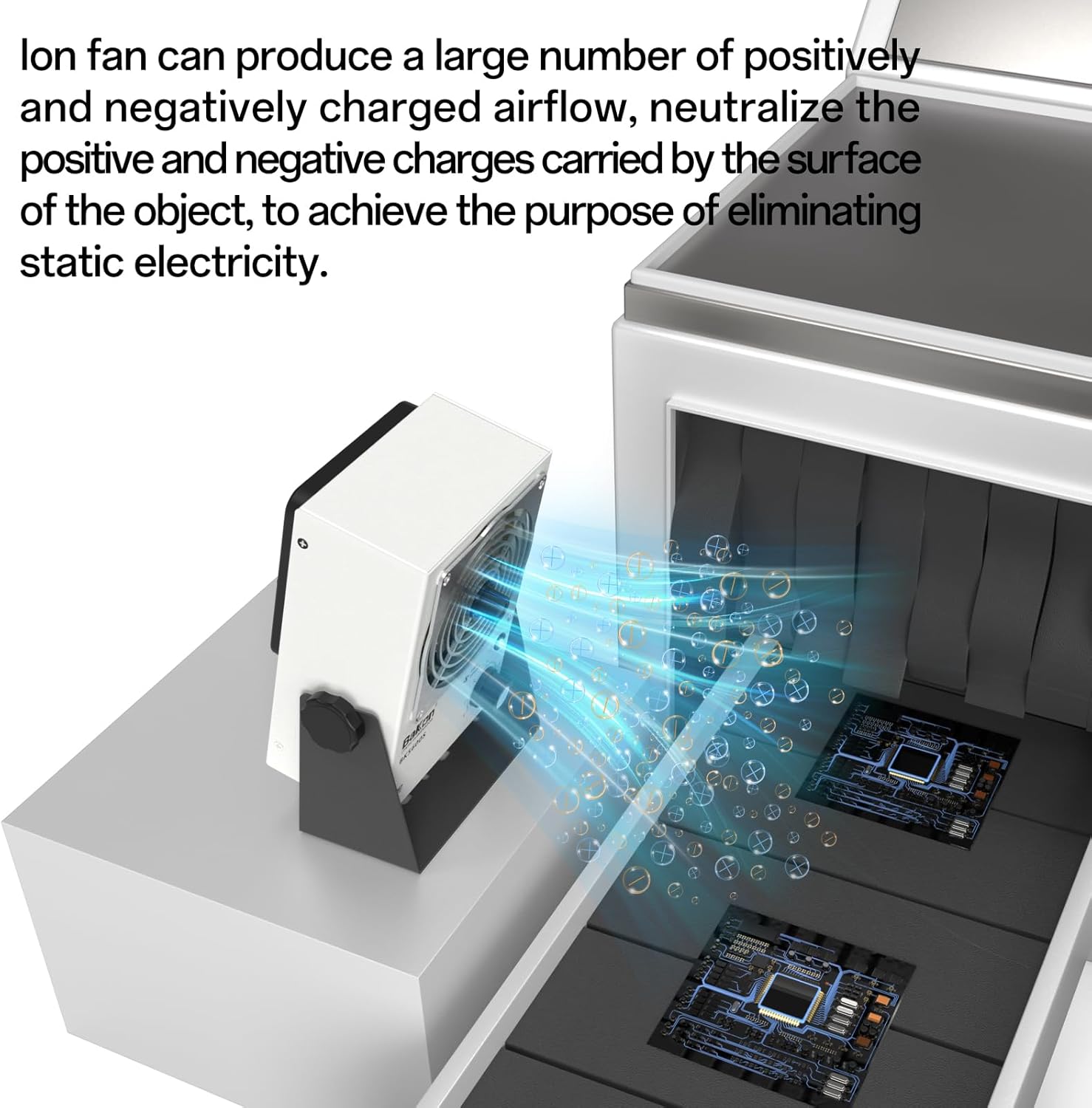
The ion fan produces a large number of positively and negatively charged airflow, which neutralizes the positive and negative charges carried by the surface of objects. This process effectively eliminates static electricity.

4.4 Product Video
5. Maintenance
Regular maintenance ensures optimal performance and longevity of your ion fan. Follow these guidelines:
5.1 Ionizer Needle Cleaning
- Daily: Spin the fan knob to clean the ionizer needle for two cycles.

5.2 Dustproof Cotton Cleaning
- Each week: Put the sponge out, wash it with fresh water, make it dry and re-deposit it.
5.3 Air Inlet and Air Outlet Cleaning
- Each week: Clean the air inlet and air outlet with pressure air.

5.4 Deep Cleaning (Monthly)
- Each Month: Open the cover after removing screws, clean the ionizer needle with a dry brush, clean the air inlet and air outlet with pressure air, then re-deposit the cover.
6. Troubleshooting
If you encounter issues with your BAKON BK5600S, refer to the following common problems and solutions:
| Problem | Possible Cause | Solution |
|---|---|---|
| Unit does not power on. | No power supply; Power switch is off; Faulty power cord. | Check power outlet; Ensure power switch is 'ON'; Replace power cord if damaged. |
| Weak airflow. | Fan speed set too low; Clogged air inlet/outlet or dustproof cotton. | Increase fan speed using the knob; Clean air inlet/outlet and dustproof cotton as per maintenance instructions. |
| Ineffective static elimination. | Ionizer needle is dirty; Unit is too far from target; Ionization function is off. | Clean ionizer needle (spin knob daily); Reposition unit closer to the target; Check if the 'IONIZATION' LED is lit. |
| Unusual noise during operation. | Obstruction in fan blades; Loose components. | Power off and inspect fan for obstructions; Ensure all covers and screws are tight. |
If the problem persists after attempting these solutions, please contact BAKON customer support.
7. Specifications
| Feature | Detail |
|---|---|
| Brand | BAKON |
| Model Name | 2024-BK5600S |
| Color | White |
| Electric Fan Design | Table Fan |
| Power Source | AC |
| Style | Industrial |
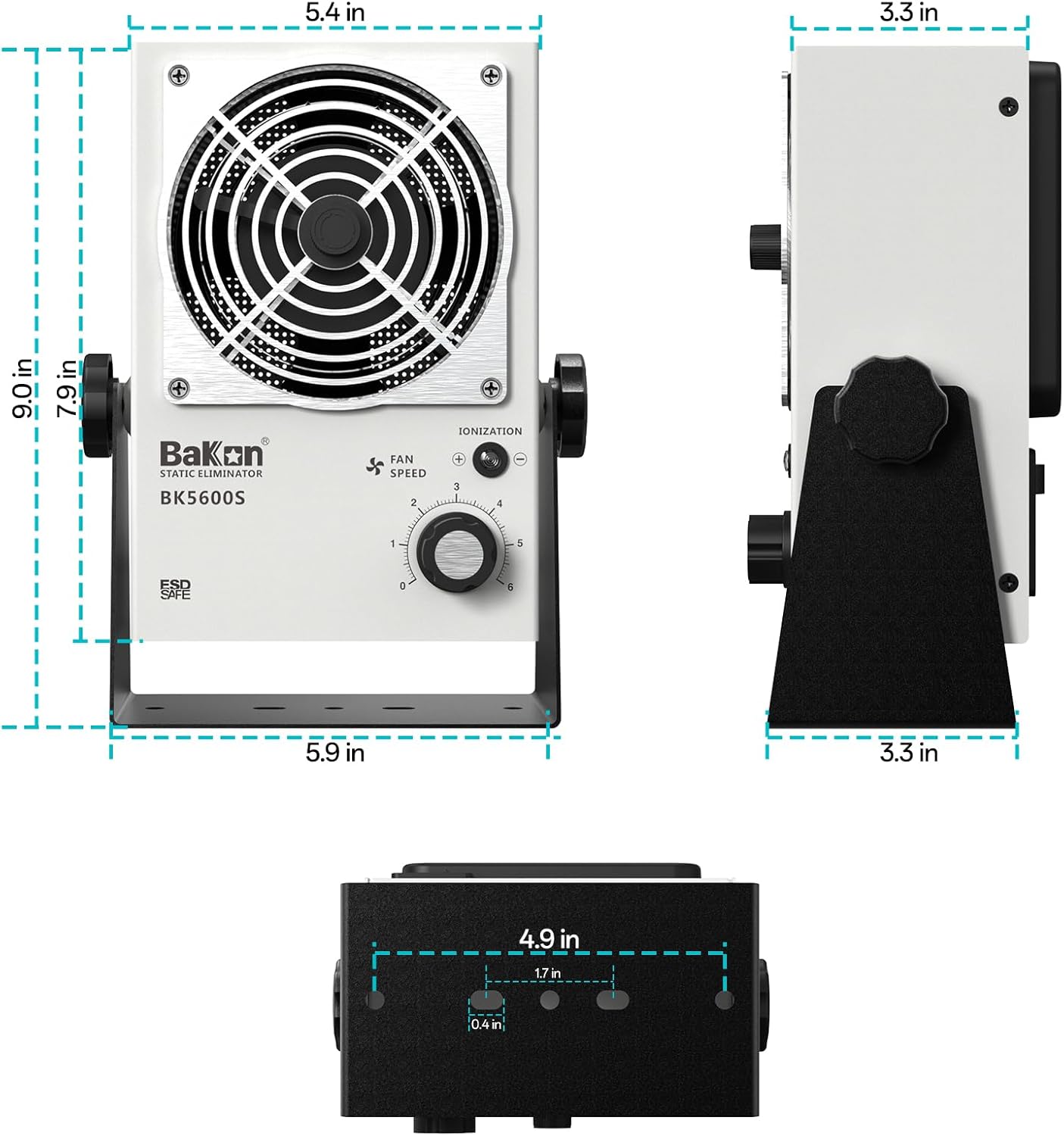
| Product Dimensions (D x W x H) | 3.15"D x 5.9"W x 9"H |
| Special Feature | Static Eliminator |
| Recommended Uses For Product | Air Circulation, Static Elimination |
| Mounting Type | Tabletop Mount |
| Voltage | 110 Volts |
| Indoor Outdoor Usage | Indoor |
| Control Method | Touch (Knob) |
| Material | Metal |
| Specification Met | ANSI, CCC |
| Included Components | Ion blower |
8. Warranty and Support
8.1 Warranty Information
The BAKON BK5600S Anti-Static Ion Fan comes with a standard manufacturer's warranty. Please refer to the warranty card included in your product packaging for specific terms, conditions, and duration. Keep your proof of purchase for warranty claims.
8.2 Customer Support
For technical assistance, troubleshooting beyond this manual, or warranty inquiries, please contact BAKON customer support. Contact information can typically be found on the product packaging or the official BAKON website.