
Introduction
This manual provides detailed instructions for the safe and effective use of your CINCOM Handheld Controller, model CM-010A. Please read this manual thoroughly before operating the device and retain it for future reference. This controller is designed for use with compatible CINCOM massagers.
Product Overview
The CINCOM Handheld Controller CM-010A is an intuitive device designed to manage the functions of your CINCOM massager. It features a power button, intensity control, and mode selection for a customized massage experience.

Image 1: Front view of the CINCOM Handheld Controller. This image highlights the main control buttons: the circular Power Button at the top, the triangular Intensity Control Button below it (with 3 intensity levels indicated), and the 'M' Mode Button at the bottom (with 2 modes indicated). The controller is shown held in a hand, illustrating its ergonomic design.
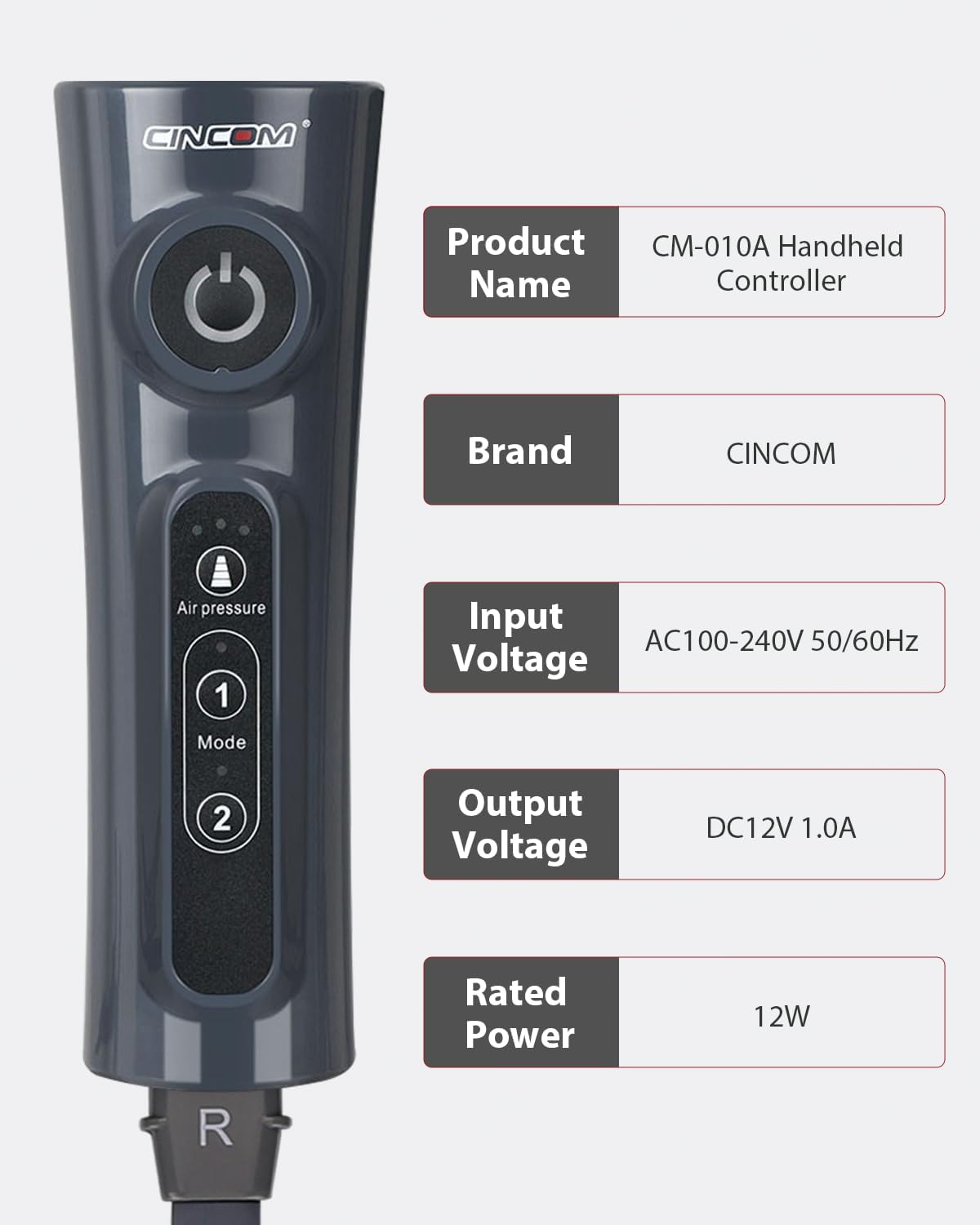
Image 2: Side view of the CINCOM Handheld Controller displaying key product specifications. Details include Product Name: CM-010A Handheld Controller, Brand: CINCOM, Input Voltage: AC100-240V 50/60Hz, Output Voltage: DC12V 1.0A, and Rated Power: 12W. This provides essential electrical and identification information for the device.
Setup
- Unpack the Controller: Carefully remove the CINCOM Handheld Controller from its packaging. Inspect for any signs of damage.
- Connect to Massager: Locate the connection port on your compatible CINCOM massager. Insert the connector cable from the handheld controller firmly into this port. Ensure a secure connection.
- Power Connection: Connect the power adapter (if separate) to the controller and then plug the adapter into a standard electrical outlet (AC100-240V 50/60Hz).
- Initial Power On: Press the Power Button on the controller to turn on the device. The indicator lights should illuminate.

Image 3: This image demonstrates the CINCOM Handheld Controller in use with a CINCOM leg massager. It shows a person comfortably seated, holding the controller, with the massager cuffs applied to their legs. This illustrates the typical setup and application of the controller with its intended device.
Operating Instructions
Follow these steps to operate your CINCOM Handheld Controller:
- Power On/Off: Press the Power Button (circular button at the top) to turn the massager on or off.
- Select Mode: Press the Mode Button (labeled 'M' or with numbers 1 and 2) to cycle through the available massage modes. The controller offers 2 distinct modes.
- Adjust Intensity: Press the Intensity Control Button (triangular button) to adjust the massage intensity. There are 3 intensity levels available. Pressing the button will cycle through these levels.
- Session Duration: The massager typically operates for a preset duration. Refer to your specific massager's manual for details on session length.
- After Use: Once your session is complete, press the Power Button to turn off the massager. Disconnect the power adapter from the outlet.
Maintenance
- Cleaning: Disconnect the controller from the power source and massager before cleaning. Wipe the surface of the controller with a soft, dry cloth. Do not use abrasive cleaners or immerse the controller in water.
- Storage: Store the controller in a cool, dry place, away from direct sunlight and extreme temperatures. Keep it away from children and pets.
- Cable Care: Avoid bending or twisting the connection cable excessively. Do not pull the cable to disconnect; always grasp the plug.
Troubleshooting
| Problem | Possible Cause | Solution |
|---|---|---|
| Controller does not power on. |
|
|
| Massager not responding to controller. |
|
|
| Intensity or mode buttons not working. |
|
|
Specifications
| Product Name | CM-010A Handheld Controller |
| Brand | CINCOM |
| Model Number | CM-010A |
| Input Voltage | AC100-240V 50/60Hz |
| Output Voltage | DC12V 1.0A |
| Rated Power | 12W |
| Product Dimensions | 2.68 x 1.9 x 8.01 inches |
| Item Weight | 11.3 ounces |
| Special Feature | Remote Control |
| Color | Grey |
| Max Number of Supported Devices | 1 |
| Compatible Devices | Massager |
Warranty and Support
For warranty information and customer support, please refer to the documentation included with your primary CINCOM massager unit or visit the official CINCOM website. Keep your purchase receipt as proof of purchase for warranty claims.
Manufacturer: CINCOM
Date First Available: July 26, 2024
