
Introduction
This manual provides detailed instructions for the safe and effective use of your CINCOM Handheld Controller, model CM-030A. Please read this manual thoroughly before operating the device and retain it for future reference.
Product Overview
The CINCOM Handheld Controller CM-030A is designed to provide intuitive control over your compatible CINCOM massager. It features clearly labeled buttons for power, intensity, mode, and heat functions.

Image 1: CINCOM Handheld Controller CM-030A with its control buttons and connection port. The image highlights the Power, Intensity, Mode, and Heat buttons, along with their respective functions and levels.
Controller Buttons and Functions:
- Power Button (⏻): Turns the device ON or OFF.
- Intensity Control Button (⚠): Adjusts massage intensity. Features 3 intensity levels (Min, Mid, Max).
- Mode Button (M): Selects massage mode. Offers 3 modes (Sequence, Circulation, Whole).
- Heat Button (♨): Activates or adjusts heat function. Provides 2 heat levels (Min, Max).
Specifications
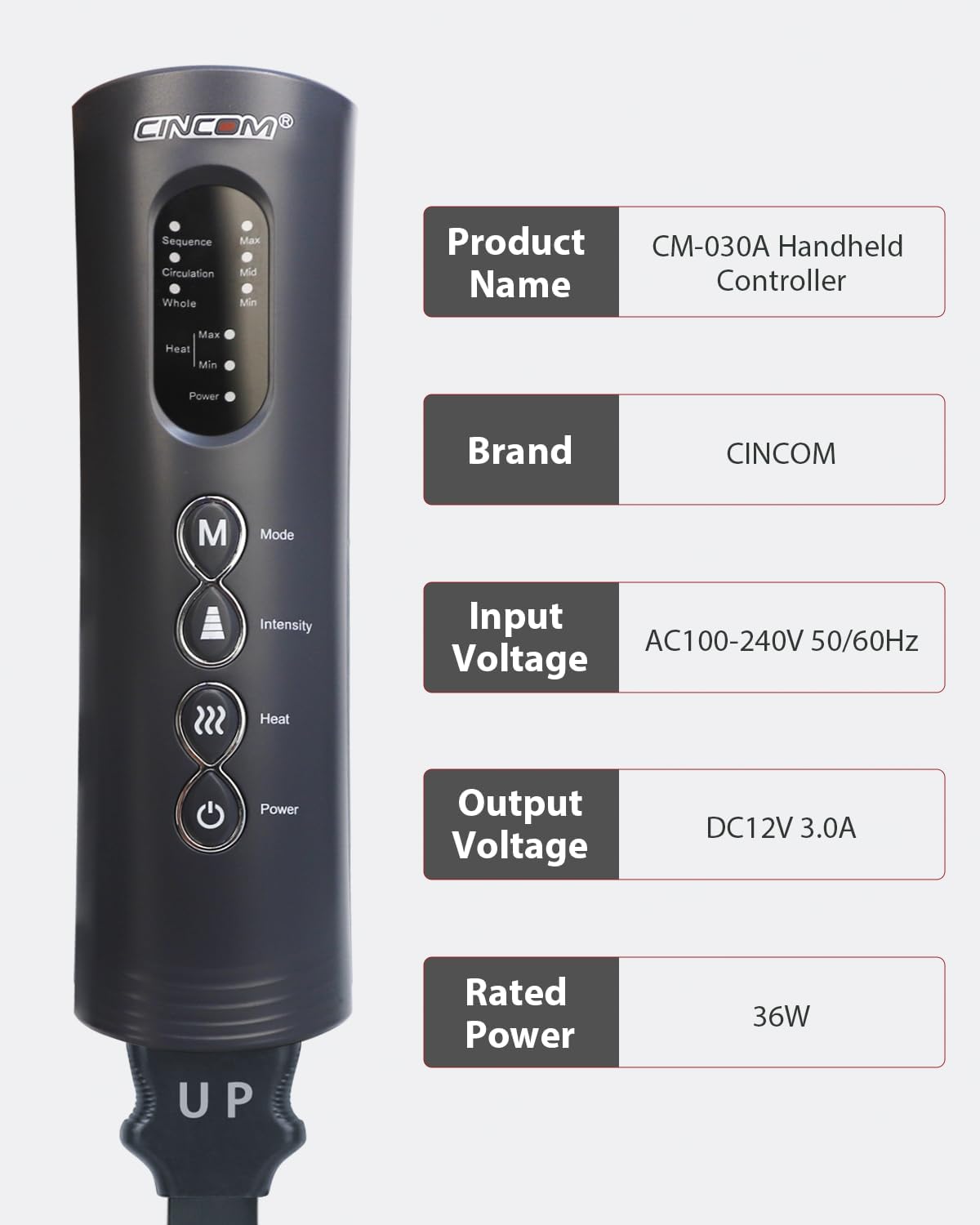
Image 2: Technical specifications for the CINCOM Handheld Controller CM-030A, including power requirements.
| Specification | Detail |
|---|---|
| Product Name | CM-030A Handheld Controller |
| Brand | CINCOM |
| Input Voltage | AC100-240V 50/60Hz |
| Output Voltage | DC12V 3.0A |
| Rated Power | 36W |
| Product Dimensions | 1.97 x 2.1 x 6.92 inches |
| Item Weight | 4.5 pounds |
| Compatible Devices | Massager (specifically CM-030A series) |
Setup Instructions
- Unpack: Carefully remove the controller from its packaging.
- Connect to Massager: Locate the connection port on your CINCOM massager (e.g., leg massager) and the corresponding cable from the handheld controller. Ensure the "UP" indicator on the controller's cable aligns with the massager's port for correct insertion. Push firmly until securely connected.
- Connect Power: Plug the power adapter into the controller's power input port, then plug the adapter into a standard AC100-240V 50/60Hz electrical outlet.
- Initial Check: Once connected, the power indicator light on the controller should illuminate, indicating it is ready for use.

Image 3: Example of the CINCOM Handheld Controller in use with a leg massager, demonstrating a typical setup.
Operating Instructions
- Power ON/OFF: Press the ⏻ Power Button to turn the massager ON. The power indicator light will turn green. Press again to turn OFF.
- Adjust Intensity: Press the ⚠ Intensity Control Button to cycle through the 3 intensity levels: Minimum (Min), Medium (Mid), and Maximum (Max). The corresponding indicator light will illuminate.
- Select Mode: Press the M Mode Button to switch between the 3 available massage modes: Sequence, Circulation, and Whole. The active mode's indicator light will be lit.
- Activate Heat: Press the ♨ Heat Button to activate the heat function. Press again to cycle between 2 heat levels: Minimum (Min) and Maximum (Max). Press a third time to turn the heat OFF.
- Session Duration: The massager typically operates for a preset duration (e.g., 15-20 minutes) and will automatically shut off. You can restart it if desired.
Maintenance and Care
- Cleaning: Disconnect the power before cleaning. Wipe the controller surface with a soft, slightly damp cloth. Do not use abrasive cleaners or immerse the controller in water.
- Storage: Store the controller in a cool, dry place away from direct sunlight and extreme temperatures. Avoid placing heavy objects on top of the controller.
- Handling: Handle the controller with care. Avoid dropping it or subjecting it to strong impacts.
- Cable Care: Do not twist, bend excessively, or pull on the power cord or massager connection cable. Always grasp the plug when disconnecting.
Troubleshooting
| Problem | Possible Cause | Solution |
|---|---|---|
| Controller does not power on. | No power supply; loose connection. | Ensure the power adapter is securely plugged into both the controller and a working electrical outlet. Check if the outlet is functional. |
| Massager does not respond to controller. | Controller not properly connected to massager. | Verify that the controller's cable is firmly and correctly inserted into the massager's port. Ensure the "UP" indicator is aligned. |
| Heat function not working. | Heat not activated or set to minimum. | Press the Heat Button multiple times to cycle through heat levels (Min, Max) and ensure it is not turned off. Allow a few minutes for heat to become noticeable. |
| Indicator lights are off. | Device is off or power issue. | Press the Power Button to turn on the device. Check power connections as described above. |
Warranty and Support
For warranty information or technical support, please refer to the documentation included with your original CINCOM massager or visit the official CINCOM website. You may also contact CINCOM customer service directly for assistance.
CINCOM Official Store: Visit the CINCOM Store on Amazon