
1. Overview
The INIU P62 is a compact and powerful 20000mAh portable power bank designed to provide high-speed charging for a wide range of devices, including laptops, smartphones, tablets, and low-current accessories. Featuring a maximum output of 65W and multiple charging ports, it ensures your devices stay powered on the go.

Image: The INIU 20000mAh 65W Portable Power Bank, showcasing its compact design and digital display.
2. Package Contents
Verify that all items are present in your package:
- INIU 20000mAh Power Bank (Model P62) x 1
- 100W USB-C to USB-C Cable (1ft) x 1
- Welcome Guide x 1
3. Setup
3.1 Charging the Power Bank
Before first use, fully charge your INIU P62 power bank. Use a compatible USB-C wall charger (not included) with at least 45W output for optimal charging speed. The digital display will show the charging progress.
- Connect the provided USB-C to USB-C cable to the IN/OUT1 port on the power bank.
- Connect the other end of the cable to a USB-C wall charger.
- The digital display will illuminate and show the battery percentage increasing.
- Charging is complete when the display shows 100%.

Image: The INIU power bank connected to a wall adapter via its USB-C port for fast recharging.
3.2 Connecting Devices
The power bank features two USB-C ports (IN/OUT1, OUT2) and one USB-A port (OUT3) for connecting your devices.
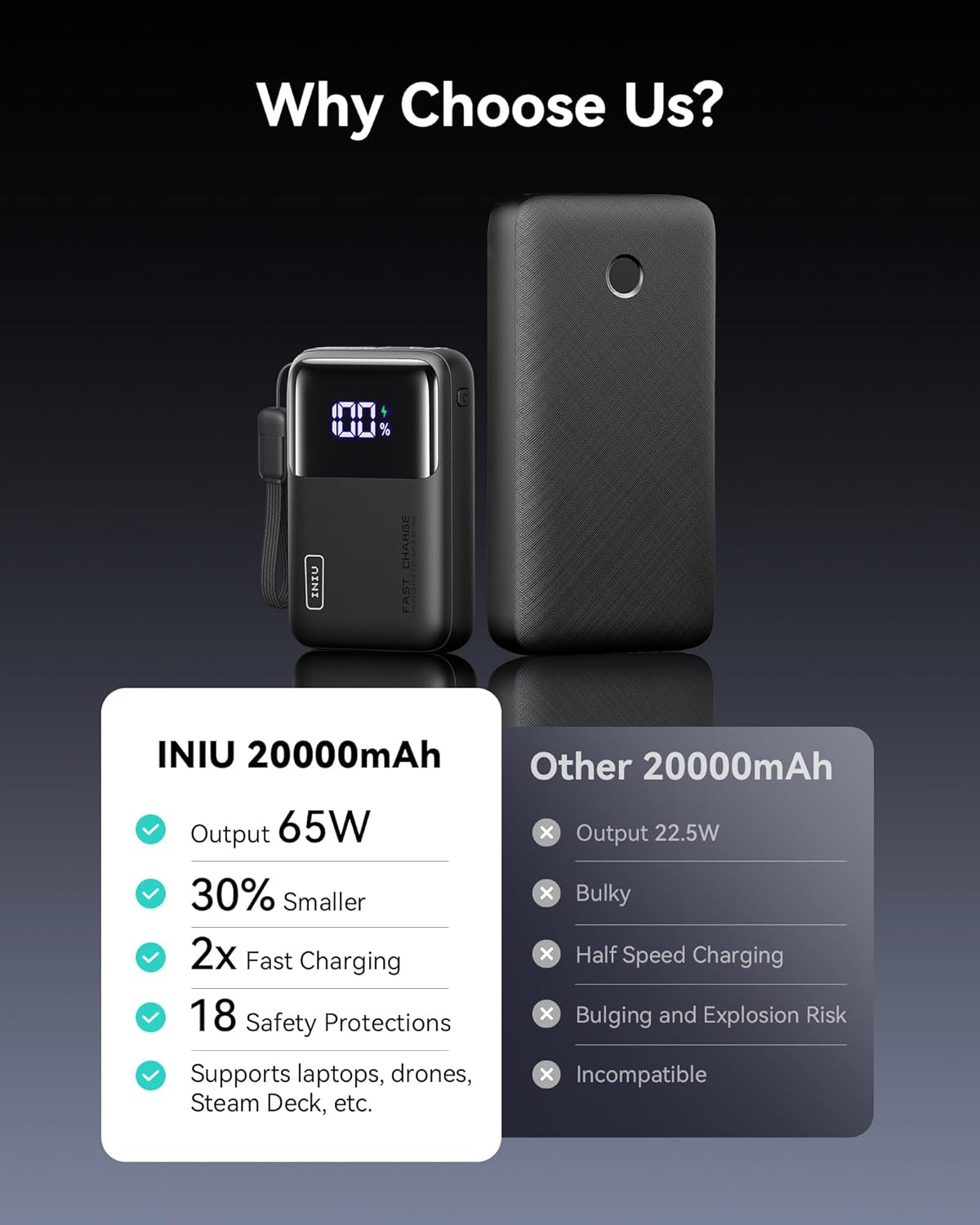
Image: A hand holding the INIU power bank, highlighting its integrated detachable USB-C cable for convenience.
4. Operation
4.1 Charging Devices
To charge your devices, connect them to the appropriate output port on the power bank using a compatible charging cable.
- USB-C (IN/OUT1): Up to 65W output for fast charging laptops, tablets, and smartphones.
- USB-C (OUT2): Up to 36W output for fast charging smartphones and tablets.
- USB-A (OUT3): Up to 18W output for standard charging of various devices.
The power bank supports simultaneous charging of multiple devices. The total output will be distributed among connected devices. For optimal fast charging of a single high-power device (e.g., laptop), use the IN/OUT1 port exclusively.

Image: Close-up view of the INIU power bank's three output ports (2x USB-C, 1x USB-A) with their respective power ratings and compatible device categories.

Image: The INIU power bank simultaneously fast charging an iPhone and a MacBook, demonstrating its dual charging capability.
4.2 Charging Low-Current Devices
The INIU P62 is designed to charge low-current devices such as Bluetooth headphones, fitness trackers, and smartwatches. Simply connect your low-current device to any available output port. The power bank will automatically detect and provide the appropriate charging current.
4.3 Digital Display
The integrated digital display shows the remaining battery percentage of the power bank, allowing you to monitor its charge level accurately.
5. Safety Information
The INIU P62 power bank incorporates a 15-Layer SmartProtect system to ensure safe and reliable operation. This includes protections against:
- Charge low and high temperature
- Discharge low and high temperature
- Battery short-circuit
- Output overvoltage
- Charging undervoltage
- Battery overdischarge
- Output overcurrent
- Charging overvoltage
- USB-C overcharge
- Charging overcurrent
- Discharge overcurrent
- Output short-circuit
- Type-C overheat
- USB-A overcharge
General Safety Precautions:
- Do not expose the power bank to extreme temperatures (hot or cold), direct sunlight, or high humidity.
- Avoid dropping, puncturing, or disassembling the device.
- Keep out of reach of children.
- Ensure adequate ventilation when charging or discharging.
- Use only original or certified compatible cables.

Image: A detailed diagram illustrating the 15-Layer SmartProtect system, highlighting various safety features.
6. Maintenance
To ensure the longevity and optimal performance of your INIU P62 power bank:
- Storage: Store the power bank in a cool, dry place away from direct sunlight.
- Battery Life: For best battery health, avoid regularly draining the power bank completely to 0% or keeping it at 100% for extended periods. Maintaining a charge between 20% and 80% is recommended when not in active use.
- Cleaning: Wipe the exterior with a soft, dry cloth. Do not use harsh chemicals or abrasive materials.
- Airline Travel: The INIU P62 is airline-approved for carry-on luggage due to its 20000mAh capacity.

Image: The INIU power bank charging a laptop, with an "Airline-Approved" badge and graphical representations of its charging capacity for various devices like MacBook, iPhone, iPad, and Steam Deck.
7. Troubleshooting
If you encounter issues with your INIU P62 power bank, consider the following:
- Power Bank Not Charging: Ensure the charging cable and wall adapter are functioning correctly and properly connected. Try a different cable or adapter.
- Device Not Charging: Verify that your device's cable is securely connected to both the power bank and your device. Check if the power bank has sufficient charge. Try a different port or cable.
- Slow Charging: Ensure you are using a high-quality, compatible cable and that your device supports fast charging. For laptops, use the 65W USB-C port (IN/OUT1).
- Digital Display Issues: If the display shows an error or is unresponsive, try fully discharging and then recharging the power bank.
For further assistance, please contact INIU customer support.
8. Specifications
| Feature | Specification |
|---|---|
| Model Number | P62 |
| Battery Capacity | 20000 Milliamp Hours (mAh) |
| Battery Cell Type | Lithium Polymer |
| Input (USB-C IN/OUT1) | Up to 45W |
| Output (USB-C IN/OUT1) | Up to 65W |
| Output (USB-C OUT2) | Up to 36W |
| Output (USB-A OUT3) | Up to 18W |
| Total Output | 65W Max |
| Number of Ports | 3 (2x USB-C, 1x USB-A) |
| Product Dimensions | 11 x 2.9 x 7.1 cm |
| Item Weight | 324.1 Grams |
| Special Features | Fast Charging, Lightweight, Multi-Device Charging, Pocket Size, Travel-Friendly |
| Compatible Devices | Laptops (e.g., MacBook, Dell XPS), Smartphones (e.g., iPhone, Samsung Galaxy, Google Pixel), Tablets (e.g., iPad), Steam Deck, Rog Ally, Bluetooth headphones, Smartwatches, etc. |
9. Warranty and Support
INIU provides an industry-leading 3-Year iNiu Care warranty for this product. This warranty covers manufacturing defects and ensures product reliability.
Additionally, lifetime technical support is available for all INIU products. For warranty claims, technical assistance, or any product-related inquiries, please refer to the contact information provided in your welcome guide or visit the official INIU website.

Image: Graphic highlighting the 3-Year INIU Care warranty and the product's TSA compliance for air travel.


