
1. Introduction
This instruction manual provides detailed guidance for the safe installation, operation, and maintenance of your new TCL 52-inch Black Ceiling Fan. Please read this manual thoroughly before beginning installation or operation to ensure proper function and to prevent potential hazards. Keep this manual for future reference.
2. Safety Information
WARNING: To reduce the risk of fire, electric shock, or personal injury, always follow these basic precautions:
- Ensure the power supply is disconnected at the circuit breaker before installation or servicing.
- All electrical wiring must be performed by a qualified electrician and comply with local codes and regulations.
- The fan must be mounted to a structural ceiling joist or an outlet box marked 'Acceptable for Fan Support of 35 lbs (15.9 kg) or less'.
- Maintain a minimum clearance of 7 feet (2.1 meters) from the floor to the fan blades.
- Do not operate the fan with damaged blades or housing.
- Avoid placing objects in the path of the fan blades.
3. Package Contents
Verify that all components are present before beginning installation:
- 1 Ceiling Fan Unit
- 1 LED Integrated Light Kit
- 1 Remote Control and Holder (with batteries included)
- 5 Fan Blades (reversible: Black and Walnut finish)
- Instruction Manual
- Mounting Hardware Kit

Image: Overview of the TCL 52-inch Black Ceiling Fan and its included components, such as the main fan body, remote control, and individual fan blades with dual-sided finishes.
4. Specifications
| Feature | Specification |
|---|---|
| Brand | TCL |
| Model Number | TCL-T001-1 |
| Size | 52 inches |
| Color | Black |
| Material | Engineered Wood, Metal, Acrylic |
| Mounting Type | Flush Mount |
| Motor Type | DC Motor |
| Fan Speeds | 6 |
| Light Source | Integrated 20W Dimmable LED |
| Color Temperature | 3000K (Warm), 4000K (Natural), 6500K (Cool White) |
| Brightness | 10% to 100% (200-2000 Lumens) |
| Control Method | Remote Control |
| Timer Settings | 1-hour, 4-hour |
| Noise Level | <25dB |
| Voltage | 120 Volts |
| Item Weight | 12.87 pounds (5.85 kg) |
| Indoor/Outdoor Usage | Indoor (Suitable for covered outdoor areas, not direct rain exposure) |

Image: Visual representation of the fan's dimensions (52-inch diameter, 10.63-inch height) and key features controlled by the remote, including customizable light, 6-speed adjustment, quiet operation, timer settings, reversible DC motor, and double-sided blades.

Image: Bar chart illustrating the low noise level of the TCL fan (25dB) compared to typical environmental sounds like city noise, normal chat, and whispers.
5. Installation
Important: Before starting, ensure the power is turned off at the circuit breaker to prevent electric shock.
- Prepare the Mounting Location: Ensure the ceiling outlet box is securely attached to the building structure and is rated for fan support.
- Install the Mounting Bracket: Attach the mounting bracket to the outlet box using the screws provided. Ensure it is firmly secured.
- Assemble Fan Blades: The fan includes reversible blades with Black and Walnut finishes. Choose your desired finish and attach the blades to the motor housing using the provided screws.
- Wiring: Carefully connect the fan's electrical wires to the household wiring according to the wiring diagram in the full instruction manual. Ensure all connections are secure and insulated.
- Attach Fan Body: Lift the fan assembly and carefully place it onto the mounting bracket. Secure the fan body to the bracket with the designated screws.
- Install Light Kit: Connect the light kit wires to the fan's light wires. Secure the LED light kit to the bottom of the fan housing.
- Restore Power: Once installation is complete and all connections are checked, restore power at the circuit breaker.

Image: A man on a ladder installing the TCL ceiling fan while a woman observes, demonstrating the installation process. The image highlights the secure mounting mechanism.
6. Operation
Your TCL ceiling fan is controlled by the included remote control. Ensure the remote has batteries installed (2 AA batteries, included).
Remote Control Functions:
- Power Button: Turns the fan and light ON/OFF.
- Fan Speed Buttons (1-6): Adjusts fan speed from 1 (lowest) to 6 (highest).
- Light ON/OFF: Toggles the light on or off.
- Light Color Temperature (CCT) Button: Cycles through 3000K (Warm Light), 4000K (Natural Light), and 6500K (Cool White Light).
- Dimming Buttons (LED+ / LED-): Adjusts the brightness of the LED light from 10% to 100%.
- Reverse Function (F/R): Changes the direction of blade rotation for summer (downward airflow) or winter (upward airflow) operation.
- Timer Buttons (1H / 4H): Sets the fan to turn off automatically after 1 or 4 hours.

Image: Diagram illustrating the reversible DC motor function, showing downward airflow for cooling in summer and upward airflow for circulating warm air in winter, controlled by the remote.

Image: Three room settings demonstrating the customizable lighting options: 3000K warm light, 4000K natural light, and 6500K cool white light, along with a dimming scale from 10% to 100% brightness.
7. Maintenance
Regular maintenance ensures optimal performance and longevity of your ceiling fan.
Cleaning:
- Always turn off the power at the circuit breaker before cleaning.
- Use a soft, damp cloth to clean the fan blades and motor housing. Do not use abrasive cleaners or solvents.
- Wipe the light cover gently with a soft cloth.
LED Module Replacement:
The integrated LED module is designed for long life. If replacement is ever needed, it is easily accessible for service.

Image: Close-up view of the fan's integrated LED module, highlighting its replaceable design for convenient maintenance.
8. Troubleshooting
| Problem | Possible Cause | Solution |
|---|---|---|
| Fan does not start | No power to the fan; Loose wire connections; Remote control battery low. | Check circuit breaker; Verify all wire connections; Replace remote control batteries. |
| Fan makes noise | Loose screws on fan blades or motor housing; Unbalanced blades. | Tighten all screws; Use the included balancing kit to balance blades. |
| Light does not work | No power to the light; Loose wire connection; LED module issue. | Check power supply; Verify light kit wiring; Contact customer support if LED module is suspected faulty. |
| Remote control not working | Low or dead batteries; Remote not paired with fan. | Replace batteries; Refer to the full manual for remote pairing instructions. |
9. Warranty and Support
TCL stands behind the quality of its products. This ceiling fan comes with a comprehensive 2-Year All-Inclusive Warranty covering the entire fan unit. The DC motor is covered by a 10-Year Warranty.
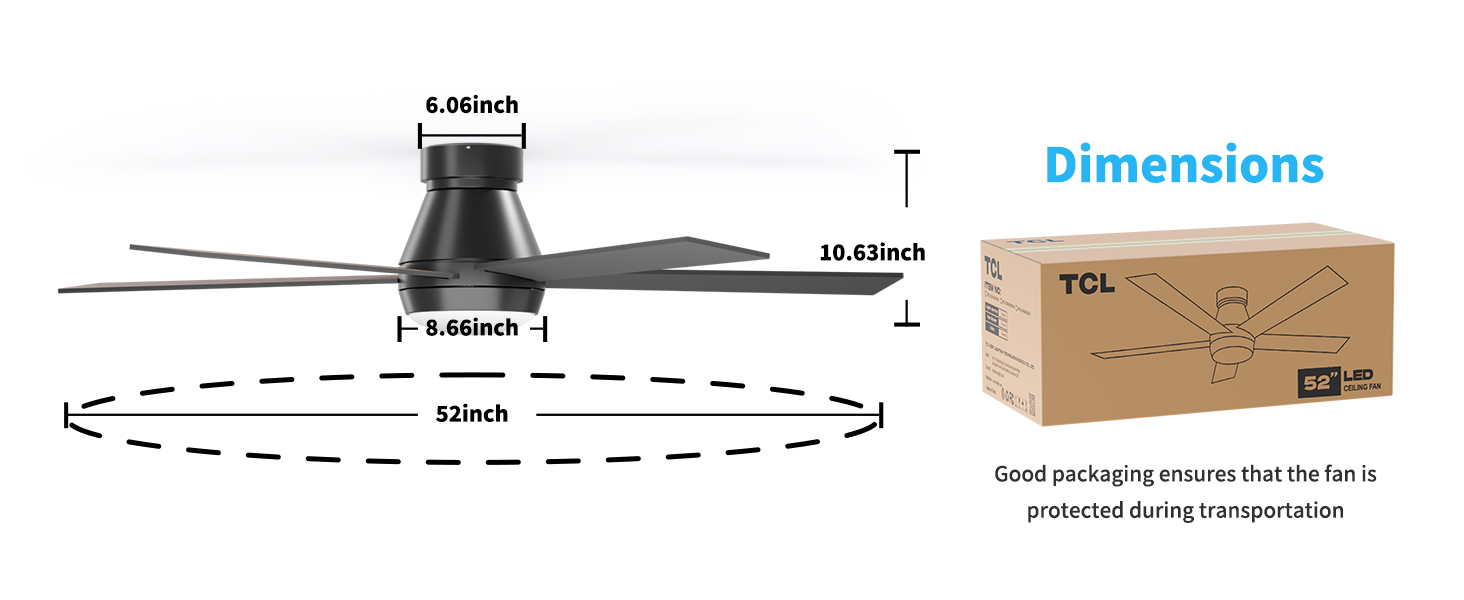
Image: Visual representation of the warranty coverage: 2 years for the whole fan and 10 years for the motor. It also advises contacting support if the LED light board or remote control are damaged or lost.
For any questions, assistance during installation, or support regarding product use, please contact TCL customer service. Our dedicated support team is available to provide fast and effective solutions.


