
1. Introduction
Thank you for choosing the Joymate Bluetooth Speaker Phone Stand with Clock. This versatile device combines a phone stand, a Bluetooth speaker, and a digital alarm clock, designed to enhance your desk setup and daily routine. This manual provides detailed instructions for setup, operation, and maintenance to ensure optimal performance.

Image 1: Joymate Bluetooth Speaker Phone Stand with Clock. The device is black, featuring a digital clock display and a foldable phone stand holding a smartphone horizontally.
2. Product Overview
2.1 Key Features
- 3-in-1 Functionality: Integrates a phone stand, Bluetooth speaker, and digital clock.
- Bluetooth 5.3: Ensures stable and quick wireless connection up to 32.8ft.
- HD Stereo Subwoofer Speaker: Delivers clear audio with enhanced bass.
- LED Display: Features 3 brightness levels and supports 12/24-hour and DST formats.
- Dual Alarm Clocks: Two customizable alarms with a snooze function.
- Adjustable Phone Stand: 360° rotatable and adjustable for angle and height.
- Wide Compatibility: Supports various smartphones, tablets, and e-readers.
- Built-in Microphone: For hands-free calls.
2.2 Package Contents
- Joymate Bluetooth Speaker Phone Stand with Clock (x1)
- Type-C Data Cable (x1)
- Instruction Manual (x1)

Image 2: The product packaging shows the main unit, a Type-C data cable, and the instruction manual.
2.3 Controls and Indicators
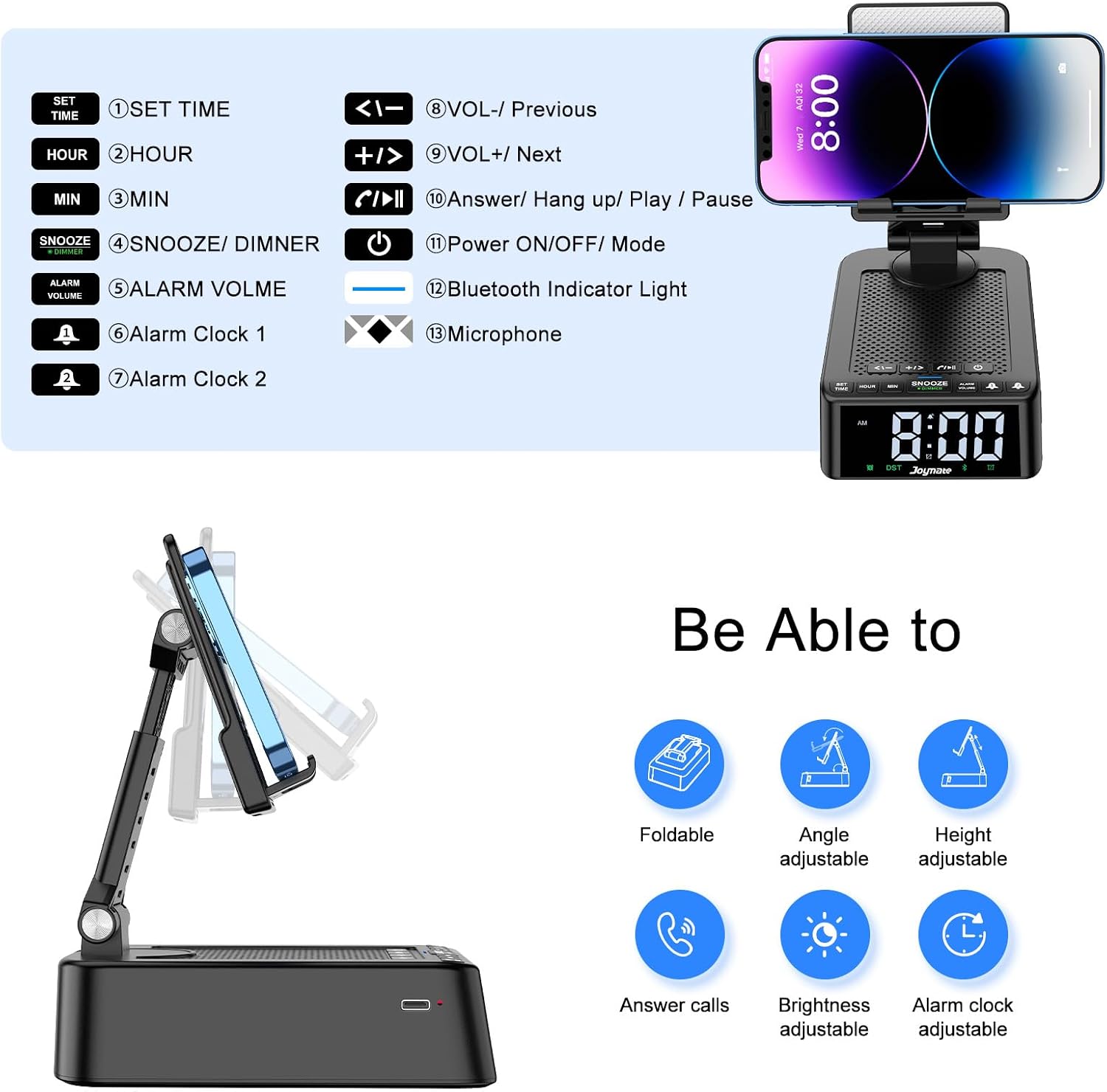
Image 3: Diagram illustrating the control buttons on the device.
- SET TIME: Button to enter time setting mode.
- HOUR: Button to adjust the hour.
- MIN: Button to adjust the minute.
- SNOOZE/DIMMER: Short press for snooze, long press to adjust display brightness.
- ALARM VOLUME: Button to adjust alarm volume.
- Alarm Clock 1: Button for Alarm 1 settings.
- Alarm Clock 2: Button for Alarm 2 settings.
- VOL-/Previous: Decrease volume or go to previous track.
- VOL+/Next: Increase volume or go to next track.
- Answer/Hang up/Play/Pause: Multifunction button for calls and music playback.
- Power ON/OFF/Mode: Long press to power on/off, short press to switch modes.
- Bluetooth Indicator Light: Indicates Bluetooth status.
- Microphone: For hands-free communication.
3. Setup
3.1 Initial Power On
- Connect the device to a power source using the provided Type-C data cable.
- Long press the Power ON/OFF/Mode button to turn on the device.
3.2 Setting Time and Date
- Press the SET TIME button. The hour display will flash.
- Use the HOUR button to adjust the hour.
- Press the SET TIME button again. The minute display will flash.
- Use the MIN button to adjust the minute.
- Press SET TIME once more to confirm and exit time setting.
- To switch between 12-hour and 24-hour format, press the HOUR button during normal time display.
- To activate or deactivate Daylight Saving Time (DST), press the MIN button during normal time display.
Video 1: Demonstration of setting the time on the Joymate L40-1 device.
3.3 Bluetooth Pairing
- Ensure the device is powered on. The Bluetooth indicator light will flash, indicating it's in pairing mode.
- On your smartphone or tablet, go to Bluetooth settings and search for 'Joymate L40-1'.
- Select 'Joymate L40-1' to connect. Once connected, the Bluetooth indicator light will be solid.
4. Operating Instructions
4.1 Using the Phone Stand
- Gently pull up the phone holder from the base.
- Adjust the angle and height of the stand to your preferred viewing position. The stand supports 360° rotation.
- Place your smartphone or tablet onto the non-slip holder.
4.2 Bluetooth Speaker Functions
- Play/Pause: Press the Answer/Hang up/Play/Pause button.
- Volume Adjustment: Use the VOL+ and VOL- buttons.
- Previous/Next Track: Long press the VOL- for previous track or VOL+ for next track.
- Answering/Ending Calls: Press the Answer/Hang up/Play/Pause button to answer an incoming call or end an ongoing call.
Video 2: Demonstration of the sound effect of the Joymate Bluetooth speaker with phone stand.
4.3 Alarm Clock Settings
- Setting Alarm 1: Press the Alarm Clock 1 button. The hour display will flash. Use HOUR and MIN buttons to set the desired time. Press Alarm Clock 1 again to confirm.
- Setting Alarm 2: Follow the same steps as Alarm 1, using the Alarm Clock 2 button.
- Snooze Function: When an alarm rings, short press the SNOOZE/DIMMER button for a 5-minute snooze.
- Turning Off Alarm: Long press the SNOOZE/DIMMER button when the alarm is ringing to turn it off completely.
- Canceling Alarm: If the alarm clock icon (1 or 2) is visible on the display, long press the corresponding Alarm Clock 1 or Alarm Clock 2 button until the icon disappears.
Video 3: Instructions on how to set Alarm Clock 1 on the device.
Video 4: Instructions on how to set Alarm Clock 2 on the device.
Video 5: Instructions on how to cancel both alarm clocks on the device.
4.4 LED Display Brightness
- Long press the SNOOZE/DIMMER button to cycle through the 3 available brightness levels (dim, medium, bright).
- The display also features a power-saving mode where the time display automatically turns off after 30 seconds of inactivity.
4.5 Computer Connection (AUX Mode)
- The speaker can connect to a computer via the provided Type-C data cable for audio playback.
- Ensure the device is in the correct mode (indicated by the Power ON/OFF/Mode button).
5. Maintenance
- Clean the device with a soft, dry cloth. Do not use abrasive cleaners or solvents.
- Keep the device away from water, moisture, and extreme temperatures.
- Avoid dropping the device or subjecting it to strong impacts.
- When not in use for extended periods, store the device in a cool, dry place.
6. Troubleshooting
| Issue | Possible Solution |
|---|---|
| Device does not power on. | Ensure the device is fully charged or connected to a power source. Long press the power button. |
| Bluetooth fails to pair. | Ensure the device is in pairing mode (flashing Bluetooth indicator). Turn off and on Bluetooth on your phone. Move closer to the device. |
| No sound from speaker. | Check volume levels on both the device and your connected phone. Ensure Bluetooth is connected or AUX cable is properly inserted. |
| Alarm does not sound. | Verify alarm time is set correctly and the alarm icon is displayed. Check alarm volume. |
| Time display is incorrect. | Re-set the time following the instructions in Section 3.2. Check 12/24-hour and DST settings. |
7. Specifications
- Model Number: L40-1
- Brand: Joymate
- Bluetooth Version: 5.3
- Connectivity Range: Up to 32.8 ft (10 meters)
- Power Source: 1 Lithium Ion battery (included)
- Item Weight: 12.3 ounces
- Package Dimensions: 6.42 x 3.9 x 2.28 inches
- Compatible Devices: Smartphones, Tablets, E-readers
8. Warranty and Support
Joymate products are designed for reliability and performance. For warranty information or technical support, please refer to the contact details provided on the product packaging or visit the official Joymate website. Please retain your proof of purchase for any warranty claims.


