
Fengind 16g/h
Fengind Smart Saltwater Pool Chlorinator System
Model: 16g/h
1. Introduction
Thank you for choosing the Fengind Smart Saltwater Pool Chlorinator System. This device is designed to provide a clean and healthy swimming environment by converting salt into chlorine through electrolysis, reducing the need for harsh chemicals. It features Wi-Fi connectivity for remote control via a mobile application and intelligent monitoring capabilities.
This manual provides detailed instructions for the installation, operation, maintenance, and troubleshooting of your new chlorinator system. Please read it thoroughly before use to ensure proper function and longevity of the product.

Figure 1.1: Fengind Smart Saltwater Pool Chlorinator System and accessories.
2. Safety Information
Always adhere to the following safety guidelines to prevent injury or damage to the unit:
- Ensure the power supply is disconnected before performing any installation, maintenance, or troubleshooting.
- The unit has an IPX6 waterproof rating, meaning it is rain and splash-proof. However, it is not designed for submersion in water. Avoid prolonged exposure to direct sunlight or severe weather conditions to extend its lifespan.
- Do not operate the system if any part is damaged or if the power cord is frayed.
- Keep the device out of reach of children.
- Only use the provided power adapter with the unit.

Figure 2.1: The chlorinator is IPX6 rated for rain and splash resistance, but not for submersion.
3. Product Overview
The Fengind Smart Saltwater Pool Chlorinator System utilizes advanced technology to maintain optimal pool water quality. It generates chlorine from salt, providing a gentler alternative to traditional chemical treatments, which can reduce skin irritation and eye discomfort.
3.1 Key Features
- Smart Monitoring: Continuously monitors pool conditions and provides error codes for high salinity (F6), low flow (F2), and low salinity (F5).
- Two Pipe Interface Options: Supports internal (1.5 inches/48.3mm or 50mm) and external (1.25-1.5 inches/32mm-38mm) pipe connections.
- IPX6 Waterproof Rating: Designed to withstand rain and splashes.
- Improved Water Quality: Produces chlorine via saltwater electrolysis, reducing the need for additional chemicals and improving overall water comfort.
- Wi-Fi App Remote Control: Monitor and adjust chlorine levels, run time, and cleaning schedules remotely via a mobile application.
- Low Salt Alarm: Notifies you when salt levels are below optimal thresholds.
- Self-Cleaning Titanium Plates: Features automatic polarity reversal with selectable cleaning cycles (4-hour, 8-hour, or 12-hour) to prevent impurity accumulation and extend system life.

Figure 3.1: The system improves pool water quality, leading to clearer water and reduced irritants.

Figure 3.2: Electrolytic plates convert chloride water into chlorine gas for sanitation.
3.2 Control Panel
The digital control panel provides real-time information and allows for manual adjustments.

Figure 3.3: Control Panel layout and indicators.
- Salinity button and indicator: Displays current salinity and allows adjustment.
- 2-digit display screen: Shows various parameters like temperature or mode.
- Status alarm indicator and troubleshooting button: Alerts for issues and provides access to troubleshooting information.
- On/Off key and lock indicator: Power control and child lock function.
- 3-digit display screen and up & down button: Shows chlorine production percentage and allows adjustment.
- Polarity switch cycle timer button: Controls the self-cleaning cycle duration.
4. Setup and Installation
Proper installation is crucial for the optimal performance of your chlorinator. Please follow these steps carefully.
4.1 Pipe Connection Options
The chlorinator offers versatile pipe connection options:
- Internal Connection: Suitable for 1.5 inches (48.3mm) or 50mm inner diameter pipes.
- External Connection: Suitable for 1.25 inches (32mm) or 1.5 inches (38mm) outer diameter pipes.
Verify your pool's pipe size before installation to ensure a proper fit.

Figure 4.1: Two pipe interface options for flexible installation.
4.2 Installation Schematic Diagrams
Refer to the following diagrams for typical installation setups. Ensure all connections are secure and leak-free.

Figure 4.2: Installation Schematic Diagram A. When using Type A pipe, an additional 50cm pipe (not supplied) may be needed after the filter outlet. Consider installing a valve after the chlorinator for easier maintenance.
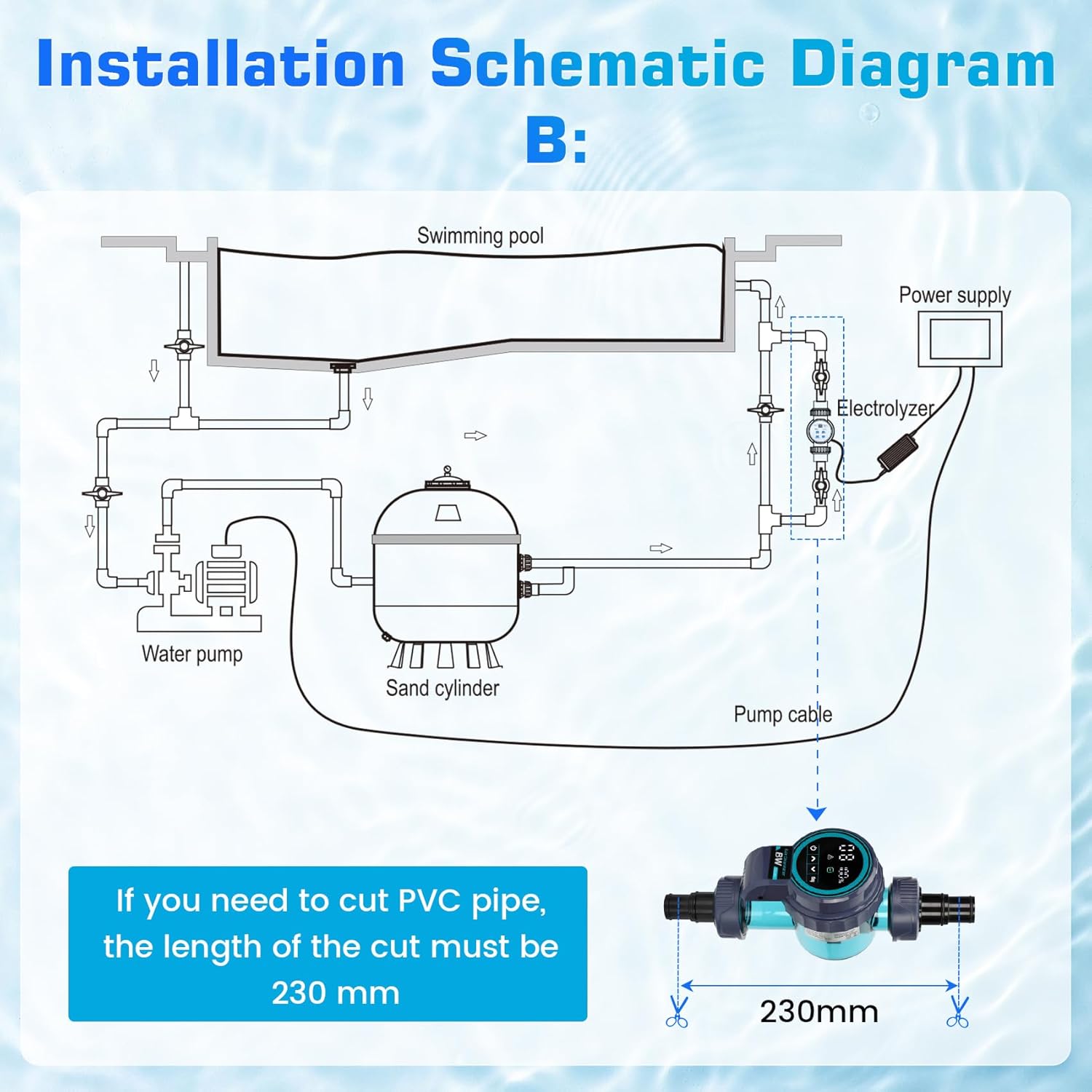
Figure 4.3: Installation Schematic Diagram B. If cutting PVC pipe, the length of the cut section for the chlorinator must be 230mm.
5. Operating Instructions
This section details how to operate your Fengind Smart Saltwater Pool Chlorinator System, including app control and manual settings.
5.1 Wi-Fi App Remote Control
The chlorinator can be controlled remotely via a dedicated mobile application, offering convenience and real-time monitoring.
- Download the official Fengind app from your mobile app store.
- Follow the in-app instructions to pair your device. The system supports Bluetooth connection within 30 meters for initial setup.
- Through the app, you can:
- Adjust chlorine intensity.
- Set run time.
- Configure automatic cleaning and polarity changing time.
- Monitor water temperature.
- Check salt concentration.
- View water flow.
- Control salt dosage.
- The app provides real-time water quality updates, alerts for issues, and maintenance reminders.
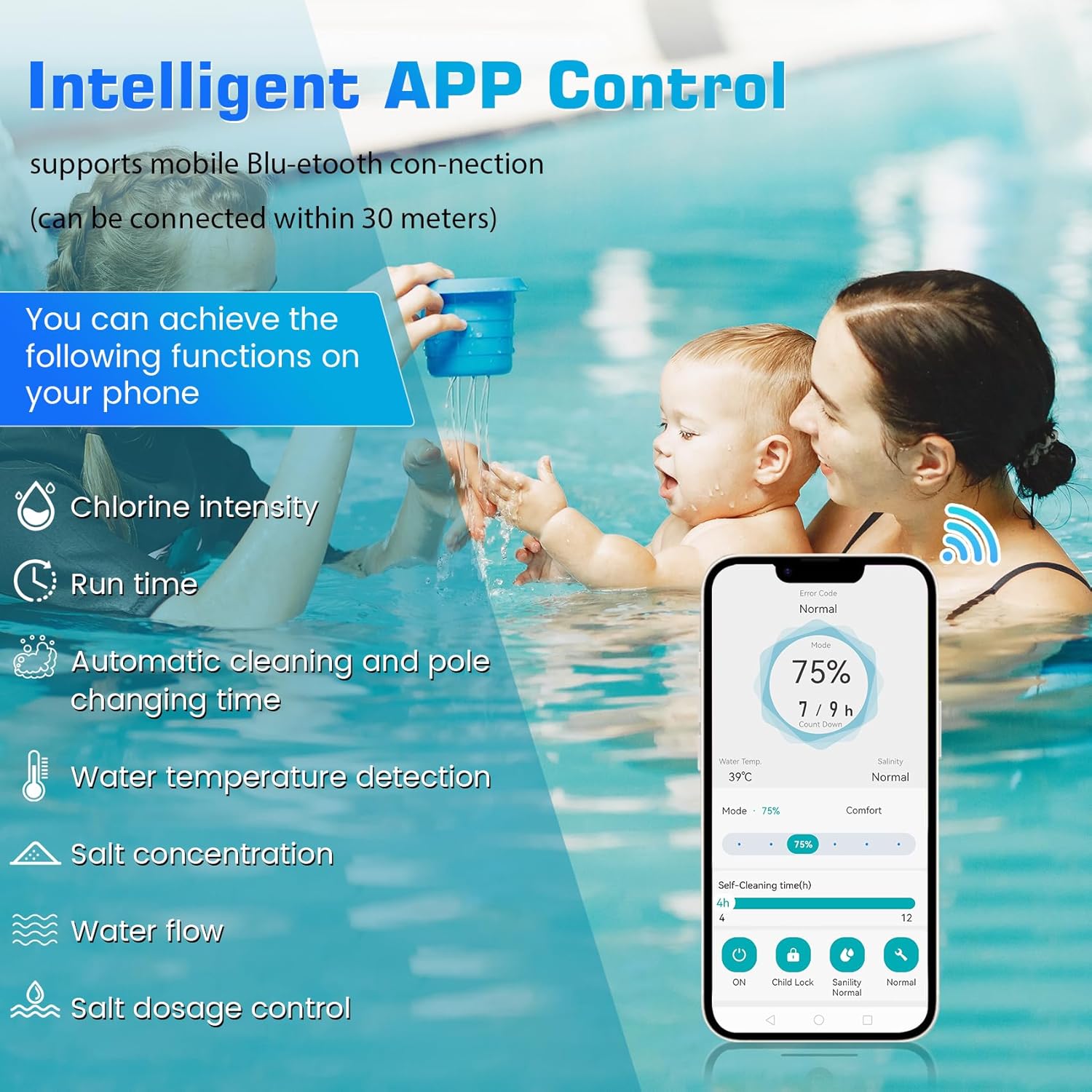
Figure 5.1: Intelligent APP Control interface for remote management.
5.2 Chlorine Production Modes
The system offers various modes to suit different pool needs:
- Standard Modes: 25% for 3h, 50% for 6h, 75% for 9h, 100% for 12h.
- Enhanced Modes: 150% for 18h, 200% for 24h.
Select the appropriate mode based on your pool size, usage, and water conditions.
6. Maintenance
Regular maintenance ensures the longevity and efficient operation of your chlorinator system.
6.1 Self-Cleaning Titanium Plates
The chlorinator is equipped with self-cleaning titanium plates that utilize automatic polarity reversal to prevent mineral buildup and corrosion. This feature reduces the frequency of manual cleaning and extends the life of the electrolytic cell.
- Selectable cleaning cycles: 4-hour, 8-hour, or 12-hour.
- It is recommended to set a cleaning cycle based on your water hardness and usage.

Figure 6.1: Self-cleaning titanium plates reduce buildup and maintenance.
6.2 Low Salt Alarm
The system features a low salt alarm to notify you when the salt levels in your pool water fall below the optimal threshold (typically <2500ppm). Maintaining proper salt levels is essential for efficient chlorine production.
- When the low salt alarm activates, add salt to your pool water as needed.
- After adding salt, hold the 'Salt' button on the control panel for 3 seconds to reset the sensor and allow the system to re-evaluate salinity.
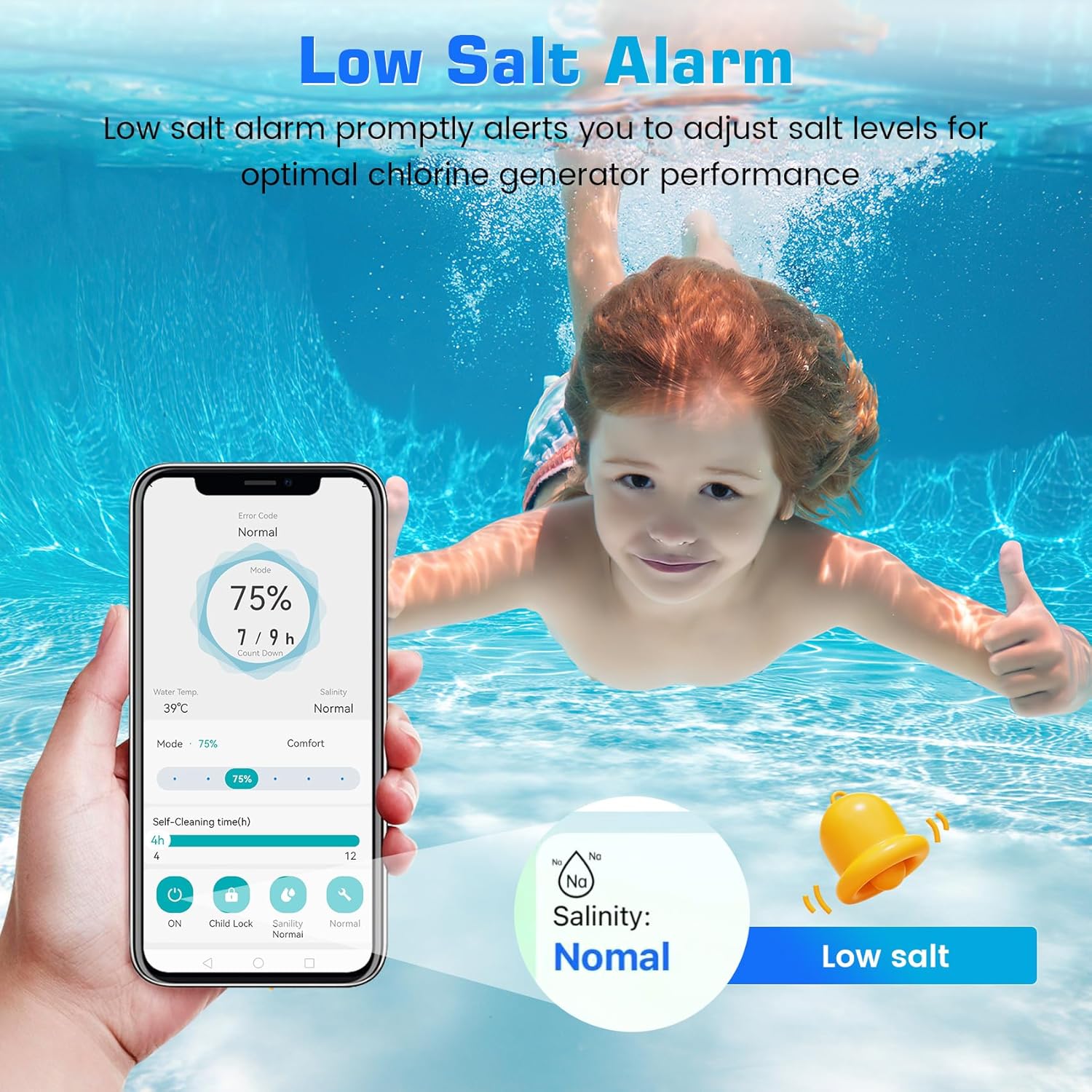
Figure 6.2: Low Salt Alarm notification.
7. Troubleshooting
The chlorinator system is designed to provide error codes to help diagnose common issues. Refer to the following table for common error codes and their solutions.
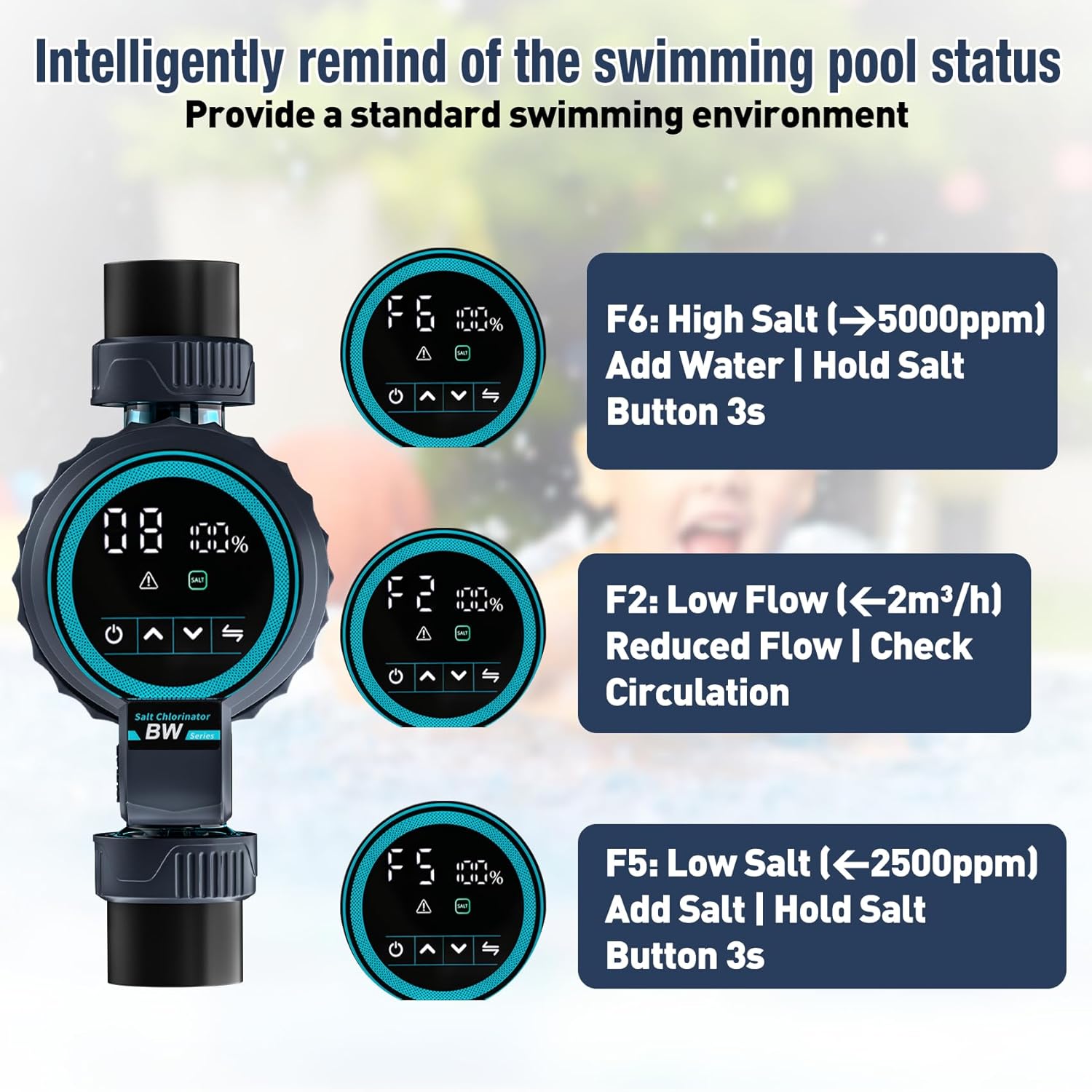
Figure 7.1: Common error codes and their solutions.
| Error Code | Description | Solution |
|---|---|---|
| F6 | High Salinity (>5000ppm) | Add fresh water to the pool to dilute the salt concentration. Hold the 'Salt' button for 3 seconds to reset the sensor. |
| F2 | Low Flow (<2m³/h) | Check your pool's circulation system. Ensure the pump is running, filters are clean, and there are no blockages in the pipes. |
| F5 | Low Salinity (<2500ppm) | Add pool salt to increase the concentration. Hold the 'Salt' button for 3 seconds to reset the sensor. |
If you encounter an error code not listed here, or if the suggested solutions do not resolve the issue, please refer to the detailed user manual provided with your product or contact customer support.
8. Specifications
Detailed technical specifications for the Fengind Smart Saltwater Pool Chlorinator System.
| Feature | Specification |
|---|---|
| Model Number | 16g/h |
| Product Dimensions | 10 x 2 x 2.99 inches |
| Item Weight | 4 pounds |
| Waterproof Rating | IPX6 |
| Chlorine Production | 16g/h (grams per hour) |
| Recommended Pool Volume | Up to 21,100 Gallons (≤60m³) |
| Salt Concentration Range | 2500 - 4500 PPM |
| Working Voltage | DC24V |
| Power Input | AC100-240V / 50-60Hz |
| Minimum Flow Rate | 2m³/hr (water flow <10m³/h) |
| Self-Cleaning Cycle Options | 4h / 8h / 12h |
| Pipe Connection Adapters | DN40 or 50 mm (internal), 32mm or 38mm (external) |
9. Warranty and Support
Fengind is committed to providing high-quality products and excellent customer service.
- Warranty Period: This product comes with a 3-year service warranty from the date of purchase.
- Customer Support: For any issues, questions, or technical assistance, please contact our support team. We aim to provide a fast and satisfactory solution within 12 hours.
Please retain your proof of purchase for warranty claims.

Figure 9.1: Our dedicated customer support team is ready to assist you.
Ask a question about this manual
Ask about setup, troubleshooting, compatibility, parts, safety, or missing instructions. Manuals+ will review the question and use this page’s manual context to help answer it.