1. Introduction
This manual provides essential information for the safe and effective installation, operation, and maintenance of the Toowei A4126 Series Momentary Waterproof Push Button Switch. Please read these instructions thoroughly before use and retain them for future reference.

Figure 1.1: Toowei A4126 Series Momentary Push Button Switch (Green)
2. Product Features
- Momentary Action: The switch activates when pressed and returns to its original state when released.
- Waterproof Design: IP67 rated, providing protection against dust and temporary immersion in water.
- Durable Construction: Designed for reliable performance in various environments.
- Compact Size: φ12mm mounting diameter for versatile applications.
- Certifications: CE, FC, RoHS compliant.

Figure 2.1: Available colors of the Toowei A4126 Series Push Button Switch
3. Safety Information
Observe the following safety precautions to prevent injury or damage to the product:
- Always disconnect power before installing or servicing the switch.
- Ensure wiring is performed by a qualified individual if you are unfamiliar with electrical installations.
- Do not exceed the specified electrical ratings (voltage, current) of the switch.
- Verify proper insulation and connections to prevent short circuits.
- Keep the switch away from extreme temperatures or corrosive substances unless specifically rated for such conditions.
4. Package Contents
The package typically includes:
- One (1) Toowei A4126 Series Momentary Waterproof Push Button Switch
- One (1) Mounting Nut
- One (1) Waterproof Washer
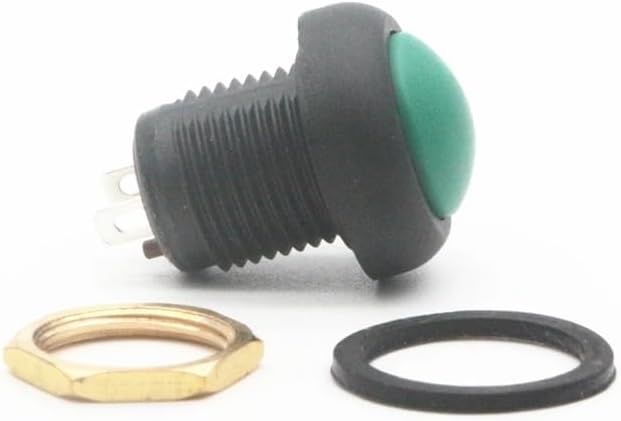
Figure 4.1: Components of the Toowei A4126 Series Push Button Switch
5. Setup and Installation
Follow these steps for proper installation:
- Prepare Mounting Hole: Drill a φ12mm (approximately 0.47 inches) diameter hole in the desired mounting surface. Ensure the surface thickness is compatible with the switch's threaded body.
- Insert Switch: Insert the switch body through the mounting hole from the front.
- Install Washer and Nut: Place the waterproof washer over the threaded body from the back of the mounting surface, followed by the mounting nut.
- Secure Switch: Tighten the mounting nut firmly to secure the switch in place. Do not overtighten.
- Wire Connections: Connect the electrical wires to the terminals on the back of the switch. Ensure correct polarity and secure connections. Refer to your circuit diagram for specific wiring requirements.

Figure 5.1: Side view showing threaded body and terminals for wiring
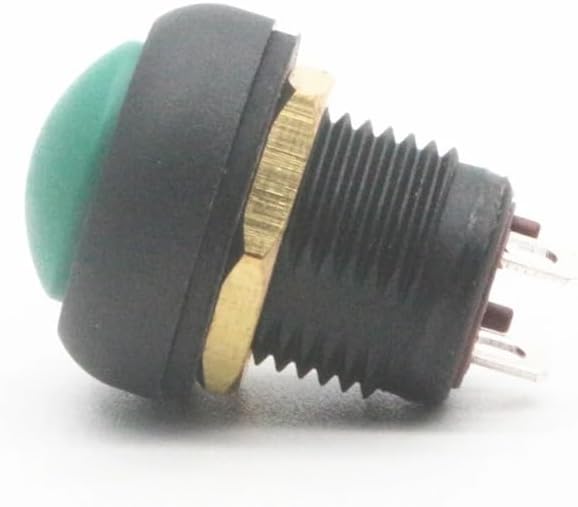
Figure 5.2: Rear view showing mounting nut and terminals
6. Operating Instructions
The Toowei A4126 Series is a momentary push button switch. Its operation is straightforward:
- Activation: Press the button to activate the connected circuit.
- Deactivation: Release the button to deactivate the connected circuit. The button will return to its original position automatically.
7. Maintenance
The Toowei A4126 Series switch requires minimal maintenance due to its sealed design.
- Cleaning: If necessary, clean the exterior of the switch with a soft, damp cloth. Avoid using harsh chemicals or abrasive materials.
- Inspection: Periodically inspect the switch for any signs of physical damage or loose connections. Ensure the mounting nut remains tight.
- Waterproof Integrity: Do not attempt to disassemble the switch, as this may compromise its waterproof rating.
8. Troubleshooting
If the switch is not functioning as expected, consider the following:
- No Power: Check if the power supply to the circuit is active.
- Loose Connections: Verify that all wires are securely connected to the switch terminals and the rest of the circuit.
- Incorrect Wiring: Ensure the switch is wired correctly according to your circuit diagram.
- Damaged Switch: If the switch shows visible damage or does not provide tactile feedback when pressed, it may need replacement.
- Circuit Fault: Test other components in the circuit to rule out issues unrelated to the switch.
9. Specifications
| Attribute | Value |
|---|---|
| Model Number | A4126 Series |
| Brand | PPOZYLPC |
| Switch Type | Momentary Push Button |
| Mounting Diameter | φ12mm |
| Waterproof Rating | IP67 |
| Certifications | CE, FC, RoHS |
| Package Dimensions | 1.18 x 0.79 x 0.39 inches |
| Item Weight | 1.76 ounces |
| Assembly Required | No |
10. Warranty and Support
For warranty information or technical support, please refer to the retailer or manufacturer's official website. Keep your purchase receipt for any warranty claims.


