Product Overview
The JALUZELE Dooya DC510 is a high-precision wireless shock sensor designed for awning shutters. It sensitively captures subtle vibrations and is compatible with all Dooya emitters. This sensor operates on DC 3V (two AAA batteries) and has a working temperature range of -20°C to 55°C with an emission power of 10 milliwatt.

Figure 1: Front view of the Dooya DC510 Wireless Shock Sensor.
Setup and Installation
1. Battery Installation
The Dooya DC510 sensor requires two AAA batteries (number seven batteries). Open the sensor casing to insert the batteries according to the polarity markings. Ensure the batteries are securely in place before reassembling the unit.

Figure 2: Internal view of the sensor, showing the battery slots and the vibration level setting dial.
2. Pairing with Dooya Emitter
To enable the sensor to communicate with your Dooya built-in receiver motor, it must be paired. Follow these steps:
- Press the P2 button on the back of your Dooya remote control twice.
- Press the vibrator multi-function setting button on the sensor once to pair.
- A confirmation signal (e.g., a beep or motor movement) should indicate successful pairing.
Video 1: This video demonstrates the pairing process for the Dooya DC510 shock sensor with a Dooya remote control and motor.
3. Setting Vibration Sensitivity Level
The sensor features ten levels of vibration intensity, from level 0 to level 9. You can adjust this setting based on your requirements. Level 1 is the most sensitive, while level 9 is the least sensitive. Level 0 senses nothing.
- Multi-function button: 0 level - set button, 5 level - up button, 9 level - down button.
- Use a small screwdriver to adjust the dial switch inside the sensor to your desired vibration level.

Figure 3: Detailed diagram illustrating how to set the vibration grade and the sensor's working principle.
4. Mounting the Sensor
The sensor is designed to be installed on the inner wall of the front beam of your awning or shutter. Ensure it is securely mounted using the provided screws and anchors.
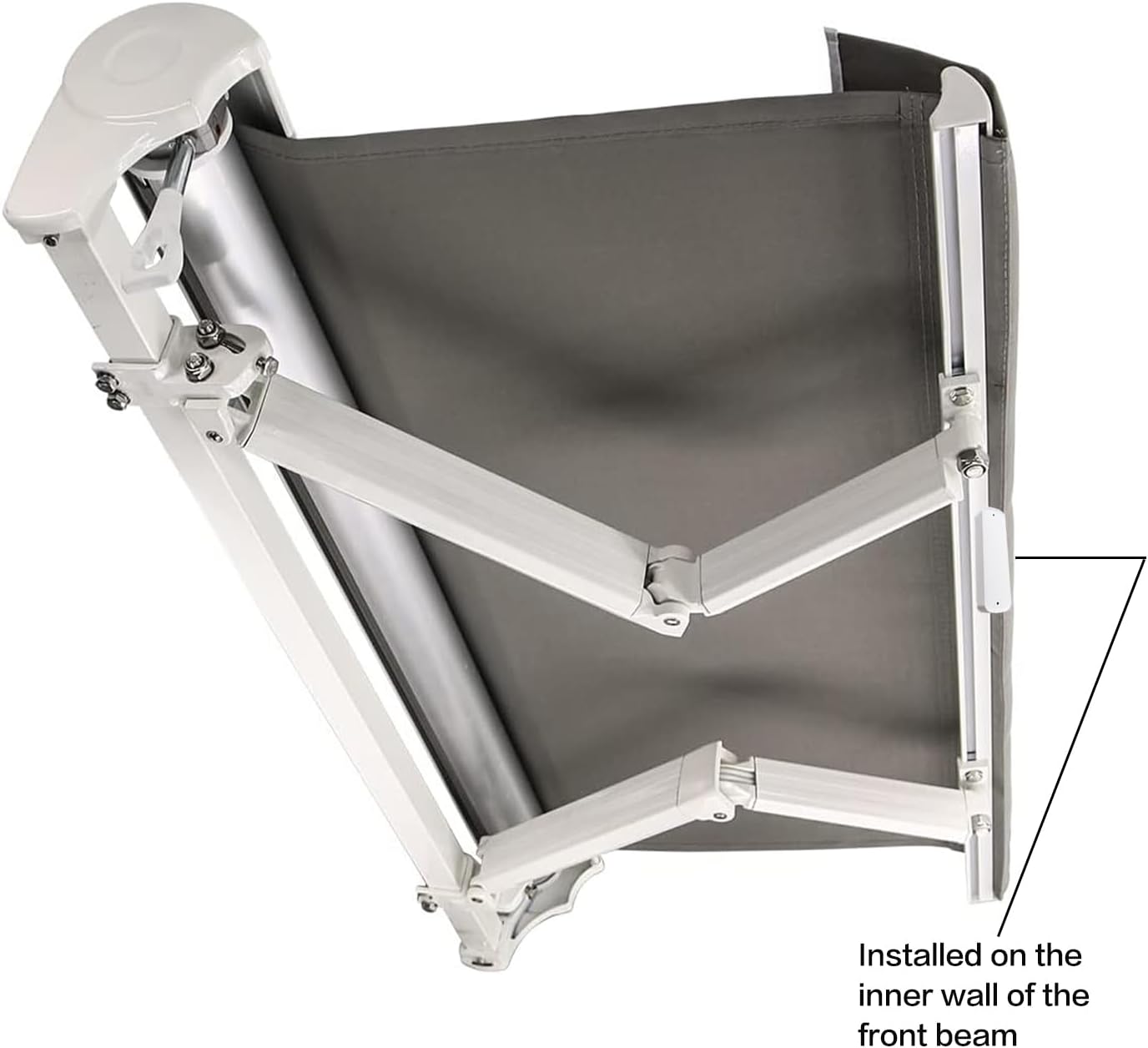
Figure 4: Example of the sensor's installation location on an awning.

Figure 5: The Dooya DC510 sensor shown with its included mounting hardware.
Operation
Working Principle
The sensor operates by detecting vibrations. When the vibration strength reaches the set value, the sensor (emitter) is triggered and sends a signal to withdraw the roller blinds or awning. The emitter will send the signal three times after detecting vibration to ensure the blinds are withdrawn. If vibration continues, the sensor will stand by after the motor closes. If vibration happens randomly, the motor will stand by directly.
Compatibility
This product is designed to be used exclusively with Dooya 433MHz built-in receiver motors and can only be set to close roller blinds and sunshades. It is compatible with Dooya DC series remotes but not with Dooya DD series remotes.

Figure 6: Visual guide to compatible (Dooya DC series) and incompatible (Dooya DD series) remote controls.

Figure 7: The sensor's wireless capability and its application with various types of blinds and shades.
Maintenance
Battery Replacement
The sensor features a low power consumption design for long battery life. When the battery voltage drops below 2.2V, the sensor will beep every 5 seconds to indicate that the batteries need to be changed. Replace the two AAA batteries promptly to ensure continuous operation.
Troubleshooting
Sensor Not Responding
- Ensure the batteries are correctly installed and have sufficient charge. Replace if the low battery warning is active.
- Verify that the sensor (emitter) is properly programmed with the Dooya receiver motor. If the emitter's programming is deleted, the wind-sun sensor will become invalid. Re-pair the sensor if necessary.
- Check that the sensor is within the effective range of the Dooya receiver motor.
- Confirm that the vibration level setting is appropriate for the environment. If set too high (e.g., level 9), it may not detect subtle vibrations.
Specifications
| Feature | Detail |
|---|---|
| Brand | JALUZELE |
| Model Name | Dooya DC510 |
| Power Supply Voltage | DC 3 V (two AAA batteries) |
| Working Temperature | -20°C ~ 55°C |
| Emission Power | 10 milliwatt |
| Product Dimensions | 5.91"L x 1.97"W (approx. 15cm L x 5cm W) |
| Material | PC |
| Special Feature | Vibration induction with 10 adjustable levels |
| Compatibility | Dooya 433MHz built-in receiver motors (DC series remotes) |

Figure 8: Physical dimensions of the Dooya DC510 sensor.
Warranty and Support
For warranty information and technical support, please refer to the contact details provided by your retailer or the manufacturer, Shaoxing Gaodeng Window blinds co.,ltd. Specific warranty terms may vary by region and purchase location.