
Uni Pro KM 225
Uni Pro KM 225 Bucket Seat User Manual
Model: KM 225 (Part No. 8773)
Brand: Uni Pro
Product Overview
The Uni Pro KM 225 Bucket Seat is designed to provide superior comfort and durability for a wide range of heavy-duty equipment. Crafted with a heavy-duty vinyl covering and ergonomic cushions, this seat is built for extended use. Its robust construction includes a corrosion-resistant, blow-molded plastic frame and a vacuum-formed waterproof vinyl with a central drain hole to prevent water accumulation. This 19-inch high-back seat is a versatile replacement for both 16-inch and 19-inch original seats and is designed to accommodate operator presence switches for enhanced safety.

Figure 1: Front view of the Uni Pro KM 225 Black Vinyl Bucket Seat, showcasing its ergonomic design and durable vinyl covering.
Installation and Setup
This section provides general guidelines for installing your Uni Pro KM 225 Bucket Seat. Due to the universal fit design, minor modifications may be required depending on your specific equipment. It is crucial to verify mounting dimensions before purchase and installation.
Pre-Installation Check:
- Verify Compatibility: Ensure the seat's dimensions and mounting pattern are compatible with your equipment's existing seat rails or mounting points. Refer to the detailed dimension diagram below.
- Operator Presence Switch: Confirm your equipment's operator presence switch can be integrated with the KM 225 seat. The seat is designed to accommodate these switches.
- Required Tools: Gather necessary tools such as wrenches, sockets, and potentially a drill if new mounting holes are required.
Installation Steps:
- Remove Old Seat: Carefully unbolt and remove the existing seat from your equipment. Disconnect any wiring for operator presence switches or other sensors.
- Align New Seat: Position the Uni Pro KM 225 seat onto the mounting rails or platform. Align the mounting holes.
- Secure Seat: Use appropriate bolts, washers, and nuts to securely fasten the new seat. Ensure all fasteners are tightened to the manufacturer's specifications. Do not overtighten.
- Connect Wiring: If applicable, connect the operator presence switch wiring to the seat. Ensure connections are secure and properly insulated.
- Test Functionality: Before operating the equipment, test the seat's stability and the functionality of any connected safety switches.

Figure 2: Bottom view of the Uni Pro KM 225 seat, illustrating the various pre-drilled mounting hole patterns for universal fit.
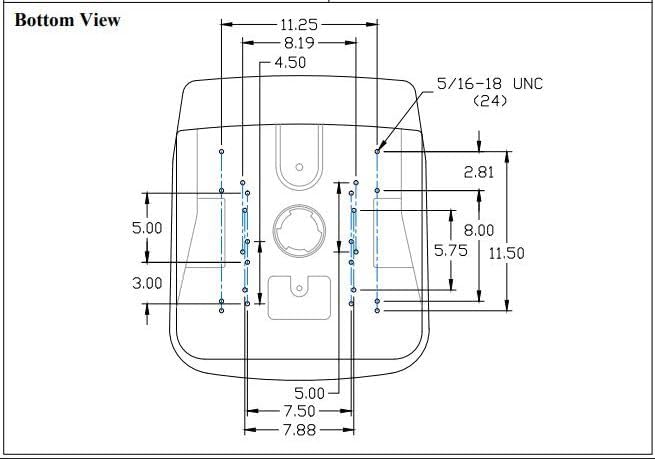
Figure 3: Detailed technical drawing providing precise mounting dimensions for the Uni Pro KM 225 seat. Users should cross-reference these measurements with their equipment's mounting points.
Operating Instructions
The Uni Pro KM 225 Bucket Seat is designed for comfort and functionality during operation of various equipment types. While the seat itself does not have operational controls, its design contributes significantly to the user experience.
- Comfort: The ergonomic cushions and heavy-duty vinyl covering are engineered to provide optimal operator comfort, reducing fatigue during long hours of use.
- Water Management: The vacuum-formed waterproof vinyl and integrated central drain hole effectively prevent water accumulation, keeping the seating surface dry even in wet conditions.
- Safety: Ensure the operator presence switch (if connected) is functioning correctly. This safety feature prevents equipment operation when the seat is unoccupied.
Maintenance and Care
Proper maintenance will extend the life and preserve the appearance of your Uni Pro KM 225 Bucket Seat.
- Cleaning: For routine cleaning, wipe the vinyl surface with a damp cloth and mild soap. Avoid harsh chemicals or abrasive cleaners, as these can damage the vinyl. Rinse thoroughly with clean water and dry with a soft cloth.
- Inspection: Periodically inspect the seat for any signs of wear, tears in the vinyl, or damage to the frame. Check all mounting bolts for tightness and re-tighten if necessary.
- Storage: If the equipment is stored outdoors, consider covering the seat to protect it from prolonged exposure to direct sunlight and extreme weather conditions, which can degrade vinyl over time.
Troubleshooting
This section addresses common issues that may arise during the installation or use of your Uni Pro KM 225 Bucket Seat.
| Problem | Possible Cause | Solution |
|---|---|---|
| Seat does not fit existing mounting points. | Mounting hole patterns do not align perfectly; slight variations in equipment manufacturing. |
|
| Operator presence switch not functioning after installation. | Incorrect wiring, switch not properly seated, or switch malfunction. |
|
| Water pooling on seat surface. | Drain hole is obstructed or seat is not level. |
|
Specifications
| Attribute | Detail |
|---|---|
| Brand | Uni Pro |
| Model Name | KM 225 |
| Part Number | 8773 |
| Color | Black |
| Material | Vinyl |
| Seat Width | 19 Inches (High-back design, replaces 16" and 19" seats) |
| Item Weight | 16 Pounds |
| Fit Type | Universal Fit |
| Vehicle Service Type | Tractor, Mower, Gator, Skid Steer, Compact Utility Tractor, Roller, Trencher, UTV, Excavator, and more. |
| UPC | 808841087736 |

Figure 4: Side profile of the Uni Pro KM 225 seat, highlighting its high-back design.

Figure 5: Rear view of the Uni Pro KM 225 seat, showing the durable plastic frame.
Warranty and Support
Specific warranty terms for the Uni Pro KM 225 Bucket Seat are typically provided by the manufacturer or the retailer at the time of purchase. It is recommended to retain your proof of purchase for any warranty claims.
For Assistance:
- Product Support: For technical assistance, installation queries, or troubleshooting beyond this manual, please contact Uni Pro customer support. Contact information can usually be found on the manufacturer's official website or on the product packaging.
- Retailer Support: For questions regarding your purchase, returns, or specific warranty details, please contact the retailer from whom you purchased the seat.
Always refer to the latest information provided by Uni Pro or your authorized dealer for the most accurate and up-to-date support resources.
Related documentsKM 225


Ask a question about this manual
Ask about setup, troubleshooting, compatibility, parts, safety, or missing instructions. Manuals+ will review the question and use this page’s manual context to help answer it.