
1. Introduction and Overview
The Stealth Cam Sol-Pak 3000mAh Solar Battery Pack is designed to provide a sustainable power source for your cellular trail cameras, reducing the need for frequent battery replacements. This unit utilizes amorphous solar panels to convert sunlight into electrical energy, charging an integrated 3000mAh Li-ion battery. The durable, weather-resistant ABS housing ensures reliable operation in various outdoor conditions. Each pack includes adjustable T-Swivel brackets for optimal positioning and an LED battery indicator for quick status checks. This product is compatible with any camera featuring an external 12-volt DC jack and includes an integrated USB charging port for versatility.
2. Product Features
- Battery Capacity: Equipped with a 3000mAh Li-ion battery for extended power.
- Solar Charging: Amorphous solar panels efficiently capture sunlight to recharge the internal battery.
- Adjustable T-Swivel Brackets: Allows for flexible positioning to maximize sun exposure and blend with surroundings.
- Durable Construction: Weather-resistant ABS housing protects against wind, rain, and other adverse weather conditions.
- Compatibility: Designed for use with trail cameras that have an external 12-volt DC jack.
- LED Battery Indicator: Provides a quick visual status of the battery's charge level.
- Integrated USB Charging Port: Offers an additional charging option and versatility.
- Cable Lock Pass-Through Slots: Ensures secure setup with the adjustable nylon camera strap.
- Versatile Use: Panels can be used individually or connected for increased power output.
3. Setup Guide
3.1 Unpacking and Initial Inspection
Carefully remove the Sol-Pak units from their packaging. Inspect each unit for any signs of damage. Ensure all components, including the adjustable T-Swivel brackets and nylon straps, are present.
3.2 Mounting the Sol-Pak
- Choose a Location: Select a location that receives maximum direct sunlight throughout the day. Avoid areas with heavy shade from trees or structures.
- Attach T-Swivel Bracket: Secure the adjustable T-Swivel bracket to the back of the Sol-Pak unit.
- Mounting Options:
- Tree/Post Mounting: Use the provided nylon camera strap to secure the Sol-Pak to a tree or post. Thread the strap through the cable lock pass-through slots.
- Screw Mounting (Optional): The T-Swivel bracket may allow for screw mounting to a flat surface (screws not included).
- Adjust Panel Angle: Position the solar panel using the T-Swivel bracket to face the sun directly for optimal charging efficiency. Adjustments may be needed seasonally.
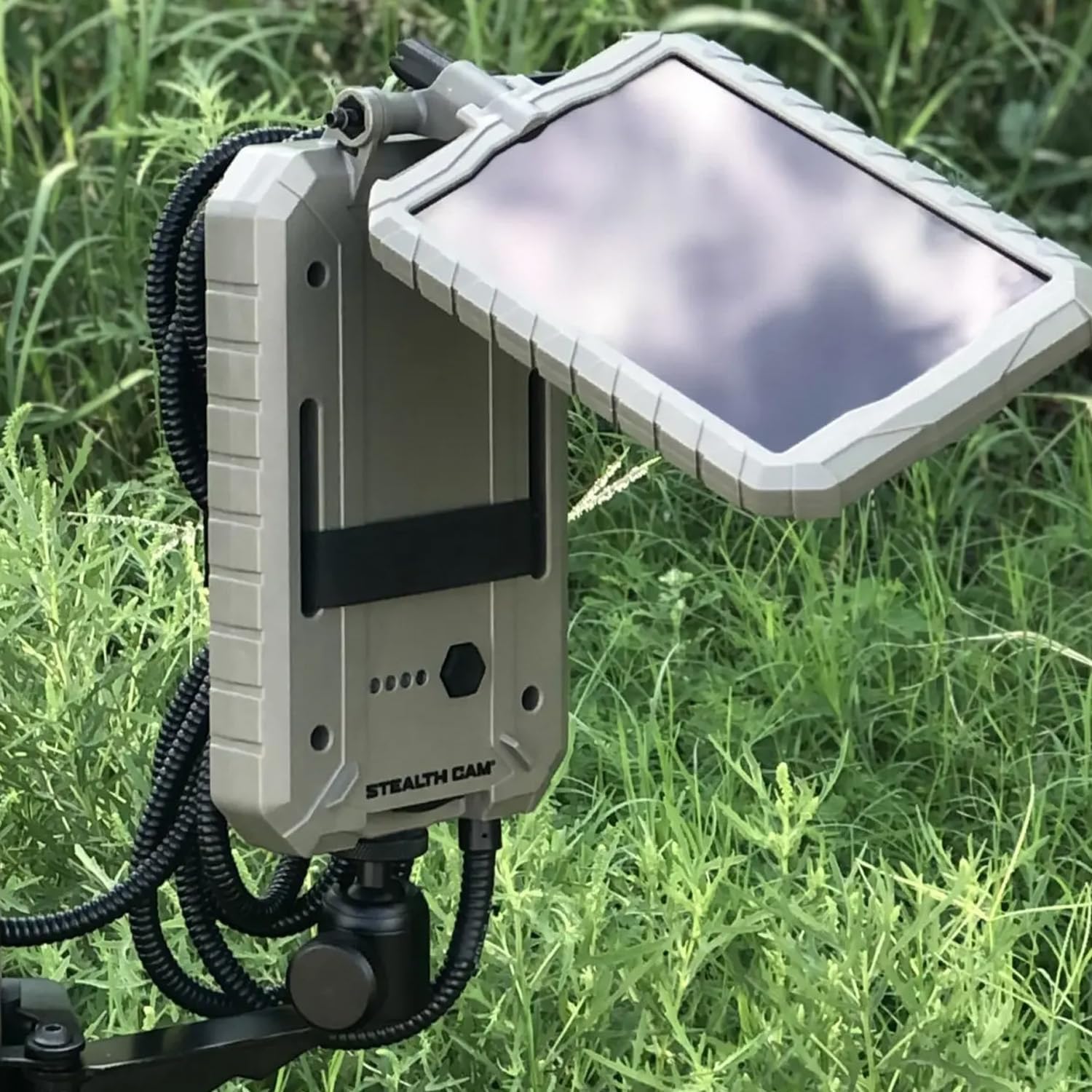
Image: Stealth Cam Sol-Pak mounted on a tree, connected to a trail camera, demonstrating typical outdoor setup.
3.3 Connecting to Your Trail Camera
- Locate the 12-volt DC jack on your trail camera.
- Connect the output cable from the Sol-Pak unit to the 12-volt DC jack on your trail camera. Ensure a secure connection.
- If your camera supports USB charging, you may use the integrated USB charging port on the Sol-Pak with a compatible USB cable (not included).

Image: A single Stealth Cam Sol-Pak unit, highlighting the solar panel, LED battery indicators, and the output cable for connecting to a trail camera.
4. Operating Instructions
4.1 Solar Charging
Once mounted and connected, the Sol-Pak will automatically begin charging its internal 3000mAh Li-ion battery when exposed to sufficient sunlight. The amorphous solar panels are designed to work even in low-light conditions, though direct sunlight provides the most efficient charge.
4.2 LED Battery Indicator
The Sol-Pak features an LED battery indicator to show the current charge level of the internal battery. Refer to the following guide:
- All LEDs Lit: Full charge.
- Fewer LEDs Lit: Indicates decreasing charge level.
- Flashing LED: May indicate a low battery or charging in progress. Consult the specific product labeling for detailed LED behavior.
4.3 Powering Your Trail Camera
The Sol-Pak continuously supplies power to the connected trail camera via the 12-volt DC jack. The internal battery acts as a buffer, ensuring consistent power delivery even during periods without sunlight. For optimal performance, ensure the Sol-Pak receives adequate daily sun exposure.

Image: Two Stealth Cam Sol-Pak units, illustrating the product as a 2-pack, ready for installation.
5. Maintenance
- Clean Solar Panels: Periodically wipe the solar panel surface with a soft, damp cloth to remove dirt, dust, leaves, or snow. A clean panel ensures maximum charging efficiency.
- Check Connections: Regularly inspect all cable connections to ensure they are secure and free from corrosion or damage.
- Inspect Housing: Check the ABS housing for any cracks or damage that could compromise its weather resistance.
- Seasonal Adjustment: Consider adjusting the panel's angle seasonally to optimize sun exposure as the sun's path changes.
6. Troubleshooting
| Problem | Possible Cause | Solution |
|---|---|---|
| Sol-Pak not charging / Low charge | Insufficient sunlight; Dirty solar panel; Loose connection. | Relocate Sol-Pak to an area with more direct sunlight. Clean the solar panel surface. Ensure all cables are securely connected. |
| Trail camera not receiving power | Sol-Pak battery depleted; Cable not connected properly; Camera's 12V DC jack issue. | Allow Sol-Pak to charge in direct sunlight. Verify cable connection between Sol-Pak and camera. Test camera with another power source if possible. |
| LED indicator not functioning | Internal fault; Extreme temperatures. | Ensure unit is within operating temperature range. If problem persists, contact Stealth Cam support. |
7. Specifications
- Model: STC-SOLP-2PK
- Battery Type: 3000mAh Li-ion (Lithium Ion)
- Solar Panel Type: Amorphous
- Housing Material: Durable, weather-resistant ABS
- Output Voltage: 12 Volts (Maximum)
- Dimensions (per unit): Approximately 8 x 2 x 4 inches
- Item Weight (2-Pack): 4.4 Pounds
- Power Source: Solar Powered
- Included Components: Solar Panels for Trail Cameras, Adjustable T-Swivel Brackets, Nylon Straps.
- Special Features: Rechargeable, LED Battery Indicator, Integrated USB Charging Port.
8. Warranty and Support
For warranty information, product support, or technical assistance, please refer to the official Stealth Cam website or contact their customer service department. Keep your purchase receipt for warranty claims.
Stealth Cam Customer Support: Please visit www.stealthcam.com/support for the latest contact information and resources.