
Introduction
The Taurus ROBOT 500 INOX COMPLETE Immersion Blender is a versatile kitchen appliance designed for efficient blending, chopping, and whisking. This manual provides essential information for safe operation, proper maintenance, and optimal use of your new immersion blender and its accessories.
Important Safety Instructions
When using electrical appliances, basic safety precautions should always be followed to reduce the risk of fire, electric shock, and/or injury to persons, including the following:
- Read all instructions before using the appliance.
- To protect against electric shock, do not immerse the motor unit, cord, or plug in water or other liquid.
- Close supervision is necessary when any appliance is used by or near children.
- Unplug from outlet when not in use, before putting on or taking off parts, and before cleaning.
- Avoid contact with moving parts.
- Do not operate any appliance with a damaged cord or plug, or after the appliance malfunctions or has been dropped or damaged in any manner.
- The use of attachments not recommended or sold by the manufacturer may cause fire, electric shock, or injury.
- Do not use outdoors.
- Do not let cord hang over edge of table or counter or touch hot surfaces.
- Keep hands and utensils out of the container while blending to prevent the possibility of severe injury to persons or damage to the blender. A scraper may be used but must be used only when the blender is not running.
- Blades are sharp. Handle carefully.
- Always operate blender with cover in place.
Product Components
Your Taurus ROBOT 500 INOX COMPLETE Immersion Blender comes with the following components:
- Motor Unit: The main body with controls for speed and power.
- Immersion Blending Shaft: Detachable stainless steel shaft with blades for blending.
- Whisk Attachment: For whipping cream, eggs, and light batters.
- Food Processing Attachment: A bowl with a chopping blade for processing ingredients.
- 500 ml Measuring Cup: A high-walled cup designed for blending and measuring.

Image: The Taurus Immersion Blender motor unit, blending shaft, whisk attachment, food processing attachment, and measuring cup.

Image: A detailed view of the stainless steel blending shaft with its protective housing and blades.
Setup and Assembly
Before first use, ensure all parts are clean. Wash all detachable parts in warm soapy water, rinse thoroughly, and dry. The motor unit should only be wiped with a damp cloth.
Attaching the Blending Shaft
- Align the blending shaft with the motor unit.
- Twist the blending shaft clockwise until it locks securely into place. You should hear a click.
Attaching the Whisk
- Insert the whisk into the whisk adapter.
- Align the whisk adapter with the motor unit and twist clockwise until it locks.
Attaching the Food Processor
- Place the chopping blade onto the central pin inside the food processor bowl.
- Place the food processor lid onto the bowl, ensuring it is properly seated.
- Align the motor unit with the opening on the food processor lid and twist clockwise until it locks.
Operating Instructions
The Taurus ROBOT 500 INOX COMPLETE Immersion Blender features a powerful 500W motor, pulse control, and a Turbo Rotation System for optimal blending results.
General Blending (Immersion Blending Shaft)
- Ensure the blending shaft is securely attached to the motor unit.
- Immerse the blending shaft into the ingredients in a deep container or the provided measuring cup. Ensure the blade guard is fully submerged to prevent splashing.
- Plug the appliance into a power outlet.
- Press and hold the power button to start blending. For short bursts of power or to control texture, use the pulse function. For maximum power, activate the Turbo Rotation System.
- Move the blender up and down gently to ensure all ingredients are evenly processed.
- Release the power button to stop. Unplug the appliance before removing the blending shaft.

Image: The immersion blender in action, creating a smooth beverage in a tall glass. The stainless steel shaft is submerged in the liquid.
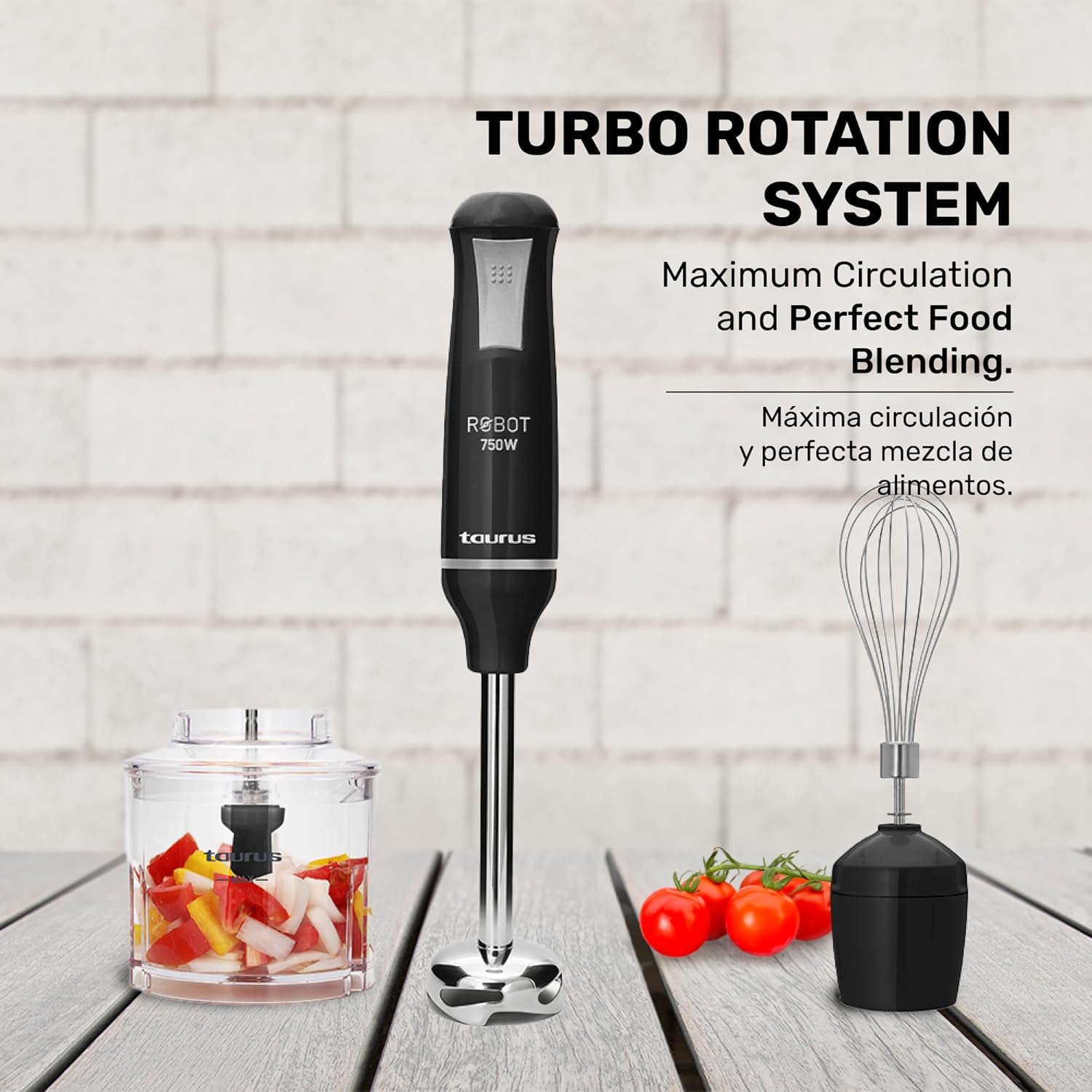
Image: The immersion blender with its Turbo Rotation System, indicating maximum circulation and perfect food blending for efficient processing.
Using the Whisk Attachment
- Attach the whisk to the motor unit as described in the Setup section.
- Place the whisk into the ingredients (e.g., eggs, cream, light batter) in a bowl.
- Plug in the appliance.
- Press and hold the power button to start whisking. Use appropriate speed for desired consistency.
- Release the power button to stop. Unplug before detaching.
Using the Food Processing Attachment
- Assemble the food processor as described in the Setup section.
- Place ingredients into the food processor bowl. Do not overfill.
- Plug in the appliance.
- Press and hold the power button to chop. Use short pulses for coarse chopping or longer presses for finer results.
- Release the power button to stop. Unplug before disassembling.

Image: The food processor attachment actively chopping vegetables, demonstrating its capability for preparing various ingredients.
Maintenance and Cleaning
Proper cleaning and maintenance will ensure the longevity and optimal performance of your immersion blender.
Cleaning Detachable Parts
- Always unplug the appliance before cleaning.
- Detach the blending shaft, whisk attachment, and food processor components from the motor unit.
- Wash these parts in warm, soapy water. The stainless steel shaft and accessories are designed for easy cleaning.
- Rinse thoroughly under running water.
- Dry all parts completely before storing.
Cleaning the Motor Unit
- Wipe the motor unit with a damp cloth.
- Never immerse the motor unit in water or any other liquid.
- Do not use abrasive cleaners or scouring pads, as they may scratch the surface.
Troubleshooting
If you encounter any issues with your immersion blender, refer to the following common problems and solutions:
| Problem | Possible Cause | Solution |
|---|---|---|
| Blender does not turn on. | Not plugged in; power outlet malfunction; attachment not securely locked. | Ensure appliance is properly plugged in; check power outlet; securely attach the desired accessory. |
| Poor blending results. | Container too wide; insufficient liquid; ingredients too large or hard. | Use a narrower container (like the provided measuring cup); add more liquid; cut ingredients into smaller pieces. |
| Splashing during operation. | Blade guard not fully submerged; container too full. | Ensure blade guard is fully submerged before starting; do not overfill the container. |
| Motor overheats. | Continuous operation for too long; processing very dense ingredients. | Allow the blender to cool down for several minutes; process dense ingredients in shorter bursts. |
Specifications
- Brand: Taurus
- Model: ROBOT 500 INOX COMPLETE
- Power: 500 Watts
- Voltage: 127 Volts (AC)
- Number of Speeds: 2 (including Pulse/Turbo)
- Special Feature: Pulse Technology, Turbo Rotation System
- Blade Material: Stainless Steel
- Product Dimensions: 2.36"D x 2.36"W x 14.17"H
- Item Weight: 1.54 pounds
- Capacity (Measuring Cup): 500 Milliliters
- Color: Black
- Manufacturer: Taurus
- Manufacture Year: 2024

Image: Visual representation of the immersion blender's dimensions: 14.17 inches (36 cm) in height and 2.36 inches (6 cm) in width/depth.
Warranty and Support
For warranty information or technical support, please refer to the documentation included in your product packaging or visit the official Taurus website. Keep your proof of purchase for any warranty claims.


