Introduction
The ZERFUN D240 Wireless Microphone System is designed for clear audio transmission in various settings, including home karaoke, meetings, parties, and public speaking events. This system features rechargeable microphones and receiver, offering independent controls for volume, echo, treble, and bass. Its cardioid pickup pattern helps isolate directional vocals from background noise, ensuring high-quality sound.
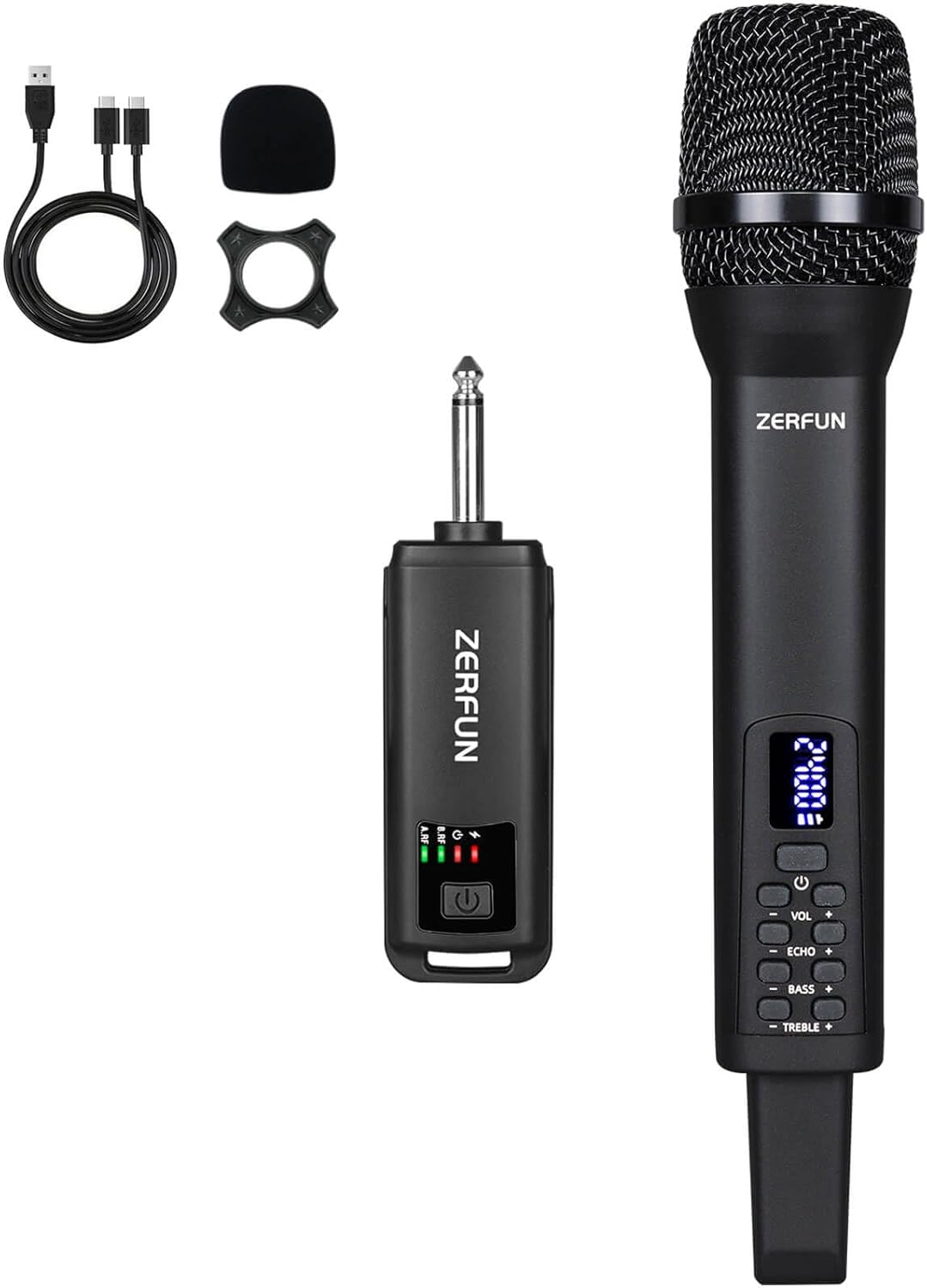
Image: The ZERFUN D240 Wireless Microphone System, including the handheld microphone, receiver, charging cable, and other accessories.
Package Contents
Upon unboxing your ZERFUN D240 Wireless Microphone System, you will find the following items:
- ZERFUN Rechargeable Cordless Mic x 1
- Receiver x 1
- Charging Cable x 1
- Microphone Windscreen x 1
- Antiskid Ring x 1
- User Manual x 1

Image: All components included in the ZERFUN D240 Wireless Microphone System package.
Setup Instructions
- Charge the Devices: Both the microphone and the receiver have built-in rechargeable batteries. Use the provided USB-C charging cable to fully charge both units before first use. The microphone typically charges in 3-4 hours and the receiver in 4-5 hours.
- Insert Batteries (if applicable): The microphone and receiver come with pre-installed rechargeable batteries. Ensure they are properly seated.
- Connect the Receiver: Plug the 1/4 inch (6.35mm) receiver output directly into the MIC input of your compatible audio device (Speaker, PA Speaker System, Power Amplifier, Audio Mixer, Karaoke Machine). Note: This microphone set is not designed for phones, PCs, or cameras.
- Power On: Turn on the receiver by pressing its power button. Then, turn on the microphone by pressing its power button. The units will automatically pair. The microphone's display will stop flashing once connected.
- Attach Windscreen and Antiskid Ring: Slide the microphone windscreen over the microphone head to reduce plosives and wind noise. Place the antiskid ring around the microphone body to prevent it from rolling on flat surfaces.
Video: A demonstration of setting up and using the ZERFUN Wireless Microphone System for various events.

Image: Detailed view of the receiver's components and indicators.
Operating Instructions
The ZERFUN D240 microphone offers independent controls for optimal sound customization:
- Volume Control (VOL): Adjust the microphone's output volume.
- Echo Control (ECHO): Add or reduce echo effect to your vocals.
- Treble Control (TREBLE): Adjust the high-frequency tones for vocal clarity.
- Bass Control (BASS): Adjust the low-frequency tones for vocal depth.
These controls allow you to fine-tune your sound for different environments and vocal styles. The microphone features a clear LED display showing current settings and battery status.

Image: The microphone's control panel for adjusting audio effects.
Battery Information
Both the ZERFUN D240 microphone and its receiver are equipped with built-in rechargeable Lithium Ion batteries.
- Charging Time: Approximately 3-4 hours for the microphone, and 4-5 hours for the receiver.
- Working Time: The microphone provides about 8-10 hours of continuous use when fully charged. The receiver offers about 4-5 hours of working time.
- Charging Port: Both units feature a USB-C charging port for convenient recharging.

Image: Battery specifications and charging details for the microphone.
Transmission Range & Compatibility
The ZERFUN D240 Wireless Microphone operates on 2.4Ghz frequencies, compliant with FCC regulations, and offers a reliable transmission range:
- Transmission Range: Up to 164 feet (outdoor) for stable, interference-free performance.
- Compatibility: Designed for use with devices featuring a 1/4 inch (6.35mm) MIC input, such as speakers, PA systems, power amplifiers, audio mixers, and karaoke machines.
- Incompatibility: This system is not compatible with phones, personal computers, or cameras.

Image: Illustration of the wireless transmission range.

Image: Visual guide to compatible and incompatible devices.
Specifications
| Feature | Detail |
|---|---|
| Brand | ZERFUN |
| Model Number | D240 |
| Microphone Form Factor | Handheld |
| Polar Pattern | Unidirectional (Cardioid) |
| Connectivity Technology | 2.4Ghz Wireless |
| Connector Type | 1/4 inch (6.35 mm) Jack |
| Power Source | Battery Powered (1 Lithium Ion battery included) |
| Microphone Working Time | 8-10 Hours |
| Receiver Working Time | 4-5 Hours |
| Transmission Range | Up to 164 feet (Outdoor) |
| Special Features | Echo, Treble, Bass, Volume Control; Rechargeable |
| Compatible Devices | Amplifier, Audio Interface, Audio Mixer, Karaoke Machine, Speaker |
| Item Weight | 14.9 ounces |
| Package Dimensions | 12.01 x 5.75 x 2.56 inches |
Troubleshooting
- No Sound:
- Ensure both microphone and receiver are fully charged and powered on.
- Verify the receiver is correctly plugged into a compatible MIC input on your audio device.
- Check the volume levels on both the microphone and your audio device.
- Confirm the microphone and receiver are paired (microphone display should not be flashing).
- Interference/Poor Sound Quality:
- Ensure the microphone is within the 164-foot operating range.
- Avoid placing the receiver near other wireless devices or sources of electromagnetic interference.
- Check for any obstructions between the microphone and receiver.
- Microphone Not Charging:
- Use the original USB-C charging cable provided. Some third-party cables may not be compatible.
- Ensure the charging cable is securely connected to both the microphone/receiver and a power source.
Maintenance
- Cleaning: Use a soft, dry cloth to clean the microphone body and receiver. Do not use liquid cleaners or abrasive materials.
- Storage: Store the microphone system in a cool, dry place away from direct sunlight and extreme temperatures when not in use.
- Battery Care: For optimal battery life, avoid fully discharging the batteries frequently. Recharge them regularly, even if the device is not in constant use.
- Windscreen: The microphone windscreen can be gently washed with mild soap and water, then air-dried completely before reattaching.
Warranty and Support
ZERFUN Rechargeable Cordless Microphone products come with supportive customer service and manufacturer assurance:
- Customer Service: 24-Hours After-Sales Customer Service is available for any inquiries or issues.
- Manufacturer Assurance: A 12-Month Manufacturer Assurance is provided for your product.
For support, please refer to the contact information provided in your user manual or visit the official ZERFUN website.


