
1. Product Overview
The AINAVI 10.25 inch Linux Car Multimedia Player Screen is an advanced upgrade designed to enhance your driving experience by integrating modern connectivity and entertainment features while retaining the original functionalities of your BMW vehicle. It features a high-definition IPS touchscreen, built-in Wireless CarPlay and Wired Android Auto, and compatibility with your car's existing systems.

Figure 1: AINAVI 10.25 inch Car Multimedia Player Screen with CarPlay interface.
2. Compatibility and Pre-Installation Check
This multimedia player is exclusively designed for BMW 1 Series, 3 Series, and 4 Series (M3, M4) models F30/F31/F32/F33/F34/F36/F80/F82/F83/F84 manufactured between 2012 and 2016, specifically those equipped with the NBT system and a 6-Pin LVDS connector. It is crucial to verify your car's original system before installation to ensure compatibility.

Figure 2: Guide to identifying your BMW's iDrive system (NBT, CIC, CCC) and the correct LVDS plug type.
Important: This unit is not compatible with CIC systems (4-Pin LVDS) or CCC systems (10-Pin LVDS).
3. Setup and Installation
The installation process involves connecting the new head unit to your vehicle's existing wiring harness and integrating it with the original system. Professional installation is recommended.
3.1 Package Contents
Before beginning installation, ensure all components are present:
- 10.25" Head Unit (1)
- ISO Wiring Harness Cable (1)
- Audio Extension Cable (1)
- USB Cable (1)
- Installation Instruction (1)

Figure 3: Contents included in the product package.
3.2 Wiring Diagram
Refer to the detailed wiring diagram for proper connection of the head unit to your vehicle's electrical system. Ensure all connections are secure before powering on the device.
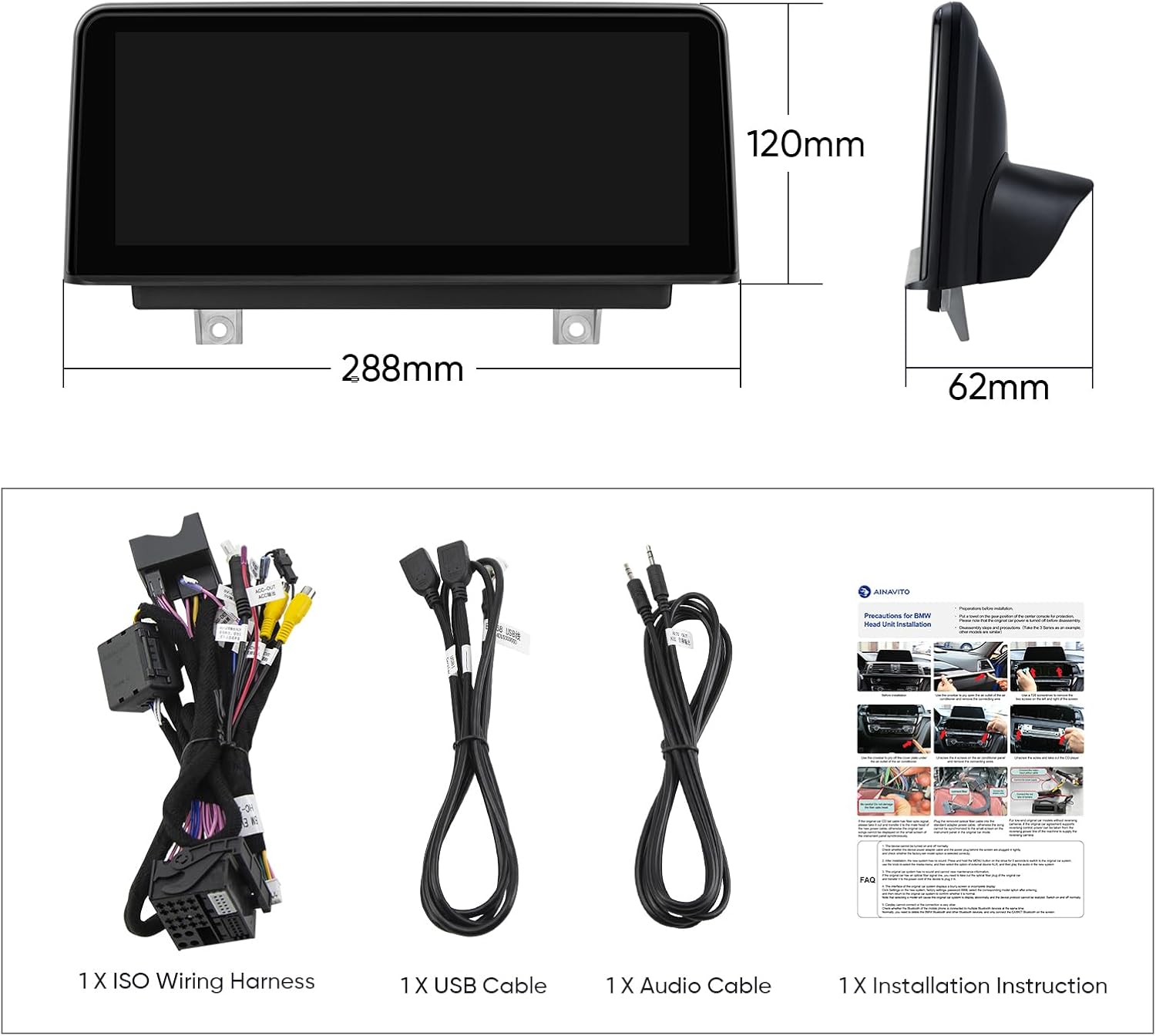
Figure 4: Wiring diagram illustrating the various connections for the multimedia player.
4. Operating Instructions
The AINAVI multimedia player offers a seamless integration of modern features with your BMW's original system.
4.1 Wireless CarPlay and Wired Android Auto
Connect your iPhone or Android smartphone to the head unit for access to navigation, calls, messages, and music. Wireless CarPlay connects via Bluetooth, while Android Auto supports both wired and wireless connections.

Figure 5: Wireless Apple CarPlay and Wired Android Auto connectivity.
Video 1: Demonstrates iOS CarPlay and Android Auto connection, steering wheel control, rear camera functionality, original system compatibility, and media playback on the 10.25" screen.
4.2 System Switching
The unit operates with dual systems, allowing you to seamlessly switch between the original car CD system and the new Linux system. This retains all original factory features while adding new functionalities.

Figure 6: Seamless system switching between original and upgraded interfaces.
4.3 Original Features Retention
The unit is designed to retain and be compatible with various original BMW features, including:
- iDrive Knob control
- Original Bluetooth
- Original Radio
- OEM rear camera
- Radar
- Steering wheel control
Vehicle information such as speed, fuel level, oil pressure, and safety warnings are also displayed on the new screen.

Figure 7: Retained original BMW system features.
4.4 Display and Audio Quality
The 10.25-inch 1280x480 HD IPS Touch Screen provides an excellent visual experience. Built-in DSP processing chips and a 16-band EQ ensure great sound quality. It supports AHD 720P backup cameras for clearer imaging.

Figure 8: High-performance 10.25" 2.5D IPS Touch Screen.
5. Maintenance
To ensure the longevity and optimal performance of your AINAVI multimedia player, follow these maintenance guidelines:
- Cleaning: Use a soft, lint-free cloth to clean the screen. For stubborn smudges, slightly dampen the cloth with water or a screen-safe cleaner. Avoid abrasive materials or harsh chemicals.
- Software Updates: Periodically check the manufacturer's website or contact support for any available software or firmware updates. Updates can improve performance, add new features, or fix bugs.
- Environmental Conditions: Avoid exposing the unit to extreme temperatures, direct sunlight for prolonged periods, or excessive moisture.
- Cable Connections: Ensure all cables remain securely connected. Loose connections can lead to intermittent functionality or poor performance.
6. Troubleshooting
If you encounter issues with your multimedia player, refer to the following common troubleshooting steps:
- No Power: Check all power connections. Ensure the vehicle's ignition is on. Verify the fuse for the unit is not blown.
- No Sound: Check volume settings on both the unit and your car's original stereo. Ensure the audio extension cable is properly connected. Verify the correct audio input (AUX) is selected on your original car system.
- CarPlay/Android Auto Not Connecting: Ensure Bluetooth is enabled on your phone and the unit. For wired connections, try a different USB cable. Restart both your phone and the multimedia unit.
- Screen Blank/Frozen: Try restarting the unit by turning off and on the car's ignition. If the issue persists, a factory reset might be necessary (refer to the detailed installation instructions for this procedure).
- Original Features Not Working: Double-check all wiring connections, especially the LVDS cable. Ensure the unit is correctly configured to integrate with your specific BMW NBT system.
For persistent issues or complex problems, please contact customer support.
7. Specifications
| Feature | Detail |
|---|---|
| Display Size | 10.25 Inches |
| Resolution | 1280x480 HD IPS |
| Operating System | Linux |
| Connectivity | Bluetooth 5.1, Dual WiFi Band (2.4GHz & 5GHz), Wireless/Wired CarPlay & Android Auto |
| Audio Output Mode | Stereo |
| Special Features | Works with Original Sound System, Highest Level QLED, DSP processing chips, 16-band EQ, AHD 720P backup camera support |
| Item Weight | 3.87 pounds |
| Package Dimensions | 12.76 x 11.26 x 5.2 inches |
| Manufacturer | AINAVI |
| Country of Origin | China |
8. Warranty and Support
The AINAVI multimedia player comes with a 12-month warranty. For any installation or technical support inquiries, please reach out to our customer support team. We offer 24-hour engineer customer support.
You can contact us via:
- Phone: +1 (833) 858-5016 (Working hours: 3:00 PM to 12:00 PM PST)
- Email: info@ainavi.com
- Amazon Order Center: Navigate to your order details and click on the seller's name (HomeCar), then select 'Ask a question'.

Figure 9: AINAVI Customer Support.


