
ALLIMITY MME-LE2483SM-NP
ALLIMITY Remote Control User Manual
Model: MME-LE2483SM-NP
Introduction
This manual provides comprehensive instructions for the ALLIMITY Remote Control, compatible with various ENGEL, RCA, ANTTEQ, Ioplee, and Nordmende TV models. This remote is designed to offer full functionality without the need for programming or complex setup. Please ensure the remote matches your device's model number or image for proper compatibility.
Compatible models include: IOP43QVDA, iRV42H3, iRV50U3, ND40S404M, iRV24H3, iRV32H3, LE2483SM, LE3283SM, LE4283SM, AV32H3, AV24H3, AV32D1, AV42F3-D1, RS65U2-EU.
Product Overview


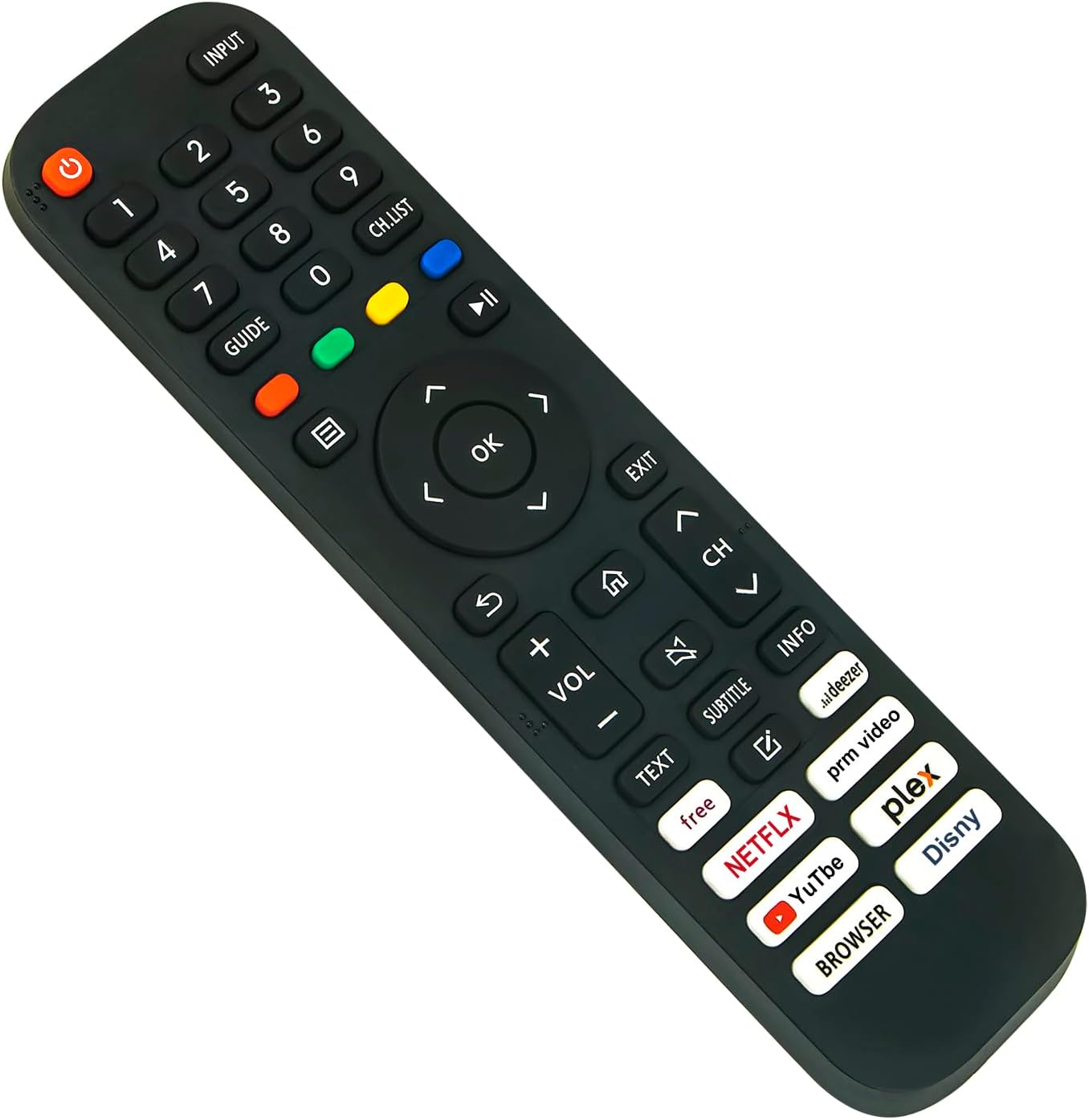
Setup
- Battery Installation:
Locate the battery compartment on the back of the remote control. Slide open the battery cover. Insert two AAA batteries (not included) into the compartment, ensuring the positive (+) and negative (-) terminals align correctly with the indicators inside. Close the battery cover securely.
- Initial Use:
No programming or pairing is required for this remote control. Once batteries are installed, point the remote directly at your compatible TV or device and begin using it immediately.
Operating Instructions
The ALLIMITY remote control is designed to replicate the full functionality of your original remote. Below is a general guide to its key buttons and their functions:
- Power Button (⏵): Turns the TV or device on/off.
- Input Button: Cycles through available input sources (HDMI, AV, etc.).
- Number Pad (0-9): Directly enters channel numbers or other numerical inputs.
- Guide Button: Displays the electronic program guide (EPG).
- CH.LIST Button: Shows the channel list.
- Navigation Buttons (Up, Down, Left, Right, OK): Used to navigate menus and confirm selections. The OK button confirms choices.
- Back/Return Button (↶): Returns to the previous screen or menu.
- Exit Button: Exits the current menu or application.
- Volume Buttons (VOL + / -): Increases or decreases the volume level.
- Mute Button (🔇): Mutes or unmutes the audio.
- Channel Buttons (CH ▲ / ▼): Changes the TV channel up or down.
- Text Button: Accesses Teletext services.
- Subtitle Button: Toggles subtitles on/off.
- Info Button: Displays information about the current program or content.
- Dedicated App Buttons (Netflix, Prime Video, YouTube, Plex, Browser, Disney): Provides direct access to popular streaming applications and the web browser.
Maintenance
- Cleaning: Use a soft, dry cloth to wipe the remote control. For stubborn dirt, slightly dampen the cloth with water or a mild, non-abrasive cleaner. Do not use harsh chemicals or abrasive materials.
- Battery Replacement: Replace batteries when the remote's response becomes sluggish or it stops functioning. Always replace both batteries at the same time with new ones of the same type.
- Storage: Store the remote in a cool, dry place away from direct sunlight and extreme temperatures. If not used for an extended period, remove the batteries to prevent leakage.
- Avoid Drops: While ergonomically designed for a good grip, avoid dropping the remote as this can damage internal components.
Troubleshooting
| Problem | Possible Cause | Solution |
|---|---|---|
| Remote not responding. | Dead or incorrectly inserted batteries. | Replace batteries with new ones, ensuring correct polarity (+/-). |
| Remote has short range or intermittent response. | Weak batteries; Obstruction between remote and device; Infrared sensor on device is blocked. | Replace batteries. Ensure a clear line of sight to the device's IR sensor. Remove any obstructions. |
| Certain buttons do not work. | Button malfunction; Remote not fully compatible with all functions of your specific device model. | Check if the button is physically stuck. Verify your device model is listed as compatible. While designed for full functionality, minor variations may occur with some specific device models. |
| Device does not turn on/off. | Remote not compatible; Device is unplugged or has no power. | Confirm the remote's compatibility with your device model. Ensure the device is properly connected to power. |
Specifications
| Feature | Detail |
|---|---|
| Brand | ALLIMITY |
| Model Number | MME-LE2483SM-NP |
| Product Dimensions | 17 x 5 x 1 cm |
| Item Weight | 59 grams |
| Compatible Devices | IOP43QVDA, iRV42H3, iRV50U3, ND40S404M, iRV24H3, iRV32H3, LE2483SM, LE3283SM, LE4283SM, AV32H3, AV24H3, AV32D1, AV42F3-D1, RS65U2-EU |
| Special Feature | Ergonomic design |
| Connectivity Technology | Infrared (IR) |
| Maximum Range | 10 Meters |
| Batteries Required | No (Batteries not included) |
Warranty and Support
For any questions or support regarding your ALLIMITY remote control, please refer to the retailer or point of purchase. While specific warranty details are not provided in this manual, standard consumer rights and return policies apply.
Ensure you have your product model number (MME-LE2483SM-NP) and purchase details ready when contacting support.
Related documentsMME-LE2483SM-NP

Ask a question about this manual
Ask about setup, troubleshooting, compatibility, parts, safety, or missing instructions. Manuals+ will review the question and use this page’s manual context to help answer it.