Introduction
This manual provides essential instructions for the assembly, operation, and maintenance of your GIANTEX Mobile Filing Cabinet. Please read this manual thoroughly before assembly and use to ensure safe and efficient operation. Keep this manual for future reference.

Image: The GIANTEX mobile filing cabinet in a home office setting, showcasing its storage capabilities and the top surface used as a printer stand with a tablet charging.
Safety Instructions
- Ensure all parts are present and undamaged before assembly. Do not use if any parts are missing or damaged.
- Assemble the unit on a soft, clean surface to prevent scratches.
- Do not overload the cabinet. Refer to the specifications section for weight limits.
- Keep children away from the assembly area. Small parts can be a choking hazard.
- Always use the locking wheels to secure the cabinet in place when not moving it.
- Ensure the power cord for the charging station is properly routed and not pinched.
- Do not expose the charging station to liquids.
Package Contents
Verify that all components listed below are included in your package:
- 1 x Filing Cabinet Unit
- 2 x Keys for the lockable cabinet
- 1 x Assembly Manual
- All necessary hardware for assembly (screws, dowels, etc.)
Setup and Assembly
Follow the step-by-step instructions provided in the included assembly manual. Ensure all connections are secure before use.
- Unpack Components: Carefully remove all parts from the packaging and lay them out on a protected surface.
- Attach Wheels: Secure the four lockable wheels to the base of the cabinet using the provided screws. Ensure they are firmly attached.
- Assemble Frame: Connect the metal frame components according to the diagrams in the separate assembly manual.
- Install Shelves and Panels: Insert the wooden shelves and side panels into the frame.
- Mount Door: Attach the cabinet door using the soft-close hinges.
- Install Charging Station: Place the integrated charging station into its designated slot and route the power cable through the cable management hole.
- Final Check: Verify that all screws are tightened and the cabinet is stable.

Image: Detailed view of the cabinet's construction, highlighting the robust metal frame, easy-to-clean surface, soft-close hinges, and ergonomic handle.
Operating Instructions
1. Using the Charging Station
The cabinet features an integrated charging station to power your electronic devices.
- Power Connection: Plug the cabinet's power cord into a standard wall outlet (220-240V).
- Ports: The charging station includes 2 power outlets (220-240V/12A), 1 USB port (5V/3.1A), and 1 Type-C port (5V/3.1A).
- Cable Management: Utilize the cable management hole to keep cords tidy and prevent tangles.
- Safety Note: The charging area is positioned below the tabletop to prevent accidental contact by children and protect against spills.

Image: Detailed view of the charging station, showing the power outlets, USB and Type-C ports, and the cable management opening.
2. Lockable Storage
The cabinet includes a lockable compartment to secure important documents and valuables.
- Locking: Insert one of the provided keys into the lock on the cabinet door and turn to secure.
- Unlocking: Use the key to unlock the door. Keep spare keys in a safe place.

Image: The cabinet's interior, demonstrating the 5-position adjustable shelf and the lockable door with keys for secure storage.
3. Adjustable Shelf
The internal shelf in the lockable compartment can be adjusted to 5 different positions, with 3 cm increments, to accommodate items of various sizes.
- Adjusting: Remove the shelf and reposition the shelf supports to the desired height. Reinsert the shelf.
4. Mobile Functionality (Lockable Wheels)
The cabinet is equipped with four 360-degree swivel wheels for easy movement, two of which are lockable for stability.
- Moving: Unlock the wheels by pushing the lever upwards.
- Securing: To prevent movement, push the lever downwards on the two lockable wheels until they click into place.
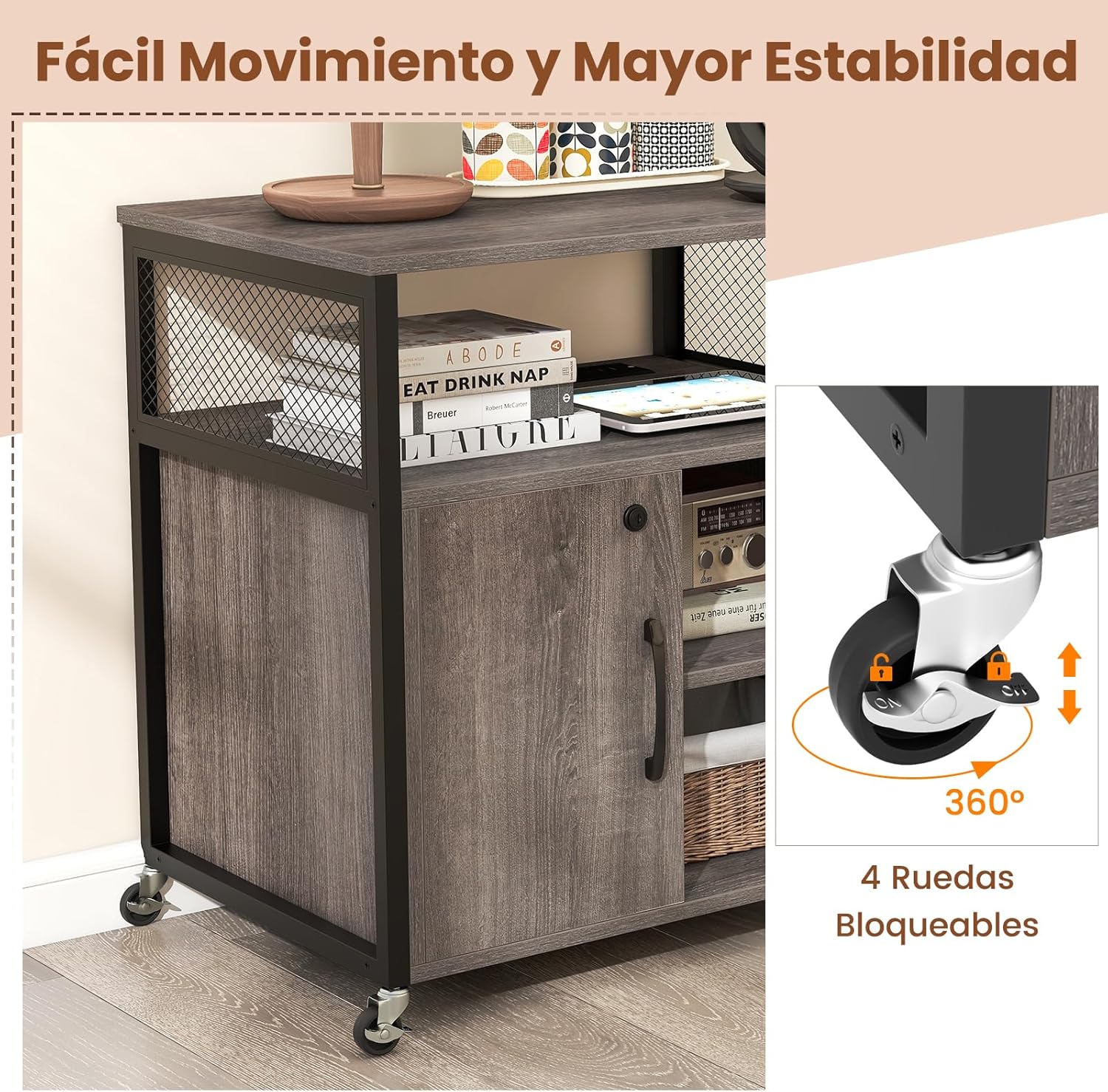
Image: A detailed view of the cabinet's lockable wheels, illustrating their 360-degree rotation and locking mechanism for secure positioning.
Maintenance
- Cleaning: Wipe the surfaces with a soft, damp cloth. Avoid abrasive cleaners or harsh chemicals.
- Dusting: Regularly dust the cabinet to maintain its appearance.
- Hardware Check: Periodically check all screws and connections to ensure they remain tight. Retighten if necessary.
- Wheel Maintenance: Keep the wheels free of debris to ensure smooth movement.
Troubleshooting
| Problem | Possible Cause | Solution |
|---|---|---|
| Cabinet is wobbly. | Loose screws or uneven floor. | Check and tighten all assembly screws. Move to a level surface. |
| Wheels do not roll smoothly. | Debris in wheels or wheels are locked. | Clear any debris from the wheels. Ensure the wheel locks are disengaged. |
| Charging station not working. | Power cord not plugged in or outlet issue. | Ensure the cabinet's power cord is securely plugged into a working wall outlet. Test the outlet with another device. |
| Cabinet door does not close properly. | Hinges misaligned or obstruction. | Check hinge alignment and adjust if necessary. Remove any items obstructing the door closure. |
Specifications
- Brand: GIANTEX
- Model Number: FE43926ES
- Color: Grey
- Material: Engineered Wood, Metal
- Product Dimensions (L x W x H): 60 x 43.5 x 65.5 cm (23.6 x 17.1 x 25.8 inches)
- Total Weight Capacity: 105 kg (231 lbs)
- Net Weight: 19.5 kg (43 lbs)
- Power Cord Length: 150 cm (59 inches)
- Charging Station Output: 2 x 220-240V/12A outlets, 1 x 5V/3.1A USB port, 1 x 5V/3.1A Type-C port
- Adjustable Shelf: 5 positions, 3 cm (1.2 inches) per level
- Included Components: 1 x Filing Cabinet, 2 x Keys, 1 x Manual

Image: Dimensional drawing of the filing cabinet, detailing its measurements in centimeters and highlighting the 105 kg weight capacity and included keys.
Warranty and Support
For warranty information or technical support, please refer to the contact details provided with your purchase or visit the official GIANTEX website. Please have your model number (FE43926ES) and purchase date ready when contacting support.
Online Support: Visit the GIANTEX Store on Amazon


