
KitchenAid KMT4109BM
KitchenAid 4 Slice Toaster User Manual
Model: KMT4109BM
Introduction
This manual provides essential information for the safe and efficient operation, maintenance, and troubleshooting of your KitchenAid 4 Slice Toaster, model KMT4109BM. Designed for everyday use, this toaster features extra-wide slots and adjustable shade control to perfectly toast a variety of breads, bagels, and more.
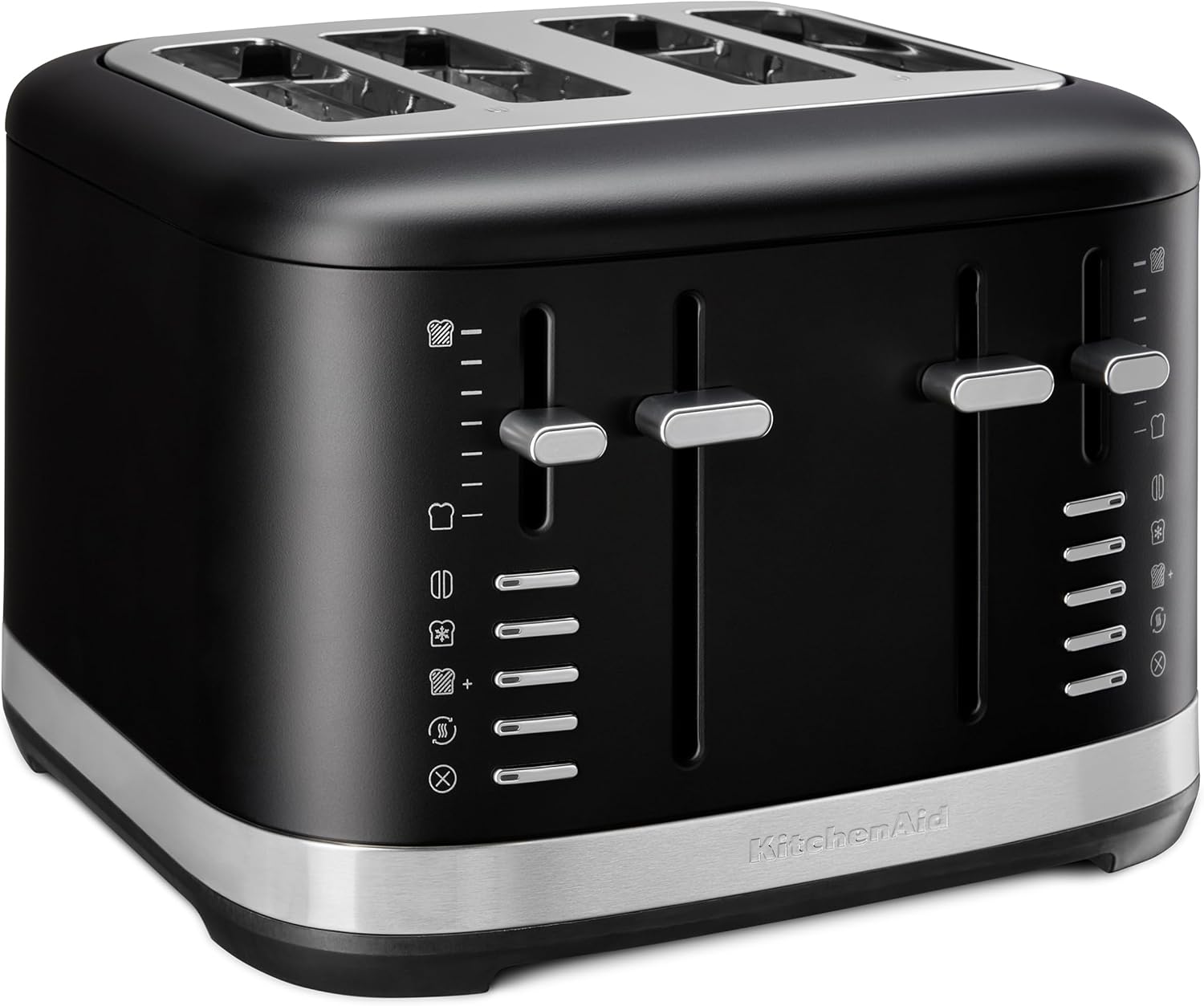
Figure 1: KitchenAid 4 Slice Toaster, Black Matte, front-angled view.
Important Safeguards
When using electrical appliances, basic safety precautions should always be followed, including the following:
- Read all instructions before operating the toaster.
- Do not touch hot surfaces. Use handles or knobs.
- To protect against electrical shock, do not immerse cord, plugs, or toaster in water or other liquid.
- Close supervision is necessary when any appliance is used by or near children.
- Unplug from outlet when not in use and before cleaning. Allow to cool before putting on or taking off parts.
- Do not operate any appliance with a damaged cord or plug or after the appliance malfunctions, or has been damaged in any manner.
- The use of accessory attachments not recommended by the appliance manufacturer may cause injuries.
- Do not use outdoors.
- Do not let cord hang over edge of table or counter, or touch hot surfaces.
- Do not place on or near a hot gas or electric burner, or in a heated oven.
- Do not use appliance for other than intended use.
- Oversize foods, metal foil packages, or utensils must not be inserted in a toaster as they may create a fire or risk of electric shock.
- A fire may occur if toasters are covered or touching flammable material, including curtains, draperies, walls, and the like, when in operation.
- Do not attempt to dislodge food when toaster is plugged in.
- Always unplug the toaster from the outlet before cleaning crumb trays.
Product Features
The KitchenAid 4 Slice Toaster is designed with convenience and versatility in mind. Key features include:
- Adjustable Shade Control: A wide range of toasting shades, from light to dark, ensures your toast is just the way you like it, every time.
- Extra-Wide Slots: Provides flexibility to toast a variety of breads without adjusting bread size, perfect for bagels, English muffins, thick breads, and homemade slices.
- Multiple Functions: Includes dedicated settings for Bagel, Defrost, Reheat, and a "Little Longer" option for customized toasting.
- Manual High Lift Lever: Easily access smaller items like English muffins or larger slices of bread.
- Bagel Function: Toasts the cut-side of a bagel or English muffin while gently warming the outer surfaces.
- Durable Metal Design: Built to last and adds a stylish touch to your kitchen countertop.
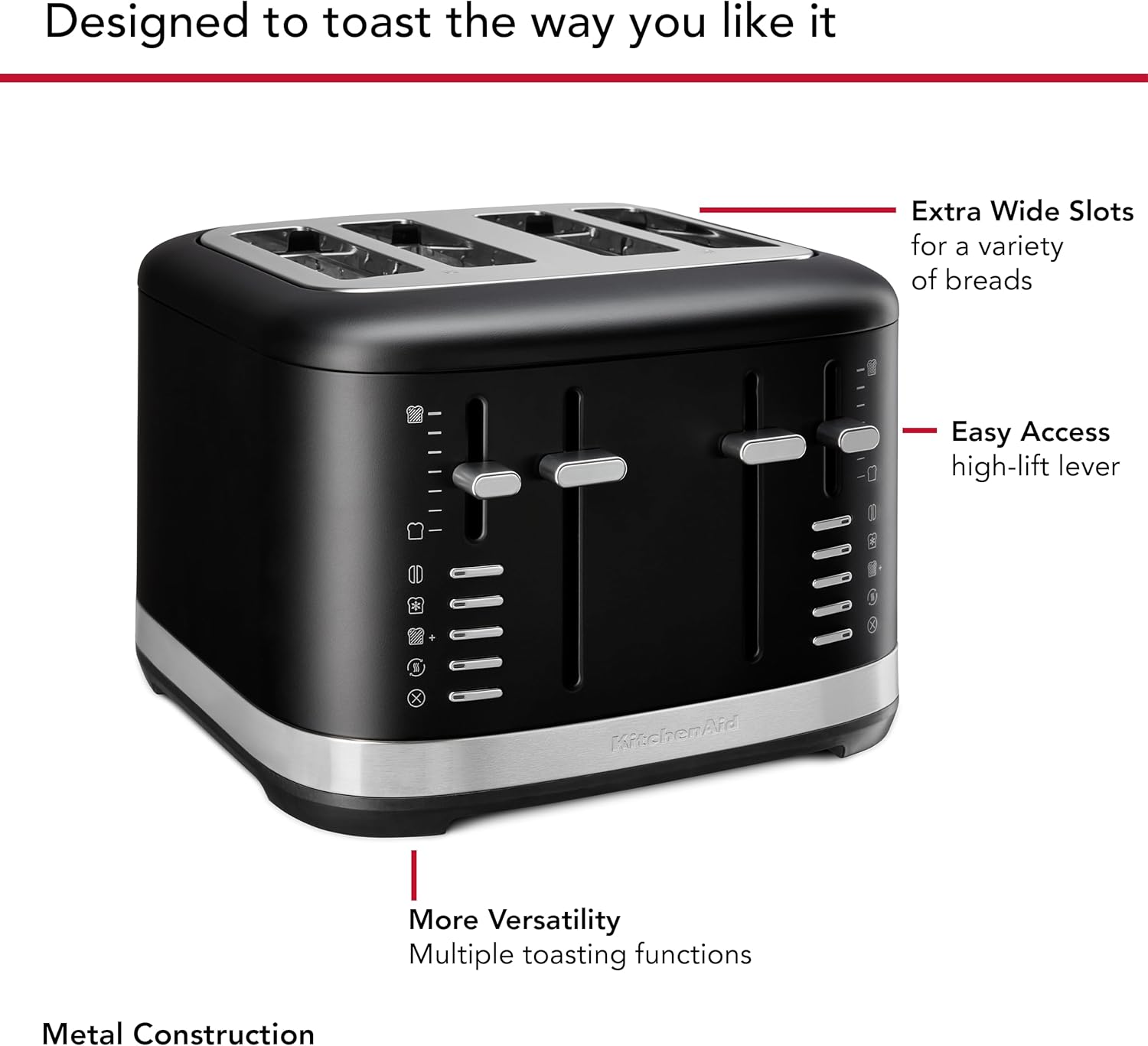
Figure 2: Key features of the toaster, including extra-wide slots, high-lift lever, and multiple toasting functions.
Setup
- Unpacking: Carefully remove the toaster and all packaging materials. Ensure all components are present and undamaged.
- Placement: Place the toaster on a stable, flat, heat-resistant surface, away from flammable materials such as curtains or walls. Ensure adequate ventilation around the appliance.
- First Use: Before first use, operate the toaster without bread on the highest setting to burn off any manufacturing residues. A slight odor or smoke may be present; this is normal and will dissipate. Ensure the area is well-ventilated.
- Power Connection: Plug the power cord into a grounded 120V AC electrical outlet.
Operating Instructions
Basic Toasting
- Insert Bread: Place up to four slices of bread, bagels, or English muffins into the extra-wide toasting slots.
- Select Shade: Adjust the shade control lever to your desired browning level, from 1 (lightest) to 5 (darkest).
- Lower Lever: Push the toast lever down until it locks into place. The toasting cycle will begin.
- Remove Toast: Once the toasting cycle is complete, the toast will automatically pop up. Use the manual high lift lever to raise smaller items for easier retrieval.

Figure 3: Placing bread into the toaster's extra-wide slots.

Figure 4: Removing toasted bread with the manual high lift lever.
Special Functions
- Bagel Function:
Insert bagels with the cut side facing inwards. Select your desired shade setting. Press the Bagel button (indicated by a bagel icon) before lowering the toast lever. This function toasts the cut side and gently warms the outer side.

Figure 5: The toaster is ideal for bagels and other thick breads.
- Defrost Function:
Place frozen bread into the slots. Select your desired shade setting. Press the Defrost button (indicated by a snowflake icon) before lowering the toast lever. This function thaws and then toasts the bread.
- Reheat Function:
To warm already toasted bread without further browning, place the bread in the slots. Press the Reheat button (indicated by a wavy arrow icon) and lower the toast lever. This cycle is shorter and designed for warming.
- Little Longer Function:
If your toast isn't quite done to your liking, press the Little Longer button (indicated by a bread slice with a plus sign) and lower the toast lever. This adds a short extension to the toasting cycle without resetting the shade setting.
- Cancel Function:
To stop the toasting cycle at any time, press the Cancel button (indicated by an 'X' icon). The toast will immediately pop up.
Video 1: An overview of the KitchenAid 2 and 4-Slice Toasters, demonstrating features like extra-wide slots, shade control, and specialized functions such as Bagel, Defrost, Reheat, and the high-lift lever. The video highlights the toaster's ability to handle various bread types and achieve desired browning levels.
Maintenance and Cleaning
Regular cleaning ensures optimal performance and extends the life of your toaster.
- Unplug and Cool: Always unplug the toaster from the electrical outlet and allow it to cool completely before cleaning.
- Crumb Trays:
The toaster features two removable crumb trays located at the bottom. Slide out the crumb trays, empty crumbs, and wipe them clean with a damp cloth. Dry thoroughly before reinserting. It is recommended to clean crumb trays regularly to prevent crumb buildup, which can be a fire hazard.

Figure 6: Removable crumb trays for easy cleaning.
- Exterior Cleaning:
Wipe the exterior of the toaster with a soft, damp cloth. Do not use abrasive cleaners or scouring pads, as they may scratch the finish. Ensure the toaster is completely dry before plugging it back in.
- Never Immerse: Never immerse the toaster, power cord, or plug in water or any other liquid.
Troubleshooting
| Problem | Possible Cause | Solution |
|---|---|---|
| Toaster does not turn on. | Not plugged in; power outage; circuit breaker tripped. | Ensure toaster is securely plugged into a working outlet. Check household circuit breaker. |
| Toast is too light or too dark. | Shade setting is incorrect for desired browning. | Adjust the shade control lever to a higher (darker) or lower (lighter) setting. |
| Food is stuck in the toaster. | Oversized food item; food shifted during toasting. | Unplug the toaster immediately. Allow to cool. Carefully remove the food using non-metallic utensils. Do not force. |
| Smoke coming from toaster. | Crumbs accumulated in crumb tray; food lodged in slots; first use burn-off. | Unplug the toaster immediately. Allow to cool. Clean crumb trays. Remove any lodged food. If it's the first use, this is normal. If smoke persists, discontinue use and contact customer service. |
If the problem persists after attempting the troubleshooting steps, please contact KitchenAid Customer Service.
Specifications
| Attribute | Detail |
|---|---|
| Brand | KitchenAid |
| Model Number | KMT4109BM |
| Color | Black Matte |
| Material | Aluminum, Plastic, Stainless Steel |
| Product Dimensions (DxWxH) | 11.4"D x 11.8"W x 8.3"H |
| Wattage | 1800 watts |
| Number of Slices | 4 |
| Voltage | 120 Volts |
| Number of Settings | 5 (Shade Control) |
| Special Features | Built-In Timer, Cancel Function, Defrost Mode, Reheat Mode, Bagel Function, Little Longer Function, High Lift Lever |
| Item Weight | 9.9 pounds |
| UPC | 883049670737 |
Warranty and Support
For warranty information, product registration, or technical support, please visit the official KitchenAid website or contact their customer service directly. Keep your purchase receipt for warranty claims.
Online Support: www.kitchenaid.com/service-and-support.html
Phone Support: Refer to your product registration card or the KitchenAid website for regional contact numbers.
Related documentsKMT4109BM


Ask a question about this manual
Ask about setup, troubleshooting, compatibility, parts, safety, or missing instructions. Manuals+ will review the question and use this page’s manual context to help answer it.