
1. Introduction
Thank you for choosing the RAVEK CFMoto UForce Apex Lights. This product is designed to provide enhanced visibility and a distinct aesthetic for your CFMoto UForce vehicle with its white running lights. This manual provides essential information for the safe installation, operation, and maintenance of your new lights. Please read it thoroughly before installation and keep it for future reference.
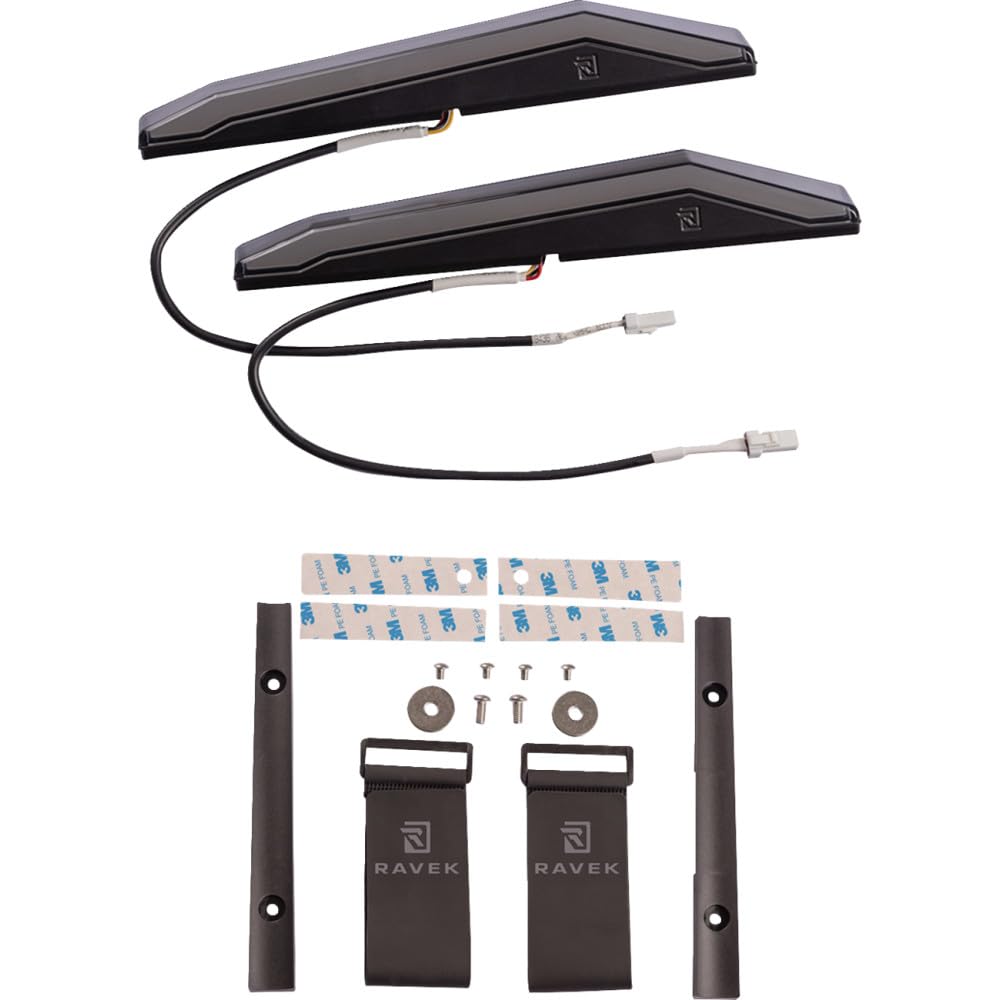
Figure 1: RAVEK CFMoto UForce Apex Lights. These rectangular lights provide white running light functionality for improved vehicle visibility.
2. Safety Information
Always observe the following safety precautions to prevent injury or damage to the product and vehicle:
- Disconnect Power: Before beginning any installation, disconnect the vehicle's battery to prevent electrical shock or short circuits.
- Professional Installation: If you are not confident in your ability to install electrical components, seek assistance from a qualified professional.
- Proper Tools: Use appropriate tools for installation. Incorrect tools can damage the product or vehicle.
- Wiring: Ensure all wiring connections are secure and properly insulated to prevent shorts and corrosion.
- Mounting: Securely mount the lights to prevent them from becoming loose during vehicle operation, which could cause a hazard.
- Operating Temperature: Do not operate the lights outside of their specified temperature range.
- Water Exposure: While designed for outdoor use, avoid submerging the lights unless explicitly stated as waterproof. Ensure all connections are sealed.
3. Package Contents
Verify that all components are present and undamaged before proceeding with installation. The package should contain:
- RAVEK CFMoto UForce Apex Light Kit (Model 68-101S)
- Installation Hardware (brackets, screws, etc. - specifics may vary)
- Instruction Manual (this document)
If any items are missing or damaged, please contact RAVEK customer support immediately.
4. Setup and Installation
The RAVEK CFMoto UForce Apex Lights are designed for "Plug & Play" installation, simplifying the wiring process. However, proper mechanical mounting is crucial.
4.1 Tools Required
- Basic hand tools (wrenches, screwdrivers)
- Wire strippers/crimpers (if custom wiring is needed)
- Multimeter (for verifying connections, optional but recommended)
4.2 Installation Steps
- Prepare Vehicle: Park the CFMoto UForce on a level surface and engage the parking brake. Disconnect the negative terminal of the vehicle's battery.
- Identify Mounting Location: Determine the desired mounting location for the Apex Lights on your UForce. Ensure the location provides clear visibility and does not obstruct other vehicle functions. The lights are rectangular and designed for specific integration points.
- Mount Brackets: Attach the provided mounting brackets to the Apex Lights using the included hardware. Do not fully tighten at this stage.
- Secure Lights: Position the lights with attached brackets onto the vehicle. Use the appropriate hardware to secure the brackets to the vehicle's frame or designated mounting points. Adjust the angle as needed for optimal light projection and then fully tighten all mounting hardware.
- Connect Wiring: Locate the designated "Plug & Play" connector on your CFMoto UForce wiring harness. Connect the Apex Lights' wiring harness directly to this connector. Ensure the connection is firm and secure. If no direct "Plug & Play" connector is available, refer to your vehicle's service manual for appropriate power and ground connections for accessory lights.
- Route Wiring: Carefully route the wiring away from moving parts, hot surfaces, and sharp edges. Use zip ties or cable clamps to secure the wiring.
- Test Functionality: Reconnect the vehicle's battery. Turn on the vehicle's ignition and activate the running lights to verify proper operation of the RAVEK Apex Lights.
- Final Inspection: Ensure all connections are secure, wiring is properly routed, and lights are firmly mounted.
Note: Specific mounting points and wiring harness locations may vary slightly depending on your CFMoto UForce model year. Consult your vehicle's owner's manual if necessary.
5. Operating Instructions
The RAVEK CFMoto UForce Apex Lights are designed to function as white running lights, typically activating with your vehicle's ignition or existing running light circuit.
- Automatic Activation: Once properly installed and connected to the vehicle's running light circuit, the Apex Lights will illuminate automatically when the vehicle's ignition is turned on or when the vehicle's running lights are activated.
- Purpose: These lights are intended to enhance your vehicle's visibility to other drivers and pedestrians, especially during daylight hours or in low-light conditions. They are not designed as primary headlights or off-road driving lights.
No user intervention is typically required for the operation of these lights after installation, as they integrate with the vehicle's existing electrical system.
6. Maintenance
The RAVEK Apex Lights are designed for durability and require minimal maintenance.
- Cleaning: Periodically clean the light lenses with a soft cloth and mild soap and water. Avoid abrasive cleaners or solvents that could damage the plastic.
- Inspection: Regularly inspect the mounting hardware and wiring connections for any signs of loosening, corrosion, or damage. Tighten any loose fasteners and repair or replace damaged wiring as needed.
- LED Longevity: The LED light source is designed for a long operational life and typically does not require replacement. If a light fails, the entire unit may need to be replaced.
7. Troubleshooting
If you encounter issues with your RAVEK Apex Lights, refer to the following troubleshooting guide:
| Problem | Possible Cause | Solution |
|---|---|---|
| Lights do not turn on. |
|
|
| Lights are dim or flickering. |
|
|
| One light is not working. |
|
|
If these steps do not resolve the issue, please contact RAVEK customer support for further assistance.
8. Specifications
Key technical specifications for the RAVEK CFMoto UForce Apex Lights (Model 68-101S):
| Feature | Detail |
|---|---|
| Model Number | 68-101S |
| Brand | RAVEK |
| Light Type | Apex Lights (White Running Lights) |
| Light Source Type | Light Emitting Diode (LED) |
| Color | White |
| Shape | Rectangular |
| Material | Plastic |
| Power Source | Corded Electric |
| Mounting Type | Bracket Mount |
| Product Dimensions | 13"L x 5.5"W x 3.75"H |
| Item Weight | 2.16 Pounds |
| UPC | 725378987974 |
9. Warranty and Support
9.1 Warranty Information
RAVEK products are manufactured to high-quality standards. For specific warranty details regarding your CFMoto UForce Apex Lights (Model 68-101S), please refer to the warranty card included with your product or visit the official RAVEK website. Typically, warranties cover defects in materials and workmanship under normal use.
Note: Damage resulting from improper installation, misuse, neglect, or unauthorized modifications is generally not covered under warranty.
9.2 Customer Support
If you have any questions, require technical assistance, or need to report a problem with your RAVEK Apex Lights, please contact RAVEK customer support. Have your product model number (68-101S) and purchase information ready when contacting support.
For the most current contact information, please visit the official RAVEK website or refer to your purchase documentation.