
CooSpo CS500
Contents
User Manual for COOSPO CS500 Bike Computer
Model: CS500
Brand: CooSpo
Product Overview
The COOSPO CS500 Bike Computer is a wireless 2.6-inch LCD GPS cycling computer designed to enhance your riding experience. It features accurate GPS tracking with multi-system support (GPS+Beidou+GLONASS+GALILEO+QZSS), intuitive route navigation, and a comprehensive display of over 140 essential cycling metrics. The device supports Bluetooth 5.0 and ANT+ connectivity for various sensors, including bike radar, and offers an impressive 45-hour battery life. Its auto-backlight feature ensures visibility in all conditions, and the IPX7 waterproof design provides durability.

The COOSPO CS500 Bike Computer features a clear 2.6-inch LCD screen, providing essential cycling metrics and navigation capabilities.
What's in the Box
Upon opening your COOSPO CS500 package, you will find the following components:
- CS500 Bike Computer *1
- Bike Computer Mount Base *1
- User Manual *1
- Anti-rope *1
- Charge Cable *1 (Type-C)

The package includes the CS500 Bike Computer, a bike computer mount base, a user manual, an anti-rope, and a charge cable.
This video provides a quick unboxing experience, showcasing all the components included in the CS500 bike computer package.
Setup Guide
1. Initial Activation and Language Selection
Before first use, ensure the device is fully charged to activate it. Connect the provided USB-C cable to the device and a power source. Once activated, you can select your preferred language from the system settings.
This video demonstrates the initial activation process of the CS500 by charging and guides through selecting the device language.
2. Button Functions
The CS500 features intuitive button controls for easy navigation and operation:
- Left Button: Short press for power on, long press for power off, short press for back function.
- Top Right Button: Access menu, confirm selection.
- Middle Right Buttons (Up/Down Arrows): Navigate menus, adjust values.
- Bottom Left Button: Homepage shortcut to history, record laps.
- Bottom Right Button: Homepage shortcut to start/pause ride.

This image highlights the various buttons on the CS500 and their primary functions.
3. Status Page Overview
The status page provides a quick overview of important information such as GPS signal strength, battery level, temperature, and connected sensor types. It also indicates the current ride mode and backlight status.
4. System Settings
Access the system settings to customize various aspects of your CS500, including units, time format, and other preferences.
5. Adding Sensors
The CS500 supports Bluetooth and ANT+ sensors. To add a new sensor, navigate to the sensor settings and initiate a search. Ensure your sensor is active and within range. Once detected, select and pair the sensor.
6. Ride Mode Configuration
The CS500 allows you to configure different ride modes (e.g., Outdoor, Indoor) and customize data fields for each. If you have multiple bikes, you can set up individual profiles for tailored data display.
7. Setting up via CooSporide App
For advanced settings and seamless data management, download the CooSporide App. The app allows you to easily configure device settings, manage ride modes, and customize data pages from your smartphone. It also facilitates firmware updates.
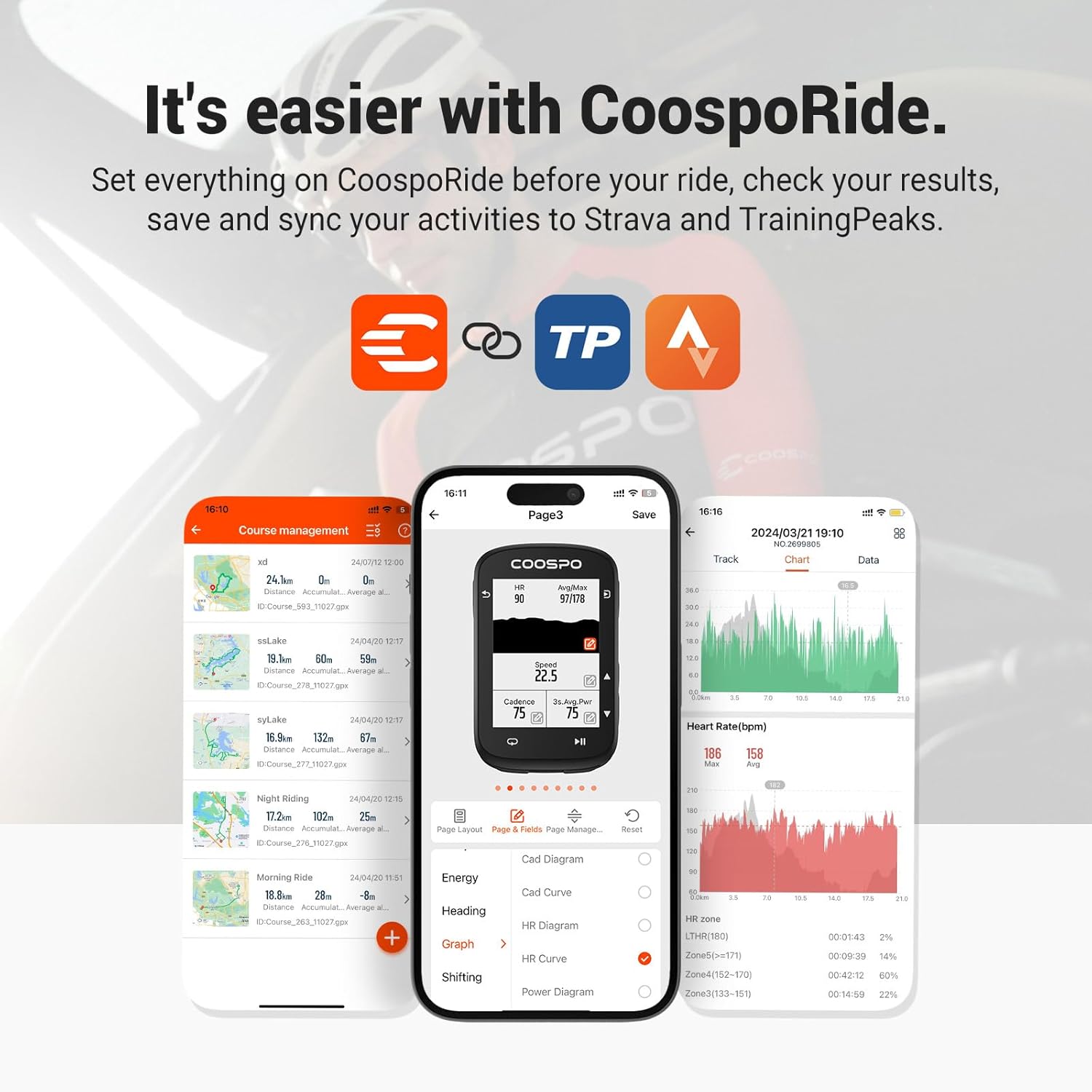
The CooSporide app provides a convenient way to manage your CS500 settings and data. You can customize display pages, update firmware, and sync activities directly from your smartphone.
This video demonstrates how to connect your CS500 to the CooSporide app for easy setup, data synchronization, and activity analysis.
Operating Instructions
1. Starting a Ride (Normal Cycling)
To start a normal cycling session, ensure GPS signal is acquired and sensors are connected. Press the Start button twice to begin recording your ride. The device will display real-time data such as speed, distance, and time.
Follow these steps to initiate a normal cycling session with your CS500, including checking GPS and sensor status, and manually starting the recording.
2. Cycling with Navigation
The CS500 offers intuitive route navigation. Before starting, ensure the compass is calibrated for accurate heading. You can create routes from your history or pre-loaded courses. The device will provide turn-by-turn prompts and display your progress on the map.
Detailed guide on using the navigation features of the CS500, including compass calibration and loading routes for guided cycling.
A step-by-step guide on how to accurately calibrate the compass on your CS500 GPS Bike Computer for precise navigation.
3. Data Display and Customization
The 2.6-inch graphical grid display allows for comprehensive data viewing. You can customize up to 9 pages with over 140 data types, prioritizing the metrics most important to your ride. This includes speed, cadence, heart rate, power, altitude, and more.

The CS500's graphical interface allows for efficient data visualization, presenting metrics like speed, distance, heart rate, and power in an easy-to-understand format.

Customize your CS500's display with 9 pages and over 140 data types, allowing you to arrange information exactly as you prefer for optimal readability during your ride.
4. Auto Functions
The CS500 features smart auto functions to enhance your cycling experience. These include auto-start/pause, auto-backlight adjustment for varying light conditions, auto-lap recording, and auto-alert features for important notifications.

Automated features such as auto-start, auto-pause, and auto-backlight simplify your ride, allowing you to focus on the road without manual adjustments.
Maintenance
1. Charging and Battery Life
The CS500 boasts an extended 45-hour battery life. Charge the device using the provided USB-C cable. A full charge ensures long rides without interruption.

Enjoy prolonged cycling adventures with the CS500's impressive 45-hour battery life, ensuring your device stays powered throughout your longest rides.
2. Waterproofing and Durability
With an IPX7 waterproof rating, the CS500 is designed to withstand various weather conditions, making it suitable for cycling in rain or dusty environments. Ensure the USB port cover is securely closed to maintain water resistance.

The CS500 is built with IPX7 waterproofing, protecting it from water and dust. It features a convenient Type-C charging port and a lightweight design for easy handling.
3. Firmware Updates
Regularly check for firmware updates via the CooSporide App to ensure your CS500 has the latest features and performance improvements. The app will notify you when an update is available and guide you through the process.
Troubleshooting
- GPS accuracy issues: Ensure you are in an open area with a clear view of the sky for optimal GPS signal acquisition. Allow a few minutes for the device to acquire satellites before starting your ride. Calibrate altitude and compass as needed.
- Sensor connection problems: Verify that your sensors are active and have sufficient battery. Ensure they are within range of the CS500. Re-pair sensors through the device settings if connection issues persist.
- Data sync failures: Check your smartphone's Bluetooth connection and ensure the CooSporide App is open and connected to the CS500. Verify your internet connection for syncing data to Strava or TrainingPeaks.
- Device not turning on: Ensure the device is fully charged. If it still doesn't turn on, try performing a soft reset by holding down the power button for an extended period (e.g., 10-15 seconds).
Specifications
| Feature | Detail |
|---|---|
| Brand | CooSpo |
| Model Name | CS500 |
| Screen Size | 2.6 Inches |
| Display Type | LCD |
| Battery Life | 45 Hours |
| Sensor Type | GPS Sensor |
| Connectivity Technology | Bluetooth, ANT |
| International Protection Rating | IPX7 |
| Mounting Type | Handlebar Mount |
| Human Interface Input | Buttons |
| Item Package Dimensions L x W x H | 7.2 x 4.88 x 0.94 inches |
| Package Weight | 0.17 Kilograms |
Warranty and Support
Warranty Information
The COOSPO CS500 Bike Computer comes with a 12-month warranty from the date of purchase, covering manufacturing defects. Please retain your proof of purchase for warranty claims.
Technical Support
For any technical issues, questions, or assistance, please contact the COOSPO support team. They aim to provide a reply within 24 hours. Visit the official CooSpo website or refer to the contact information provided in the user manual for support channels.
Ask a question about this manual
Ask about setup, troubleshooting, compatibility, parts, safety, or missing instructions. Manuals+ will review the question and use this page’s manual context to help answer it.