
1. Product Overview
The LILYGO T-Display-S3 AMOLED 1.64 is a versatile development board featuring an ESP32-S3 microcontroller and an integrated 1.64-inch HD AMOLED screen. This board is designed for various embedded projects requiring wireless connectivity and a vibrant display.
Key features include 2.4 GHz Wi-Fi and Bluetooth 5 (LE) for wireless communication, and the capability to be powered independently via an external battery.
Package Contents
Verify that all items listed below are included in your package:
- 1 x T-Display 1.64 inch display development board
- 1 x Power Cable (PH1.25)
- 2 x Pin Headers
- 1 x USB cable (if included in specific kit)
- Quick start guide or user manual (this document)

Image: LILYGO T-Display-S3 AMOLED Development Board with included power cable and pin headers.

Image: Diagram illustrating the components included in the package: the T-Display board, a PH1.25 power cable, and pin headers.
2. Setup Instructions
2.1 Initial Connection
To begin using your LILYGO T-Display-S3, connect it to your computer using a compatible USB-C cable. This connection provides power and enables data communication for programming.

Image: Rear view of the LILYGO T-Display-S3 board, highlighting the USB-C port for connection and various pin headers.
2.2 Software Development Environment
The LILYGO T-Display-S3 supports several development environments. For detailed setup instructions and example code, refer to the official GitHub repository:
- Supported Environments: Arduino IDE, PlatformIO-IDE, ESP-IDF
- GitHub Repository: github.com/Xinyuan-LilyGO/T-Display-AMOLED-1.64
Follow the instructions provided in the repository for driver installation, board configuration, and uploading your first program.
2.3 External Power Supply
The board can be powered independently using an external battery connected via the PH1.25 connector. Ensure correct polarity when connecting the battery.
3. Operating Instructions
3.1 Basic Operation
Once programmed, the T-Display-S3 will execute the uploaded code. The 1.64-inch AMOLED display will show visual output as defined by your program. The integrated capacitive touch functionality allows for interactive applications.

Image: The LILYGO T-Display-S3 AMOLED screen showing a touch test interface with coordinates and button options.
3.2 Wireless Connectivity
The ESP32-S3 module provides 2.4 GHz Wi-Fi and Bluetooth 5 (LE) capabilities. These can be utilized within your code to connect to networks, communicate with other devices, or implement IoT functionalities.
- Wi-Fi: Connect to local networks for internet access or local communication.
- Bluetooth: Establish short-range connections with compatible devices.
4. Maintenance
4.1 General Care
To ensure the longevity of your T-Display-S3 board:
- Avoid exposing the board to extreme temperatures, humidity, or direct sunlight.
- Handle the board by its edges to prevent damage to components.
- Store the board in an anti-static bag when not in use.
4.2 Cleaning
If cleaning is necessary, use a soft, dry, anti-static cloth. Do not use liquid cleaners or solvents, as these can damage the electronic components and the AMOLED screen.
5. Troubleshooting
This section addresses common issues you might encounter.
5.1 Board Not Powering On
- Check USB Connection: Ensure the USB-C cable is securely connected to both the board and your computer/power source.
- Verify Power Source: Confirm that your USB port or external power supply is providing adequate power (5V).
- External Battery: If using an external battery, check its charge level and ensure correct polarity.
5.2 Display Not Working
- Software Issue: Ensure your uploaded code correctly initializes and drives the AMOLED display. Refer to the GitHub examples.
- Connection: Verify that the display is properly seated and connected to the main board.
5.3 Wi-Fi/Bluetooth Connectivity Issues
- Code Configuration: Double-check your Wi-Fi SSID, password, and Bluetooth pairing procedures in your code.
- Antenna: Ensure any external antenna (if used) is properly connected.
- Environment: Minimize interference from other 2.4 GHz devices.
For further assistance, consult the official GitHub repository or contact LILYGO support.
6. Specifications
Detailed technical specifications for the LILYGO T-Display-S3 AMOLED Development Board:
| Feature | Detail |
|---|---|
| MCU | ESP32-S3R8 Dual-core LX7 microprocessor |
| Wireless Connectivity | 2.4 GHz Wi-Fi & Bluetooth 5 (LE) |
| Flash Memory | 16MB |
| PSRAM | 8MB |
| Display Type | 1.64-inch ICNA3311 AMOLED |
| Display Resolution | 280 x 456 pixels |
| Display Driver IC | ICNA3311 (CO5300) |
| Bus Interface | QSPI |
| Touch Function | Capacitive Touch (FT3168 chip) |
| USB Charging | 5V 500mA |
| Battery Voltage Detection | IO04 |
| Dimensions (L x W x H) | 42mm x 28mm x 11mm (approx.) |
| Operating System | Linux (supported development environment) |
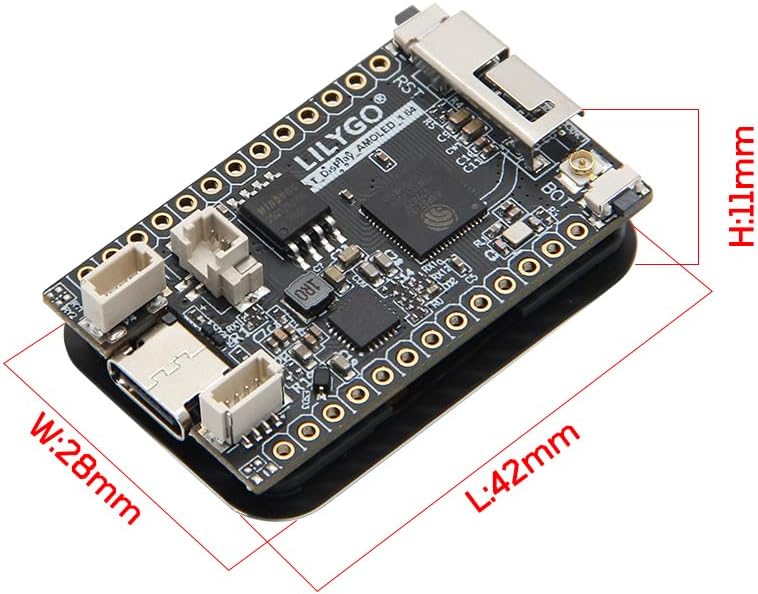
Image: Dimensions of the LILYGO T-Display-S3 AMOLED Development Board.

Image: Detailed technical diagram of the LILYGO T-Display-S3, including pinout and component information.
7. Warranty Information
LILYGO products are typically covered by a limited manufacturer's warranty against defects in materials and workmanship. For specific warranty terms and conditions, please refer to the documentation provided with your purchase or contact LILYGO customer support directly. Keep your proof of purchase for warranty claims.
8. Support
For technical support, development resources, and community discussions, please visit the official LILYGO GitHub repository:
github.com/Xinyuan-LilyGO/T-Display-AMOLED-1.64
If you have any questions or require further assistance, you may also contact the seller or LILYGO directly through their official channels.