1. Introduction
This manual provides detailed instructions for the safe and effective use of your BAOFENG UV-21 GPS Multi-Band Ham Radio. Please read this manual thoroughly before operating the device to ensure proper functionality and to prevent damage. The BAOFENG UV-21 is a versatile handheld radio featuring GPS positioning, wireless frequency copy, VOX function, and multi-band reception capabilities, designed for amateur radio enthusiasts and outdoor communication.
2. Safety Information
Always observe the following safety precautions to reduce the risk of fire, electric shock, injury, or damage to the radio.
- Do not operate the radio in explosive atmospheres (e.g., flammable gases, dust particles, metallic powders).
- Do not transmit without an antenna attached.
- Do not disassemble or modify the radio. Repairs should only be performed by qualified technicians.
- Keep the radio away from direct sunlight, excessive heat, and moisture.
- Use only BAOFENG approved batteries and chargers.
- This device is Not Water Resistant. Avoid exposure to water or high humidity.
- Ensure the radio is FCC certified (FCC ID: 2AJGM-UV21) and operated within legal frequency limits.
3. Package Contents
Verify that all items are present in your package:
- 1x BAOFENG UV-21 Radio Body
- 1x Rechargeable Battery
- 1x Antenna
- 1x Belt Clip
- 1x Type-C Charger Cable
- 1x Base Charger (Desktop Charger)
- 1x Lanyard
- 1x User Manual
4. Product Overview
The BAOFENG UV-21 features a robust design with an intuitive interface. Familiarize yourself with the radio's components:

Image: The BAOFENG UV-21 radio body, its detachable battery, and a Type-C charging cable. The radio features a full keypad and a color display.

Image: A detailed view of the BAOFENG UV-21's 1.77-inch LCD screen, displaying frequency information and channel details. The screen is larger than previous models for improved readability.
Key Components:
- Antenna: For transmitting and receiving signals.
- PTT (Push-to-Talk) Button: Located on the side, press to transmit.
- Speaker/Microphone: Integrated for audio input and output.
- LCD Display: 1.77-inch color screen for displaying frequency, channel, and status information.
- Keypad: Numeric and function keys for input and control.
- VFO/MR Button: Toggles between Frequency Mode (VFO) and Channel Mode (MR).
- A/B Button: Selects the upper or lower display line for operation.
- Menu Button: Accesses the radio's menu settings.
- Navigation Keys: Up/Down arrows for menu navigation and frequency adjustment.
- Power/Volume Knob: On top, turns the radio on/off and adjusts volume.
- Battery Pack: Rechargeable, attaches to the rear of the radio.
- Type-C Charging Port: On the battery for direct charging.
5. Setup
5.1. Battery Installation and Charging
Before first use, fully charge the battery.
- Install Battery: Align the battery pack with the grooves on the back of the radio and slide it upwards until it clicks into place.
- Remove Battery: Press the battery release latch (usually at the bottom of the battery) and slide the battery downwards.
- Charging:
- Using Type-C Cable: Connect the Type-C cable to the port on the battery pack and plug the other end into a USB power source (e.g., car charger, power bank, laptop, or wall adapter).
- Using Base Charger: Place the radio with the battery installed into the desktop charging cradle. Ensure the charging contacts align. The indicator light on the charger will show charging status.

Image: Illustration of the two charging methods for the BAOFENG UV-21: direct Type-C cable charging to the battery, and charging via the desktop base charger. Both methods are shown with various power sources like a power bank and car charger.
5.2. Antenna Attachment
Screw the antenna clockwise onto the connector on the top of the radio until it is finger-tight. Do not overtighten.
5.3. Belt Clip and Lanyard
Attach the belt clip to the designated slot on the back of the radio for convenient carrying. The lanyard can be attached to the top of the radio for added security.
6. Operating Instructions
6.1. Power On/Off and Volume
- Power On: Rotate the Power/Volume knob clockwise until you hear a click.
- Power Off: Rotate the Power/Volume knob counter-clockwise until you hear a click.
- Adjust Volume: Rotate the Power/Volume knob while the radio is on.
6.2. Mode Selection (VFO/MR)
Press the VFO/MR button to switch between:
- VFO (Frequency Mode): Allows direct frequency input and scanning.
- MR (Channel Mode): Allows selection of pre-programmed channels (up to 999 channels).
6.3. Transmitting and Receiving
- Receiving: The radio will automatically receive signals on the selected frequency/channel.
- Transmitting (PTT): Press and hold the PTT button on the side of the radio to transmit. Speak clearly into the microphone. Release the PTT button to receive.
- VOX Function: The Voice Operated eXchange (VOX) function allows hands-free transmission. When VOX is enabled, the radio will automatically transmit when it detects your voice. Adjust VOX sensitivity in the menu.
6.4. Wireless Frequency Copy
The UV-21 features a wireless frequency copy function, allowing it to quickly identify and replicate the frequency of another radio without requiring computer programming.
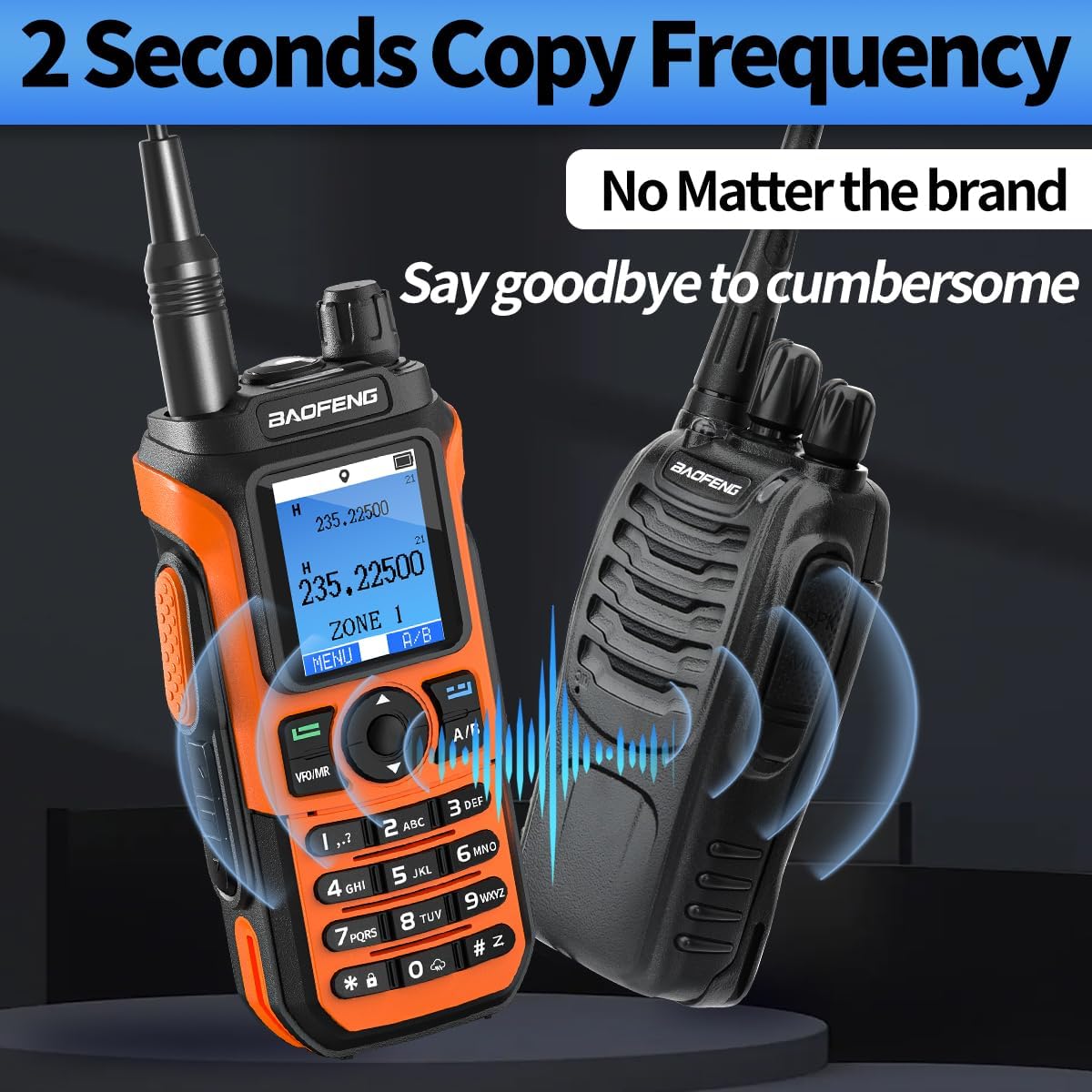
Image: Two BAOFENG radios, one orange UV-21 and one black radio, demonstrating the 2-second frequency copy feature. Blue waves indicate signal transfer, highlighting the ease of copying frequencies between devices.
Refer to the on-screen prompts or the full digital manual for specific steps to activate and use this feature.
6.5. GPS Function
The integrated GPS function provides real-time positioning and location sharing capabilities, useful for outdoor activities and team coordination.

Image: A BAOFENG UV-21 radio displaying GPS coordinates, overlaid on a map with multiple location pins, illustrating the GPS+BDS positioning and location sharing feature for team communication.

Image: A BAOFENG UV-21 radio displaying GPS information, with a global map background showing interconnected location pins, emphasizing the GPS+BDS positioning and location sharing capabilities.
Access the GPS menu to view your current coordinates and to initiate location sharing with other compatible devices.
6.6. Multi-Band and FM Radio Function
The UV-21 supports multi-band reception and transmission across VHF and UHF frequencies, and also includes an FM radio function for entertainment.
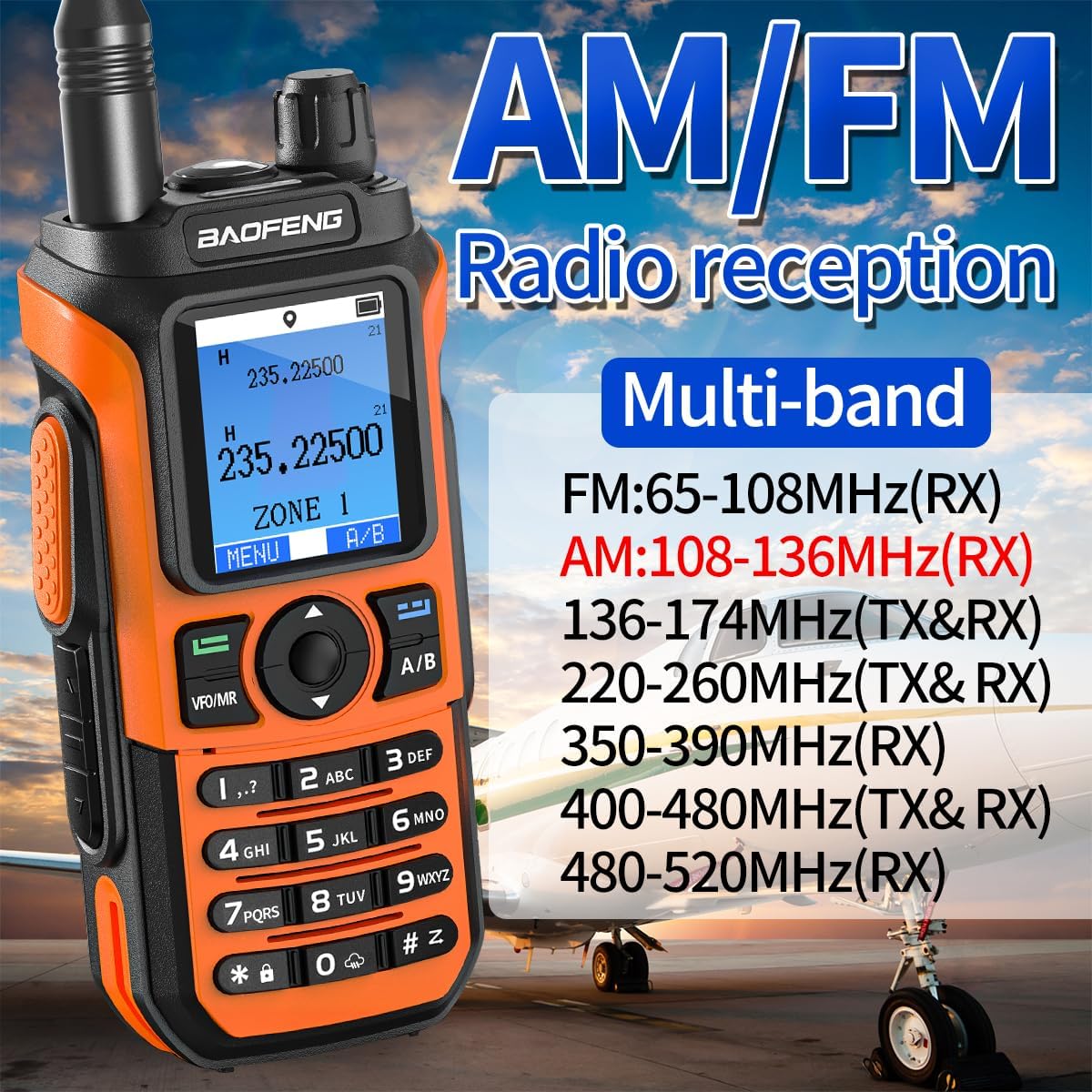
Image: A BAOFENG UV-21 radio displaying frequency information, with text indicating its AM/FM radio reception and multi-band capabilities, including frequency ranges for FM (65-108MHz), AM (108-136MHz), and various VHF/UHF bands.
- Multi-Band Operation: The radio operates on VHF and UHF frequencies. Specific frequency ranges are detailed in the Specifications section.
- FM Radio: To access the FM radio, navigate through the menu or use a dedicated function key if available. You can listen to local FM broadcasts.
6.7. Programming
The BAOFENG UV-21 supports programming via Chirp software. It is compatible with UV-17ProGPS programming software. While the wireless copy function allows for quick frequency replication, advanced customization of channels and settings can be done through software programming.
7. Maintenance
7.1. Cleaning
Wipe the radio's surface with a soft, damp cloth. Do not use harsh chemicals or abrasive cleaners. Ensure the radio is dry before use or charging.
7.2. Battery Care
- Avoid overcharging or completely discharging the battery.
- Store the battery in a cool, dry place when not in use.
- If the radio will not be used for an extended period, remove the battery.
7.3. Storage
Store the radio in a dry, dust-free environment, away from extreme temperatures and direct sunlight.
8. Troubleshooting
| Problem | Possible Cause | Solution |
|---|---|---|
| Radio does not power on | Battery discharged or not properly installed | Charge the battery fully. Ensure battery is securely attached. |
| Cannot transmit or receive | Incorrect frequency/channel, antenna not attached, low battery | Verify frequency/channel. Attach antenna. Charge battery. Check squelch settings. |
| Poor audio quality | Weak signal, incorrect volume, microphone/speaker obstruction | Move closer to the other radio. Adjust volume. Clear any obstructions. |
| GPS not acquiring signal | Indoors, obstructed view of sky | Move to an open outdoor area with a clear view of the sky. |
9. Specifications
| Feature | Detail |
|---|---|
| Model Number | UV-21R |
| Brand | BAOFENG |
| Number of Channels | 999 |
| Frequency Range (RX) | FM: 65-108MHz, AM: 108-136MHz, 136-174MHz, 220-260MHz, 350-390MHz, 400-480MHz, 480-520MHz |
| Frequency Range (TX) | 136-174MHz, 220-260MHz, 400-480MHz |
| Talking Range Maximum | 5 Miles (approx. 8 km) |
| Voltage | 7.4 Volts (DC) |
| Special Features | GPS Function, Wireless Frequency Copy, VOX, Emergency Alarm, Long Range |
| Display | 1.77 inch Larger LCD Screen |
| Charging | Type-C Rechargeable, Base Charger |
| Water Resistance Level | Not Water Resistant |
| FCC ID | 2AJGM-UV21 |
| Compatible Programming Software | Chirp (UV-17ProGPS compatible) |
10. Warranty & Support
Warranty information for this product is not explicitly provided in the available data. For specific warranty details, please refer to the documentation included with your purchase or contact BAOFENG customer support directly.
For technical support, troubleshooting assistance, or further inquiries, please visit the official BAOFENG website or contact their customer service department. Keep your purchase receipt and product model number (UV-21R) handy when seeking support.


