1. Introduction
This manual provides detailed instructions for the UAYESOK QX-18 USB Handheld Speaker Microphone. This device is designed for use with various platforms including computers, laptops, and Android phones, offering both microphone and customizable keyboard functionalities. It is particularly suitable for applications such as Euro Truck Simulator 2.
2. Package Contents
Please verify that all items listed below are included in your package:
- 1 x UAYESOK QX-18 USB Handheld Speaker Microphone
- 1 x Microphone Holder Mount
- 1 x Product Instruction Manual (physical copy)
3. Product Overview
The UAYESOK QX-18 features a robust design with intuitive controls for seamless operation.

Figure 3.1: Front view of the UAYESOK QX-18 USB Handheld Speaker Microphone, showing the speaker grille, QX-18 model number, and orange PTT buttons.
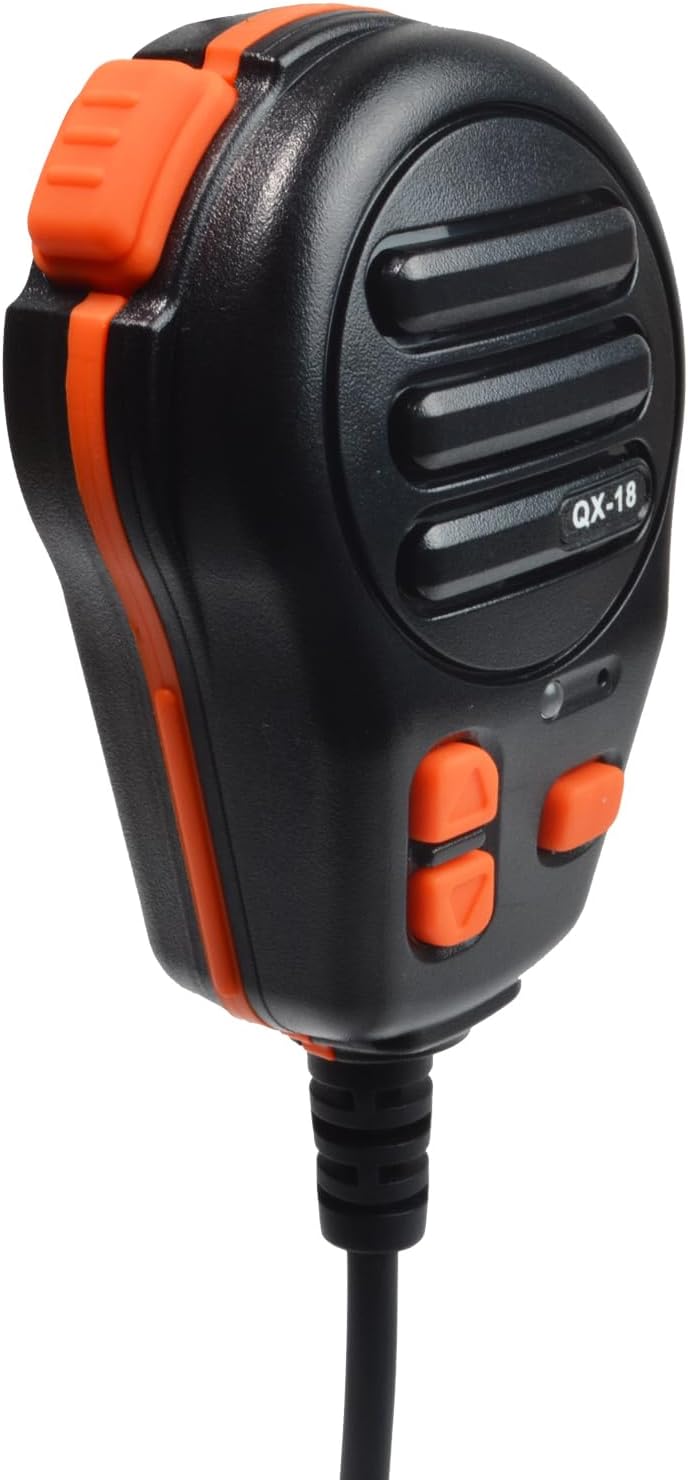
Figure 3.2: Angled view of the UAYESOK QX-18 USB Handheld Speaker Microphone, highlighting the side profile and orange trim.

Figure 3.3: The UAYESOK QX-18 USB Handheld Speaker Microphone connected to its coiled USB cable, ready for use.

Figure 3.4: A hand holding the UAYESOK QX-18 USB Handheld Speaker Microphone, demonstrating its ergonomic design and size.

Figure 3.5: Rear view of the UAYESOK QX-18 USB Handheld Speaker Microphone, showing the mounting point for the mic holder.

Figure 3.6: Close-up of the USB Type-A connector of the UAYESOK QX-18 speaker microphone cable.
4. Setup
- Software Installation: Refer to the included physical instruction manual for details on where to download the necessary software for your device. Install the software on your computer, laptop, or Android phone.
- Connect the Device: Plug the USB Type-A connector of the QX-18 speaker microphone into an available USB port on your compatible device.
- Configure Mode: Follow the instructions in the software or the physical manual to select the desired operating mode (Microphone Mode or Keyboard Mode).
- Install Holder (Optional): Attach the microphone holder mount to a suitable surface if desired, then place the speaker microphone into the holder.
5. Operating Instructions
5.1. Microphone Mode
In Microphone Mode, the device functions as a communication microphone with speaker output.
- Transmit Signal (PTT1): Press the PTT1 button to transmit your voice. A red indicator light will illuminate when transmission is active.
- Adjust Volume: Use the dedicated volume buttons on the device to adjust the received audio volume.
- Customizable Button (PTT2): The PTT2 button can be configured within the software to perform any desired keyboard function.
5.2. Keyboard Mode
In Keyboard Mode, all buttons on the device can be customized to act as specific keyboard inputs.
- Custom Key Mapping: All buttons on the speaker microphone can be assigned custom keyboard values through the accompanying software.
- No Call Function: Please note that the call function is not available when the device is operating in Keyboard Mode.
6. Maintenance
To ensure the longevity and optimal performance of your UAYESOK QX-18 speaker microphone, follow these maintenance guidelines:
- Cleaning: Use a soft, dry cloth to clean the exterior of the device. Avoid using harsh chemicals or abrasive materials.
- Storage: Store the device in a cool, dry place away from direct sunlight and extreme temperatures.
- Handling: Avoid dropping the device or subjecting it to strong impacts. Do not attempt to disassemble the unit, as this will void the warranty.
7. Troubleshooting
If you encounter issues with your UAYESOK QX-18 speaker microphone, consider the following basic troubleshooting steps:
- Connection Check: Ensure the USB cable is securely connected to both the speaker microphone and your device.
- Software Review: Verify that the correct software is installed and configured according to the instructions in the physical manual. Check for any available software updates.
- Restart Device: Sometimes, restarting the connected computer or phone can resolve connectivity issues.
- Test on Another Port/Device: If possible, try connecting the speaker microphone to a different USB port or another compatible device to rule out port or device-specific problems.
For further assistance, please refer to the support section.
8. Specifications
| Brand | UAYESOK |
| Model Name | QX-18 |
| Connectivity Technology | USB |
| Connector Type | USB Type-A |
| Compatible Devices | Personal Computer, Laptop, Android Phone |
| Microphone Form Factor | Handheld |
| Polar Pattern | Unidirectional |
| Special Feature | Battery Indicator Light (if applicable, though USB powered) |
| Item Weight | 3.2 ounces |
| Package Dimensions | 8 x 2 x 2 inches |
| Manufacturer | Quanzhou Hai Mao Wei Communication Co., Limited |
9. Support Information
Should you have any questions or require further assistance regarding your UAYESOK QX-18 USB Handheld Speaker Microphone, please do not hesitate to contact us. We are committed to responding to your inquiries within 12 hours.
Please refer to the contact information provided in your product packaging or the official UAYESOK website for the most current support channels.


