
1. Introduction
This manual provides detailed instructions for the installation, operation, and maintenance of your YuanLey 7 Port 2.5G Unmanaged Ethernet Switch. This device is designed to expand your network capacity with high-speed 2.5 Gigabit Ethernet and 10 Gigabit SFP+ connectivity, offering a reliable and efficient solution for various network environments.
Please read this manual thoroughly before using the product to ensure proper setup and optimal performance. Keep this manual for future reference.
2. Product Overview
2.1 Key Features
- 7 Ports: 5 x 2.5 Gigabit Base-T Ethernet ports and 2 x 10 Gigabit SFP+ ports.
- High Speed: Supports 10/100/1000Mbps and 2.5Gbps on RJ45 ports, and 1Gbps/2.5Gbps/10Gbps on SFP+ ports.
- Unmanaged: Plug and Play functionality requires no configuration.
- Fanless Design: Silent operation, ideal for noise-sensitive environments.
- Durable Construction: Metal casing with 6KV lightning protection.
- Flexible Installation: Supports desktop placement and wall mounting.
- Energy Efficient: Low power consumption, typically less than 2W in standby.
- Wide Operating Temperature: Functions reliably from -10°C to 50°C.
2.2 Package Contents
- YuanLey 7 Port 2.5G Unmanaged Ethernet Switch
- Power Adapter (12V 1.0A)
- User Manual (this document)
2.3 Product Layout and Indicators

Figure 1: Front Panel Layout with Ports and Indicators
- DC Input Port (12V 1.0A): Connects to the included power adapter.
- PWR (Power) Indicator:
- Green: Device is powered on.
- Off: Device is powered off.
- 5 x 2.5Gbps Ports (L1-L5): RJ45 ports for 10/100/1000/2500Mbps Ethernet connections.
- Orange Link/Act LED: 2.5Gbps connection.
- Green Link/Act LED: 100/1000Mbps connection.
- Flashing: Data activity.
- 2 x 10G SFP+ Ports (L6-L7): SFP+ slots for 1G/2.5G/10G fiber or DAC modules (modules not included).
- Link/Act LED: On when link is established, flashing when data activity.
- S&V Dip Switch: (Standard Mode / VLAN Mode) - Note: This model is unmanaged and typically operates in Standard Mode. Refer to specific product documentation for advanced features if applicable.
3. Setup Instructions
3.1 Placement
The switch can be placed on a desktop or mounted on a wall. Ensure the location is dry, well-ventilated, and away from direct sunlight or heat sources. Maintain adequate space around the device for proper airflow.
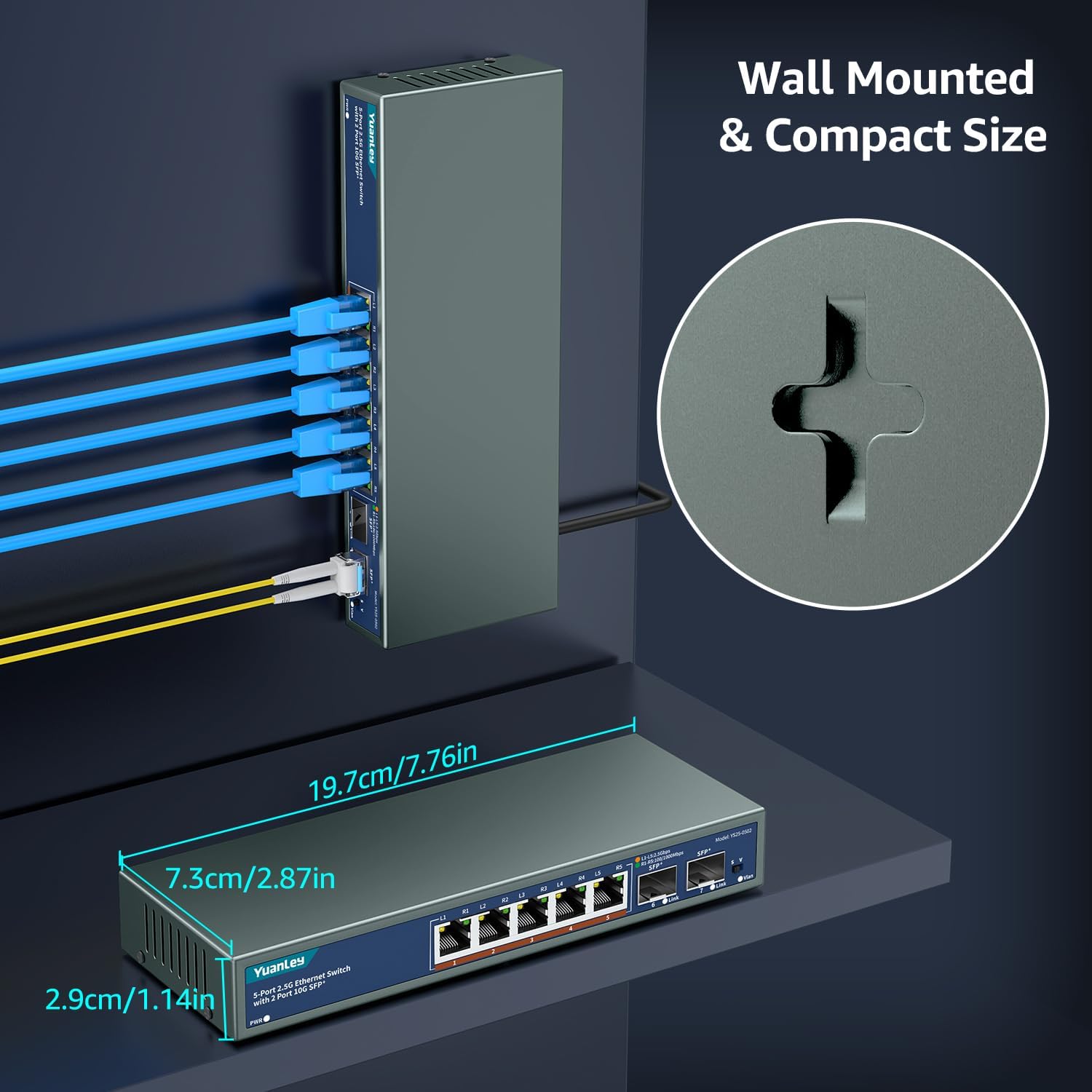
Figure 2: Wall Mounting Option
For wall mounting, use appropriate screws (not included) with the keyhole slots on the bottom of the switch. Ensure the mounting surface is sturdy enough to support the device.
3.2 Connecting the Switch (Plug and Play)
The YuanLey 2.5G Unmanaged Ethernet Switch is designed for simple plug-and-play operation. No software configuration is required.
- Power Connection: Connect the included 12V 1.0A power adapter to the DC Input Port on the switch and then plug it into a standard electrical outlet. The PWR indicator should illuminate green.
- Ethernet Connections (RJ45): Connect your network devices (e.g., computers, NAS, Wi-Fi 6 APs, routers) to the 2.5Gbps RJ45 ports (L1-L5) using standard Ethernet cables (Cat5e or higher recommended for 2.5G speeds). The corresponding Link/Act LED will light up (orange for 2.5G, green for 100/1000Mbps) when a valid connection is established.
- SFP+ Connections (Optional): If using SFP+ modules (not included), insert the compatible 1G/2.5G/10G SFP+ module into one of the SFP+ ports (L6-L7). Then, connect your fiber optic cable or DAC cable to the SFP+ module. The SFP+ Link/Act LED will illuminate when a valid connection is established.

Figure 3: Typical Plug and Play Setup
Your network devices should now be able to communicate through the switch. Verify network connectivity on your connected devices.
4. Operating Instructions
As an unmanaged switch, the YuanLey 7 Port 2.5G Ethernet Switch operates automatically once connected. There are no software configurations or settings to adjust.
- Automatic Negotiation: The RJ45 ports automatically detect the speed (10/100/1000/2500Mbps) and duplex mode of connected devices.
- Auto MDI/MDIX: The ports automatically adjust for straight-through or crossover Ethernet cables, eliminating the need for specific cable types.
- Flow Control: Supports IEEE 802.3x flow control for reliable data transmission.
- LED Indicators: Monitor the status of your network connections using the PWR and Link/Act LEDs as described in Section 2.3.

Figure 4: High Performance Network Setup with 2.5G Devices
5. Maintenance
The YuanLey 2.5G Unmanaged Ethernet Switch is designed for minimal maintenance. Follow these guidelines to ensure its longevity and optimal performance:
- Cleaning: Use a soft, dry cloth to clean the exterior of the switch. Do not use liquid or aerosol cleaners.
- Ventilation: Ensure that the ventilation holes on the sides of the switch are not blocked to prevent overheating.
- Power Cycle: If the switch experiences issues, try disconnecting the power adapter for 10 seconds and then reconnecting it.
- Cable Management: Keep network cables organized and free from kinks or excessive bending to prevent signal degradation.
- Environmental Conditions: Operate the switch within the specified temperature and humidity ranges (-10°C to 50°C).
6. Troubleshooting
If you encounter problems with your switch, refer to the following troubleshooting tips:
| Problem | Possible Cause | Solution |
|---|---|---|
| No Power (PWR LED off) | Power adapter not connected or faulty; power outlet not working. | Ensure power adapter is securely connected to the switch and a working power outlet. Test the outlet with another device. Try a different power adapter if available. |
| No Link Light on Port | Cable not connected properly; faulty cable; connected device is off or faulty; incorrect SFP+ module. | Check cable connections at both ends. Try a different Ethernet cable. Ensure the connected device is powered on and functioning. For SFP+ ports, verify the module is correctly inserted and compatible. |
| Slow Network Speeds | Cable quality; connected device speed limitation; network congestion. | Use Cat6 or higher Ethernet cables for 2.5G connections. Ensure your connected devices (NICs, routers) support 2.5G or 10G speeds. Check for other network activity that might be consuming bandwidth. |
| Intermittent Connection | Loose cable connection; faulty cable; power fluctuations. | Secure all cable connections. Replace suspect cables. Ensure a stable power supply. Power cycle the switch. |
| Switch feels warm | Normal operation for fanless design; insufficient ventilation. | The metal casing acts as a heatsink, so it is normal for the switch to feel warm. Ensure adequate ventilation around the device. If it feels excessively hot to the touch, ensure it's not in an enclosed space. |
If the problem persists after trying these solutions, please contact YuanLey customer support.
7. Specifications
| Feature | Description |
|---|---|
| Model Number | YS25-0502 (5x2.5G +2x10G SFP+(Unmanaged)) |
| Brand | YuanLey |
| Number of Ports | 7 (5 x 2.5G Base-T RJ45, 2 x 10G SFP+) |
| RJ45 Port Speed | 10/100/1000/2500Mbps (Auto-negotiation) |
| SFP+ Port Speed | 1G/2.5G/10G (Compatible with appropriate modules) |
| Switching Capacity | 65 Gbps |
| MAC Address Table | 16K |
| Power Input | DC 12V 1.0A |
| Power Consumption | < 2W (Standby) |
| Operating Temperature | -10°C to 50°C (14°F to 122°F) |
| Storage Temperature | -40°C to 70°C (-40°F to 158°F) |
| Humidity | 10% to 90% non-condensing |
| Dimensions (L x W x H) | Approx. 19.7 x 7.3 x 2.9 cm (7.76 x 2.87 x 1.14 inches) |
| Weight | 0.6 kg (1.32 lbs) |
| Housing | Metal, Fanless |
| Lightning Protection | 6KV |
| Standards | IEEE 802.3, IEEE 802.3u, IEEE 802.3ab, IEEE 802.3bz, IEEE 802.3ae, IEEE 802.3x |
8. Warranty and Support
8.1 Warranty Information
This YuanLey product comes with a 1-year warranty from the date of purchase. The warranty covers defects in materials and workmanship under normal use. It does not cover damage caused by misuse, accidents, unauthorized modifications, or improper installation.
Please retain your proof of purchase for warranty claims.
8.2 Customer Support
For technical assistance, troubleshooting, or warranty inquiries, please contact YuanLey customer support:
- Email: support@yuanley.com
- Website: Visit the official YuanLey website for FAQs and additional resources.
When contacting support, please provide your product model number (YS25-0502) and a detailed description of the issue.


