
Iceman RJ56-CU-100
Iceman Commercial Ice Maker Machine User Manual
Model: RJ56-CU-100
1. Product Overview
The Iceman Commercial Ice Maker Machine is designed to provide a consistent supply of ice for commercial and home use. It features a high daily ice production capacity and a substantial storage bin, making it suitable for restaurants, bars, offices, and large households. The unit is equipped with an intuitive control panel and a self-cleaning function for ease of use and maintenance.
Key Features:
- Produces up to 100 lbs of ice daily.
- 30 lbs ice storage bin capacity.
- Three selectable ice cube sizes.
- Intuitive control panel with LED alerts.
- Self-cleaning function.
- Durable stainless-steel finish.
- Includes ice scoop with interior mount.

2. Safety Instructions
Please read all safety instructions carefully before operating the ice maker. Failure to follow these instructions may result in electric shock, fire, or property damage.
- Electrical Safety: Ensure the unit is connected to a grounded 120V/270W power outlet. Do not use extension cords.
- Water Supply: A dedicated cold water supply line is required. Ensure all water connections are secure to prevent leaks.
- Drainage: The unit requires a gravity (floor) drain. Ensure the drain hose is properly connected and positioned to allow for continuous drainage.
- Installation: Professional installation is required for this appliance to ensure proper water and drain connections and electrical safety.
- Ventilation: Ensure adequate clearance around the unit for proper ventilation to prevent overheating.
- Cleaning: Always unplug the unit before cleaning or performing any maintenance.
- Children and Pets: Keep children and pets away from the appliance during operation and maintenance.
3. What's in the Box
Upon unpacking, please verify that all components listed below are present and undamaged:
- Iceman Commercial Ice Maker Machine
- User Guide (this document)
- Ice Scoop with Mount
- Drain Hose
4. Setup
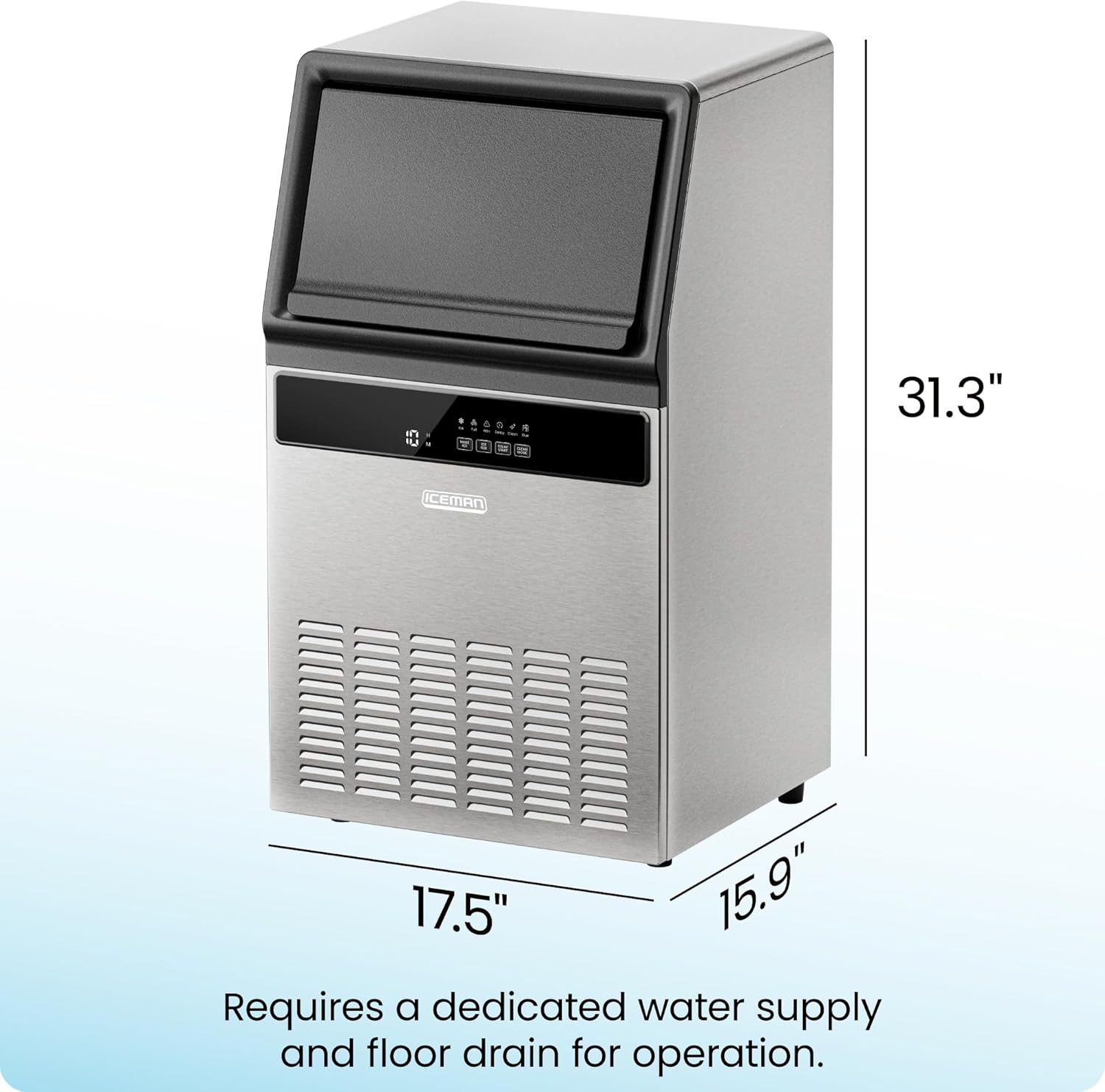
The Iceman Commercial Ice Maker Machine is designed for freestanding or undercounter installation. Due to the water and drain requirements, professional installation is recommended.
Installation Requirements:
- Location: Choose a stable, level surface capable of supporting the unit's weight. Ensure the location allows for proper ventilation and access to power, water, and drain connections.
- Water Supply: A dedicated cold water supply line with a shut-off valve must be available within close proximity to the installation site.
- Drainage: A gravity (floor) drain is essential for continuous operation. The included drain hose connects the ice maker to this drain.
- Electrical: A grounded 120V/270W electrical outlet is required.
5. Operating Instructions
Once properly installed and connected, the Iceman Commercial Ice Maker is ready for operation.
Ice Production:
- The machine can produce up to 100 pounds of ice per day.
- The internal storage bin can hold up to 30 pounds of ice.
- Ice is produced approximately every 10-15 minutes.

Control Panel Functions:
The control panel features an LED display and several buttons for easy operation.

- MAKE ICE: Starts or stops the ice-making cycle.
- ICE SIZE: Allows selection from three different ice cube sizes (small, medium, large).
- DELAY START: Initiates a timer before the ice-making process begins.
- CLEAN MODE: Activates the self-cleaning function.
LED Indicators: The control panel includes LED alerts for various statuses:
- Ice: Indicates ice production is active.
- Full: Alerts when the ice storage bin is full.
- Attn: General attention/warning indicator.
- Delay: Indicates Delay Start mode is active.
- Clean: Indicates the unit is in cleaning mode.
- Due: Alerts when cleaning is due.
Ice Size Selection:
Press the "ICE SIZE" button to cycle through the available ice cube sizes. The selected size will be indicated on the display.

6. Maintenance
Regular maintenance ensures optimal performance and longevity of your ice maker.
Self-Cleaning Function:
- The unit features a one-touch self-cleaning function. Press the "CLEAN MODE" button to initiate the cleaning cycle.
- The machine will provide automatic notifications when cleaning is due, indicated by the "Due" LED alert.
- Refer to the detailed cleaning instructions in the full PDF User Guide for specific steps and recommended cleaning solutions.
General Cleaning:
- Regularly wipe down the exterior stainless-steel finish with a soft, damp cloth.
- Clean the ice storage bin periodically to ensure hygiene.
7. Troubleshooting
If you encounter issues with your Iceman Commercial Ice Maker, refer to the following basic troubleshooting steps. For more complex problems, consult the full PDF User Guide or contact customer support.
- No Ice Production: Check if the unit is plugged in and powered on. Ensure the water supply is connected and the water valve is open. Verify that the ice bin is not full.
- Low Ice Production: Ensure proper ventilation around the unit. Check that the ambient temperature is within the recommended operating range.
- Water Leakage: Inspect all water connections (inlet and drain hose) for proper sealing. Ensure the drain hose is not kinked or blocked.
- Error Codes/LED Alerts: Refer to the "Control Panel Functions" section for common LED alerts. For specific error codes, consult the detailed troubleshooting section in the PDF User Guide.
8. Specifications
| Attribute | Value |
|---|---|
| Brand | Iceman |
| Model Name | Commercial Ice Maker |
| Model Number | RJ56-CU-100 |
| Product Dimensions (D x W x H) | 15.9"D x 17.5"W x 31.29"H |
| Daily Ice Production | 100 lbs |
| Ice Storage Capacity | 30 lbs |
| Wattage | 270 watts |
| Voltage | 120V |
| Refrigerant | R290a |
| Material | Stainless Steel |
| Installation Type | Freestanding, Undercounter |
| Certifications | ETL Certified, CETL Approved |
| Item Weight | 55.1 pounds |
9. Warranty and Support
Iceman provides a 1-year assurance for this product, covering manufacturing defects and malfunctions under normal use.
Customer Support:
For technical assistance, warranty claims, or further inquiries, please refer to the official Iceman website or contact their customer service department.
A comprehensive User Guide in PDF format is available for download, providing detailed instructions and troubleshooting information:
Related documentsRJ56-CU-100


Ask a question about this manual
Ask about setup, troubleshooting, compatibility, parts, safety, or missing instructions. Manuals+ will review the question and use this page’s manual context to help answer it.