
UJNIKM X6-6068-U-24-240-R
Tuya Smart Lock User Manual
Model: X6-6068-U-24-240-R
Introduction
This manual provides detailed instructions for the installation, operation, and maintenance of your Tuya Smart Lock. Please read this manual carefully before installation and use to ensure proper functionality and security. This smart lock offers multiple convenient unlocking methods and is designed for various door types.

Figure 1: Tuya Smart Lock (Model X6-6068-U-24-240-R)
This image displays the sleek black design of the smart lock, featuring a numeric keypad, a fingerprint sensor integrated into the handle, and a keyhole for mechanical override.
Main Features
The Tuya Smart Lock is equipped with advanced features for enhanced security and convenience:
- 5 Unlock Ways: Fingerprint, Password, IC Card, Mechanical Key, and Mobile APP.
- Durable Construction: Carved alloy material provides robust protection for your home.
- Indoor Double Lock Knob: Adds an extra layer of security from the inside.
- Emergency Power Supply: USB port for emergency charging in case of power loss.
- Low Battery Warning: Notifies you when the battery is low, ensuring timely recharging. A full charge lasts approximately 3 months.
- English Voice and Menu: User-friendly interface with English voice prompts.
- Unlock Record Query: View unlock history directly from the lock.
- Versatile Compatibility: Suitable for various door types including wooden, stainless steel, bronze, double doors, and old-fashioned security doors.
- Adjustable Handle Direction: Compatible with both left and right-opening doors.
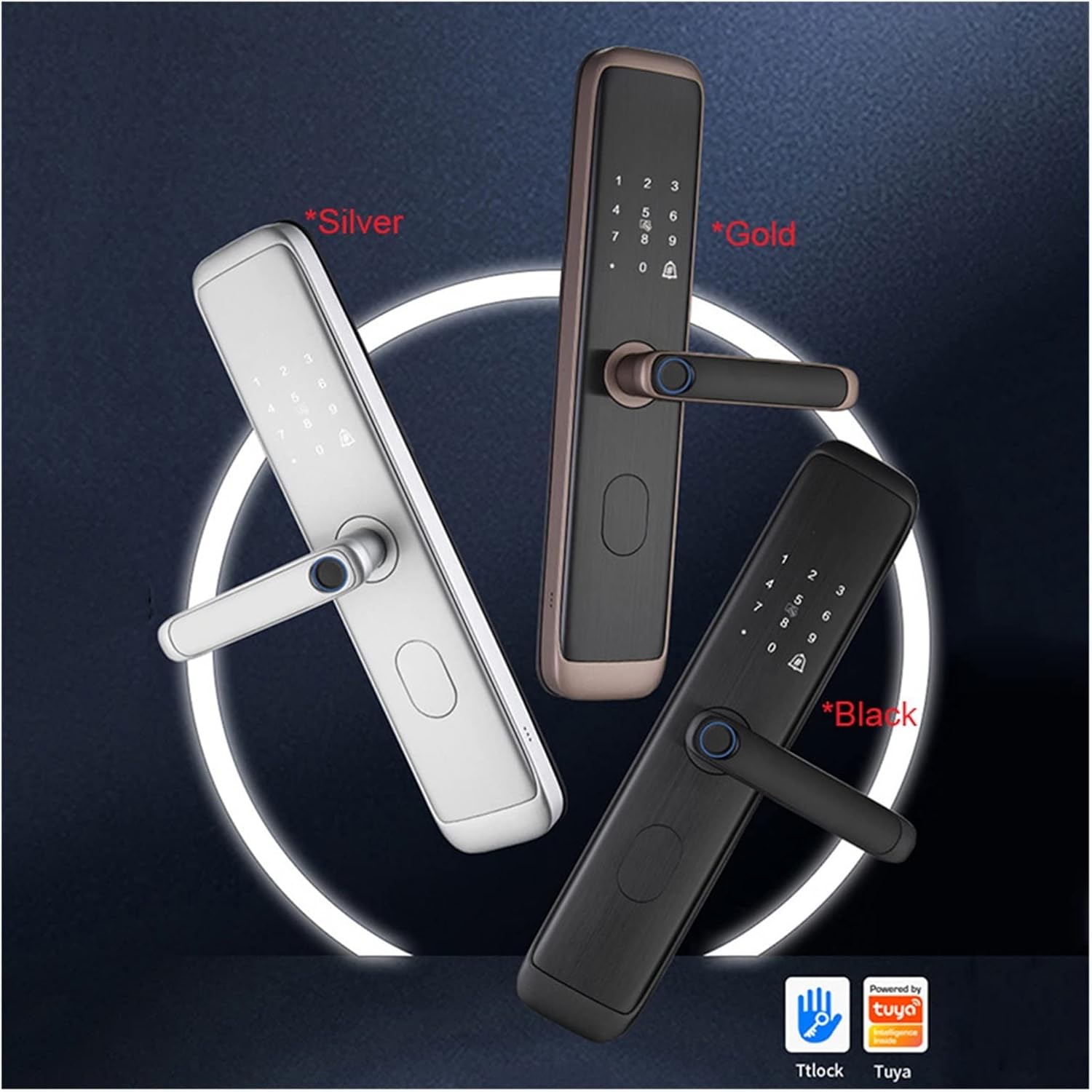
Figure 2: Available Color Options
This image showcases the Tuya Smart Lock in three distinct finishes: silver, gold, and black, highlighting the aesthetic versatility of the product.
Setup and Installation
Before beginning installation, ensure you have all components and tools. The lock is suitable for door thicknesses between 40-90 centimeters.
Package Contents:
- Tuya Smart Lock Assembly (Front and Rear Panels)
- Mortise Lock Body
- Mounting Screws and Accessories
- IC Cards (x2)
- Mechanical Keys (x2)
- User Manual
Installation Steps (General):
- Prepare the Door: Ensure the door is clean and the existing mortise cutout matches the new lock's dimensions. Refer to the provided template for precise drilling if necessary.
- Install Mortise Lock Body: Insert the mortise into the door edge and secure it with screws.
- Install Front Panel: Connect the data cable from the front panel through the door to the rear panel side. Position the front panel and align it with the mortise.
- Install Rear Panel: Connect the data cable to the rear panel. Secure the rear panel to the front panel using the provided screws, ensuring the handle operates smoothly.
- Install Batteries: Insert the required batteries into the battery compartment on the rear panel.
- Test Functionality: After installation, test all unlocking methods (mechanical key, fingerprint, password, IC card, APP) to ensure proper operation.

Figure 3: Installed Lock with Safety Features
This image illustrates the smart lock installed on a door, highlighting its design for preventing accidental unlocking by pets or small children, requiring a specific downward press before rotation.
Operating Instructions
1. Fingerprint Unlock:
Place your registered finger on the fingerprint sensor located on the handle. The lock will unlock if the fingerprint is recognized.
2. Password Unlock:
Enter your registered password on the keypad, followed by the '#' key. The lock will unlock if the password is correct.
3. IC Card Unlock:
Tap your registered IC card against the card reader area on the lock's front panel. The lock will unlock upon successful card recognition.

Figure 4: IC Card Unlocking
This image demonstrates the ease of unlocking the smart lock by simply tapping a registered IC card against the designated sensor area on the keypad.
4. Mechanical Key Unlock:
Insert the mechanical key into the hidden keyhole and turn to unlock. This method is primarily for emergency access.
5. APP Unlock:
Download the Tuya Smart APP and pair it with your lock via Wi-Fi. You can then remotely unlock the door, manage users, and view access logs through the app.

Figure 5: APP and Remote Unlocking
This image illustrates the smart lock's connectivity, showing a smartphone with the Tuya app interface for remote control and a separate remote key fob for convenient access.
Maintenance
- Battery Replacement: Replace batteries when the low battery warning is issued. Use high-quality alkaline batteries for optimal performance.
- Emergency Charging: If batteries are completely depleted, connect a power bank to the USB emergency charge port to temporarily power the lock.
- Cleaning: Wipe the lock surface with a soft, dry cloth. Avoid using abrasive cleaners or solvents that may damage the finish or electronic components.
- Fingerprint Sensor: Keep the fingerprint sensor clean and dry for accurate recognition.
Troubleshooting
- Lock Not Responding: Check battery levels. If low, replace batteries or use emergency USB power.
- Fingerprint Not Recognized: Ensure your finger is clean and dry. Re-register your fingerprint if issues persist.
- Password Not Working: Verify the correct password is being entered. Ensure no keys are stuck.
- IC Card Not Working: Ensure the card is properly registered. Try tapping it firmly on the sensor.
- APP Connectivity Issues: Check your Wi-Fi connection. Ensure the lock is within range of your router. Restart the lock and your router if necessary.
- Handle Not Turning: Check for any obstructions. Ensure the mortise is correctly installed and aligned.
Specifications
| Attribute | Detail |
|---|---|
| Brand | UJNIKM |
| Model Name | UJNIKM (X6-6068-U-24-240-R) |
| Color | X6-6068-U-24-240-R (Black) |
| Unlock Methods | Fingerprint, Password, IC Card, Mechanical Key, APP |
| Material | Aluminum Alloy (Carved alloy material, IMD brushed panel process) |
| Door Thickness Compatibility | 40-90 centimeters |
| Power Supply | 2600mAh (Internal Battery, USB Emergency Charge) |
| Battery Life | Approx. 3 months per full charge |
| Item Weight | 50 Grams (1.76 ounces) |
| Package Dimensions | 1.18 x 0.79 x 0.39 inches |
| Assembly Required | No |

Figure 6: IMD Brushed Panel Detail
This image provides a detailed view of the lock's IMD (In-Mold Decoration) brushed panel process, showcasing the quality and texture of the aluminum alloy material.
Warranty and Support
For warranty information and technical support, please refer to the product packaging or contact UJNIKM customer service directly. Keep your purchase receipt as proof of purchase for any warranty claims.
If you have any questions about the product, please feel free to contact us at any time.
Related Documents - X6-6068-U-24-240-R
 |
MEAN WELL HVG-240 Series: 240W Constant Voltage + Constant Current LED Driver Datasheet for the MEAN WELL HVG-240 series, a 240W LED power supply offering dual mode constant voltage and constant current output. Features wide input range, IP67/IP65 rating, and various dimming options for diverse lighting applications. |
 |
Tuya Smart Fingerprint Lock User Manual - Installation and Operation Guide Comprehensive user manual for the Tuya Smart Fingerprint Lock, covering product list, installation procedures, operational guidelines, Tuya app networking, and home security specifications. |
 |
AriaVetri ADGLG Glass Door Lock User Manual Comprehensive user manual for the AriaVetri ADGLG Glass Door Lock, covering installation, operation, features, technical specifications, and troubleshooting. |
 |
AVENTICS Series G3 Bus Couplers and I/O Modules - Technical Specifications Comprehensive technical specifications, part numbers, and dimensions for AVENTICS Series G3 bus couplers supporting various fieldbus protocols (DeviceNet, MODBUS TCP, PROFIBUS DP, Profinet, POWERLINK, CANopen, EtherNET/IP, EtherCAT) and I/O modules. Includes electrical, environmental, and dimensional data for industrial automation applications. |
 |
General Physiotherapy GK-3 Gen 3.0: Advanced Percussion Massager Features & Specifications Discover the new General Physiotherapy GK-3 Gen 3.0, a streamlined and advanced percussion massager. Learn about its features, specifications, pricing, and how it replaces previous models. Includes FAQs and applicator information. |
 |
Ultraloq U-Bolt Pro WiFi Installation Guide Comprehensive installation guide for the Ultraloq U-Bolt Pro WiFi smart lock, covering preparation, assembly, and setup. Includes detailed steps, component lists, and important notes for a successful installation. |
Ask a question about this manual
Ask about setup, troubleshooting, compatibility, parts, safety, or missing instructions. Manuals+ will review the question and use this page’s manual context to help answer it.