
1. Product Overview
The Focket TEQ 5 Acoustic Guitar Preamplifier Equalizer is designed to enhance and improve the sound quality of your acoustic and electric guitars. This 5-band EQ preamp features an integrated digital tuner and offers versatile tone control, making it suitable for various musical styles and performance settings.

Image: The Focket TEQ 5 Preamplifier Equalizer integrated into an acoustic guitar, demonstrating its use.
Key Features:
- 5-Band Equalizer: Provides precise control over Bass, Mid, Treble, Pres. Brilliance, and Volume.
- Integrated Digital Tuner: For accurate and convenient guitar tuning.
- Enhanced Sound Quality: Optimizes your guitar's output for professional-grade performance.
- Easy Installation: Designed for straightforward setup in both acoustic and electric guitars.
2. Package Contents
Please verify that all items listed below are included in your package:
- 1 x Equalizer Unit
- 1 x Guitar Pickup Stick (Piezo Pickup)
- 1 x Cable
- 1 x Cable Tie
- 1 x Suction Cup
- 4 x Screw
- 1 x Washer
- 2 x Nut Plate

Image: All components included in the Focket TEQ 5 package, laid out for inspection.
3. Specifications
| Feature | Specification |
|---|---|
| Brand | Focket |
| Model Name | Focketot4ad2uw8p |
| Product Dimensions (D x W x H) | 4.33" x 4.33" x 2.36" (110mm x 110mm x 60mm) |
| Equalizer Bands | 5 (Bass, Mid, Treble, Pres. Brilliance, Volume) |
| Control Range (Low, Mid, High, Pressure) | ±12dB |
| Frequency Response | 20Hz to 20KHz |
| Working Power | 1 x 9V 6F22 Battery (not included) |
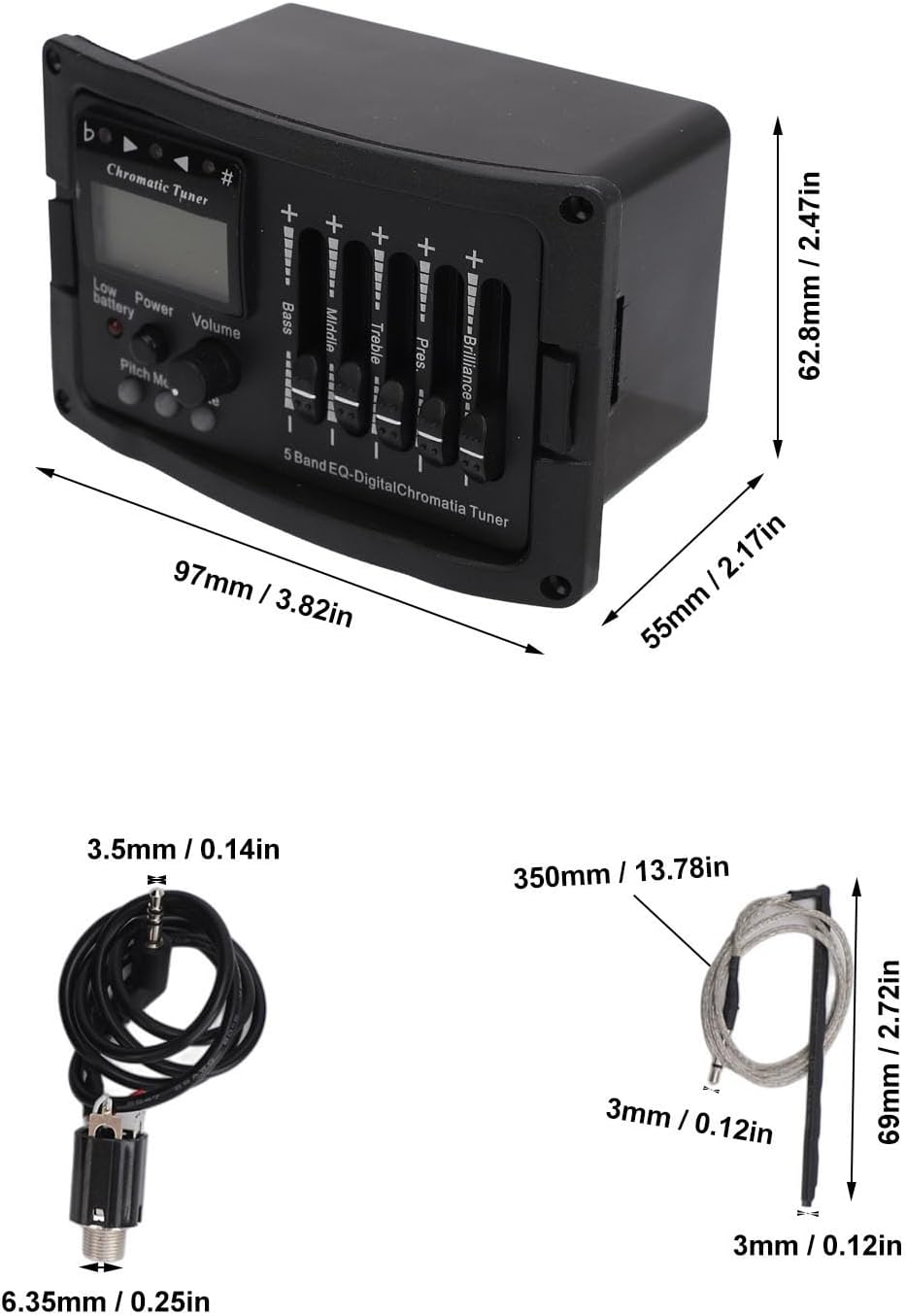
Image: Detailed dimensions of the Focket TEQ 5 Preamplifier Equalizer unit.
4. Setup and Installation
The Focket TEQ 5 preamp is designed for easy installation. Professional installation is recommended if you are unfamiliar with guitar electronics.
Installation Steps:
- Prepare the Guitar: Ensure your guitar is unplugged and the strings are loosened or removed to access the internal cavity.
- Cut the Opening: Carefully cut an opening in the side of your guitar body to accommodate the equalizer unit. Refer to the product dimensions for precise measurements.
- Install the Pickup: Mount the guitar pickup stick (piezo pickup) under the saddle of your guitar bridge. Ensure it is securely placed for optimal sound capture.
- Connect Wiring: Connect the pickup wire to the designated input on the equalizer unit. Use the provided cable ties and adhesive pad to secure internal wiring and prevent rattling.
- Mount the Equalizer: Insert the equalizer unit into the prepared opening. Secure it using the provided mounting screws, washer, and nut plates.
- Install Battery: Open the battery compartment on the equalizer unit and insert one 9V 6F22 battery (not included), observing correct polarity.
- Test Connections: Once installed, re-string your guitar and connect it to an amplifier to test the functionality of the preamp and tuner.

Image: The Focket TEQ 5 Preamplifier Equalizer installed in an acoustic guitar, illustrating the ease of setup.
5. Operating Instructions
Familiarize yourself with the controls to achieve your desired sound.
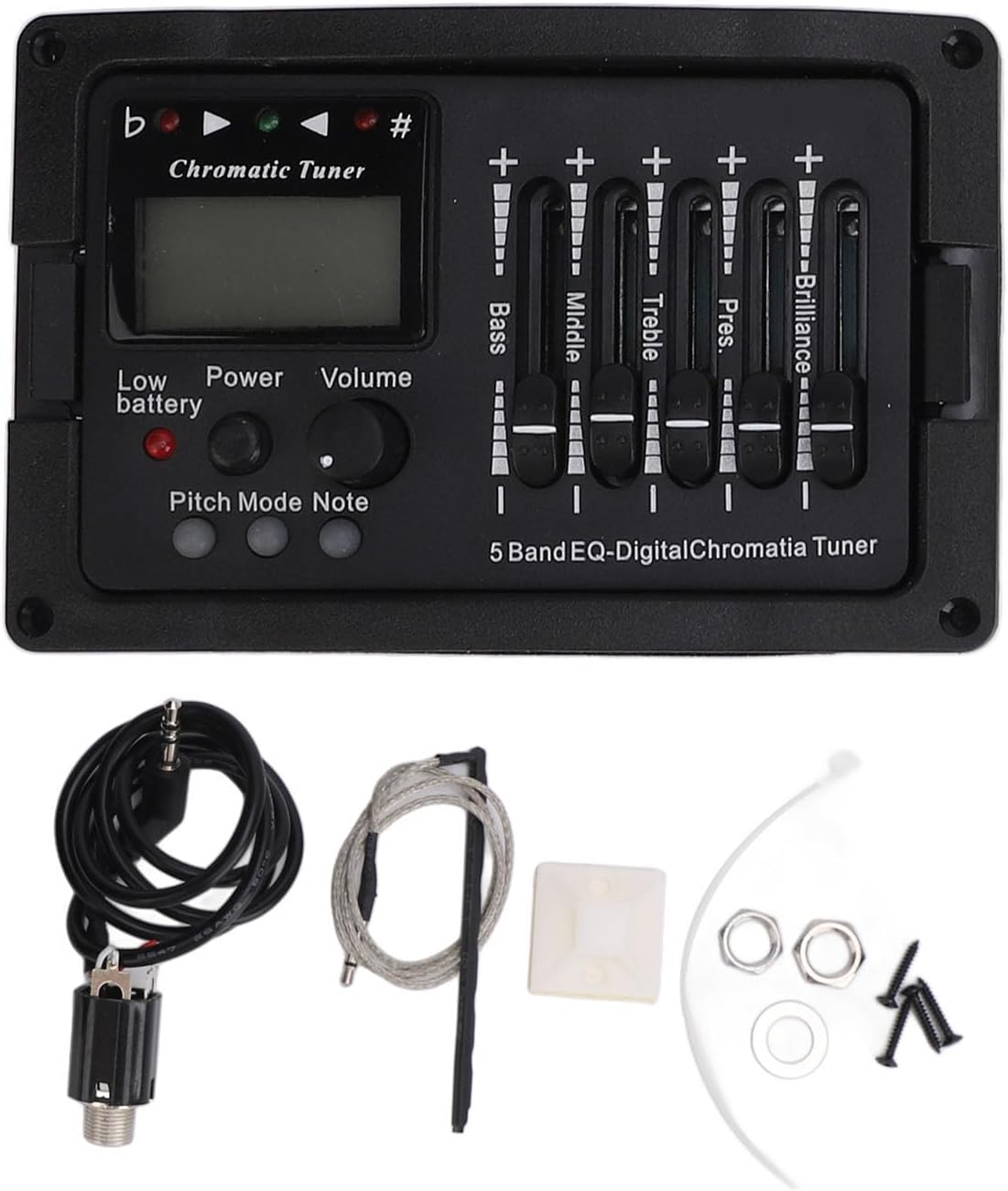
Image: Detailed view of the Focket TEQ 5 Preamplifier Equalizer's control panel.
Controls:
- Volume Knob: Adjusts the overall output level of your guitar. Turn clockwise to increase volume, counter-clockwise to decrease.
- Bass Slider: Controls the low-frequency response. Move up to boost bass, down to cut bass.
- Middle Slider: Controls the mid-range frequency response. Move up to boost mids, down to cut mids.
- Treble Slider: Controls the high-frequency response. Move up to boost treble, down to cut treble.
- Pres. Brilliance Slider: Adjusts the presence and brilliance of the sound, affecting higher frequencies for clarity and sparkle. Move up to increase brilliance, down to decrease.
- Power Button: Turns the equalizer unit on or off.
- Chromatic Tuner: Press the 'Pitch Mode' button to activate the tuner. The LCD display will show the note being played. Adjust your guitar strings until the indicator shows the correct pitch.
- Low Battery Indicator: An LED light will illuminate when the 9V battery needs replacement.
6. Maintenance
Proper maintenance ensures the longevity and optimal performance of your Focket TEQ 5 Preamplifier Equalizer.
Battery Replacement:
The unit operates on one 9V 6F22 battery. When the 'Low Battery' indicator illuminates, replace the battery promptly to maintain sound quality and tuner accuracy.
- Locate the battery compartment on the side of the equalizer unit.
- Carefully open the compartment.
- Remove the old 9V battery.
- Insert a new 9V 6F22 battery, ensuring correct polarity (+ and - terminals).
- Close the battery compartment securely.

Image: Side view of the Focket TEQ 5 Preamplifier Equalizer, illustrating the battery compartment location.
Cleaning:
Wipe the surface of the equalizer unit with a soft, dry cloth. Avoid using liquid cleaners or abrasive materials, as they may damage the finish or electronic components.
7. Troubleshooting
If you encounter issues with your Focket TEQ 5 Preamplifier Equalizer, refer to the following common problems and solutions:
- No Sound Output:
- Check if the unit is powered on.
- Verify the 9V battery is correctly installed and not depleted. Replace if necessary.
- Ensure all cables (pickup to preamp, preamp to amplifier) are securely connected.
- Check the amplifier's volume and settings.
- Distorted Sound:
- Reduce the guitar's volume or the preamp's volume.
- Check for loose wiring connections inside the guitar.
- Ensure the EQ sliders are not set to extreme positions. Try a flat setting first.
- Tuner Not Working Accurately:
- Ensure the tuner mode is activated.
- Replace the 9V battery if the low battery indicator is on.
- Ensure there is no excessive background noise interfering with the pickup.
- Excessive Feedback:
- Reduce the volume.
- Adjust the EQ settings, particularly reducing mid and high frequencies.
- Move further away from the amplifier.
8. Warranty and Support
Warranty Information:
This product comes with a manufacturer warranty for 90 days from the date of purchase. Please retain your proof of purchase for warranty claims. The warranty covers defects in materials and workmanship under normal use.
Customer Support:
For technical assistance, troubleshooting beyond this manual, or warranty inquiries, please contact the seller or manufacturer directly through your purchase platform. Provide your model number (Focketot4ad2uw8p) and a detailed description of the issue for efficient support.