
1. Introduction
Thank you for choosing the VTOMAN FlashSpeed 1000 Portable Power Station. This manual provides essential information for the safe and efficient operation of your device. Please read it thoroughly before use and keep it for future reference. The FlashSpeed 1000 is a versatile power solution designed to meet your energy needs whether you are at home, outdoors, or in an emergency situation.

Figure 1: VTOMAN FlashSpeed 1000 Portable Power Station
2. Safety Instructions
Always prioritize safety when operating the power station. Failure to follow these instructions may result in injury, damage to the device, or property damage.
- Do not expose the unit to water, rain, or moisture. Keep it dry.
- Avoid extreme temperatures. Do not operate or store the unit in direct sunlight or in environments exceeding 131°F (55°C) or below -4°F (-20°C).
- Ensure adequate ventilation during use. Do not block ventilation openings.
- Do not disassemble, repair, or modify the unit. Contact qualified service personnel for assistance.
- Keep out of reach of children and pets.
- Use only approved accessories and charging cables.
- Avoid dropping, puncturing, or subjecting the unit to severe impacts.
3. What's in the Box
- 1x FlashSpeed 1000 Portable Power Station
- 1x AC Charging Cable
- 1x USB-C to USB-C Cable
- 1x USB-A to USB-C Cable
- 1x User Manual
4. Product Features
4.1. Fast Charging Capability
The FlashSpeed 1000 comes with a 700W AC charging cable, allowing it to reach 80% charge in approximately 50 minutes and a full 100% in just 70 minutes. This rapid charging ensures minimal downtime.
4.2. Versatile Output Ports
Equipped with 14 output ports, the power station is ready for any scenario. This includes 3 AC ports, 4 USB-A ports, 2 Type-C ports, 2 DC ports, 1 car port, 1 jumper cable port, and an extended battery port.

Figure 2: Detailed view of the 14 output ports
4.3. UPS (Uninterruptible Power Supply) Function
The built-in UPS function ensures that essential appliances like CPAP machines or aquariums continue to run without interruption during power outages. The switchover time is less than 20ms, providing seamless power transfer.
4.4. 12V Car Jump Starter
The FlashSpeed 1000 can jump-start unresponsive vehicles with 12V car jump starter functionality. It can start all gasoline engines and diesel engines up to 10.0L in just a few seconds, including 12V vehicles, motorcycles, pickup trucks, RVs, and more.
4.5. Durable LiFePO4 Battery
Built with a tough LiFePO4 core and LiFeBMS, the generator is designed for longevity with over 3000 cycles of endurance, ensuring reliable performance for over 10 years.

Figure 3: Internal structure highlighting the durable LiFePO4 battery
4.6. Expandable Capacity
The power station's capacity can be expanded to a whopping 2376Wh with an additional battery pack (sold separately), making it ideal for extended outdoor adventures or as a whole-home backup solution.

Figure 4: FlashSpeed 1000 with optional expansion battery
4.7. V-Beyond Technology
This compact generator boasts an 828Wh capacity and 1000W (2000W peak) output, ready to fuel all your devices. It works for resistive loads such as space heaters, lights, toasters, ovens, and coffee makers.

Figure 5: Powering devices with V-Beyond Technology
5. Setup & First Use
5.1. Initial Charging
Before first use, fully charge your FlashSpeed 1000 using the provided AC charging cable. Plug the cable into a standard wall outlet. The display will indicate charging progress. A full charge takes approximately 70 minutes.
5.2. Connecting Devices
Once charged, press the main power button to turn on the unit. Connect your devices to the appropriate output ports (AC, USB, DC). Ensure the device's power requirements do not exceed the port's or the unit's maximum output.
6. Operating Instructions
6.1. Charging the Power Station
- Wall Outlet: Use the included AC charging cable for the fastest recharge.
- Car Charger: Plug into your vehicle's 12V car lighter. Ideal for charging while traveling.
- Solar Panel: Connect compatible solar panels (sold separately) to the designated input port for eco-friendly charging.

Figure 6: Various charging methods for the power station
6.2. Usage Scenarios
- Outdoor Camping: Power your camping lights, mini-fridges, and other gear.
- Home Backup: Keep essential home appliances running during power outages.
- Vehicle Emergency: Use the jump starter function or power tools for roadside assistance.
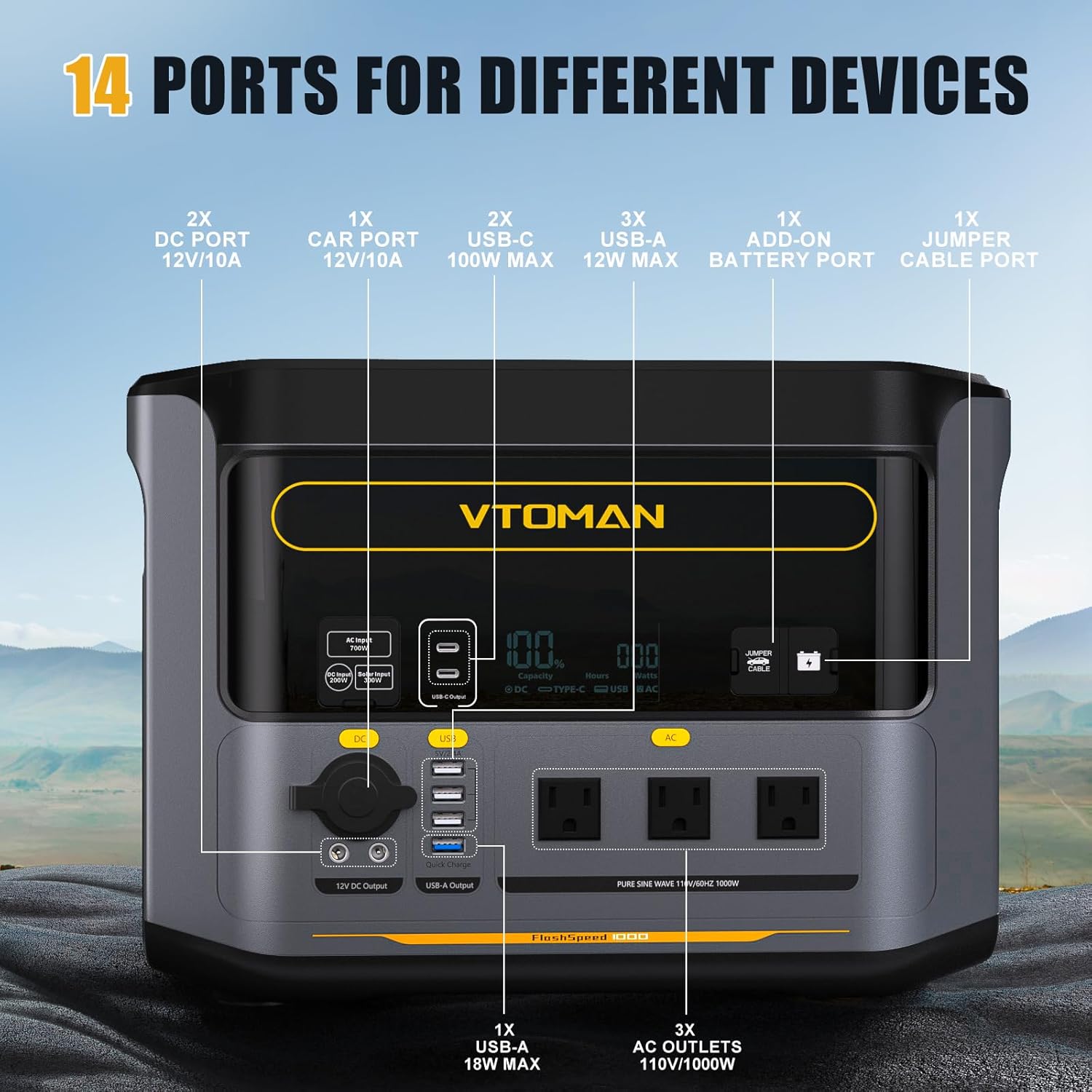
Figure 7: Outdoor usage scenario

Figure 8: Home backup usage scenario
6.3. Pass-Through Charging
The FlashSpeed 1000 supports pass-through charging, meaning you can charge the power station itself while simultaneously powering other devices connected to its output ports.
Video 1: Official product overview of VTOMAN FlashSpeed 1000 Portable Power Station.
7. Maintenance & Care
- Store the power station in a cool, dry place away from direct sunlight.
- For long-term storage, charge the battery to 50-80% every 3-6 months to maintain battery health.
- Clean the exterior with a soft, dry cloth. Do not use abrasive cleaners or solvents.
- Ensure ventilation ports are clear of dust and debris.
8. Troubleshooting
- Unit not turning on: Ensure the battery is charged. Press and hold the power button for a few seconds.
- Devices not charging: Check if the output port is activated. Verify the device's power requirements are within the unit's limits.
- Slow charging: Ensure you are using the correct charging cable and power source. Check for optimal solar panel positioning if using solar charging.
- Overload protection activated: Disconnect some devices. The unit will automatically reset once the load is reduced.
9. Specifications
| Feature | Specification |
|---|---|
| Brand | VTOMAN |
| Model Name | PB-85 |
| Battery Type | LiFePO4 |
| Battery Capacity | 828Wh |
| Wattage | 1000 watts (2000W Peak) |
| AC Input | 700W Max |
| Solar Input | 300W Max |
| DC Output | 12V/10A (Car Port), 12V/10A (2x DC Ports) |
| USB-A Output | 5V/2.4A (3x), Quick Charge 3.0 (1x) |
| USB-C Output | 100W Max (2x) |
| Product Dimensions | 15.6"L x 10.2"W x 11.1"H |
| Item Weight | 32 Pounds |

Figure 9: Product dimensions
10. Warranty & Support
VTOMAN offers a 24-month protection plan and 30-day easy returns. For assistance, please reach out to us at service.us@vtoman.com. Our products are returnable, and we provide ongoing support to ensure your satisfaction.

