
Introduction
Thank you for choosing the HULALA HOME NSCL0522-WALNUT End Table. This manual provides essential information for the safe assembly, operation, maintenance, and troubleshooting of your new end table. Please read these instructions carefully before beginning assembly and retain them for future reference.
Safety Information
- Weight Limits: Ensure not to exceed the weight limit of 100 lbs (45 kg) on the tabletop. Each drawer supports a maximum weight of 21 lbs (9.5 kg). Exceeding these limits may cause damage or instability.
- Stability: Adjust the feet to ensure the table is level and stable on all surfaces to prevent tipping.
- Placement: Place the end table on a flat, stable surface. Avoid placing it in areas with high humidity or direct sunlight to prevent wood damage.
- Electrical Safety: When using the integrated charging station, ensure all connected devices and cables are in good condition. Do not overload the power strip. Keep liquids away from the charging area.
Package Contents
Before assembly, verify that all components are present and undamaged. If any parts are missing or damaged, please contact customer support.
- End Table Components (top, sides, drawers, legs, hardware)
- Assembly Instructions
- Required Tools (e.g., screwdriver)
Setup and Assembly
Assembly is required for this end table. Please follow the included step-by-step instructions carefully. A screwdriver is the recommended tool for assembly.

Image: End Table Dimensions and Weight Capacities.
General Assembly Steps:
- Unpack all components and lay them out on a clean, soft surface to prevent scratches.
- Identify all hardware and components by comparing them with the parts list in the separate assembly guide.
- Attach the legs to the base of the table using the provided hardware. Ensure they are securely tightened.
- Assemble the main frame of the table according to the instructions, connecting the side panels to the top and bottom sections.
- Insert the drawer glides into the designated slots on the table frame.
- Assemble the drawers, attaching the front panels, sides, and bottom. Install the bronze handles.
- Carefully slide the assembled drawers into the table frame.
- Place the tabletop onto the assembled frame and secure it.
- Adjust the feet at the bottom of the legs to ensure the table is level and stable.
Operating Instructions
Charging Station Space:
The HULALA HOME end table features a dedicated space on the tabletop for a charging station. This area is designed to help manage electronic device charging and keep cords organized.
- Placement: Lift the designated section of the tabletop to reveal the charging station compartment. Place your power strip or charging hub within this space.
- Cable Management: Utilize the cable management holes at the back of the end table to route power cords neatly, reducing clutter and preventing tangled wires.
- Usage: Connect your electronic devices (phones, tablets, etc.) to your power strip or charging hub inside the compartment. Close the tabletop section to conceal the charging station when not in use or for a tidier appearance.
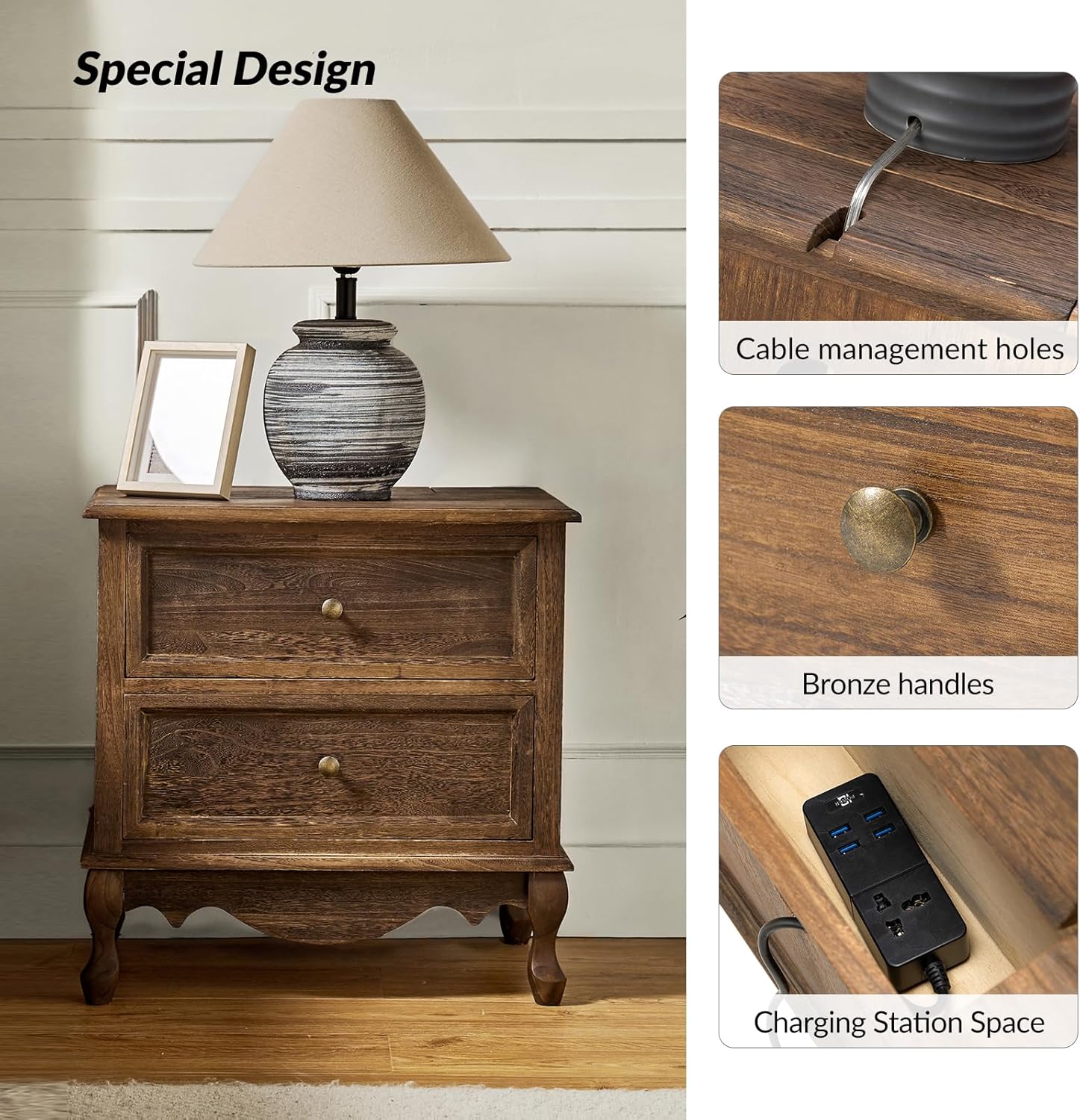
Image: Charging Station and Cable Management Features.
Drawer Operation:
The end table is equipped with two drawers featuring smooth metal glides for easy opening and closing.
- Opening/Closing: Gently pull or push the bronze handles to operate the drawers. Avoid forcing them.
- Storage: Use the drawers to store nighttime necessities, remote controls, or other small items. Do not exceed the 21 lbs (9.5 kg) weight limit per drawer.

Image: Smooth Gliding Drawers and Sturdy Wood Legs.
Maintenance
- Cleaning: Wipe the surface with a dry, soft cloth. Avoid using harsh chemicals, abrasive cleaners, or excessive moisture, which can damage the wood finish.
- Spills: Immediately wipe up any spills to prevent staining or water damage.
- Inspection: Periodically check all screws and connections to ensure they remain tight. Retighten if necessary.
- Environmental Conditions: Maintain a stable room temperature and humidity level. Extreme fluctuations can cause wood to warp or crack.
Troubleshooting
| Problem | Possible Cause | Solution |
|---|---|---|
| Table is wobbly or unstable. | Uneven floor; loose connections. | Adjust the leveling feet on the bottom of the legs. Check and tighten all assembly screws. |
| Drawers do not slide smoothly. | Drawer glides are dirty or misaligned; drawer is overloaded. | Clean drawer glides. Ensure drawers are not overloaded. Check for proper alignment during assembly. |
| Charging station compartment lid does not close properly. | Cables are obstructing the lid; items are too tall inside. | Rearrange cables and ensure no items are protruding above the compartment edge. |
Specifications
| Feature | Detail |
|---|---|
| Model Number | NSCL0522-WALNUT |
| Brand | HULALA HOME |
| Product Dimensions (D x W x H) | 16" x 24" x 24" (40.6 cm x 60.9 cm x 60.9 cm) |
| Item Weight | 19.4 Pounds (8.8 kg) |
| Maximum Tabletop Weight Recommendation | 100 Pounds (45 kg) |
| Maximum Drawer Weight Recommendation | 21 Pounds (9.5 kg) per drawer |
| Frame Material | Paulownia Wood |
| Top Material Type | Engineered Wood |
| Color | Walnut |
| Number of Drawers | 2 |
| Special Features | Charging Station Space |
| Assembly Required | Yes |
| Recommended Tools for Assembly | Screwdriver |
| Product Care Instructions | Wipe with Dry Cloth |
Warranty and Support
For warranty information or customer support, please refer to the documentation included with your purchase or visit the official HULALA HOME website. If you have any questions regarding assembly, missing parts, or product functionality, please contact HULALA HOME customer service directly.
Online Resources: HULALA HOME Store on Amazon


