1. Product Overview
The Generic M72 Bluetooth Earbuds offer a wireless audio experience designed for comfort and convenience. These in-ear earbuds provide clear sound and seamless connectivity, making them suitable for various activities including sleeping, driving, hiking, and cycling. They feature an ergonomic design for extended wear and come with a portable charging case.
Key Features:
- Wireless Convenience: Enjoy seamless Bluetooth connectivity for a hassle-free listening experience.
- Compact Design: Ultra-portable earbuds with a sleek charging case for easy storage and transport.
- Comfortable Fit: Ergonomic in-ear design ensures a secure and comfortable wear for extended periods.
- Noise Isolation: Passive noise reduction helps minimize external sounds for an immersive audio experience.
- Rechargeable Battery: Long-lasting battery life with the included charging case for on-the-go power.

Figure 1: Generic M72 Bluetooth Earbuds and Charging Case. The image displays the earbuds, one inside the open charging case and one outside, highlighting their compact design and the digital battery indicator on the case.
2. What's Included
Your package should contain the following items:
- Generic M72 Headphone body (Left and Right Earbuds)
- Charging Case
Note: A USB charging cable is typically included with the charging case, though not explicitly listed in the product components.
3. Setup Guide
3.1 Initial Charging
- Place both earbuds into the charging case.
- Connect the charging case to a USB power source using a compatible USB Type-C cable.
- The digital display on the charging case will indicate the battery level. Charge until it shows 100%.
- A full charge typically takes approximately 1-2 hours.
3.2 Bluetooth Pairing
- Ensure the earbuds are fully charged.
- Open the charging case. The earbuds will automatically enter pairing mode (indicated by a flashing LED light on the earbuds).
- On your device (smartphone, tablet, laptop), go to the Bluetooth settings.
- Search for available devices and select "M72" or "Generic M72" from the list.
- Once connected, the earbud LED light will stop flashing, and your device will confirm the connection.
- If pairing fails, place the earbuds back in the case, close it, and try again.
3.3 Wearing the Earbuds
- Identify the left (L) and right (R) earbuds.
- Gently insert each earbud into the corresponding ear canal.
- Rotate the earbud slightly until it fits snugly and comfortably. A proper fit is crucial for optimal sound quality and noise isolation.
4. Operating Instructions
The M72 earbuds feature intuitive touch controls. Refer to the diagram below for common operations:
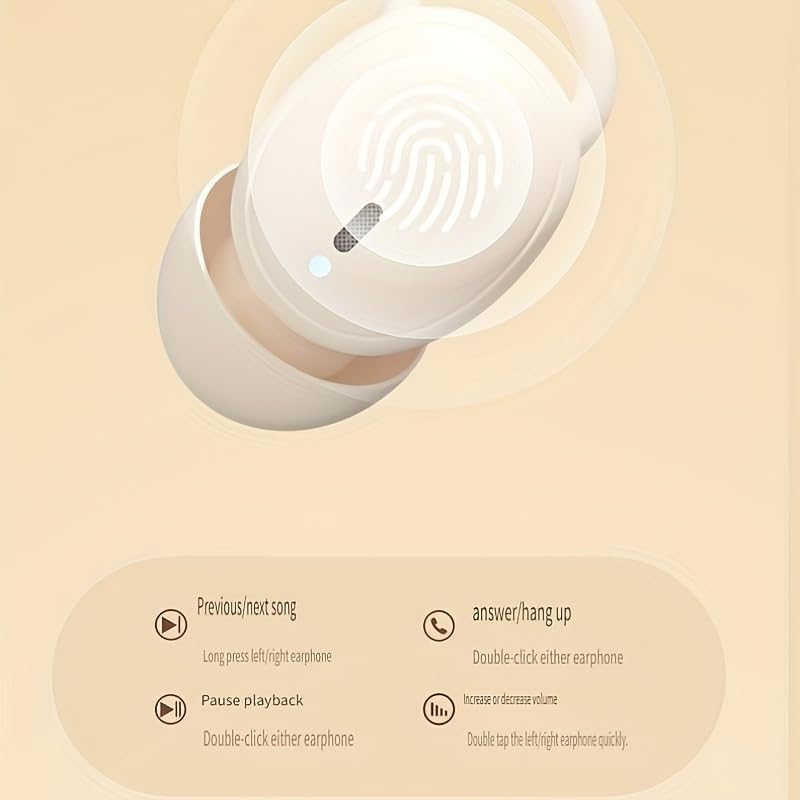
Figure 2: Earbud Touch Control Functions. This diagram illustrates how to control music playback, calls, and volume using touch gestures on the earbuds.
4.1 Music Playback
- Play/Pause: Double-click either earbud.
- Previous Song: Long press the left earbud.
- Next Song: Long press the right earbud.
4.2 Call Management
- Answer/Hang Up Call: Double-click either earbud.
4.3 Volume Control
- Increase/Decrease Volume: Double tap the left/right earphone quickly.
4.4 Power On/Off
- Power On: Open the charging case, and the earbuds will automatically power on.
- Power Off: Place the earbuds back into the charging case and close the lid. They will automatically disconnect and power off.
5. Maintenance and Care
5.1 Cleaning
- Regularly clean the earbuds and charging case with a soft, dry, lint-free cloth.
- Do not use abrasive cleaners, alcohol, or chemical solvents.
- Gently remove any earwax or debris from the earbud tips and speaker mesh using a small, soft brush or cotton swab.
5.2 Storage
- Always store the earbuds in their charging case when not in use to protect them from dust, dirt, and damage.
- Store in a cool, dry place, away from direct sunlight and extreme temperatures.
5.3 Battery Care
- To prolong battery life, avoid fully discharging the earbuds and charging case frequently.
- Charge the device regularly, even if not in frequent use, to prevent deep discharge.
- Do not expose the battery to excessive heat or cold.
6. Troubleshooting
| Problem | Possible Cause | Solution |
|---|---|---|
| Earbuds not pairing with device. | Earbuds not in pairing mode; device Bluetooth off; out of range. | Ensure earbuds are in pairing mode (open case). Turn device Bluetooth off and on. Move device closer to earbuds. Forget "M72" in device Bluetooth settings and re-pair. |
| No sound from earbuds. | Volume too low; earbuds not connected; media paused. | Increase volume on both earbuds and connected device. Check Bluetooth connection. Ensure media is playing. |
| Earbuds not charging. | Charging cable faulty; power source issue; earbuds not seated correctly. | Try a different USB Type-C cable and power adapter. Ensure earbuds are properly seated in the charging case. Clean charging contacts if necessary. |
| Poor sound quality or disconnections. | Interference; low battery; too far from device. | Move away from sources of interference (e.g., Wi-Fi routers). Charge earbuds. Stay within 10 meters of the connected device. |
7. Specifications
The following table outlines the technical specifications for the Generic M72 Bluetooth Earbuds:
| Feature | Detail |
|---|---|
| Model Name | Earphones (M72) |
| Connectivity Technology | Wireless |
| Wireless Communication Technology | Bluetooth |
| Bluetooth Version | 4.0 |
| Noise Control | Sound Isolation |
| Headphones Jack | No Jack |
| Included Components | Headphone body |
| Age Range (Description) | Adult |
| Material | Plastic |
| Compatible Devices | Smartphones, Laptops, Desktops, Tablets, Televisions |
| Cable Feature | Without Cable |
| Water Resistance Level | Not Water Resistant |
| Control Method | Voice (Note: Touch controls are also present) |
| Audio Driver Type | Balanced Armature Driver |
| Earpiece Shape | rounded tips |
| Ear Placement | In Ear |
| Form Factor | In Ear |
| Impedance | 140 Ohm |

Figure 3: Additional Product Parameters. This image provides further details on the product's name, available colors, charging interface (Type-C), battery type, Bluetooth version (V5.46), communication distance (about 10 meters), and compatible playback devices.
Note: The image indicates Bluetooth version V5.46, while the text specification lists 4.0. Please refer to the latest product packaging for the most accurate Bluetooth version.
8. Warranty and Support
Specific warranty details and direct customer support contact information are not provided within this manual. For warranty claims, technical support, or further inquiries, please refer to the product packaging, the retailer's website where the product was purchased, or the manufacturer's official website.
Please retain your proof of purchase for any warranty-related services.


