
1. Introduction
The Sintron ST-005 is a versatile timer control power box designed to manage the operation time of electronic devices. It supports both coin and modern mobile payment methods, offering flexibility and convenience for various commercial applications. This manual provides essential information for the proper setup, operation, and maintenance of your ST-005 unit.
2. Product Features and Applications
The ST-005 is engineered for superior performance and adaptability, making it suitable for a wide range of public and commercial settings.
- Payment Versatility: Supports multiple payment options including Apple Pay, Google Pay, PayPal, Venmo, Cash App, credit cards, and up to six different coin types.
- High Power Capacity: Designed for US/Canada electronic devices, supporting up to 30A at 220V/240V, suitable for heavy-duty appliances.
- Customizable LCD Display: Personalize the on-screen text to display your store name or contact information.
- Over-The-Air (OTA) Updates: Ensures the device remains current with the latest firmware and features.
- Robust Design: Utilizes solid-state relays for enhanced durability and safety.
Common Applications:
- Washing Machines & Dryers
- Massage Chairs
- Shoe Polishers
- Gaming Machines & Arcade Games
- Charging Stations
- RV Parks
- Kiosks
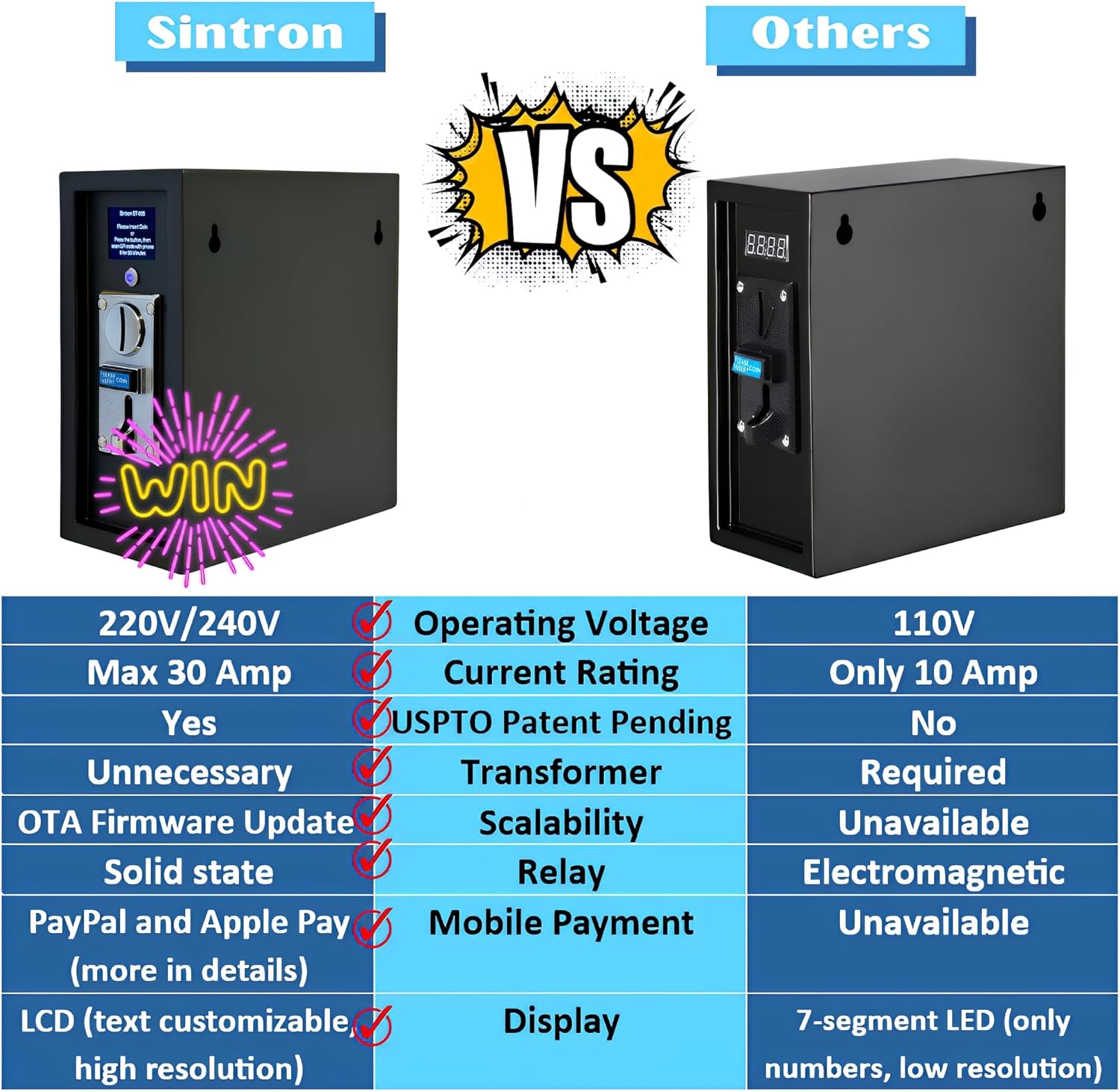
Figure 1: Various usage scenarios for the Sintron ST-005 timer control box.

Figure 2: Feature comparison between Sintron ST-005 and other timer control boxes.

Figure 3: Internal relay comparison: Solid state relay (Sintron) vs. Electromagnetic relay (Others).
3. Setup
3.1 Power Connection
Ensure the ST-005 is connected to a 220V/240V power source with a NEMA 14-30R 4-prong plug. Verify the wiring orientation is standard for proper operation.

Figure 4: Correct 4-prong standard orientation for power connection.
3.2 Device Integration
Connect your electronic device (e.g., washing machine, massage chair) to the ST-005 power box. The ST-005 acts as an intermediary, controlling power supply to the connected device based on payment.

Figure 5: Internal wiring of the ST-005 for device integration.
4. Operating Instructions
4.1 Coin Payment
Insert the required coins into the coin slot. The LCD screen will display the accumulated time or credit. Once sufficient payment is made, the device will activate for the purchased duration.
4.2 Mobile Payment
Press the button on the ST-005 to generate a QR code on the LCD screen. Use your smartphone to scan the QR code. You will be directed to a secure payment portal where you can select your preferred mobile payment method (Apple Pay, Google Pay, PayPal, Venmo, Cash App, or credit card). Upon successful payment, the device will activate.

Figure 6: Mobile payment process using QR code scan. Example Payment Link

Figure 7: Supported payment methods.
4.3 Customizable LCD Display
Access the device settings to personalize the text displayed on the LCD screen. You can enter your store name, contact number, or other relevant information for your customers.

Figure 8: Customizing the LCD display text.
5. Maintenance
Regular maintenance ensures the longevity and optimal performance of your ST-005 unit.
- Cleaning: Keep the exterior and coin slot clean from dust and debris. Use a soft, dry cloth.
- Firmware Updates: The ST-005 supports Over-The-Air (OTA) firmware updates. Periodically check for and apply updates to ensure access to the latest features and security enhancements. Contact customer support for details on update procedures.
- Inspection: Regularly inspect power cables and connections for any signs of wear or damage.
6. Troubleshooting
If you encounter issues with your ST-005, refer to the following common troubleshooting steps:
- Device Not Powering On: Verify the power connection to the ST-005 and the connected appliance. Ensure the power source is active.
- Payment Not Registering: For coin payments, ensure coins are inserted correctly and are of a supported type. For mobile payments, check your internet connection and ensure the QR code is scanned accurately.
- Incorrect Time Allocation: Review your device settings for pricing and time configurations.
- Display Issues: If the LCD display is not functioning correctly, try restarting the unit.
For persistent issues, please contact Sintron customer support for assistance.
7. Specifications
| Feature | Specification |
|---|---|
| Model Number | ST-005 |
| Operating Voltage | 220V/240V |
| Current Rating | Max 30 Amp |
| Payment Methods | Coin (up to 6 types), Mobile (Apple Pay, Google Pay, PayPal, Venmo, Cash App, Credit Cards) |
| Display | LCD (Text Customizable, High Resolution) |
| Firmware Updates | Over-The-Air (OTA) |
| Relay Type | Solid State Relay |
| Dimensions (L x W x H) | 345mm (13.6") x 132mm (5.2") x 280mm (11") |
| Item Weight | 16.89 pounds |

Figure 9: Sintron ST-005 product view.
Figure 10: Sintron ST-005 product dimensions.
8. Warranty and Support
Sintron is committed to customer satisfaction. If you encounter any issues with your ST-005 unit, please contact our customer service team. We are dedicated to providing prompt assistance and resolving any problems you may experience.
For support, please refer to the contact information provided with your product or visit the official Sintron website.
9. Product Videos
Video 1: Demonstration of transforming a household washer into a commercial machine using the Sintron timer box.
Video 2: Overview of the Sintron timer box taking charge of appliances.
Video 3: Demonstration of the mobile payment feature of the Sintron timer box.
Video 4: Explaining how a home washer can become commercial with the Sintron timer box.
Video 5: Introduction to the Sintron timer box, highlighting its mobile and coin payment features.