
1. Introduction
Thank you for choosing the ZIPRO Strike Magnetic Exercise Bike. This manual provides essential information for the safe assembly, operation, and maintenance of your new fitness equipment. Please read this manual thoroughly before using the product and retain it for future reference.
The ZIPRO Strike Gold exercise bike is designed for effective home training, offering a versatile workout experience. It features a magnetic resistance system, 16 training programs, and iConsole+ compatibility, allowing you to track your progress and customize your workouts.

Image 1.1: Front-side view of the ZIPRO Strike Magnetic Exercise Bike, showcasing its black and gold design.
2. Safety Information
Before beginning any exercise program, consult your physician. This is especially important for individuals over the age of 35 or those with pre-existing health conditions.
- Always place the exercise bike on a flat, stable surface.
- Ensure adequate space around the bike for safe operation and movement.
- Keep children and pets away from the equipment during use.
- Inspect the bike for loose parts or damage before each use. Do not use if damaged.
- Wear appropriate athletic footwear and clothing.
- Do not exceed the maximum user weight capacity of 150 kg (330 lbs).
- Adjust the seat and handlebars to a comfortable and safe position before starting your workout.
- Stop exercising immediately if you feel faint, dizzy, or experience pain.
3. Package Contents
Please check that all components are present and undamaged. If any parts are missing or damaged, contact customer support.
- Main Frame Assembly
- Front and Rear Stabilizers
- Seat Post and Seat
- Handlebar Post and Handlebars
- Pedals (Left and Right)
- Console/Display Unit
- Power Adapter (if applicable)
- Assembly Hardware (bolts, washers, nuts)
- Tools (wrenches, Allen keys)
- User Manual
4. Setup and Assembly
Follow these steps to assemble your ZIPRO Strike Exercise Bike. It is recommended to have two people for assembly.
- Attach Stabilizers: Secure the front and rear stabilizers to the main frame using the provided bolts and washers. Ensure they are firmly tightened.
- Install Pedals: Identify the left (L) and right (R) pedals. The left pedal screws counter-clockwise, and the right pedal screws clockwise. Thread them carefully into the crank arms and tighten securely.
- Assemble Seat: Attach the seat to the seat post, then insert the seat post into the main frame. Adjust the height and horizontal position as desired and secure with the adjustment knob.
- Mount Handlebars: Connect the handlebar post to the main frame. Attach the handlebars to the handlebar post. Connect any sensor cables from the handlebars to the console wiring.
- Install Console: Mount the console onto the handlebar post. Connect all necessary cables (pulse sensors, power, resistance control) to the console.
- Final Check: Verify all bolts and connections are tight. Ensure the bike is stable and level.

Image 4.1: Detail of the flywheel and stable base, indicating a secure assembly point.

Image 4.2: Detail of the pedals with adjustable straps for secure foot placement.
5. Operating Instructions
5.1 Console Overview
The console displays key workout metrics and allows you to select training programs. It typically shows Time, Speed, Distance, Calories, Pulse, and Watts.
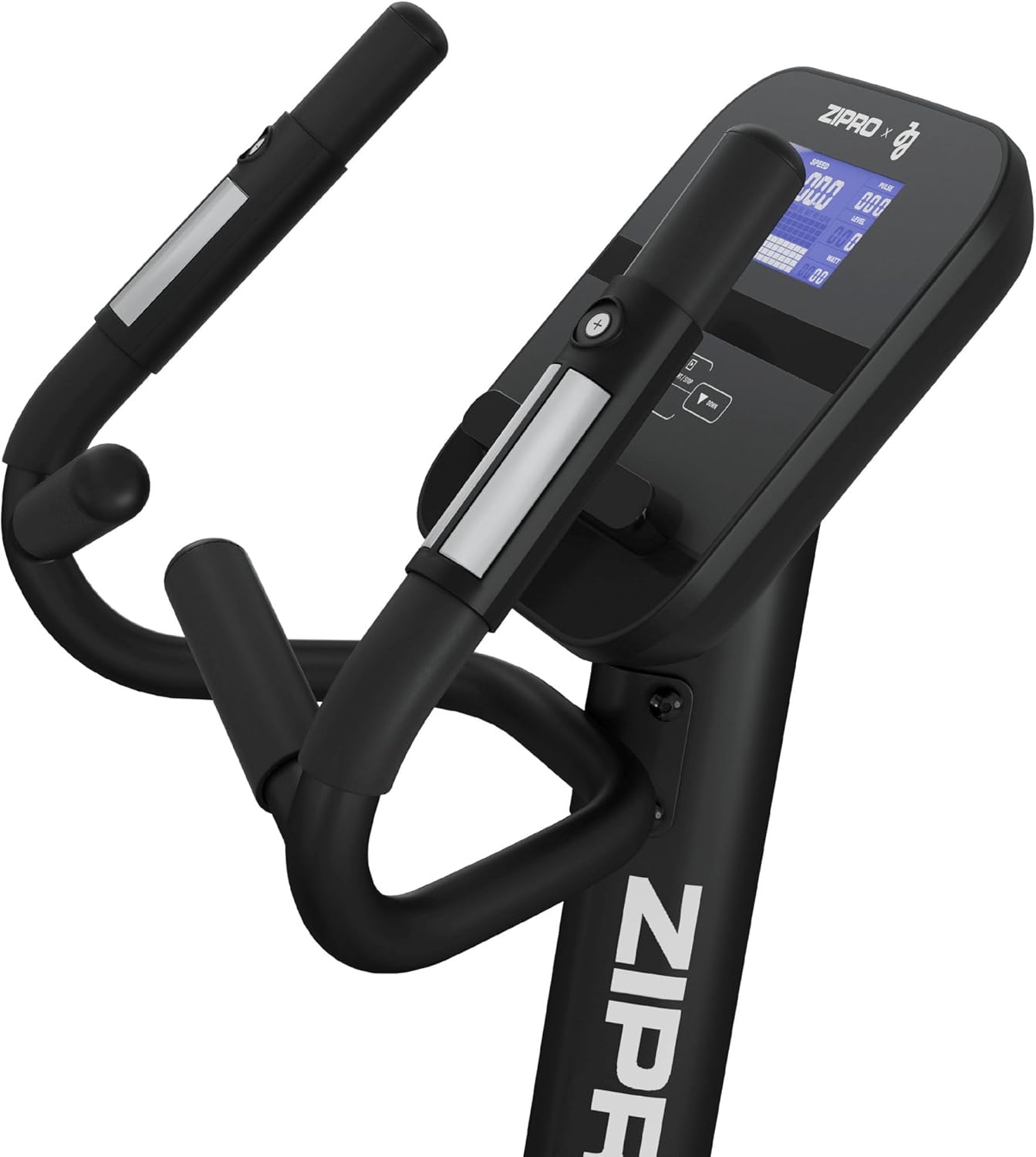
Image 5.1: The console with integrated pulse sensors on the handlebars and control buttons.
5.2 Basic Operation
- Power On: The console will typically power on automatically when you start pedaling or press any button.
- Adjust Resistance: Use the '+' and '-' buttons on the console or handlebars to increase or decrease the magnetic resistance level. The bike offers 16 levels of resistance.
- Select Program: Use the 'MODE' or 'PROGRAM' button to cycle through the available 16 training programs. Refer to the console's specific instructions for detailed program descriptions.
- Monitor Pulse: Grip the pulse sensors on the handlebars to display your heart rate on the console.
- Adjust Seat and Handlebars: Ensure the seat is at a height where your leg is slightly bent at the knee at the bottom of the pedal stroke. Adjust handlebars for comfortable posture.

Image 5.2: The wide and comfortable seat, adjustable for user comfort.
5.3 iConsole+ and App Connectivity
The ZIPRO Strike bike is compatible with iConsole+ and other fitness applications via Bluetooth. This allows for advanced training programs, tracking, and virtual routes.
- Download App: Download the iConsole+ app or other compatible fitness apps from your device's app store.
- Enable Bluetooth: Ensure Bluetooth is enabled on your smartphone or tablet.
- Connect: Open the app and follow the on-screen instructions to connect to your ZIPRO Strike bike.
- Place Device: Use the integrated tablet holder on the console to securely place your device during workouts.

Image 5.3: The console featuring a tablet holder, demonstrating app connectivity.

Image 5.4: Convenient bottle holder located on the main upright frame.
6. Maintenance
Regular maintenance ensures the longevity and safe operation of your exercise bike.
- Cleaning: Wipe down the bike with a damp cloth after each use to remove sweat and dust. Avoid abrasive cleaners.
- Check Connections: Periodically check all bolts, nuts, and screws to ensure they are tight. Tighten if necessary.
- Lubrication: The magnetic resistance system is generally maintenance-free. However, if you notice any squeaking from moving parts (e.g., seat post), apply a small amount of silicone-based lubricant.
- Storage: Store the bike in a dry, cool place away from direct sunlight and extreme temperatures.
7. Troubleshooting
Here are solutions to common issues you might encounter:
| Problem | Possible Cause | Solution |
|---|---|---|
| Console not turning on | Loose power connection, dead batteries (if applicable), console malfunction. | Check power adapter connection. Replace batteries if battery-powered. Contact support if issue persists. |
| No resistance change | Loose cable connection to resistance mechanism, console malfunction. | Check all cables connected to the console and resistance unit. Restart the console. |
| Unusual noise during operation | Loose bolts, friction between parts, internal mechanism issue. | Check and tighten all assembly bolts. Apply lubricant to moving parts if necessary. |
| Inaccurate pulse reading | Hands not firmly on sensors, dry hands, sensor malfunction. | Ensure firm and consistent contact with both pulse sensors. Slightly moisten hands if too dry. |
8. Specifications
- Model: Strike Gold
- Resistance Mechanism: Magnetic
- Drive System: Belt
- Maximum Weight Capacity: 150 Kilograms
- Dimensions (L x W x H): 130 x 63 x 140 cm
- Item Weight: 150 Kilograms (Note: This seems to be an error in the source data, likely referring to max user weight. Actual product weight is typically much lower.)
- Material: Metal, Plastic, Polyethylene
- Power Source: Battery Powered (for console)
- Programs: 16 training programs, iConsole+ compatible
- Special Features: Solid and stable construction, comfortable adjustable saddle, quick-selection buttons on handlebars, USB charging, Bluetooth connectivity.

Image 8.1: Dimensions of the ZIPRO Strike Exercise Bike.
9. Warranty and Support
For warranty information, please refer to the documentation included with your purchase or contact ZIPRO customer service directly. Keep your proof of purchase for any warranty claims.
If you encounter any issues not covered in this manual or require further assistance, please contact ZIPRO customer support through their official website or the retailer where you purchased the product.


