
Introduction
This manual provides detailed instructions for the setup, operation, and maintenance of your PANDAAR S1 Two-Way Wireless Intercom Indoor Unit. Please read this manual carefully before using the product to ensure proper function and longevity.
IMPORTANT NOTICE: This is an INDOOR UNIT ONLY. It will NOT function as a standalone doorbell and does not include an outdoor button unit. If you require a complete doorbell system, please purchase the Indoor + Outdoor Doorbell Kit.
Product Overview
The PANDAAR S1 Indoor Unit serves as both a doorbell receiver and a two-way voice intercom. It is designed for flexible communication within your home, office, or other environments.
Key Features:
- Dual Functionality: Operates as an indoor doorbell receiver and a two-way voice intercom.
- Expandable System: Can be paired with multiple indoor units or an outdoor doorbell unit to create a flexible communication network.
- Long Wireless Range: Offers up to 300 meters (1000 feet) in open areas for extensive coverage.
- Customizable Audio: Features 4 adjustable volume levels and 4 selectable ringtones.
- Weather Resistant: IP44 waterproof rating provides protection against splashes.
- Reliable Communication: Operates without Wi-Fi or an app, using professional wireless radio technology with encrypted signals for stable and private communication.
- Rechargeable Battery: Equipped with a built-in 800mA rechargeable battery and charging base.
Components:
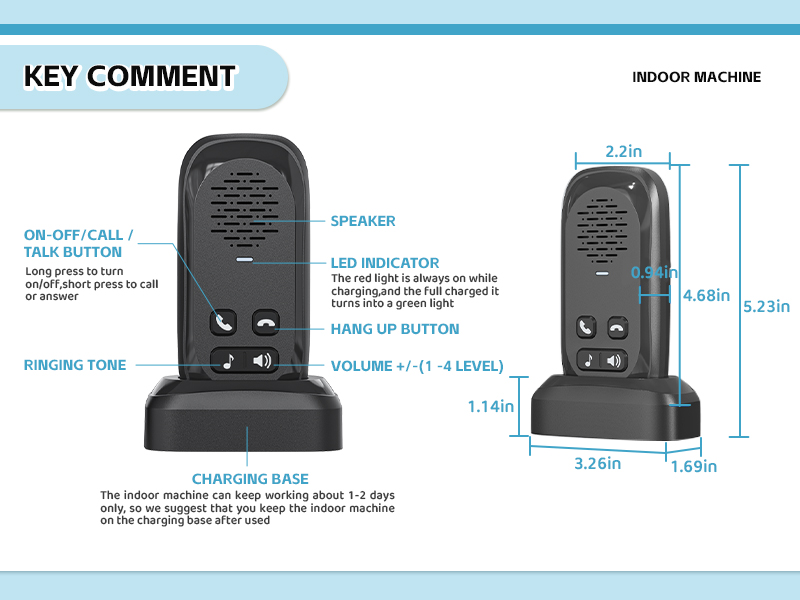
The package includes the PANDAAR S1 Indoor Unit and its charging base.

Setup
Charging the Unit:
Place the indoor unit onto its charging base. The LED indicator will show charging status. For optimal performance and battery life, it is recommended to keep the indoor unit on the charging base when not in active use, as it typically operates for 1-2 days on a full charge.
Pairing Indoor Units (Intercom Function):
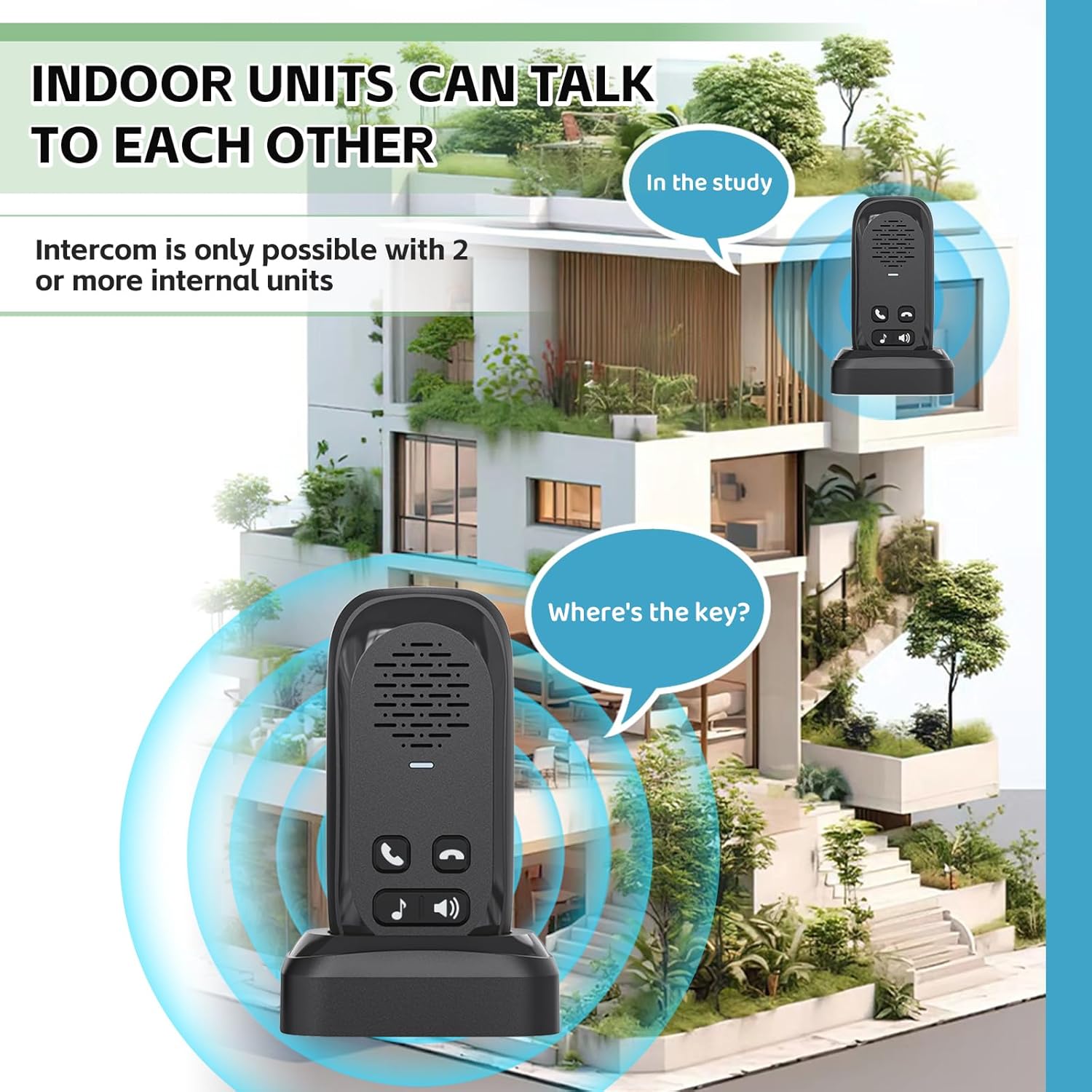
If you have purchased multiple indoor units for room-to-room communication:
- Designate one indoor unit as the primary unit (e.g., Unit D) and another as the secondary unit (e.g., Unit E).
- On the primary indoor unit (Unit D), press the "📞" (Call) button.
- Listen for a voice announcement of "successful" from the unit, indicating that pairing is complete.
Expanding Your System:
The PANDAAR S1 system is expandable. You can add more indoor units or an outdoor doorbell unit to your existing setup. For new units to function correctly, they must be paired with an already established primary outdoor unit (if you have one) or a primary indoor unit.
Important Pairing Reminder:
- When adding new indoor or outdoor units, they must be paired with the designated primary outdoor unit (if applicable).
- Attempting to pair new units with other indoor units or secondary outdoor units may result in a loss of existing pairing configurations.

Operating Instructions
Power On/Off:
Long press the "📞" (Call/Talk) button to power the unit on or off.
Receiving a Call from an Outdoor Unit:
- When a visitor presses the CALL button on the outdoor unit, your indoor unit will ring.
- Press the "📞" (Answer) button on the indoor unit to accept the call.
- Engage in a two-way conversation without needing to continuously hold any buttons.
- To end the conversation, press the "✆" (Hang Up) button.

Indoor Unit to Indoor Unit Communication:
If you have two or more indoor units paired, they can communicate directly with each other, similar to a walkie-talkie system. Press the "📞" (Call) button on your indoor unit to initiate a call to another paired indoor unit.
Adjusting Volume and Ringtones:
Use the volume buttons (labeled with music note and speaker icons) on the indoor unit to cycle through 4 adjustable volume levels and 4 selectable ringtones to suit your preference.

Maintenance
- Charging: Always return the indoor unit to its charging base when not in use to ensure it is ready for operation.
- Cleaning: Wipe the unit with a soft, dry cloth. Avoid using harsh chemicals or abrasive cleaners.
- Water Resistance: The IP44 rating protects against splashes. Do not submerge the unit in water or expose it to heavy rain.
Troubleshooting
| Problem | Possible Cause | Solution |
|---|---|---|
| Unit does not power on. | Low battery or no charge. | Place the unit on its charging base and ensure it is properly connected to a power source. Allow time for charging. |
| Difficulty pairing units. | Incorrect pairing procedure or interference. | Review the "Setup" section and re-attempt the pairing process carefully. Ensure units are within range and away from major sources of interference during pairing. |
| Limited communication range. | Obstacles such as thick walls (e.g., brick) or other structural interference. | While the unit has a long range in open areas, physical obstacles can significantly reduce effective range. Try repositioning units to minimize obstructions. |
| Call connection is unstable or drops. | Units are out of range, low battery, or interference. | Ensure units are within the effective operating range. Recharge units if battery is low. Move units away from potential sources of electronic interference. Re-sync if necessary. |
| Outdoor unit rings, but indoor unit cannot initiate conversation. | Operational design. | The system is designed for the person at the outdoor unit to initiate the conversation by pressing their talk button after ringing the doorbell. The indoor unit can only answer the call. |
Specifications
- Model: S1
- Brand: PANDAAR
- Item Weight: 5.9 ounces
- Package Dimensions: 5.04 x 2.52 x 2.52 inches
- Color: Black (for this variant)
- Wireless Range: Up to 300m / 1000ft (in open areas)
- Waterproof Rating: IP44
- Battery: Built-in 800mA rechargeable battery
- Communication: Two-way, full-duplex
- Volume Levels: 4
- Ringtones: 4
Warranty and Support
For warranty information and customer support, please refer to the documentation included with your purchase or visit the official PANDAAR website. Keep your purchase receipt as proof of purchase for any warranty claims.