
1. Introduction and Overview
The Comgrow 4-in-1 Y-axis Rotary Roller V2 is a versatile accessory designed to expand the capabilities of most laser engraving machines. It enables precise engraving on a variety of curved surfaces, including cylindrical and spherical objects. This manual provides detailed instructions for assembly, operation, and maintenance to ensure optimal performance.
Key features of this rotary roller include:
- Four Engraving Modes: Supports Roller Rotary, Chuck Rotary, Sphere Rotary, and Ring Rotary for diverse applications.
- Enhanced Clamping Options: Includes standard claws, pins, and trapezoidal claws for secure gripping of various object shapes and sizes.
- Broad Compatibility: Designed to work with a wide range of laser engravers, including XTool D1/M1/P2, Creality Falcon Series, LONGER RAY 5/B1, ORTUR OLM2-S2-LF/OLM2 S2-LU2-2/OLM2 S2, ADJA D2/D4, Twotrees TS2, DAVCARE L1, and GOIOK K1.
- Precision Engineering: Constructed from anodized aluminum alloy with an accurate stepper motor and transmission system, ensuring engraving accuracy within ±0.1mm.
- Pre-assembled Design: Offers a plug-and-play experience with minimal setup required.

Image 1.1: Overview of the Comgrow 4-in-1 Y-axis Rotary Roller V2 and its accessories.
2. Product Features
The Comgrow Rotary Roller offers four distinct modes to accommodate various engraving needs:
- Roller Rotary: Ideal for cylindrical objects with consistent diameters, such as tumblers and mugs.
- Chuck Rotary: Utilizes a three-jaw chuck to securely hold irregularly shaped cylindrical objects or those with varying diameters, like wine glasses or small vases.
- Sphere Rotary: Designed for engraving spherical objects such as baseballs or Christmas ornaments.
- Ring Rotary: Specialized for engraving small rings or similar jewelry items.

Image 2.1: Visual representation of the four engraving modes.
The rotary roller is equipped with an industrial-grade precision stepper motor and a robust transmission system, including a transmission shaft and belt. This design minimizes error and ensures high accuracy for detailed engraving tasks.

Image 2.2: Detail of the precision motor and transmission system.
3. Setup Instructions
The Comgrow 4-in-1 Y-axis Rotary Roller V2 comes pre-assembled for ease of use. Follow these steps to integrate it with your laser engraving machine:
- Unpack Components: Carefully remove all items from the packaging. Verify that all parts listed in the packing list are present.
- Placement: Position the rotary roller on a stable, level surface within the working area of your laser engraving machine.
- Connect to Engraver: Disconnect the Y-axis motor cable from your laser engraving machine. Connect the provided connection cable from the rotary roller to the Y-axis port on your engraving machine. The rotary roller will then act as the Y-axis.
- Cable Compatibility: Two different connection cables are provided to ensure compatibility with various stepper motors. If one cable does not fit, try the other.
- Software Configuration: Make necessary adjustments in your laser engraving software (e.g., LightBurn, GRBL) to enable rotary engraving. Refer to your software's documentation for specific settings related to rotary axis calibration.
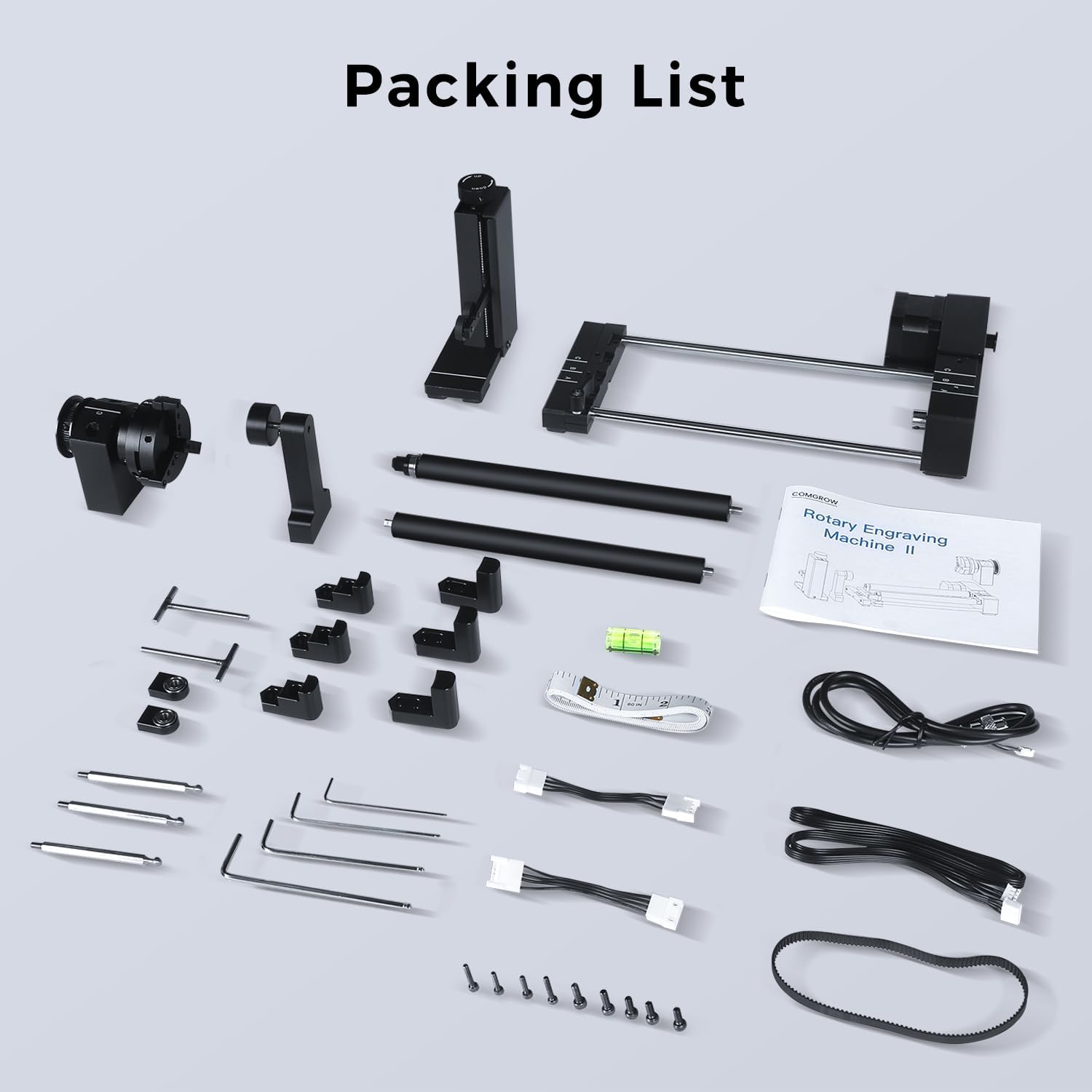
Image 3.1: Contents of the packing list, including the rotary roller, various claws, pins, and connection cables.

Image 3.2: Diagram illustrating the Y-axis motor cable connection.

Image 3.3: Adjustment points for object height and positioning.
4. Operating Instructions
Before operating, ensure your laser engraver's software is correctly configured for rotary engraving. The following sections detail the use of each rotary mode and clamping options.
4.1. Roller Rotary Mode
This mode is suitable for engraving on cylinders with consistent diameters and extra-long lengths, such as baseball bats and ceramic vases. The separate support module included in the kit can be used for irregular cylinders like Yeti cups, wine glasses, and wine bottles.
- Application Ranges:
- A: 3mm-50mm diameter
- B: 45mm-60mm diameter
- C: Over 60mm diameter

Image 4.1: Roller Rotary mode in operation.
4.2. Chuck Rotary Mode (L-shape Claw Clamp)
The L-shape claw clamps are suitable for objects with obvious spherical or cylindrical features, such as insulated tumblers, vases, and short wooden sticks. The clamps can be adjusted for forward or reverse clamping.
- Forward Clamping Range: 55mm-105mm
- Reverse Clamping Range: 4mm-43mm

Image 4.2: L-shape Claw Clamp applications.
4.3. Chuck Rotary Mode (Trapezoidal Claw Clamp)
Trapezoidal claw clamps are designed for clamping cylindrical objects with small diameters, such as bowls or small vases. Reversing the trapezoidal claw clamp allows for clamping wine glasses or large-diameter vases.
- Forward Clamping Range: 30mm-106mm
- Reverse Clamping Range: 4mm-82mm

Image 4.3: Trapezoidal Claw Clamp applications.
4.4. Sphere and Ring Rotary Mode (Extended Pins)
The extended pins are suitable for clamping most spherical objects like baseballs and Christmas balls. They can also be used for engraving the surface and inner wall of small objects such as rings.

Image 4.4: Extended Pins for spherical and ring engraving.
4.5. Special Scenarios: Objects with Handles
For cylindrical objects with handles, such as mugs, the chuck can be installed in reverse to provide clearance for the handle during rotation.

Image 4.5: Reverse chuck installation for objects with handles.
4.6. Recommended Engraving Parameters
The following table provides recommended parameters for various engraving materials. These are starting points and may require adjustment based on your specific laser engraver and desired results.
| Material | Recommended Speed (mm/min) | Maximum Power (%) | Minimum Power (%) |
|---|---|---|---|
| Baseball | 6000 | 60 | 20 |
| Baseball Bat | 5000-6000 | 50-60 | 20 |
| Christmas Ball | 8000 | 50 | 20 |
| Insulated Tumbler | 8000 | 50 | 20 |
| Mug (paint black or spray paint) | 500 | 100 | 20 |
| Glass (paint black or spray paint) | 500 | 100 | 20 |
| Ceramic Vase (paint black or spray paint) | 500 | 100 | 20 |
5. Maintenance
Regular maintenance ensures the longevity and optimal performance of your Comgrow 4-in-1 Y-axis Rotary Roller V2.
- Cleaning: Periodically clean the rollers, chuck, and other components to remove dust, debris, and engraving residue. Use a soft, dry cloth. For stubborn residue, a slightly damp cloth can be used, ensuring all parts are dry before next use.
- Belt Inspection: Check the transmission belt for any signs of wear, cracks, or looseness. A worn belt can affect engraving accuracy. Replace if necessary.
- Lubrication: The moving parts and bearings are generally self-lubricating. Avoid applying excessive lubricants unless specifically instructed, as this can attract dust.
- Storage: When not in use, store the rotary roller in a clean, dry environment to prevent dust accumulation and potential damage.
6. Troubleshooting
If you encounter issues with your Comgrow 4-in-1 Y-axis Rotary Roller V2, refer to the following common problems and solutions:
- Rotary Roller Not Moving:
- Ensure the Y-axis motor cable is securely connected to both the rotary roller and the laser engraver.
- Verify that the correct connection cable is used for your engraver model.
- Check software settings to confirm rotary mode is enabled and configured correctly.
- Inaccurate Engraving / Skipping:
- Ensure the object is securely clamped and not slipping. Adjust clamping force or use appropriate claws/pins.
- Check the transmission belt for proper tension. A loose belt can cause skipping.
- Verify software settings for steps per rotation or circumference are accurate for the object being engraved.
- Ensure the rotary roller is placed on a level surface.
- Object Rolling Off (Roller Mode):
- Ensure the object's diameter is within the supported range for roller mode.
- Adjust the height of the support module to match the object's center of gravity.
- For tapered objects, use the chuck mode or a specialized jig if available.
If these steps do not resolve the issue, please contact Comgrow technical support for further assistance.
7. Specifications
| Feature | Detail |
|---|---|
| Product Dimensions | 10.63 x 4.72 x 6.3 inches |
| Item Model Number | HB-Y-axis Rotary Roller fba |
| Item Weight | 5.21 pounds |
| Manufacturer | Comgrow |
| Material | Anodized Aluminum Alloy |
| Engraving Accuracy | ±0.1mm |
| Rotary Modes | Roller, Chuck, Sphere, Ring |
| Clamping Options | Standard Claws, Pins, Trapezoidal Claws |
8. Warranty and Support
Comgrow is committed to providing high-quality products and excellent customer service. If you encounter any problems or have questions regarding your Comgrow 4-in-1 Y-axis Rotary Roller V2, please do not hesitate to contact our professional technical support team.
For support, please refer to the contact information provided with your product packaging or visit the official Comgrow website.