
1. Welcome
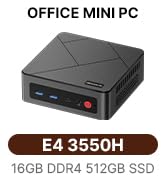
This manual provides essential information for setting up, operating, and maintaining your BOSGAME E4 Mini PC. The E4 Mini PC is a compact desktop computer powered by an AMD Ryzen 5 3550H processor, 16GB DDR4 RAM, and a 1TB PCIe SSD, designed for office, home, and streaming applications. Please read this manual thoroughly before using your device.
2. Setup Guide
2.1 Package Contents
Verify that all items are present in the package:
- BOSGAME E4 Mini PC
- Power Adapter
- HDMI Cable
- VESA Mount with Screws
- User Manual

2.2 Connecting Your Mini PC
Step 1: Connect Peripherals
Connect your keyboard, mouse, and monitor(s) to the appropriate ports on the Mini PC. The E4 supports up to three displays simultaneously.

Step 2: Power Connection
Connect the power adapter cable to the DC-in port on the rear of the Mini PC, then plug the adapter into a power outlet.
Step 3: Network Connection
For a stable wired internet connection, connect an Ethernet cable to one of the two RJ45 LAN ports on the back of the Mini PC. Alternatively, you can use the built-in Wi-Fi 5 for wireless connectivity.

Step 4: Power On
Press the power button located on the front panel of the Mini PC to turn on the device. The power indicator light will illuminate.
3. Operating Your BOSGAME E4
3.1 Display Configuration
The BOSGAME E4 Mini PC supports triple display output, allowing you to connect up to three monitors simultaneously for enhanced productivity or immersive entertainment. Use the HDMI, DisplayPort, and USB-C ports for video output.
3.2 Connectivity
USB Ports
The Mini PC is equipped with multiple USB ports, including USB 3.2 Gen2 for high-speed data transfer and USB 2.0 for standard peripherals. A USB-C port is also available, supporting 5Gbps data transmission and 1080P video output.

Wireless Connectivity
The device features integrated Wi-Fi 5 (802.11ac) and Bluetooth 5.0, providing stable and high-speed wireless connections for networking and peripheral devices like keyboards, headphones, and speakers.
3.3 System Performance
The AMD Ryzen 5 3550H processor with integrated Radeon Vega 8 Graphics delivers reliable power for 4K video streaming and multitasking. The 16GB DDR4 RAM and 1TB PCIe SSD ensure quick application launches and efficient file transfers, making it suitable for office documents, media storage, and everyday computing.
4. Maintenance and Care
To ensure optimal performance and longevity of your BOSGAME E4 Mini PC, follow these guidelines:
- Keep Clean: Maintain a clean, dust-free environment for the Mini PC. Dust can accumulate in vents and affect cooling efficiency.
- Ensure Ventilation: Do not block the air vents on the device. Proper airflow is crucial for efficient heat dissipation.
- Software Updates: Regularly update your operating system, drivers, and applications to ensure system stability and security.
- Proper Shutdown: Always shut down the system properly through the operating system. Avoid forced shutdowns unless absolutely necessary.

5. Troubleshooting Common Issues
If you encounter issues with your BOSGAME E4 Mini PC, refer to the following troubleshooting tips:
5.1 No Power
- Check if the power adapter is securely connected to both the Mini PC's DC-in port and a functional power outlet.
- Ensure the power button has been pressed firmly.
5.2 No Display
- Verify that your monitor is powered on and the correct input source is selected.
- Ensure the video cable (HDMI, DisplayPort, or USB-C) is securely connected to both the Mini PC and the monitor.
- Try using a different video cable or connecting to another monitor to rule out cable or monitor issues.
5.3 Network Connectivity Issues
- Wired Connection: Check if the Ethernet cable is properly connected to both the Mini PC and your router/modem. Verify your router/modem is working correctly.
- Wi-Fi Connection: Ensure Wi-Fi is enabled in your operating system settings and you are connected to the correct network. Restart your router/modem if necessary.
5.4 Slow Performance
- Close any unnecessary applications running in the background.
- Check for and install any pending operating system or driver updates.
- Ensure the Mini PC has adequate ventilation to prevent thermal throttling.
6. Technical Specifications
Detailed specifications for the BOSGAME E4 Mini PC:
| Feature | Specification |
|---|---|
| Processor | AMD Ryzen 5 3550H (4 Cores/8 Threads, up to 3.7GHz) |
| Graphics | AMD Radeon Vega 8 Graphics |
| RAM | 16GB DDR4 SODIMM (2400MHz) |
| Storage | 1TB PCIe 3.0 X4 SSD (M.2 2280 NVMe) |
| Display Output | 1x HDMI 2.0 (4K@60Hz), 1x DisplayPort (4K@60Hz), 1x USB-C (1080P@60Hz) - Triple Display Support |
| Network | Dual RJ45 Gigabit LAN, Wi-Fi 5 (802.11ac), Bluetooth 5.0 |
| USB Ports | 3x USB 3.2 Gen2, 1x USB 2.0, 1x USB-C |
| Operating System | Windows 11 (Compatible with Linux and Ubuntu) |
| Dimensions (LxWxH) | 5 x 5 x 1.8 inches (128 x 127.1 x 42.8 mm) |
| Weight | 2.14 pounds |
7. Warranty and Customer Support
BOSGAME provides reliable after-sales service for your E4 Mini PC to ensure your satisfaction.
- Warranty: Enjoy 1 year of professional factory support from the date of purchase.
- Customer Service: Access 24/7 online customer service for any inquiries or technical assistance.
- Certifications: The BOSGAME E4 Mini PC is FCC, ROHS, and CE certified, ensuring compliance with safety and quality standards.
For further assistance, please contact BOSGAME Official support through your purchase platform or the contact information provided in your product documentation.


