
1. Introduction
This eRapta Magnetic Wireless Backup Camera (Model A1CT501(T)) is an accessory camera intended to expand the capabilities of your existing eRapta ACT501 wireless backup camera system. It is not a standalone product and requires the ACT501 monitor and receiver for operation. This manual will guide you through the setup, operation, and maintenance of this additional camera.
Important Note: This camera is designed to work exclusively with the eRapta ACT501 system. It is not compatible with other systems or for standalone use.
2. Product Overview
2.1. Package Contents
- eRapta Magnetic Wireless Backup Camera (Model A1CT501(T))
Note: The main ACT501 system, including the monitor, is sold separately.
2.2. Key Features
- High Capacity Battery: Built-in 9600mAh rechargeable battery for extended operation without external power.
- Magnetic Base: Strong magnetic base allows for quick and portable attachment to any metal surface.
- Stable Digital Signal: Upgraded signal chip provides stable transmission up to 320ft in open areas and 40ft on vehicles.
- 1080P HD Image: Features a Sunrest sensor for clear 1080P high-definition video.
- Infrared Night Vision: Equipped with 16 infrared LED lights for clear color images in low-light conditions.
- IP69K Waterproof: Constructed with high-quality waterproof materials and a sealed charging port for durability in harsh weather.
- Wide 150° View Angle: Provides a broad field of view to minimize blind spots.
- Adjustable Angle: Features an adjustable screw design for precise camera angle positioning.
2.3. Camera Components
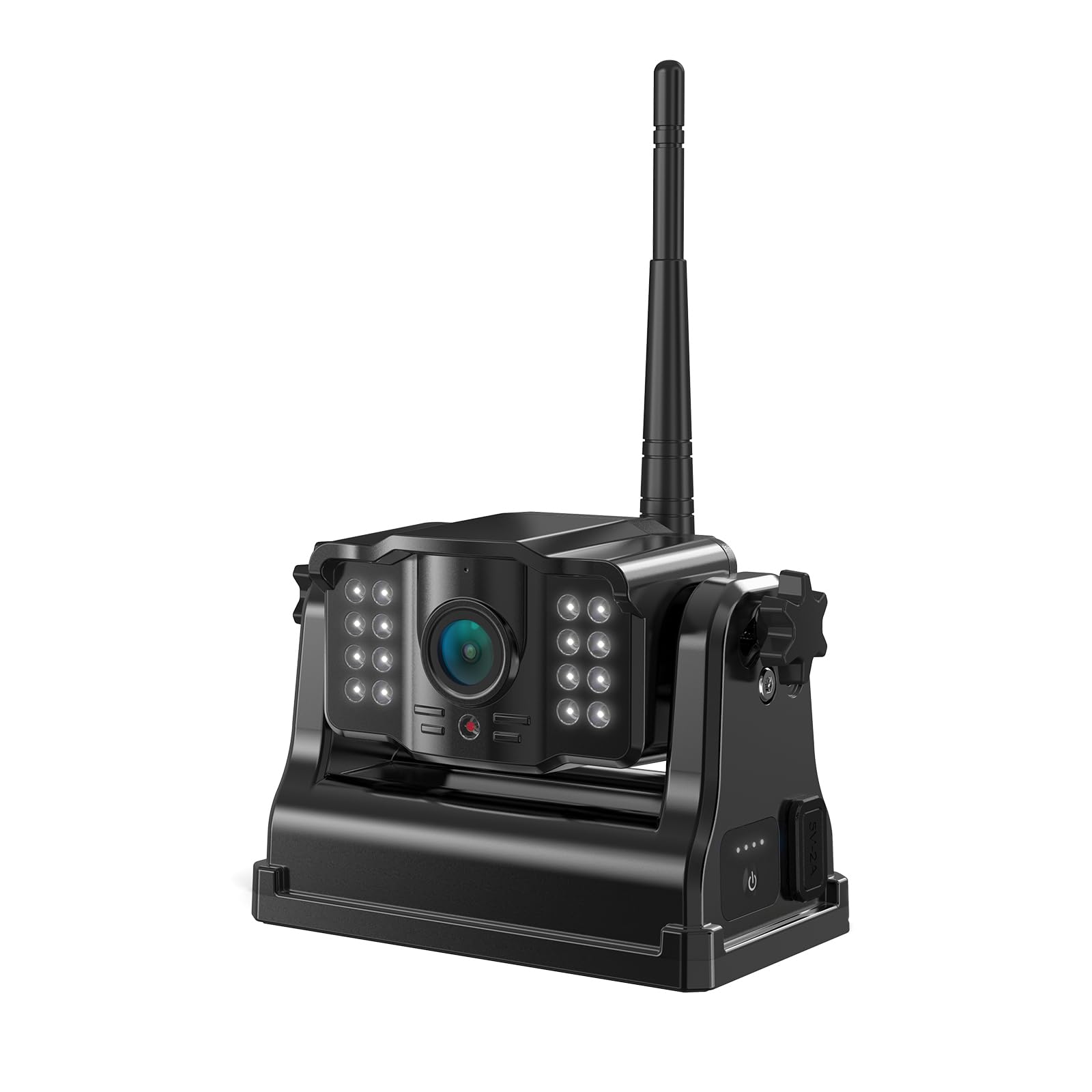
Figure 1: Front view of the eRapta Magnetic Wireless Backup Camera, showing the lens, infrared LEDs, antenna, and magnetic base.
- Camera Lens: Captures video feed.
- Infrared LEDs: Provide illumination for night vision.
- Antenna: For wireless signal transmission to the ACT501 monitor.
- Magnetic Base: Allows for secure attachment to metal surfaces.
- Charging Port (Type-C): For recharging the internal battery.
- Power Indicator Lights: Show battery charge level.
- Power Button: To turn the camera on/off.
3. Setup and Installation
3.1. Charging the Camera
- Locate the Type-C charging port on the camera.
- Connect the camera to a 5V phone charger or a Type-C power cord (not included).
- The power indicator lights will illuminate to show charging status. Ensure the camera is fully charged before first use.
3.2. Mounting the Camera
The camera features a strong magnetic base for easy, wire-free installation on any metal surface of your vehicle (e.g., rear bumper, trailer hitch, side panel). The base is designed with a rubber wrap to prevent scratching vehicle paint.
- Identify a suitable metal surface on your vehicle where the camera can provide the desired view. Ensure the surface is clean and dry.
- Place the magnetic base of the camera firmly onto the chosen metal surface. The strong magnet will secure it in place.
- Adjust the camera's angle using the adjustable screw mechanism to achieve the optimal viewing angle.
- Ensure the camera is securely attached and will not shift during vehicle movement.
Tip: The portable design allows for easy removal and reinstallation on different vehicles or locations as needed.
3.3. Pairing with ACT501 System
This camera is designed to automatically pair with your eRapta ACT501 system. If pairing does not occur automatically, refer to your ACT501 system's instruction manual for specific pairing procedures for additional cameras.
4. Operation
4.1. Powering On/Off
- To turn on the camera, press and hold the power button until the indicator lights illuminate.
- To turn off the camera, press and hold the power button until the indicator lights turn off.
4.2. Viewing the Feed
Once powered on and paired, the camera's video feed will be transmitted wirelessly to your ACT501 monitor. Refer to your ACT501 system's manual for instructions on switching between multiple camera views (if applicable) and utilizing features like split-screen or full-screen display.
- 1080P HD Image: The camera provides a clear 1080P resolution image for detailed viewing.
- Infrared Night Vision: In low-light conditions, the infrared LEDs will automatically activate, providing clear color night vision.
- 150° Wide Angle: The wide-angle lens offers an expansive view, helping to eliminate blind spots when reversing or maneuvering.
5. Maintenance
- Cleaning: Use a soft, damp cloth to clean the camera lens and body. Avoid abrasive cleaners or solvents.
- Waterproof Design: The camera is IP69K waterproof. Ensure the charging port cover is securely closed when not charging to maintain water resistance.
- Temperature Range: The camera is designed to operate in temperatures ranging from -6°F to 151°F (-21°C to 66°C). Avoid prolonged exposure to temperatures outside this range.
- Battery Care: For optimal battery life, avoid fully discharging the battery frequently. Recharge the camera regularly, especially if stored for extended periods.
6. Troubleshooting
| Problem | Possible Cause | Solution |
|---|---|---|
| No image on ACT501 monitor. | Camera is off or battery is low. Camera not paired with ACT501 system. Signal interference. | Ensure camera is charged and powered on. Refer to ACT501 manual for pairing instructions. Reposition camera or monitor to reduce interference. Ensure no large metal objects are blocking the signal path. |
| Image is blurry or distorted. | Camera lens is dirty. Poor signal strength. | Clean the camera lens with a soft cloth. Move camera closer to the ACT501 monitor or adjust antenna position. |
| Camera not charging. | Charging cable or adapter faulty. Charging port obstructed. | Try a different Type-C cable and 5V adapter. Check charging port for debris. |
| Camera falls off metal surface. | Surface is not metal or is uneven. Excessive vibration. | Ensure camera is mounted on a flat, ferrous metal surface. Re-secure the camera or choose a more stable mounting location. |
7. Specifications
| Model Number | A1CT501(T) |
| Brand | eRapta |
| Product Dimensions | 0.7"L x 1.5"W x 0.8"H (1.78 cm L x 3.81 cm W x 2.03 cm H) |
| Item Weight | 1.68 pounds (0.76 kg) |
| Video Capture Resolution | 1080p |
| View Angle | 150 Degrees |
| Waterproof Rating | IP69K |
| Battery Capacity | 9600mAh |
| Operating Voltage | 5 Volts |
| Operating Temperature | -6°F to 151°F (-21°C to 66°C) |
| Connectivity | Wireless |
| Compatible Devices | eRapta ACT501 monitor system |
8. Warranty and Support
For warranty information and customer support, please refer to the documentation included with your original eRapta ACT501 system or visit the official eRapta website. If you encounter any issues not covered in this manual, please contact eRapta customer service for assistance.
Online Support: Visit the eRapta Store on Amazon