
1. Introduction
Thank you for choosing the ISDT BG-8S Smart Digital Battery Tester/Checker. This device is designed to provide accurate and comprehensive information about your battery's status, including voltage, cell balance, and capacity. It supports various battery types and offers additional functions such as USB charging and receiver signal testing. Please read this manual thoroughly before using the device to ensure safe and optimal operation.
2. Safety Information
- Always handle batteries with care. Incorrect handling can lead to fire, explosion, or other hazards.
- Ensure correct polarity when connecting batteries to the tester. Reverse polarity can damage the device and the battery.
- Do not expose the device to water, moisture, or extreme temperatures.
- Keep the device away from children and pets.
- Do not attempt to disassemble or modify the device. This will void the warranty and may cause damage or injury.
- Use the device in a well-ventilated area.
3. Product Overview
3.1 Key Features
- Smart Battery Integration: Works with BattGO technology via XT60i connection to display detailed battery parameters, cycles, and allow quick setting adjustments.
- Multiple Measurement Connections: Supports XT60/XT60i, XH2.54 1-8S balance lead, XH 2.54 3-pin, and JST for voltage measurement.
- Broad Battery Type Support: Compatible with LiHv, LiPo, Lilon, LiFe (1-8S), NiMH/Cd (1-10S), and BEC output measurements.
- Cell Balancing: Features an auto-balancing function with an advanced algorithm to optimize cell performance and extend battery lifespan. Automatically enters power-saving mode after balancing.
- Portable Charging Function: Can act as a power bank for mobile devices, supporting Qualcomm QC 2.0/3.0, BC1.2, and Apple devices, with a maximum output of 12V/2A.
- Receiver Signal Test & Protocol Analysis: Detects BEC output voltage via a standard 3-pin connector and supports multi-protocol analysis (PWM, PPM, S.BUS).
3.2 Device Components
The ISDT BG-8S features a compact design with an intuitive interface.
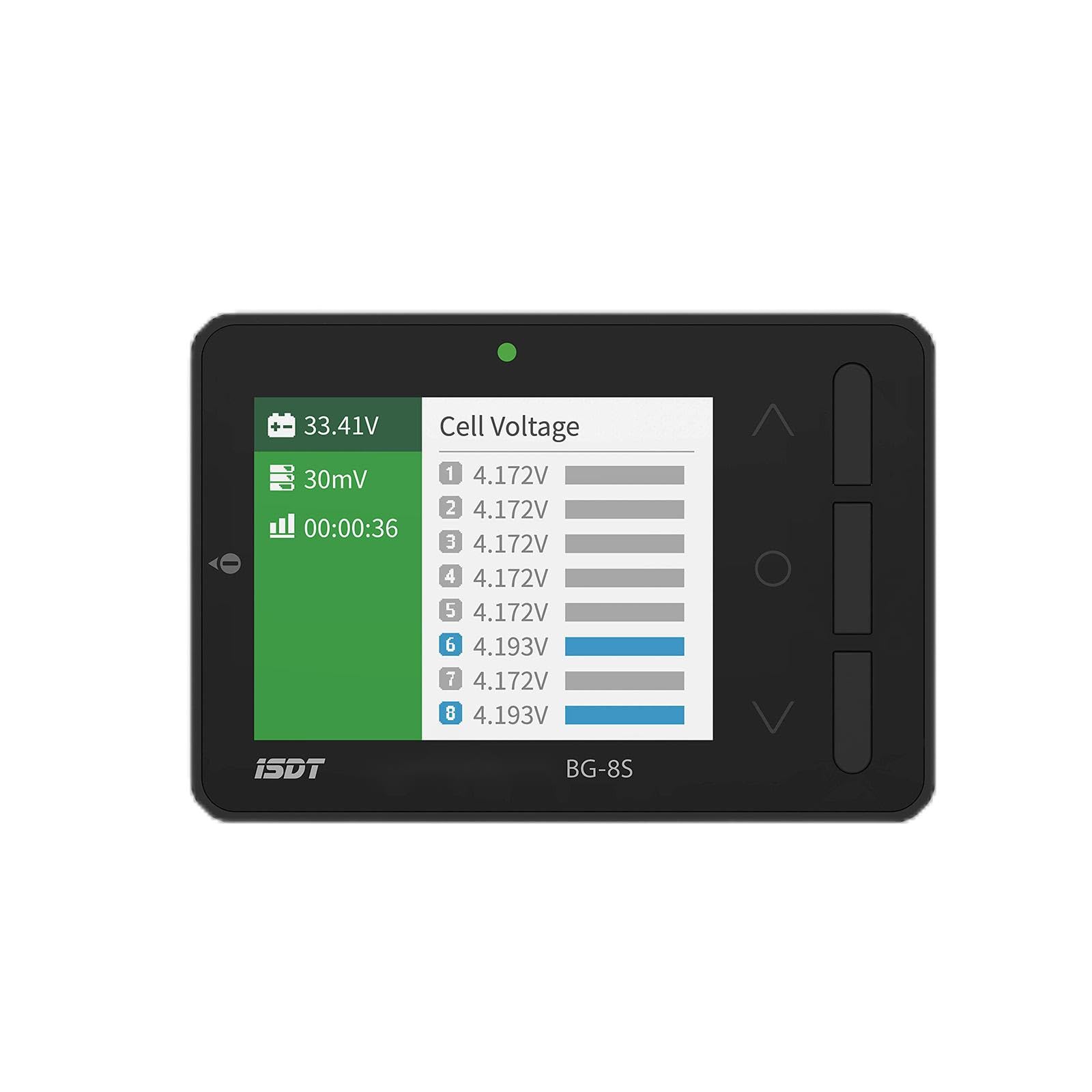
Front view of the ISDT BG-8S Smart Digital Battery Tester, showcasing its color IPS LCD screen and various connection ports.
- 2.4-inch IPS LCD Display: A vibrant 260,000-color screen for clear data visualization.
- XT60/XT60i Port: Main input for battery connection and BattGO functionality.
- Balance Port (1-8S): For connecting battery balance leads.
- USB Port: For firmware updates and USB charging output.
- 3-pin Port: For receiver signal testing and BEC voltage detection.
- Navigation Buttons: For menu navigation and selection.
4. Setup
4.1 Initial Power On
- Connect a compatible battery (e.g., LiPo, LiFe) to the XT60/XT60i port or the balance port.
- The device will power on automatically and display the main interface.
- If using a battery with BattGO technology, connect it via the XT60i port to access advanced battery information.
4.2 Firmware Updates
To ensure optimal performance and access new features, regularly check for firmware updates on the official ISDT website. Connect the device to a computer via the USB port and follow the instructions provided by ISDT for updating the firmware.
5. Operating Instructions
5.1 Battery Voltage Measurement
- Connect the battery to the appropriate port: XT60/XT60i for main voltage, or the balance port for individual cell voltages.
- The display will automatically show the total voltage, individual cell voltages, and other relevant battery parameters.
- Navigate through the display using the navigation buttons to view detailed information.
5.2 Cell Balancing
- Connect your LiPo/LiFe/LiHv battery to the balance port.
- Select the 'Balance' function from the main menu.
- Confirm the balancing process. The device will begin to balance the individual cells to optimize their voltage levels.
- Once balancing is complete, the device will indicate completion and automatically enter power-saving mode.
5.3 USB Charging (Power Bank Function)
- Connect a charged battery to the XT60/XT60i port of the BG-8S.
- Connect your mobile device or other USB-powered device to the USB port of the BG-8S using a compatible USB cable.
- The BG-8S will begin charging the connected device, supporting QC 2.0/3.0, BC1.2, and Apple device protocols with up to 12V/2A output.
5.4 Receiver Signal Test and Protocol Analysis
- Connect the 3-pin connector from your receiver or BEC to the 3-pin port on the BG-8S.
- Select the 'Receiver Test' or 'Protocol Analysis' function from the menu.
- The device will display the BEC output voltage and analyze various protocols such as PWM, PPM, and S.BUS.
6. Maintenance
- Cleaning: Use a soft, dry cloth to clean the device. Do not use solvents or abrasive cleaners.
- Storage: Store the device in a cool, dry place, away from direct sunlight and extreme temperatures.
- Screen Protection: The device comes with a screen protector. Keep it on to prevent scratches.
- Cable Inspection: Regularly inspect all cables and connectors for signs of wear or damage. Replace damaged cables immediately.
7. Troubleshooting
| Problem | Possible Cause | Solution |
|---|---|---|
| Device does not power on. | Battery not connected or discharged. Incorrect polarity. | Ensure battery is properly connected and charged. Verify correct polarity. |
| Inaccurate voltage readings. | Poor connection. Damaged balance lead. | Check all connections. Try a different balance lead or battery. Ensure battery is at room temperature. |
| USB charging not working. | Battery connected to BG-8S is too low. USB cable faulty. Device not compatible. | Ensure the source battery has sufficient charge. Try a different USB cable. Verify device compatibility with QC 2.0/3.0. |
| Screen is unresponsive or frozen. | Temporary software glitch. | Disconnect all power sources, wait a few seconds, then reconnect. |
8. Specifications
- Working Voltage: 5.0V - 36V
- Input Voltage (1S): 0.8V - 15V
- Input Voltage (2-8S): 0.8V - 4.8V
- Battery Cells: 1-8S
- Voltage Measurement Accuracy: 0.005V @ 4.2V
- Balancing Cells Accuracy: Supported
- USB Charging: QC 2.0 / 3.0, BC1.2, Maximum output 12V/2A
- Supported Battery Types: LiHv (1-8S), LiPo (1-8S), LiFe (1-8S), Lilon (1-8S), NiMH/Cd (1-10S)
- Display: 2.4-inch, 320x240 resolution, 260,000 color IPS LCD
- Dimensions: 80 x 55 x 19 mm (3 x 2 x 1 inches)
- Weight: 59g (3.2 ounces)
- Operating Temperature: 0-40°C
- Working Humidity: 10%-90%RH (non-condensing)
- Storage Temperature: -20-60°C
- Storage Humidity: 5%-90%RH (non-condensing)
9. Warranty and Support
The ISDT BG-8S Smart Digital Battery Tester is covered by a manufacturer's warranty. Please refer to the warranty card included with your product or visit the official ISDT website for detailed warranty terms and conditions.
For technical support, troubleshooting assistance, or inquiries regarding your product, please contact ISDT customer service through their official website or the contact information provided in your product packaging. When contacting support, please have your product model (BG-8S) and purchase information ready.