
Introduction
This manual provides essential instructions for the safe and efficient operation of your ISDT 608PD Lipo Battery Charger. Please read this manual thoroughly before using the device to ensure proper functionality and to prevent damage or injury. The ISDT 608PD is a versatile smart charger designed for various RC battery types, featuring dual-mode input (DC 240W/10A, USB-C PD 100W/5A) and intelligent battery management capabilities.
Safety Information
- Always use the charger in a well-ventilated area, away from flammable materials.
- Never leave the charger unattended while in operation.
- Ensure correct battery type and cell count settings before charging. Incorrect settings can lead to battery damage or fire.
- Do not charge damaged or swollen batteries.
- Keep the charger away from moisture, dust, and direct sunlight.
- Use only compatible power sources and cables.
- Keep out of reach of children.
Product Overview
The ISDT 608PD is a compact and powerful smart charger offering advanced features for RC battery management.

Front view of the ISDT 608PD Smart Charger, showcasing its compact design and clear display screen.
Key Features:
- Dual-Mode Input: Supports DC 240W/10A and USB-C PD 140W/5A for flexible power options.
- Intelligent Battery Management: Features APP connectivity for monitoring battery parameters and charging status.
- IPS Screen: A 1.5-inch IPS screen with automatic brightness adjustment provides clear visibility from a 178° viewing angle, even in bright conditions.
- Efficient Cooling System: Equipped with an advanced cross-flow cooling air duct, ball bearing fan, aluminum alloy fins, and a silicon heat conducting pad for optimal heat dissipation.
- Universal Compatibility: Charges and discharges a wide range of battery types including LiFe, LiPo, LiHv (4.35V~4.50V) 1-6S, Pb 1-12S, and NiMH 1-16S.

Visual representation of the ISDT 608PD's core features, highlighting its dual input, high current, cooling, compact design, and app control.
Setup
Power Connection:
- Connect a compatible DC power source (5-30V) to the XT60 input port or a USB-C PD power source (5-28V) to the USB-C port.
- Ensure the power source can provide sufficient wattage for your charging needs (up to 240W via DC, 140W via USB-C).

The charger supports dual-mode input via XT60 for DC power and USB-C for Power Delivery 3.1. Only one input can be used at a time.
Battery Connection:
- Connect your battery's main discharge lead to the appropriate output port on the charger.
- For balance charging, connect the battery's balance lead to the balance port on the charger.
- The USB-C port also functions as a bi-directional port, allowing for both input and output.

The USB-C port offers bi-directional functionality, supporting up to 140W input and 100W output for charging and powering devices.
Operating Instructions
Basic Operation:
- Once powered on, the charger's IPS screen will display the main interface.
- Navigate through the menus using the control buttons below the screen.
- Select the desired battery type (LiFe, LiPo, LiHv, NiMH, Pb) and cell count.
- Set the charging current. Refer to your battery's specifications for recommended charging rates.
- Initiate the charging process. The screen will display real-time charging data.

The 1.5-inch IPS screen provides a clear and dynamic display of charging information, visible from wide angles.

The charger delivers up to 240W DC output with a maximum current of 10A, enabling fast charging.
APP Control:
The ISDT 608PD supports APP connection for intelligent battery management. Download the ISD Link app to your mobile device for enhanced control and monitoring.
- Scan the QR code provided in the product packaging or visit ISD Link Download Page to download the ISD Link application.
- Enable Bluetooth on your mobile device.
- Open the ISD Link app and follow the on-screen instructions to connect to your ISDT 608PD charger.
- Once connected, you can view battery parameters, monitor charging status, and adjust settings directly from your phone.

The charger can be controlled and monitored via the ISD Link mobile application, offering full intelligent battery management.
Maintenance
- Keep the charger clean and free from dust and debris. Use a soft, dry cloth for cleaning.
- Regularly inspect cables and connectors for any signs of wear or damage. Replace if necessary.
- Store the charger in a cool, dry place when not in use.
- Do not attempt to disassemble or modify the charger. This will void the warranty and may cause damage or injury.
Troubleshooting
Common Issues and Solutions:
- Charger not powering on: Ensure the power input cable is securely connected and the power source is active and providing sufficient voltage.
- Charging error/alarm: Check the battery type and cell count settings. Verify that the battery is not damaged or over-discharged. The charger supports alarms for abnormal battery voltage and string number setting errors.
- Slow charging: Confirm that the input power source can deliver the required wattage and current. Check cable connections for any resistance.
- APP connection issues: Ensure Bluetooth is enabled on your mobile device and the charger. Restart both the app and the charger if necessary.
Specifications
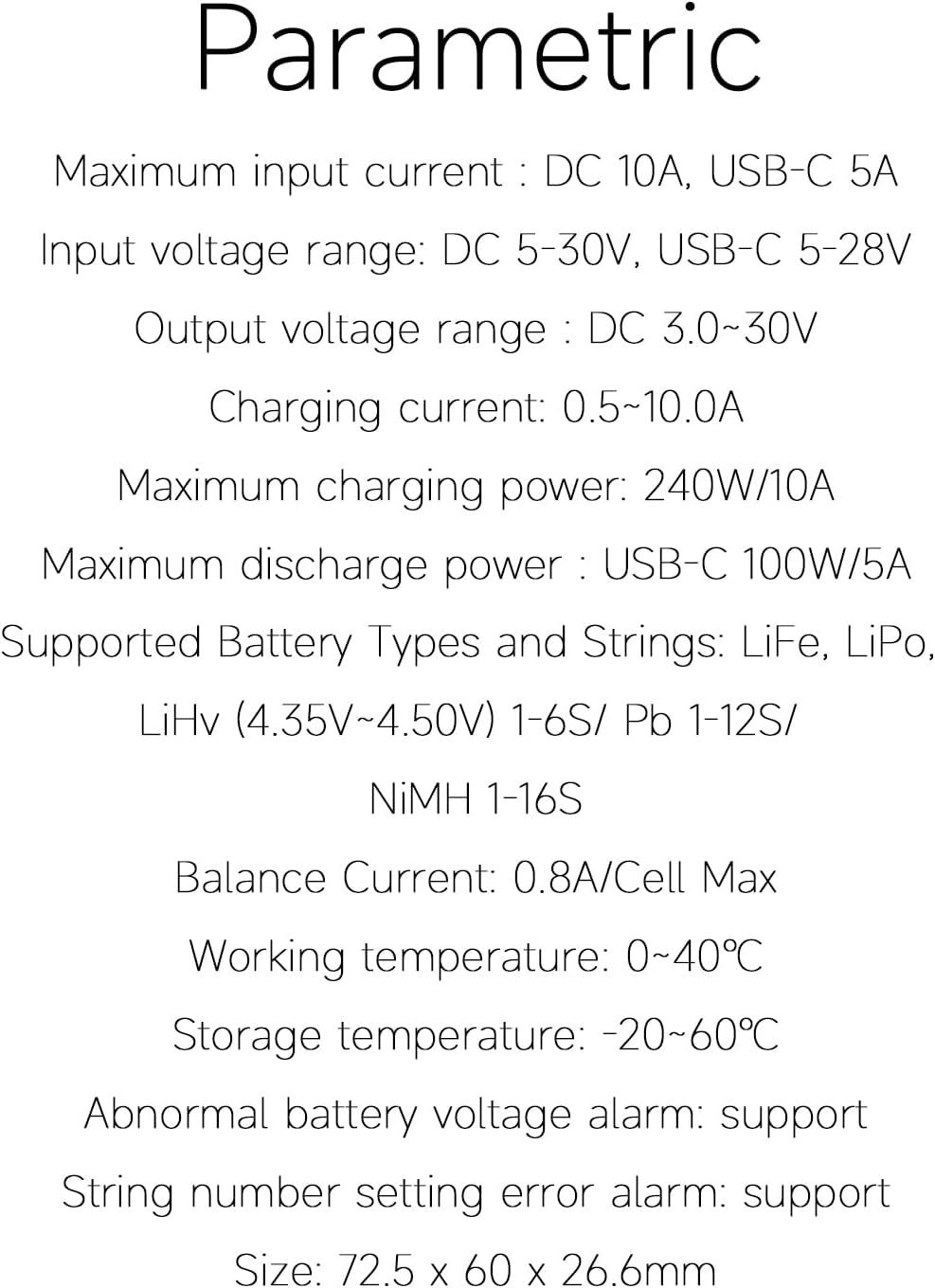
Comprehensive parametric specifications for the ISDT 608PD Smart Charger.
| Maximum Input Current | DC 10A, USB-C 5A |
| Input Voltage Range | DC 5-30V, USB-C 5-28V |
| Output Voltage Range | DC 3.0-30V |
| Charging Current | 0.5-10.0A |
| Maximum Charging Power | 240W/10A (DC), 140W/5A (USB-C) |
| Maximum Discharge Power | USB-C 100W/5A |
| Supported Battery Types | LiFe, LiPo, LiHv (4.35V~4.50V) 1-6S / Pb 1-12S / NiMH 1-16S |
| Balance Current | 0.8A/Cell Max |
| Operating Temperature | 0~40℃ |
| Storage Temperature | -20~60℃ |
| Dimensions | 72.5×60×26.6mm (2.85"D x 2.36"W x 1.05"H) |
| Weight | 85g (±10%) / 0.07 Kilograms |
| Connector Type | USB-C |
| Certifications | CE, FCC, UL |
Warranty
The ISDT 608PD Smart Charger comes with a one-year warranty from the date of purchase. This warranty covers manufacturing defects under normal use. Please retain your proof of purchase for warranty claims. The warranty does not cover damage caused by misuse, unauthorized modifications, accidents, or improper handling.
Support
For technical support, troubleshooting assistance, or warranty inquiries, please contact ISDT customer service through their official website or the retailer from whom you purchased the product. Please have your product model and purchase details ready when contacting support.


