
1. Important Safety Information
Read all instructions carefully before assembly and use. Keep this manual for future reference.
- Mattress Safety: Ensure the mattress surface is at least 5 inches below the top of the guardrail. Recommended mattress thickness is 4-6 inches.
- Anti-Tipping: Secure the bed to the wall using the provided anti-tip nails or kit to prevent tipping.
- Assembly: Assembly requires at least two adults. Do not attempt to assemble alone.
- Weight Limit: The loft bed is designed to hold up to 400 pounds (181.44 kg). Do not exceed this weight limit.
- Guardrails: Always use guardrails on both sides of the upper bunk.
- Ladder Safety: Ensure the ladder is securely attached before use.
- Ventilation: Ensure adequate ventilation around the bed, especially if using the desk area for extended periods.


2. Product Overview
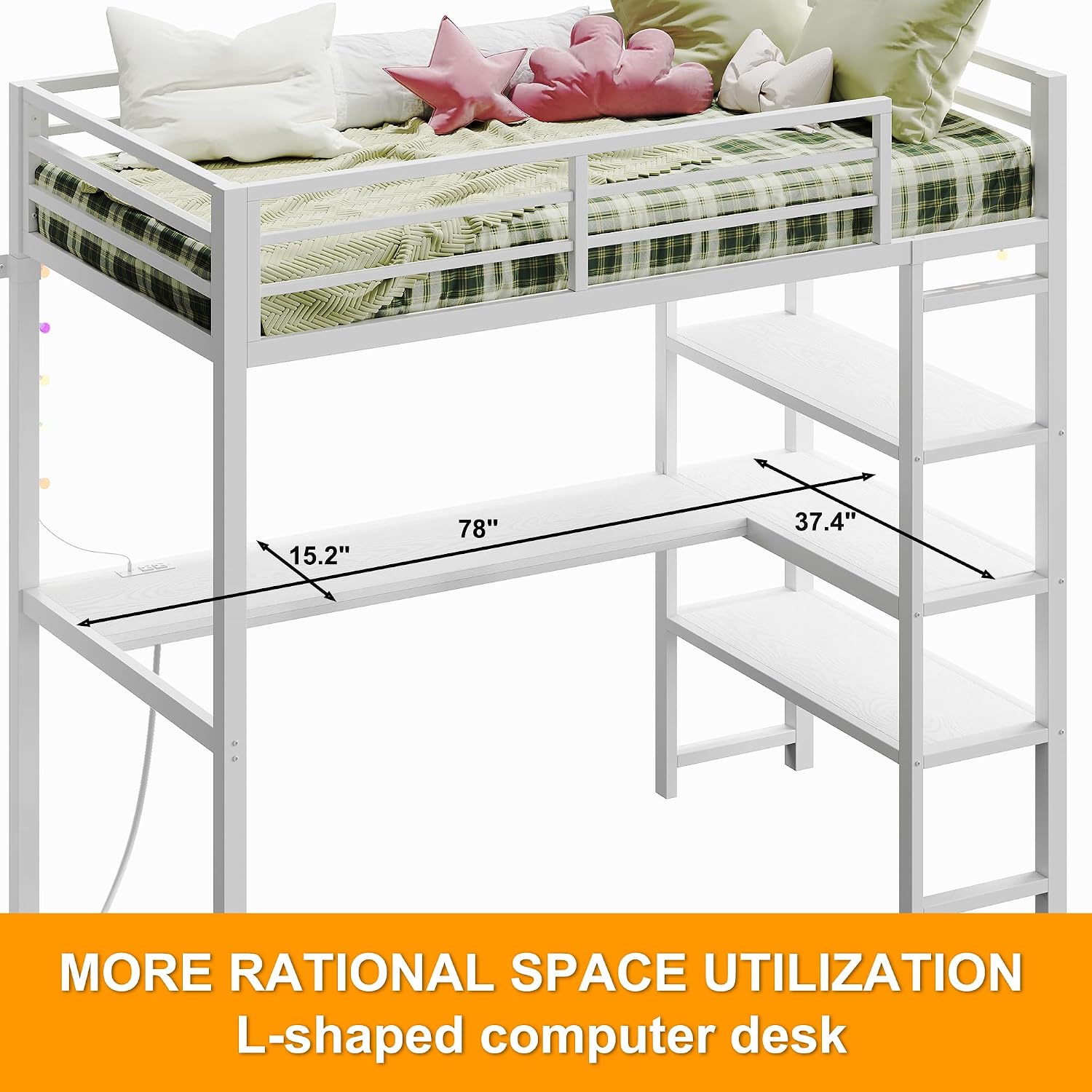
The ANCTOR Twin Size Loft Bed is designed for space-saving functionality, featuring an integrated L-shaped desk, storage shelves, a charging station, and LED lighting. This heavy-duty metal frame bed provides a versatile solution for bedrooms, guestrooms, or dormitories.
- Integrated L-shaped Desk: Provides a dedicated area for work, study, or creative activities.
- Built-in Charging Station: Equipped with two AC outlets and two USB ports for convenient device charging.
- Storage Shelves: Three open shelves offer vertical storage for books, files, decorations, and other essentials.
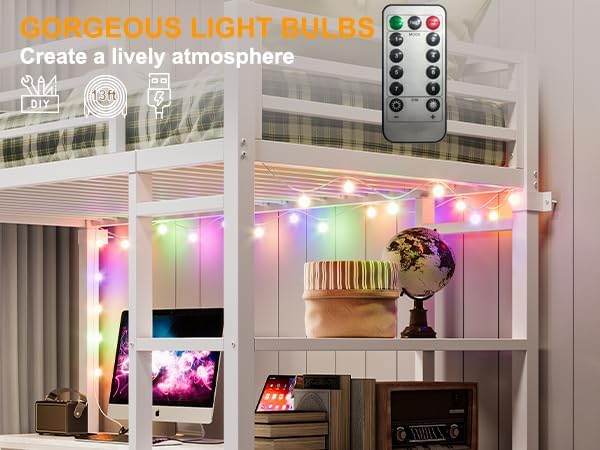
- LED Lighting: Colorful LED lights enhance the room's ambiance.
- Heavy-Duty Metal Frame: Constructed for stability and durability.
- Space Under Bed: Approximately 59.87 inches (152 cm) of clearance under the top bunk.


3. Setup and Assembly
Assembly of the ANCTOR Loft Bed requires careful attention to detail and the assistance of at least one other person. All necessary components and tools are included. Follow the provided graphical instructions for a smooth assembly process.
3.1 Pre-Assembly Checklist
- Verify all parts are present and undamaged according to the parts list.
- Ensure you have adequate space for assembly.
- Gather any additional tools if desired (e.g., power drill with Allen wrench attachment for faster assembly).
3.2 Assembly Steps (General Guidelines)
- Begin by assembling the main bed frame components.
- Attach the bed slats to form the mattress support.
- Assemble the L-shaped desk and integrate it into the frame. Ensure all connections are aligned and secure.
- Install the storage shelves on the designated side.
- Attach the guardrails to the upper bunk.
- Install the charging station into the desk surface and route the power cord.
- Affix the LED lights as desired.
- Secure the bed to the wall using the anti-tipping kit.
Note: Refer to the detailed graphical instructions included in your product packaging for specific step-by-step guidance and part identification.

4. Operating Instructions
4.1 Using the Charging Station
The integrated charging station provides convenient power access for your electronic devices.
- Plug the bed's main power cord into a standard 110V AC wall outlet.
- Use the two AC outlets for larger electronics.
- Use the two 5V/2A USB ports to charge smartphones, tablets, or other USB-powered devices.

4.2 Controlling the LED Lights
The colorful LED lights can be controlled to create various moods.
- The LED lights are typically controlled via a remote control (if included) or a switch on the light string itself.
- Refer to the separate instructions provided with the LED light kit for specific functions (e.g., color change, brightness adjustment, modes).
4.3 Utilizing the Desk and Shelves
The L-shaped desk and three storage shelves are designed to maximize space and organization.
- Use the desk for studying, working on a computer, or creative projects.
- Organize books, stationery, and decorative items on the shelves. Each shelf has a capacity of 88 lbs.

5. Maintenance
Proper maintenance ensures the longevity and safety of your ANCTOR Loft Bed.
- Cleaning: For the metal frame and desk surfaces, wipe with a damp cloth and mild detergent. Dry thoroughly. Avoid abrasive cleaners.
- Fabric Care: Any fabric components (e.g., mattress cover, if applicable) should be dry cleaned only, as per their specific care instructions.
- Hardware Check: Periodically check all bolts, screws, and connections to ensure they are tight. Retighten as necessary.
- Anti-Tipping Kit: Regularly inspect the wall attachment for the anti-tipping kit to ensure it remains secure.
- Electrical Components: Ensure the charging station and LED light cords are not pinched or damaged. Disconnect power before cleaning or inspecting electrical parts.
6. Troubleshooting
This section addresses common issues you might encounter with your loft bed.
| Problem | Possible Cause | Solution |
|---|---|---|
| Bed wobbles or feels unstable. | Loose connections; anti-tipping kit not installed or loose. | Ensure all bolts and screws are tightened. Verify the anti-tipping kit is securely fastened to the wall. |
| Desk components do not align properly during assembly. | Parts incorrectly oriented; manufacturing misalignment. | Double-check the assembly instructions for correct part orientation. If parts are genuinely misaligned, contact customer support. |
| Charging station not working. | Power cord not plugged in; faulty outlet; damaged charging unit. | Ensure the bed's power cord is securely plugged into a functional wall outlet. Test the outlet with another device. If still not working, contact customer support. |
| LED lights not turning on. | Power connection issue; remote control battery dead; faulty lights. | Check the power connection for the LED lights. Replace remote control batteries. If issues persist, contact customer support. |
7. Specifications
| Feature | Detail |
|---|---|
| Model Number | HK-BFT-06 |
| Brand | ANCTOR |
| Style | Industrial |
| Size | Twin |
| Colour | Vintage White |
| Frame Material | Metal |
| Product Dimensions (L x W x H) | 103L x 198W x 180.5H centimetres (approx. 40.6L x 78W x 71.1H inches) |
| Item Weight | 54.89 kg (approx. 121 lbs) |
| Weight Capacity (Maximum) | 181.44 kg (approx. 400 lbs) |
| Mattress Thickness Recommendation | 4-6 inches |
| Under-bed Clearance | Approx. 59.87 inches (152 cm) |
| Charging Station | 2 AC Outlets (110V/12A), 2 USB Ports (5V/2A), 6.5-foot Power Cord |
| Number of Shelves | 3 |
| Shelf Capacity | 88 lbs per shelf |
| Included Components | Footboard, Headboard, Slats, Desk, Shelves, Charging Station, LED Lights, Anti-tipping Kit |
| Product Care Instructions | Dry Clean Only (for fabric components), Wipe clean for metal/wood surfaces. |
8. Warranty and Support
ANCTOR products are manufactured with quality and customer satisfaction in mind. For specific warranty details, please refer to the warranty card included with your purchase or contact ANCTOR customer support directly.
If you encounter any issues during assembly, operation, or require replacement parts, please contact ANCTOR customer service. Have your model number (HK-BFT-06) and purchase information ready when contacting support.
Contact Information: Please refer to the contact details provided in your product packaging or on the official ANCTOR website.