
1. Introduction
Thank you for purchasing the OPPSK 180W Silent Stage Par Light. This professional-grade lighting fixture is designed for various applications including DJ events, concerts, weddings, churches, and other stage or event uplighting needs. Featuring 18x10W RGBWA+UV 6-in-1 LEDs, a robust aluminum shell, and versatile control options, this manual provides essential information for safe and effective operation.
2. What's in the Box
- 1 x RGBWAUV HEX LED Par Light
- 1 x Power Cable
- 1 x User Manual
- 2 x Mounting Brackets
- 2 x Thumb Screws
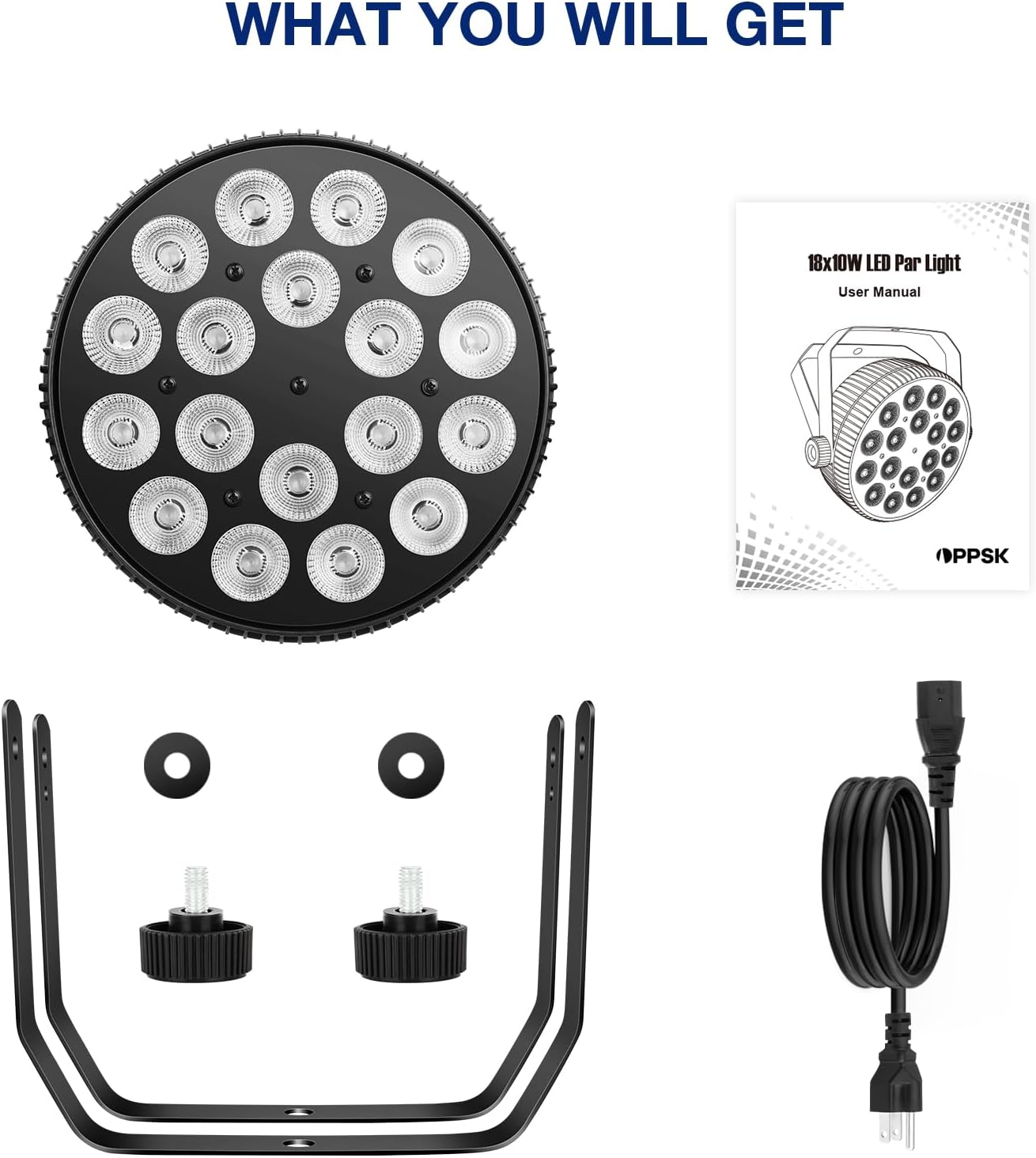
This image displays all components included in the product packaging: one OPPSK 180W Par Light, one standard power cable, one user manual, two mounting brackets, and two thumb screws for attachment.
3. Product Features
- 180W Output: Equipped with 18x10W RGBWA+UV LEDs for exceptional brightness and vivid color effects.
- 6-in-1 Color Mixing: Red, Green, Blue, White, Amber, and UV for a wide spectrum of colors and blacklight effects.
- Silent Cooling Fan: Designed with a whisper-quiet cooling fan to prevent interference with audio or event atmosphere.
- Professional Aluminum Build: Heavy-duty cast aluminum housing ensures long-term durability and efficient heat dissipation.
- Multiple Control Modes: Supports 10-channel DMX512, sound activation, auto (jump, fade, strobe), and master-slave modes.
- Daisy-Chain Power: Built-in IEC In/Out ports allow up to 4 lights to be daisy-chained from a single outlet, reducing cable clutter.
- Onboard Menu Control: Easy navigation and setting adjustments directly on the unit, no remote needed for basic functions.
- Mounting Versatility: Includes double brace stands for floor mount or truss mount applications.

This image illustrates the diverse range of lighting effects and control modes available on the OPPSK 180W Par Light, highlighting its versatility for different event requirements.

This diagram highlights the effectiveness of the par light's silent cooling system, ensuring minimal noise disruption during operation, making it suitable for environments where audio quality is critical.
4. Setup
4.1 Mounting the Light
The par light comes with two mounting brackets and thumb screws. These brackets can be attached to the sides of the light using the provided screws. The double brace design allows for stable floor placement or secure attachment to a truss system (clamps not included).
4.2 Power Connection
Connect the provided power cable to the 'POWER IN' port on the back of the unit. For multiple lights, utilize the 'POWER OUT' port to daisy-chain up to 4 units from a single power source. Ensure all connections are secure before powering on.

This diagram demonstrates the efficient daisy-chaining capability of the par lights, simplifying power distribution and reducing cable clutter for multi-light setups.
5. Operating Modes
The OPPSK 180W Par Light offers several operating modes, configurable via the onboard menu display and buttons (MENU, UP, DOWN, ENTER) on the back of the unit.
5.1 DMX Control (10-Channel)
For advanced lighting control, connect the unit to a DMX512 controller using DMX IN/OUT ports. Refer to the user manual for detailed DMX channel assignments and functions (e.g., color intensity, strobe speed, fade time).
5.2 Sound Activation Mode
In this mode, the light reacts to ambient sound, changing colors and patterns in sync with music or other audio. This is ideal for dynamic party environments.
5.3 Auto Modes (Jump, Fade, Strobe)
- Jump Mode: Colors change abruptly from one to another.
- Fade Mode: Colors transition smoothly between each other.
- Strobe Mode: The light flashes rapidly, with adjustable speed.
5.4 Master-Slave Mode
Connect multiple units via DMX cables. Set one unit as 'Master' and others as 'Slave' to synchronize their operation without a dedicated DMX controller.

This image provides a clear view of the control interface on the back of the par light, essential for understanding how to configure its various operating modes and connections.
This video provides a visual guide to operating the par light, showcasing how to navigate through different modes like DMX, strobe, gradual color changes, and sound-activated effects using the onboard controls.
6. Maintenance
- Cleaning: Regularly clean the lens and housing with a soft, dry cloth to ensure optimal light output and prevent dust buildup.
- Inspection: Periodically check all cables and connections for wear or damage. Replace any faulty components immediately.
- Storage: Store the light in a dry, cool place away from direct sunlight and extreme temperatures when not in use.
7. Troubleshooting
- No Power: Ensure the power cable is securely connected to both the light and a working power outlet. Check the fuse on the unit.
- No Light Output: Verify the selected operating mode is active and not in a 'blackout' state. Check DMX connections if applicable.
- Incorrect Color/Pattern: Reset the unit to factory defaults or reconfigure the desired mode/DMX settings.
- Fan Noise: While designed to be quiet, excessive fan noise might indicate dust buildup. Clean the fan vents.
8. Specifications
| Feature | Specification |
|---|---|
| Model Number | OK-0123-18SP |
| Light Source | 18x10W RGBWA+UV 6-in-1 LEDs |
| Power Consumption | 180 Watts |
| Brightness | 27000 Lumens |
| Voltage | 110 Volts |
| Beam Angle | 45 Degrees |
| Control Modes | DMX512 (10-channel), Sound Activated, Auto, Master-Slave |
| Material | Aluminum |
| Product Dimensions | 10"L x 10"W x 4.9"H |
| Item Weight | 5.44 pounds |
9. Warranty & Support
This product comes with a 12-month limited warranty. For any questions, issues, or support needs, please contact OPPSK customer service for prompt and friendly assistance.

