
1. Introduction
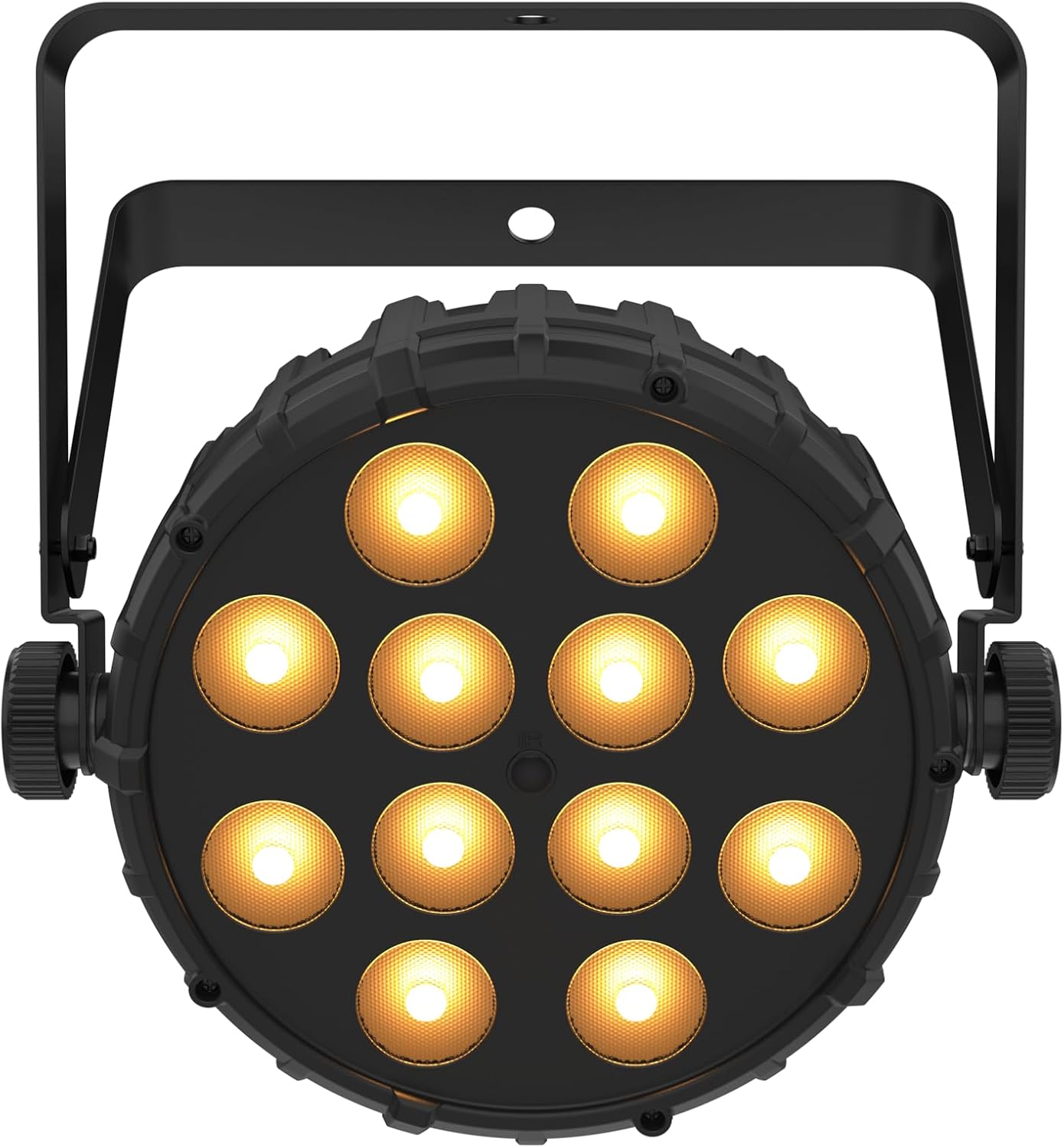
The CHAUVET DJ SlimPAR Q12 BT ILS is a compact wash light designed for various lighting applications. This device features built-in Bluetooth wireless technology and ILS compatibility, allowing for flexible control options. It is equipped with multiple LEDs to produce a wide range of colors and effects. This manual provides essential information for the safe and efficient use of your SlimPAR Q12 BT ILS.
Key Features:
- Compact wash light with built-in Bluetooth wireless technology.
- ILS compatibility for integration into the ILS ecosystem.
- D-Fi USB compatibility for wireless Master/Slave or DMX control.
- Direct control from a smartphone or tablet without additional hardware.
- Designed to fit optimally in the CHS-30 VIP Gear Bag.
2. Setup
Before operating the SlimPAR Q12 BT ILS, ensure all components are present and undamaged. Follow these steps for initial setup:
- Unpacking: Carefully remove the fixture from its packaging. Inspect for any signs of damage during transit.
- Mounting: The fixture includes a dual-purpose yoke for mounting. It can be used as a floor stand or attached to a truss using appropriate clamps (not included). Ensure the mounting surface or truss can support the weight of the fixture. For overhead mounting, always use a safety cable through the designated safety loop.
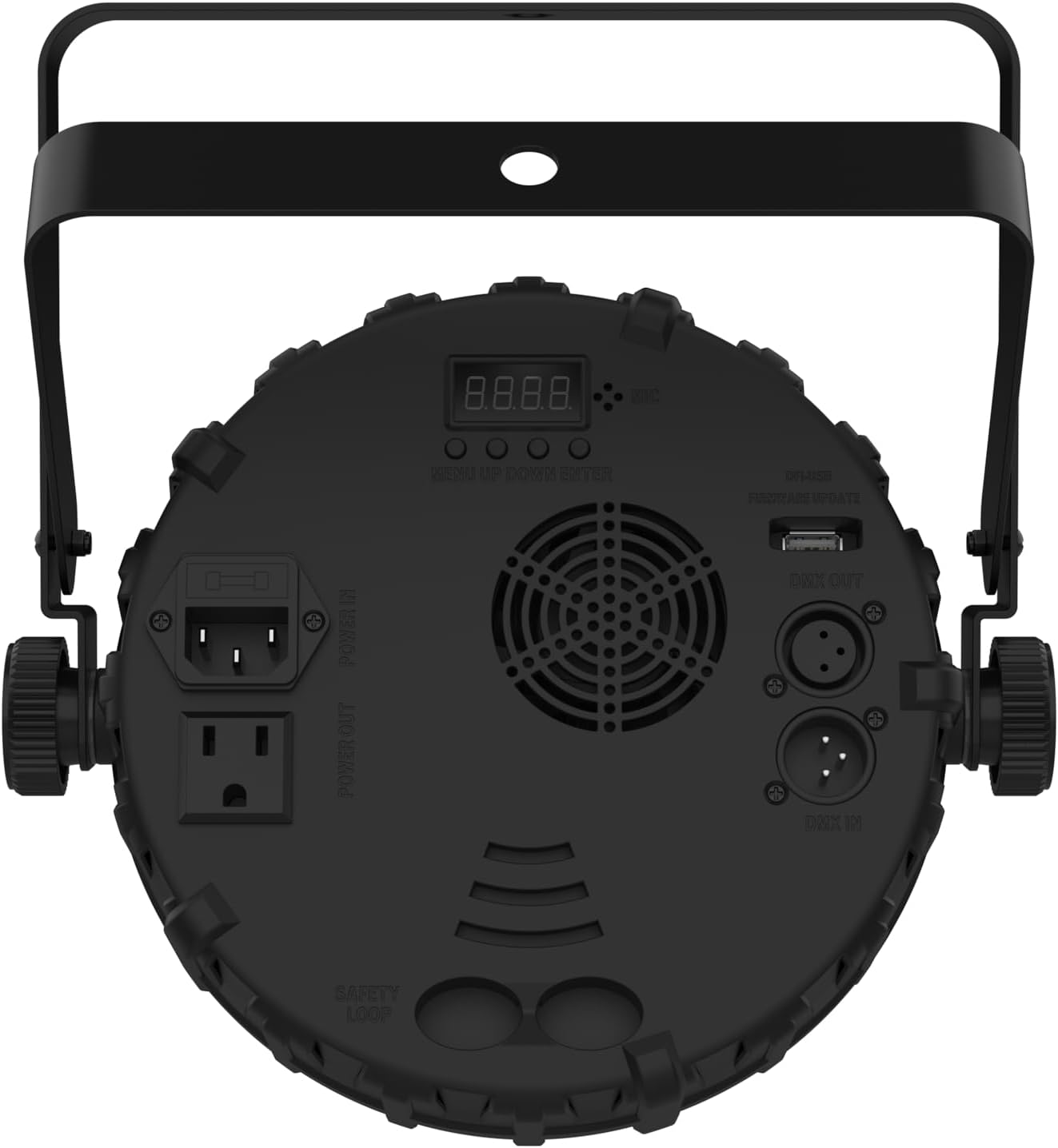
- Power Connection: Connect the power cable to the IEC input on the rear of the fixture. The fixture also features a power output for daisy-chaining multiple units.
- DMX Connection (Optional): For DMX control, connect a 3-pin DMX cable from your DMX controller to the DMX IN port. If daisy-chaining, connect from DMX OUT to the next fixture's DMX IN.
- D-Fi USB (Optional): For wireless DMX control, insert a D-Fi USB transceiver (sold separately) into the D-Fi USB port.
- Bluetooth Connection (Optional): For smartphone/tablet control, ensure Bluetooth is enabled on your device and follow the instructions in the dedicated mobile application.
3. Operation
The SlimPAR Q12 BT ILS can be operated in several modes:
3.1. Control Panel Operation
The rear panel features a digital display and control buttons (MENU, UP, DOWN, ENTER) for navigating settings and selecting operating modes. Refer to the full product manual for detailed menu navigation.
3.2. DMX Control
Connect the fixture to a DMX controller. Set the DMX address using the control panel. The fixture supports DMX 512 protocol, allowing for precise control over color, intensity, and effects. Consult the DMX channel chart in the comprehensive manual for specific channel assignments.
3.3. Bluetooth Control
Download the official CHAUVET DJ BTAir app on your smartphone or tablet. Power on the fixture and open the app. The app will detect the SlimPAR Q12 BT ILS via Bluetooth, allowing you to control various parameters wirelessly.
3.4. ILS (Integrated Lighting System) Control
When integrated into an ILS ecosystem, the SlimPAR Q12 BT ILS can synchronize with other ILS-compatible fixtures. This allows for coordinated light shows and simplified programming across multiple devices.
3.5. Master/Slave Mode
For synchronized operation without a DMX controller, set one fixture as the Master and others as Slaves. Connect them via DMX cables. The Master fixture's settings will control all connected Slave fixtures.


Official Product Video: Quick Look at the Chauvet DJ SlimPar Q12 BT ILS LED Light
This video provides a quick overview of the CHAUVET DJ SlimPAR Q12 BT ILS LED light, demonstrating its features and connectivity options, including DMX and power output. It highlights the fan for cooling and the dual stand design for versatile placement. The video also showcases the 12 LEDs with RGB and warm light spectrum capabilities, and the robust tightening bolts for secure positioning.
4. Maintenance
Regular maintenance ensures the longevity and optimal performance of your SlimPAR Q12 BT ILS.
- Cleaning: Periodically clean the exterior of the fixture with a soft, lint-free cloth. For lenses, use a specialized lens cleaner and cloth to avoid scratches. Ensure the fixture is powered off and disconnected before cleaning.
- Fan and Vents: Keep the cooling fan and ventilation openings clear of dust and debris to prevent overheating. Use compressed air to gently clear any blockages.
- Cable Inspection: Regularly inspect power and DMX cables for any signs of wear, cuts, or damage. Replace damaged cables immediately.
- Firmware Updates: Check the CHAUVET DJ website for any available firmware updates for your model to ensure you have the latest features and bug fixes.
5. Troubleshooting
If you encounter issues with your SlimPAR Q12 BT ILS, refer to the following common troubleshooting steps:
| Problem | Possible Cause | Solution |
|---|---|---|
| Fixture does not power on. | No power supply; faulty cable; blown fuse. | Check power connection. Test with a different cable. Inspect and replace fuse if necessary. |
| No DMX control. | Incorrect DMX address; faulty DMX cable; DMX controller issue. | Verify DMX address setting. Test DMX cables. Check DMX controller output. |
| Bluetooth connection fails. | Bluetooth not enabled; app issue; distance too far. | Ensure Bluetooth is active on your device. Restart the app and fixture. Reduce distance to fixture. |
| Fixture overheats. | Blocked ventilation; excessive ambient temperature. | Clear all vents and fan. Ensure adequate airflow around the fixture. Operate within specified temperature ranges. |
If the problem persists after attempting these solutions, contact CHAUVET DJ customer support.
6. Specifications
Detailed technical specifications for the CHAUVET DJ SlimPAR Q12 BT ILS:
- Brand: CHAUVET DJ
- Model Number: SLIMPARQ12BTILS
- Color: Black
- Finish Type: Painted
- Light Source Type: LED
- Number of Light Sources: 12
- Item Weight: 3 pounds (1.36 kg)
- Product Dimensions: 25.47 x 25.47 x 13.07 inches (64.7 x 64.7 x 33.2 cm)
- UPC: 781462226473
- Manufacturer: Chauvet Lighting
- First Available Date: July 19, 2024
7. Warranty & Support
7.1. Warranty Information
The CHAUVET DJ SlimPAR Q12 BT ILS comes with a manufacturer's warranty. For specific warranty terms and conditions, please refer to the warranty card included with your product or visit the official CHAUVET DJ website. Keep your proof of purchase for warranty claims.
7.2. Customer Support
For technical assistance, service, or replacement parts, please contact CHAUVET DJ customer support. You can find contact information on the official CHAUVET DJ website or through your authorized dealer. When contacting support, please have your product model number (SLIMPARQ12BTILS) and purchase date available.
Visit the CHAUVET DJ Store for more products and information.


