
Introduction
The JBL PartyLight Stick is a Bluetooth-enabled light accessory designed to enhance your party experience with dynamic, synchronized lighting. It can operate independently or integrate with compatible JBL PartyBox speakers to create a cohesive audio-visual display. This manual provides essential information for setting up, operating, and maintaining your PartyLight Stick.

Image: The JBL PartyLight Stick in operation, displaying a colorful light gradient.
What's in the Box
Upon unboxing your JBL PartyLight Stick, ensure all components are present:
- 1x JBL PartyLight Stick unit
- 1x 0.9m USB C-to-C cable
- 1x Quick Start Guide / Safety Sheet / Warranty Card

Image: The JBL PartyLight Stick and its included USB-C charging cable.
Setup
1. Initial Charging
Before first use, fully charge your JBL PartyLight Stick using the provided USB C-to-C cable and a compatible power adapter (not included). The device requires 5 Volts (DC) for charging. A full charge provides approximately 8 hours of battery life.
2. Placement
The PartyLight Stick is designed for floor standing placement. Its stable base ensures it remains upright during use. For optimal light dispersion, consider placing it in an open area. The 360-degree light direction ensures illumination from all angles.

Image: A JBL PartyLight Stick illuminating a room, demonstrating its 360-degree light capability.
3. JBL PartyBox App Installation
For advanced control and customization of your light show, download and install the JBL PartyBox app on your smartphone or tablet. The app allows you to manage colors, patterns, motion, speed, and intensity settings.

Image: A user interacting with the JBL PartyBox app to customize the light settings.
Operating Instructions
1. Power On/Off
Locate the power button on the base of the PartyLight Stick. Press and hold the button to power the device on or off.

Image: Detail of the control panel on the JBL PartyLight Stick, showing the power button.
2. Connecting to JBL PartyBox Speakers
The PartyLight Stick is designed to automatically sync with the sound and lights of any Auracast-enabled JBL PartyBox speaker. Ensure your PartyBox speaker is powered on and within range. The light stick will detect the PartyBox and synchronize its light show.
3. Standalone Operation (without PartyBox)
If you do not have an Auracast-enabled JBL PartyBox, the PartyLight Stick can still create a dynamic light show. It features a built-in microphone and music detection algorithm that automatically identifies and syncs to the beat of music playing nearby. Ensure the music volume is sufficient for detection.
4. Customizing the Light Show
Use the JBL PartyBox app to control various aspects of the light show:
- Colors: Select from a wide range of colors.
- Patterns: Choose different light patterns.
- Motion, Speed, and Intensity: Adjust these settings to match the desired mood, from subtle glows to energetic dancefloor effects.
5. Multiple PartyLight Sticks
For a more immersive visual experience, you can connect multiple JBL PartyLight Sticks using the JBL PartyBox app. The app's built-in music detection algorithm will choreograph an even larger group light show, enhancing the overall ambiance.
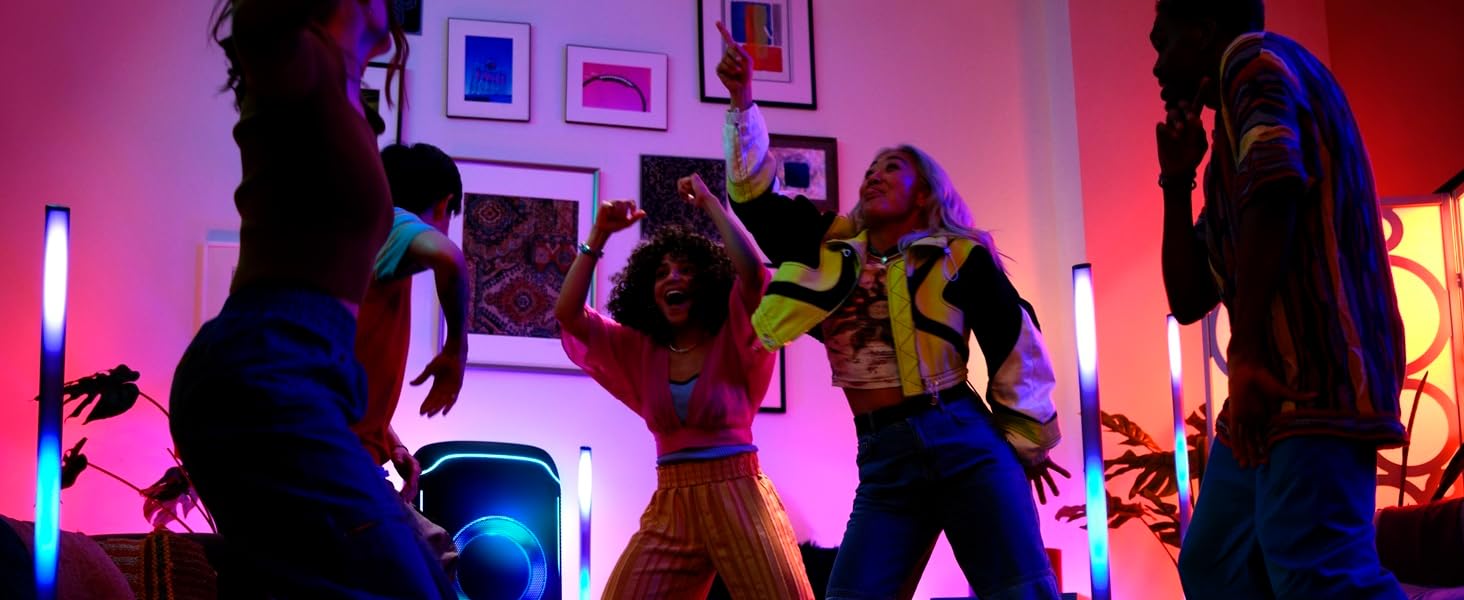
Image: Several JBL PartyLight Sticks and a PartyBox speaker working together to create a dynamic light display.
Video: Official JBL product video demonstrating the PartyLight Stick's features and synchronization capabilities with a JBL PartyBox speaker.
Maintenance
1. Cleaning
To clean the PartyLight Stick, gently wipe its surface with a soft, damp cloth. Avoid using harsh chemicals or abrasive materials, as these can damage the finish. Ensure the device is powered off and unplugged before cleaning.
2. Water Resistance
The JBL PartyLight Stick has an IPX4 splashproof rating, meaning it can withstand splashes of water from any direction. It is suitable for outdoor use in light rain or near water sources, but it should not be submerged in water.

Image: The top of the JBL PartyLight Stick, highlighting its IPX4 splashproof feature.
3. Battery Care
To prolong battery life, avoid fully discharging the device frequently. Store the PartyLight Stick in a cool, dry place when not in use for extended periods. Recharge the battery periodically if stored for a long time to prevent deep discharge.
Troubleshooting
- Device not powering on: Ensure the battery is charged. Connect the USB-C cable to a power source and try again.
- Lights not synchronizing with PartyBox: Verify that the JBL PartyBox speaker is Auracast-enabled and powered on. Ensure both devices are within close proximity.
- Lights not reacting to music in standalone mode: Check that the music volume is sufficiently loud for the built-in microphone to detect the beat. Ensure there are no obstructions covering the microphone.
- App connectivity issues: Ensure Bluetooth is enabled on your mobile device. Restart the JBL PartyBox app and the PartyLight Stick.
- Short battery life: Ensure the device is fully charged. High brightness and intense light patterns can consume battery faster. Reduce brightness or simplify patterns for longer usage.
Specifications
| Feature | Detail |
|---|---|
| Brand | JBL |
| Model Number | JBLPLSTICKAM |
| Dimensions (L x W x H) | 8.54" x 8.54" x 42.56" |
| Item Weight | 2.54 Pounds |
| Material | Polycarbonate (PC) |
| Power Source | Battery Powered |
| Battery Type | 1 Lithium Ion battery (included) |
| Average Battery Life | 8 Hours |
| Voltage | 5 Volts (DC) |
| Light Source Type | Light Emitting Diode (LED) |
| Beam Angle | 360 Degrees |
| Special Features | Portable, Color changing, Pulsing, IPX4 Splashproof |
| UPC | 050036403047 |

Image: Technical drawing illustrating the physical dimensions of the JBL PartyLight Stick.
Warranty Information
The JBL PartyLight Stick is covered by a 1-year manufacturer's warranty. Please refer to the included Warranty Card for detailed terms and conditions, including coverage specifics and how to make a claim.
Support
For further assistance, technical support, or product inquiries, please visit the official JBL website or contact JBL customer service. You can find contact information on the JBL website or your Warranty Card.
JBL Official Website: Visit the JBL Store