
1. Introduction
The PocketBook Verse Pro Color is a compact and advanced 6-inch e-reader designed for an immersive reading and listening experience. It features the latest E Ink Kaleido 3 color screen, offering eye-safe and glare-free viewing. This device combines portability with powerful functionalities, including IPX8 water protection, audiobook support with Bluetooth, Text-to-Speech, and adaptive SMARTlight technology.
This manual provides essential information on setting up, operating, maintaining, and troubleshooting your PocketBook Verse Pro Color e-reader.
2. Product Overview
Familiarize yourself with the physical components of your PocketBook Verse Pro Color e-reader.

Figure 2.1: Front view of the PocketBook Verse Pro Color e-reader, showcasing its color display with a 'GREEN GLOBAL' infographic.
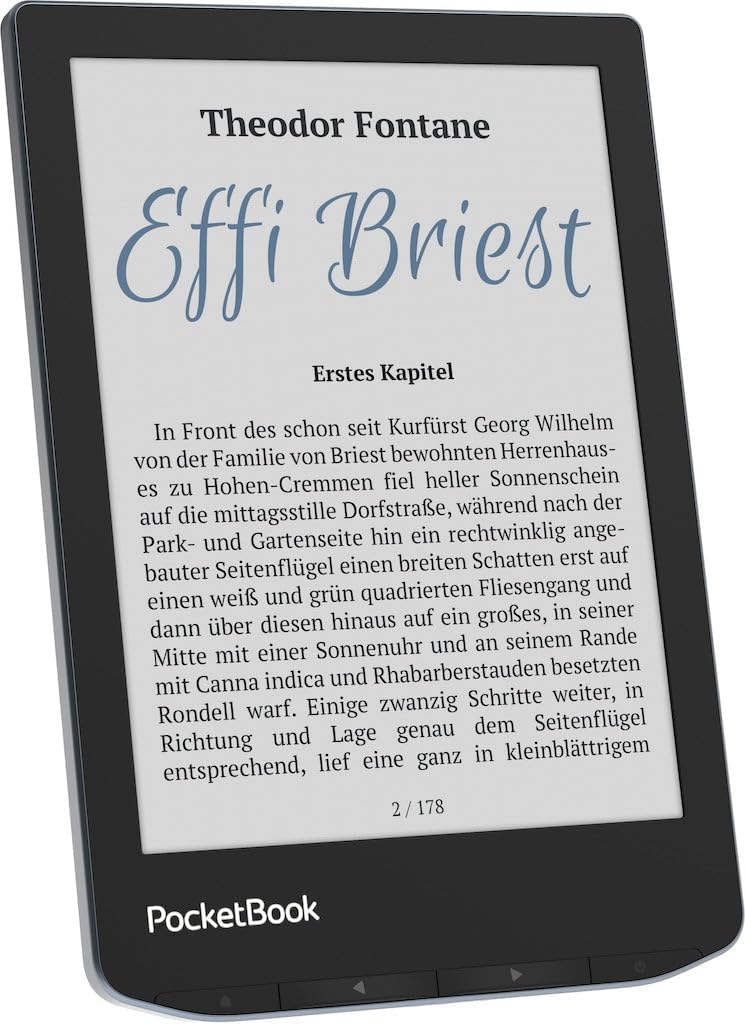
Figure 2.2: Front view of the e-reader displaying a text page, demonstrating readability.

Figure 2.3: Side profile of the PocketBook Verse Pro Color, highlighting its thin and compact design.

Figure 2.4: Bottom view of the e-reader, featuring the USB Type-C port for charging and data transfer.

Figure 2.5: Back view of the PocketBook Verse Pro Color, showing its textured surface for improved grip.
3. Setup
3.1 Initial Charging
Before first use, fully charge your PocketBook Verse Pro Color using the provided USB Type-C cable and a compatible power adapter (not included). The charging indicator will show the device's charging status.
3.2 Power On/Off
- To Power On: Press and hold the power button located on the device for a few seconds until the screen activates.
- To Power Off: Press and hold the power button, then select 'Power Off' from the options that appear on the screen.
- To Sleep: Briefly press the power button to put the device into sleep mode. Press again to wake it up.
3.3 Initial Configuration
Upon first power-on, you will be guided through the initial setup process, which includes:
- Language Selection: Choose your preferred language for the device interface.
- Wi-Fi Connection: Connect to a Wi-Fi network to enable online features, content downloads, and software updates.
- Time and Date: Set the correct time and date.
4. Operating Instructions
4.1 Reading Experience
The PocketBook Verse Pro Color features an E Ink Kaleido 3 color screen, providing a comfortable reading experience with reduced eye strain and glare. The screen displays text and images in color, enhancing comics, magazines, and illustrated books.
4.1.1 SMARTlight Adjustment
The SMARTlight feature allows you to adjust both the brightness and color temperature of the screen's frontlight. This enables comfortable reading in various lighting conditions, from bright daylight to complete darkness.
Video 4.1: Demonstrates how to adjust the SMARTlight feature on your PocketBook e-reader. Swipe up or down on the right side of the screen to control brightness, and on the left side to change the color temperature.
4.1.2 Changing Font Settings
Customize your reading experience by changing the font type and size to your preference.
Video 4.2: Guide on how to change the font on your PocketBook. Access 'Settings' then 'Font' to select your desired font style.
4.1.3 Activating Dark Mode
For reading in low-light conditions or for personal preference, you can activate Dark Mode, which inverts the screen colors (white text on a dark background).
Video 4.3: Instructions on how to activate Dark Mode on your PocketBook. Open the upper drop-down menu and toggle the Dark Mode option.
4.2 Audio Features
The Verse Pro Color supports audio playback, allowing you to listen to audiobooks or use the Text-to-Speech function.
- Audiobook Support: Play audiobooks directly on your device.
- Bluetooth 5.4: Connect wireless headphones or speakers for a private listening experience.
- Text-to-Speech (TTS): The device can read aloud any text file.
4.2.1 Downloading and Installing TTS Voices
To utilize the Text-to-Speech feature, you may need to download and install additional voice packages.
Video 4.4: Explains how to download and install Text-to-Speech (TTS) voices on your PocketBook (FW6.0). Open a text file, access the context menu, choose a voice, and download new voice packages.
4.3 File Management and Supported Formats
The PocketBook Verse Pro Color supports a wide range of e-book and audio formats. You can transfer files to your device via USB connection or through cloud services.
- Sideloading: Connect your e-reader to a computer via the USB-C cable. The device will appear as an external drive, allowing you to drag and drop files directly into its storage.
- Supported Formats: The device supports various formats including FB2, EPUB, MOBI, PDF, and CBZ (for comics).
4.4 Navigation
The device features both a responsive touchscreen and physical page-turn buttons for intuitive navigation.
- Touchscreen: Tap to select, swipe to turn pages, and pinch to zoom.
- Physical Buttons: Use the buttons located at the bottom of the device to turn pages forward or backward.
4.5 IPX8 Water Protection
The PocketBook Verse Pro Color is IPX8 water-protected, meaning it can withstand immersion in fresh water up to 2 meters deep for up to 60 minutes. This allows for worry-free reading in environments like the bath, pool, or beach. Ensure the USB-C port is dry before charging.
5. Maintenance
- Cleaning: Use a soft, dry, lint-free cloth to clean the screen and body of the device. Avoid using abrasive cleaners or solvents.
- Storage: Store the e-reader in a cool, dry place away from direct sunlight and extreme temperatures.
- Battery Care: For optimal battery life, avoid fully discharging the device frequently. Charge it regularly, and if storing for an extended period, ensure it has a partial charge (around 50%).
- Software Updates: Periodically check for and install software updates to ensure optimal performance and access to new features. Connect to Wi-Fi and navigate to 'Settings' > 'Software' > 'Software Update'.
6. Troubleshooting
6.1 Common Issues and Solutions
| Issue | Possible Cause / Solution |
|---|---|
| Device does not turn on | Ensure the battery is charged. Connect to a power source and try again. If unresponsive, perform a hard reset by holding the power button for 10-15 seconds. |
| Screen is unresponsive or slow | Restart the device. Ensure the screen is clean and dry. If the issue persists, check for software updates. |
| Wi-Fi connection issues | Ensure Wi-Fi is enabled on the device. Check your router and network settings. Try forgetting the network and reconnecting. |
| Cannot transfer files | Ensure the USB cable is properly connected and the device is recognized by your computer. Try a different USB port or cable. |
| Battery drains quickly | Reduce screen brightness, disable Wi-Fi and Bluetooth when not in use. Close background applications. Ensure SMARTlight is not set to maximum intensity unnecessarily. |
| Muted colors or washed-out display | This is a characteristic of E Ink Kaleido displays compared to traditional LCD/OLED. Adjust the SMARTlight settings (brightness and color temperature) to improve perceived contrast and vibrancy. |
7. Specifications
| Feature | Detail |
|---|---|
| Brand | PocketBook |
| Model Name | Verse Pro Color |
| Model Number | PB634K3-1-WW |
| Display Technology | Electronic Ink (E Ink Kaleido 3) |
| Screen Size | 6 inches |
| Display Resolution | 800 x 600" or "1024 x 768 (Color/Monochrome) |
| Memory Storage Capacity | 16 GB |
| Connectivity Technology | USB Type-C, Bluetooth 5.4, Wi-Fi |
| Human-Interface Input | Touchscreen, Physical Buttons |
| Water Protection | IPX8 |
| Special Features | Adjustable Front Light (SMARTlight), Anti-Glare Screen, Audiobooks, Text-to-Speech Function |
| File Formats Supported | FB2, EPUB, MOBI, PDF, CBZ, and more |
| Battery Description | Lithium-Ion |
| Item Weight | 349 g |
| Included Components | E-reader, USB Type-C cable, documents |
8. Warranty and Support
8.1 Warranty Information
The PocketBook Verse Pro Color comes with a 2-year warranty from the date of purchase. This warranty covers manufacturing defects and malfunctions under normal use. Please retain your proof of purchase for warranty claims.
For detailed warranty terms and conditions, please refer to the official PocketBook website or the warranty documentation included with your device.
8.2 Customer Support
If you encounter any issues not covered in this manual or require further assistance, please contact PocketBook customer support. You can typically find support contact information on the official PocketBook website (www.pocketbook.ch) or through the 'Support' section within your device's settings.
When contacting support, please have your device's model number (PB634K3-1-WW) and serial number ready.


