1. Introduction
Thank you for choosing the MEDION SO90 Overlock Sewing Machine. This manual provides essential information for the safe and efficient operation, setup, and maintenance of your new machine. Please read these instructions thoroughly before first use and keep them for future reference.
The MEDION SO90 is designed for precise and efficient overlock stitching, offering versatility with 2, 3, or 4 threads. Its robust construction and user-friendly features make it suitable for various sewing projects.

Figure 1: MEDION SO90 Overlock Sewing Machine, front-right view.
2. Important Safety Instructions
- Always disconnect the machine from the power supply when cleaning, servicing, or when not in use.
- Keep fingers away from all moving parts, especially the needle and cutting blades.
- Use only the accessories specified by the manufacturer.
- Never operate the machine with any air openings blocked. Keep ventilation openings of the sewing machine and foot controller free from the accumulation of lint, dust, and loose cloth.
- Do not operate where aerosol (spray) products are being used or where oxygen is being administered.
- This appliance is not intended for use by persons (including children) with reduced physical, sensory or mental capabilities, or lack of experience and knowledge, unless they have been given supervision or instruction concerning use of the appliance by a person responsible for their safety.
- Children should be supervised to ensure that they do not play with the appliance.
3. Package Contents
Carefully unpack your MEDION SO90 Overlock Sewing Machine and check that all items are present and undamaged. If any items are missing or damaged, please contact customer support.
- MEDION SO90 Overlock Sewing Machine (MD19169)
- 4 Spool Plates
- 4 Thread Spools (pre-mounted)
- Lint Brush
- Empty Oil Bottle
- Needle Set
- Edge Guide
- Machine Cover
- Tweezers
- Waste Bin
- 3 Screwdrivers (large, medium, small)
- Lower Spare Blade
- Two-Thread Converter
- Foot Pedal

Figure 2: Integrated accessory compartment with various sewing tools.
4. Product Overview
Familiarize yourself with the main components and features of your overlock machine.

Figure 3: Key features of the MEDION SO90 Overlock Sewing Machine, including 4/3/2 thread sewing, telescopic thread guide, separately adjustable thread tension, free arm sewing, and twin needle function.
- Telescopic Thread Guide: Ensures smooth thread feeding.
- Thread Tension Dials: Individually adjustable for each thread to achieve balanced stitches.
- Needle Clamp: Secures the needles in place.
- Presser Foot: Holds fabric firmly during sewing.
- Stitch Length Dial: Adjusts the length of your stitches.
- Differential Feed Dial: Controls the feeding of fabric to prevent stretching or puckering.
- Free Arm: Allows for sewing cylindrical items like cuffs and pant legs.
- LED Sewing Light: Illuminates the sewing area for better visibility.
5. Setup
5.1 Unpacking and Placement
- Remove the machine from its packaging.
- Place the machine on a stable, flat surface. Ensure there is enough space around the machine for comfortable operation.
- Connect the foot pedal and power cord to the machine and then to a suitable power outlet (220V).
5.2 Threading the Machine
Correct threading is crucial for proper stitch formation. Follow the numbered threading path indicated on the machine. The MEDION SO90 supports 2, 3, or 4-thread configurations.

Figure 4: The MEDION SO90 Overlock Sewing Machine illustrating its capacity for 2, 3, or 4 threads simultaneously.
- Raise the presser foot and the needle bar to their highest positions.
- Place the thread spools onto the spool pins, using the spool plates provided.
- Follow the color-coded or numbered threading guides for each thread, starting with the upper looper, then lower looper, and finally the needles.
- Ensure threads pass through all tension discs and guides correctly.
- Pull approximately 10-15 cm of thread past the needles and loopers.
6. Operating Instructions
6.1 Basic Stitching
- Turn on the power switch. The LED light will illuminate the sewing area.
- Place the fabric under the presser foot.
- Lower the presser foot.
- Gently press the foot pedal to start sewing. Guide the fabric smoothly.
- At the end of the seam, lift the presser foot and pull the fabric away, cutting the thread chain.
6.2 Adjusting Stitch Settings
- Thread Tension: Adjust the tension dials (usually numbered 1-9) to achieve a balanced stitch. Higher numbers increase tension, lower numbers decrease it. Test on a scrap fabric.
- Stitch Length: Use the stitch length dial to change the density of your stitches.
- Differential Feed: Adjust this dial to prevent wavy seams on stretchy fabrics or to create gathering effects. A setting of 1.0 is neutral. Higher numbers stretch, lower numbers gather.
6.3 Using the Free Arm
The free arm feature is ideal for sewing small, circular items.

Figure 5: The free arm of the MEDION SO90 Overlock Sewing Machine in use for sewing circular garments.
- Remove the accessory compartment to expose the free arm.
- Slide the cylindrical garment (e.g., sleeve, pant leg) onto the free arm.
- Proceed with sewing as usual, guiding the fabric around the free arm.
7. Maintenance
Regular maintenance ensures the longevity and optimal performance of your overlock machine.
7.1 Cleaning
- Always unplug the machine before cleaning.
- Use the lint brush to remove lint and dust from the looper area, under the needle plate, and around the feed dogs.
- Wipe the exterior surfaces with a soft, dry cloth. Do not use harsh chemicals or abrasive cleaners.
7.2 Lubrication
Apply a small drop of sewing machine oil to designated lubrication points as indicated in the detailed manual or by a service technician. Do not over-oil.
7.3 Needle Replacement
Replace needles regularly, especially if they are bent, dull, or if you experience skipped stitches. Use only appropriate overlock machine needles.
- Turn off and unplug the machine.
- Loosen the needle clamp screw(s) with the provided screwdriver.
- Remove the old needle(s).
- Insert the new needle(s) with the flat side facing the back, pushing it up as far as it will go.
- Tighten the needle clamp screw(s) securely.
8. Troubleshooting
This section addresses common issues you might encounter. For more complex problems, please contact customer support.
| Problem | Possible Cause | Solution |
|---|---|---|
| Skipped Stitches | Incorrect needle insertion, bent/dull needle, improper threading, incorrect tension. | Reinsert needle correctly, replace needle, re-thread machine, adjust tension. |
| Thread Breakage | High thread tension, poor quality thread, incorrect threading, burrs on thread path. | Reduce tension, use quality thread, re-thread, check for rough spots. |
| Fabric Puckering | Too high differential feed, incorrect tension, dull needle. | Adjust differential feed to neutral or lower, adjust tension, replace needle. |
| Machine Not Starting | Power cord not connected, foot pedal not connected, power switch off. | Check all connections, ensure power switch is on. |
9. Technical Specifications
| Feature | Specification |
|---|---|
| Model Number | SO90 (MD19169) |
| Brand | MEDION |
| Power | 90 Watts |
| Voltage | 220 Volts |
| Material | Metal |
| Item Weight | 7.2 Kilograms |
| Product Dimensions (L x W x H) | 31 x 31 x 32 cm |
| Sewing Light | LED |
| Thread Capacity | 2, 3, or 4 threads |
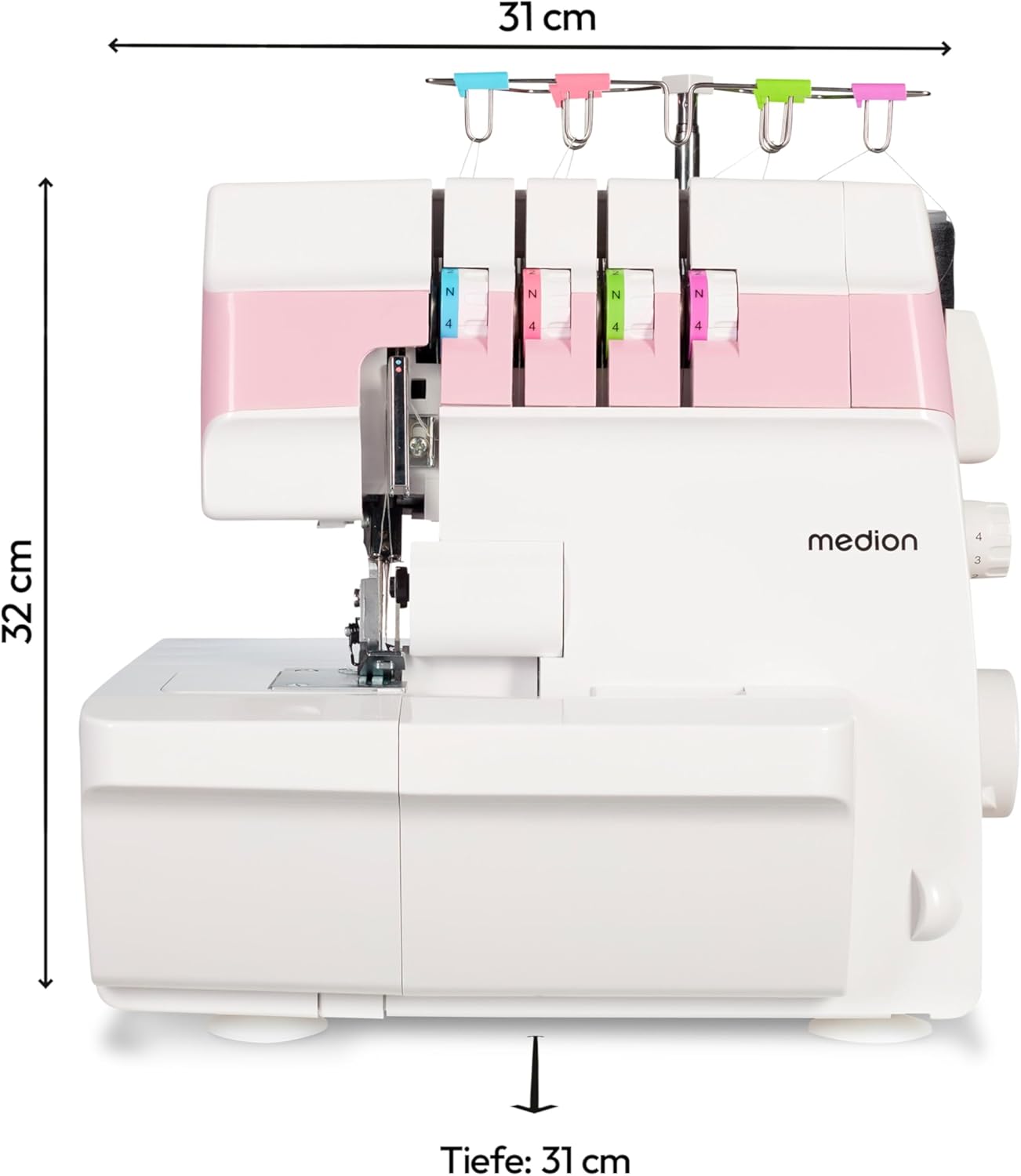
Figure 6: Side view of the MEDION SO90 Overlock Sewing Machine with dimensions: 31 cm width, 32 cm height, and 31 cm depth.
10. Warranty and Support
For information regarding warranty coverage, technical support, or spare parts, please refer to the warranty card included with your product or visit the official MEDION website. Keep your proof of purchase for warranty claims.
MEDION is committed to providing high-quality products and customer service. If you have any questions or require assistance, please do not hesitate to contact our support team.


