1. Introduction
The HiBy R6 gen3 is a portable digital audio player designed for high-resolution audio playback. It combines advanced audio circuitry with a modern Android operating system to deliver a versatile and high-fidelity listening experience. This manual provides essential information for setting up, operating, and maintaining your device.

2. What's in the Box
Verify that all items are present upon unboxing:
- HiBy R6III Player
- Player case
- Type-C USB cable
- Instruction manual (this document)
- Screen protectors
3. Setup
3.1 Initial Charging
Before first use, fully charge the HiBy R6 gen3 using the provided Type-C USB cable and a compatible USB power adapter (not included). The device features a Lithium Ion battery.
3.2 Power On/Off
To power on the device, press and hold the power button located on the side until the screen illuminates. To power off, press and hold the power button, then select 'Power off' from the on-screen options.
3.3 Initial Configuration
Upon first startup, follow the on-screen prompts to configure basic settings such as language, Wi-Fi connection, and Google account setup. The device runs on Android 12, allowing for a familiar smartphone-like experience.
4. Operating Instructions
4.1 Physical Controls
The HiBy R6 gen3 features several physical buttons for convenient control:
- Power/Screen Lock Button: Press briefly to lock/unlock the screen. Press and hold to power on/off or restart.
- Volume Control: Dedicated buttons or a wheel (depending on specific model variant) to adjust audio output level.
- Playback Control Buttons: Typically include Play/Pause, Next Track, and Previous Track.
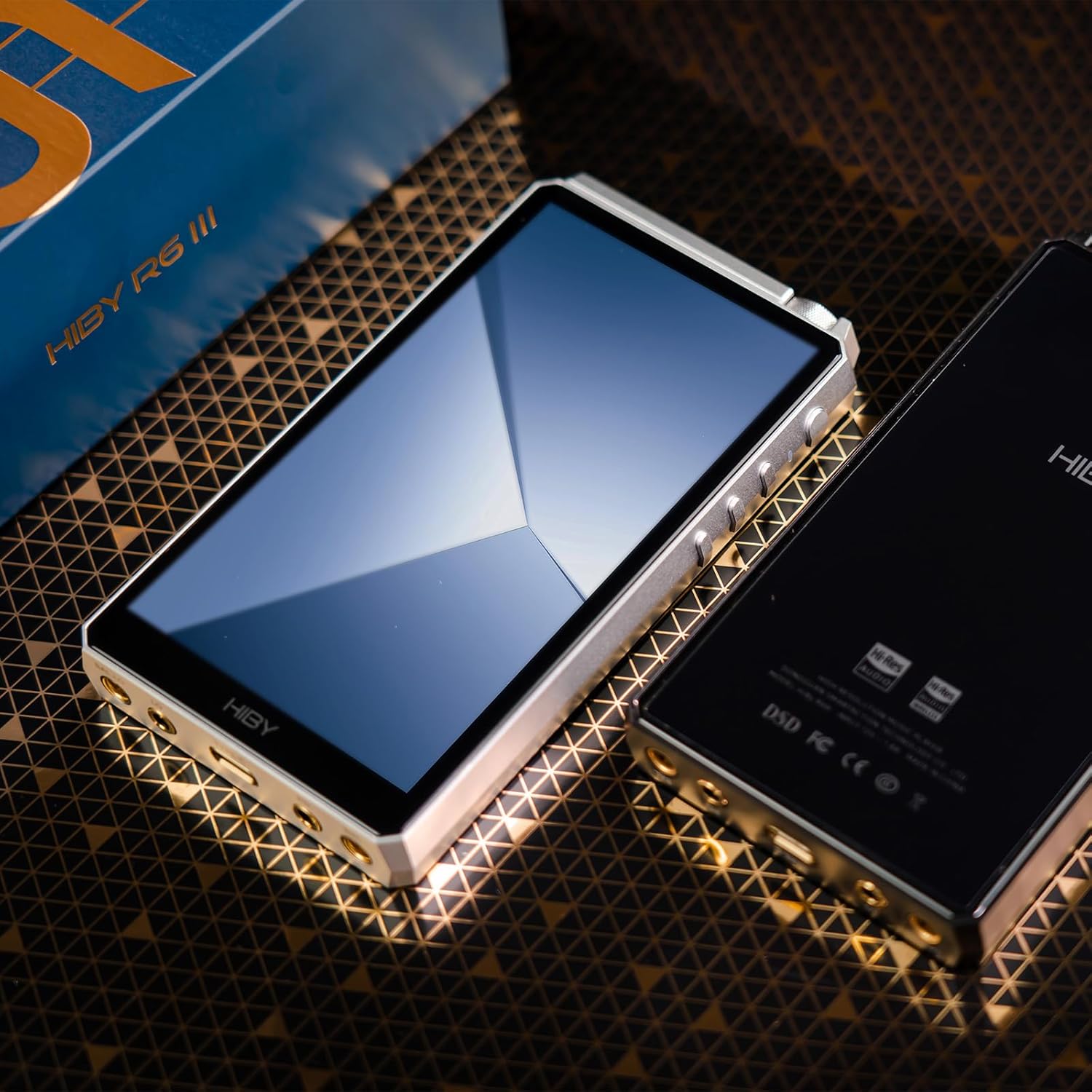
4.2 Touchscreen Navigation
The device features a responsive touchscreen for navigating the Android 12 interface, managing applications, and controlling music playback. Swipe, tap, and pinch gestures are supported.
4.3 Audio Playback
Utilize the pre-installed HiBy Music app or download third-party music players from the Google Play Store to manage and play your audio files. The device supports a wide range of audio formats, including Hi-Res Audio.
5. Connectivity
5.1 Wired Connections
The HiBy R6 gen3 offers multiple wired audio outputs:
- 3.5mm Headphone Output (PO): Standard single-ended headphone jack.
- 4.4mm Balanced Headphone Output (BAL): For balanced headphones, offering improved sound quality and power.
- Line Outputs: Dedicated 3.5mm and 4.4mm line outputs for connecting to external amplifiers or audio systems.
- USB Digital Audio: Supports USB digital audio input/output for connecting to a computer or external DAC.
- Coaxial Digital Output: For connecting to external DACs or receivers via coaxial cable.

5.2 Wireless Connectivity
The device supports both Bluetooth and Wi-Fi for wireless audio streaming and internet access:
- Bluetooth 5.0: Supports high-quality codecs including LDAC, aptX, aptX HD, SBC, and AAC for wireless headphone or speaker connections.
- Wi-Fi: Supports 2.4GHz and 5GHz bands with speeds up to 433Mbps for streaming services and app downloads.

6. Storage and Memory
The HiBy R6 gen3 comes with 4GB of RAM and 64GB of internal ROM. Memory can be expanded up to 2TB using a microSD card (not included) for extensive music libraries.

7. Audio Features
7.1 Digital-to-Analog Converters (DACs)
The device features dual ES9038Q2M DAC chips, which operate simultaneously for both single-ended and balanced headphone outputs. This configuration ensures optimal performance and high-fidelity sound reproduction. It supports native DSD512, PCM 32bit/768kHz, and MQA 16x decoding.

7.2 Amplification
The HiBy R6 gen3 incorporates both Class A and Class AB headphone amplifiers. Class A provides constant peak output power, high driving capability, and fast response, ideal for demanding headphones. Class AB offers a high-efficiency amplification mode, balancing driving power with battery life.

8. Software and Operating System
The HiBy R6 gen3 runs on Android 12, powered by a Qualcomm Snapdragon 665 processor. This open Android system allows users to download and install a wide range of third-party applications from the Google Play Store, ensuring quick responsiveness and smooth operation.

9. Maintenance
9.1 Battery Life
Battery performance varies depending on the amplification mode and output used:
- Class A: Approximately 9 hours (3.5mm PO), 6 hours (4.4mm BAL).
- Class AB: Approximately 15 hours (3.5mm PO), 12 hours (4.4mm BAL).

9.2 Cleaning and Care
Use a soft, dry cloth to clean the device. Avoid using harsh chemicals or abrasive materials. Keep the device away from extreme temperatures, moisture, and direct sunlight.
9.3 Software Updates
Periodically check for software updates through the device's settings menu to ensure optimal performance and access to the latest features.
10. Troubleshooting
10.1 Device Unresponsive
If the device becomes unresponsive, perform a soft reset by pressing and holding the power button for approximately 10 seconds until the device restarts.
10.2 No Audio Output
Check headphone connections, ensure volume is not muted or too low, and verify that the correct output mode is selected in the audio settings. Test with different headphones or cables if possible.
10.3 Connectivity Issues
For Bluetooth or Wi-Fi issues, try toggling the respective functions off and on. Ensure the device is within range of the network or paired accessory. Restarting the device can also resolve temporary connectivity problems.
11. Specifications
| Feature | Detail |
|---|---|
| Model Name | HIBYR6G3 |
| Operating System | Android 12 |
| Processor | Qualcomm Snapdragon 665 |
| RAM | 4GB |
| Internal Storage (ROM) | 64GB |
| Expandable Memory | Up to 2TB via microSD |
| DAC Chips | Dual ES9038Q2M |
| Amplifier Type | Class A & Class AB |
| Hi-Res Audio Support | Native DSD512, PCM 32bit/768kHz, MQA 16x |
| Bluetooth | 5.0 (LDAC, aptX, aptX HD, SBC, AAC) |
| Wi-Fi | 2.4GHz / 5GHz (up to 433Mbps) |
| Connectivity Ports | 3.5mm PO, 4.4mm BAL, 3.5mm Line Out, 4.4mm Line Out, USB-C, Coaxial Digital Out |
| Screen Size | 3 inches (diagonal) |
| Battery | 1 Lithium Ion (included) |
| Item Weight | 1.21 pounds |
| Package Dimensions | 8.66 x 5.12 x 2.17 inches |
12. Warranty and Support
For warranty information, technical support, or service inquiries, please refer to the official HiBy website or contact your authorized dealer. Keep your purchase receipt as proof of purchase for warranty claims.


