
ARGENDON Sandidry 55C
Contents
ARGENDON Commercial Dehumidifier Sandidry 55C User Manual
Model: Sandidry 55C | Brand: ARGENDON
1. Introduction and Overview
This manual provides detailed instructions for the installation, operation, and maintenance of your ARGENDON Sandidry 55C Commercial Dehumidifier. Designed for effective moisture removal in large spaces such as crawlspaces, basements, job sites, and garages, this Energy Star certified unit offers high efficiency and durability.
The Sandidry 55C is capable of removing 55 pints per day (AHAM) and up to 120 pints per day at saturation conditions, covering areas up to 1,500 sq. ft. It features a built-in pump, auto-defrost function, and a MERV-1 filter for improved air quality.

Figure 1.1: ARGENDON Sandidry 55C Commercial Dehumidifier, front view with drain hose.
2. Safety Information
Please read all safety warnings and instructions carefully before operating the dehumidifier to prevent injury or damage. Keep this manual for future reference.
- Ensure the unit is connected to a properly grounded electrical outlet.
- Do not operate the unit with a damaged power cord or plug.
- Do not block air inlets or outlets. Maintain adequate clearance around the unit for proper airflow.
- Do not immerse the unit in water or allow water to enter electrical components.
- Always unplug the unit before cleaning or performing any maintenance.
- This appliance is ETL certified, ensuring it meets strict safety standards.
- Keep out of reach of children and pets.
- Operate the unit on a stable, level surface to prevent water leakage.
3. Package Contents
Verify that all items listed below are included in your package. If any items are missing or damaged, please contact customer support.
- ARGENDON Sandidry 55C Dehumidifier Unit
- User Manual (this document)
- MERV-1 Filter
- Pump Drain Hose (19.6 ft)
- Gravity Drain Hose (6.5 ft)
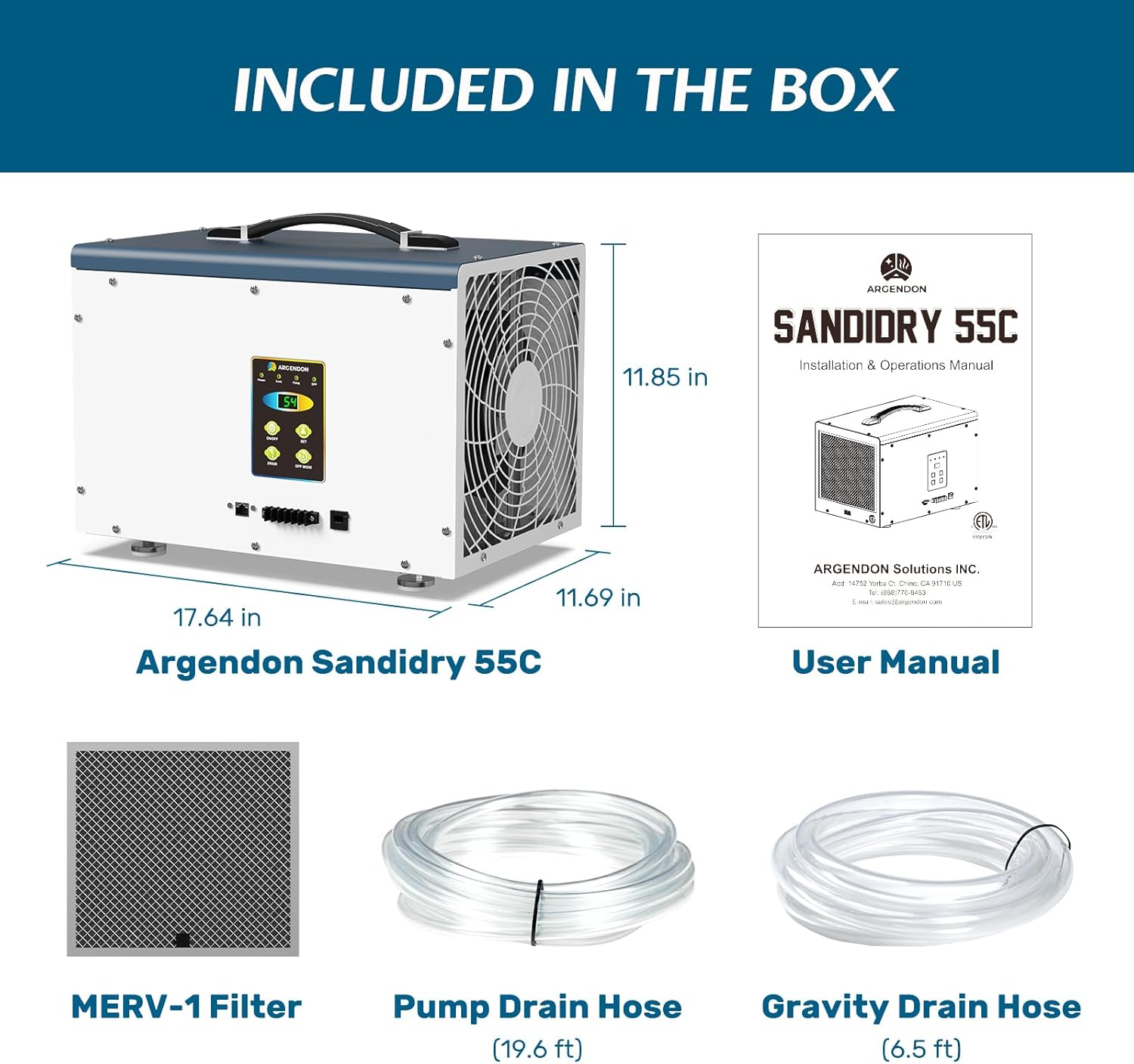
Figure 3.1: Contents included in the ARGENDON Sandidry 55C package.
4. Product Features
- Energy Star Certified: Operates efficiently, reducing energy consumption.

Figure 4.1: Energy Star certification highlights energy efficiency.
- High Capacity Moisture Removal: Removes up to 120 PPD (Pints Per Day) at saturation, covering up to 1,500 sq. ft. with 153 CFM airflow.

Figure 4.2: Illustration of effective moisture removal.
- Dual Drainage Options: Includes both a 6.5 ft gravity drain hose and a built-in condensate pump with a 19.6 ft pump drain hose for flexible water removal.

Figure 4.3: Gravity and pump drainage options for versatile setup.
- Upgraded Technology: Features Rare Earth Alloy Tube Evaporator and Internal Corrosion Protection to extend unit life and prevent freon leakage. Utilizes core rotary compression technology.
- User-Friendly Control Panel: Simple four-button operation with humidity setting, continuous mode, GPP mode, auto turn on/off, and troubleshooting interface.

Figure 4.4: Easy-to-use control panel for various settings.
- Auto-Defrost Function: Automatically defrosts coils at low temperatures, ensuring continuous operation and energy saving.

Figure 4.5: Auto Defrost ensures efficient operation in cooler environments.
- MERV-1 Filter: Captures pollutants, protects internal components, and outputs clean air. Washable and reusable.

Figure 4.6: The MERV-1 filter is washable and reusable for air purification.
- Auto-Restart: The unit automatically resumes operation after a power outage.
- Compact and Portable: Designed for easy movement and placement in various locations.

Figure 4.7: The compact design allows for convenient portability.
- Remote Control Compatible: Can be controlled with an optional remote (sold separately).

Figure 4.8: The unit supports an optional remote control for convenience.
5. Setup and Installation
Proper setup is crucial for optimal performance and safety.
5.1 Placement
- Place the dehumidifier on a level, stable surface in your crawlspace, basement, or other desired area.
- Ensure there is at least 12 inches (30 cm) of clearance around all sides of the unit for proper airflow.
- Avoid placing the unit near heat sources or in direct sunlight.
- The unit is designed for use in environments like crawl spaces and basements.

Figure 5.1: Ideal placement for the dehumidifier in a basement setting.
5.2 Drainage Options
The Sandidry 55C offers two methods for continuous drainage:
5.2.1 Gravity Drainage
- Connect the included 6.5 ft gravity drain hose to the drain outlet on the unit.
- Ensure the hose is sloped downwards to a floor drain or suitable receptacle, allowing water to flow out by gravity.
- Do not allow the hose to kink or rise above the unit's drain outlet.
5.2.2 Pump Drainage
- Connect the included 19.6 ft pump drain hose to the pump outlet.
- The built-in condensate pump allows water to be directed upwards (up to 19.6 feet) or to a distant drain, such as a sink, outside a window, or a dedicated condensate pump drain.
- Ensure the pump hose is securely connected and routed to prevent leaks.

Figure 5.2: Visual guide for connecting drainage hoses.
6. Operation
The control panel provides easy access to all functions.
Figure 6.1: Detailed view of the dehumidifier's control panel.
6.1 Basic Controls
- ON/OFF Button: Press to turn the unit on or off.
- SET Button: Use to adjust the desired humidity level. The display will show the set humidity percentage.
- DRAIN Button: Activates or deactivates the pump drainage function.
- GPP MODE Button: Toggles between different operating modes (e.g., General Purpose, Performance). Refer to the display for current mode.
6.2 Operating Modes
- Continuous Mode: The unit will operate continuously regardless of the humidity level until manually turned off or the GPP mode is selected.
- Humidity Setting Mode: The unit will operate until the ambient humidity reaches the set target level, then cycle on and off to maintain it.
- GPP Mode: (General Purpose/Performance Mode) This mode optimizes the unit's operation for specific conditions. Consult the display for details on its function.
6.3 Auto-Defrost
The unit is equipped with an automatic defrost function. If frost builds up on the evaporator coils, the unit will temporarily stop dehumidifying and run the fan to melt the frost. This is a normal operation and ensures efficient performance in cooler environments. Dehumidification will resume once the coils are clear.
7. Maintenance
Regular maintenance ensures the longevity and efficiency of your dehumidifier.
7.1 MERV-1 Filter Cleaning/Replacement
- The MERV-1 filter should be checked and cleaned every 3-6 months, or more frequently depending on air quality.
- To clean, remove the filter and wash it with warm, soapy water. Rinse thoroughly and allow it to air dry completely before reinserting.
- Replace the filter if it is damaged or cannot be cleaned effectively.
7.2 Unit Cleaning
- Always unplug the unit before cleaning.
- Wipe the exterior with a soft, damp cloth. Do not use harsh chemicals or abrasive cleaners.
- Ensure air inlets and outlets are free from dust and debris.
7.3 Storage
- If storing the unit for an extended period, ensure all water is drained from the reservoir and hoses.
- Clean the filter and the exterior of the unit.
- Store the unit upright in a cool, dry place, away from direct sunlight and extreme temperatures.
8. Troubleshooting
Before contacting customer support, please refer to the following common issues and solutions.
| Problem | Possible Cause | Solution |
|---|---|---|
| Unit does not turn on. | No power, power cord loose, unit off. | Check power connection, ensure outlet is functional, press ON/OFF button. |
| No water collected / Not dehumidifying. | Humidity setting too high, ambient humidity too low, air filter clogged, temperature too low (auto-defrost active). | Lower humidity setting, check ambient humidity, clean/replace air filter, allow auto-defrost cycle to complete. |
| Water leakage from unit. | Unit not level, drain hose kinked/blocked, drain hose not properly connected. | Ensure unit is on a level surface, check drain hose for kinks or blockages, re-secure drain hose connections. |
| Unit is noisy. | Unit not level, fan obstruction, normal operation sound. | Ensure unit is on a level surface, check for obstructions around fan, some operational noise is normal. |
9. Specifications
| Feature | Detail |
|---|---|
| Brand | ARGENDON |
| Model Name | Sandidry 55C |
| Dehumidification Capacity (AHAM) | 55 Pints per Day |
| Dehumidification Capacity (Saturation) | 120 Pints per Day |
| Coverage Area | Up to 1500 Square Feet |
| Air Flow Capacity | 153 CFM (Cubic Feet per Minute) |
| Product Dimensions (D x W x H) | 11.69"D x 17.64"W x 11.85"H |
| Item Weight | 44.4 Pounds |
| Wattage | 402.25 watts |
| Color | Blue |
| Material | Metal |
| Special Features | Adjustable Humidity Control, Automatic Defrost, Built-In Pump, Continuous Draining, Merv-1 Filter |
| Recommended Uses | Commercial, Residential, Whole Home |
| Upper Temperature Rating | 105 Degrees Fahrenheit |
| UPC | 717038051361 |
10. Warranty and Support
ARGENDON stands behind the quality of its products.
10.1 Limited Warranty
Every ARGENDON crawl space dehumidifier comes with a 5-year limited warranty. This warranty covers:
- 6 Month Parts and Labor: Includes shipment charges for replacement parts or unit.
- 1 Year Parts and Labor: Excludes shipment charge to send the defective product back for repair or replacement.
- 3-Year Parts and Labor: Covers refrigeration system only.
- 5-Year Compressor and Coil.
For additional warranty information or to make a claim, please refer to the full warranty details provided with your purchase or contact ARGENDON customer support.
10.2 Customer Support
If you have any questions, require assistance, or need to troubleshoot an issue not covered in this manual, please contact our professional customer support team. Contact information can typically be found on the ARGENDON official website or on the product packaging.
Ask a question about this manual
Ask about setup, troubleshooting, compatibility, parts, safety, or missing instructions. Manuals+ will review the question and use this page’s manual context to help answer it.