
1. Product Overview
The BEBASIA Fingerprint Door Lock with Handle Sets (Model BA2H-AG) provides advanced security and convenient access for your home. This smart lock integrates multiple entry methods including fingerprint, passcode, Bluetooth app, physical keys, and IC cards. For enhanced smart home functionality, it supports Alexa and Google Voice control, along with remote access when paired with a separately sold gateway. Designed for ease of use and robust security, it features anti-peeping password protection, auto-lock, and one-touch locking.

Image 1.1: The BEBASIA Fingerprint Door Lock with Handle Sets in Aged Bronze.

Image 1.2: Overview of the smart and security features of the BEBASIA door lock.
2. Package Contents
Verify that all components are present in your package:
- Smart Deadbolt Lock
- Door Handlesets
- 3 IC Cards
- 2 Backup Keys
- Accessories Bag (screws, mounting hardware)
- User Manual
3. Installation Guide
The BEBASIA BA2H-AG lock is designed for compatibility with most US standard doors. Ensure your door meets the specified dimensions for proper installation.
3.1 Door Compatibility
- Door Thickness: 1.38 inch to 1.97 inch (35mm-50mm)
- Hole Diameter: 2-1/8 inches (54mm)
- Backset: 2-3/8 inches or 2-3/4 inches (60mm or 70mm)
- Supports both left-handed and right-handed door configurations.

Image 3.1: Door compatibility and dimension requirements for installation.
3.2 General Installation Steps
Refer to the detailed instructions in the included User Manual for step-by-step installation. A screwdriver is typically required for assembly.

Image 3.2: Installation of the BEBASIA smart lock components.
4. Operation
4.1 Unlocking Methods
- Fingerprint Unlock: Place your registered fingerprint on the sensor for quick access. The lock can store up to 50 unique fingerprints.
- Passcode Unlock: Enter your personalized passcode on the keypad. The anti-peeping feature allows you to enter random digits before or after your actual code to prevent others from guessing it. The lock supports up to 250 passcodes.
- Bluetooth App Unlock: Use the dedicated mobile application to unlock the door via Bluetooth when you are within range.
- Physical Key Unlock: In case of power failure or other issues, use the provided physical backup keys for manual access.
- IC Card Unlock: Tap a registered IC card on the lock to gain entry. The lock supports up to 1000 IC cards, with 3 included in the package.
- Smart Voice Unlock (Requires Gateway): When connected to a gateway (sold separately), you can use voice commands with Amazon Alexa or Google Assistant to unlock your door.
- Remote Access (Requires Gateway): With a gateway, you can remotely lock or unlock your door from anywhere, manage user access, and monitor lock status via the mobile app.

Image 4.1: Fingerprint unlock in action.

Image 4.2: Anti-peeping passcode entry.
4.2 Locking Methods
- Auto-Lock: Configure the lock to automatically re-lock after a set period (5-900 seconds) once the door is closed.
- One-Touch Locking: Press the '#' button for 2 seconds to instantly lock the door from the outside.

Image 4.3: Auto-lock feature demonstration.
4.3 Modes
- Privacy Mode: Activates a privacy function from the inside, preventing external access via keypad, fingerprint, or IC card.
- Passage Mode: Keeps the door unlocked for continuous access during specific times, ideal for high-traffic periods.
- Silent Mode: Disables all sound notifications from the lock for quiet operation.
5. App Control and Smart Home Integration
The BEBASIA smart lock can be managed via a dedicated mobile application, offering advanced control and monitoring features.
5.1 Mobile Application Features
- Generate and share one-time, permanent, timed, or recurring passcodes for guests.
- View real-time lock status and access log records (who unlocked the door and when).
- Manage registered fingerprints and IC cards.
- Adjust auto-lock settings and other lock parameters.
Image 5.1: Mobile application interface for lock management.
5.2 Smart Home Integration (Requires Gateway)
To enable remote access and voice control functionalities, a BEBASIA gateway (sold separately) is required. The gateway connects your lock to your home Wi-Fi network.
- Remote Unlock/Lock: Control your door from anywhere via the app.
- Voice Control: Integrate with Amazon Alexa or Google Assistant for hands-free operation.
- Real-time Notifications: Receive alerts on your phone for lock activity.
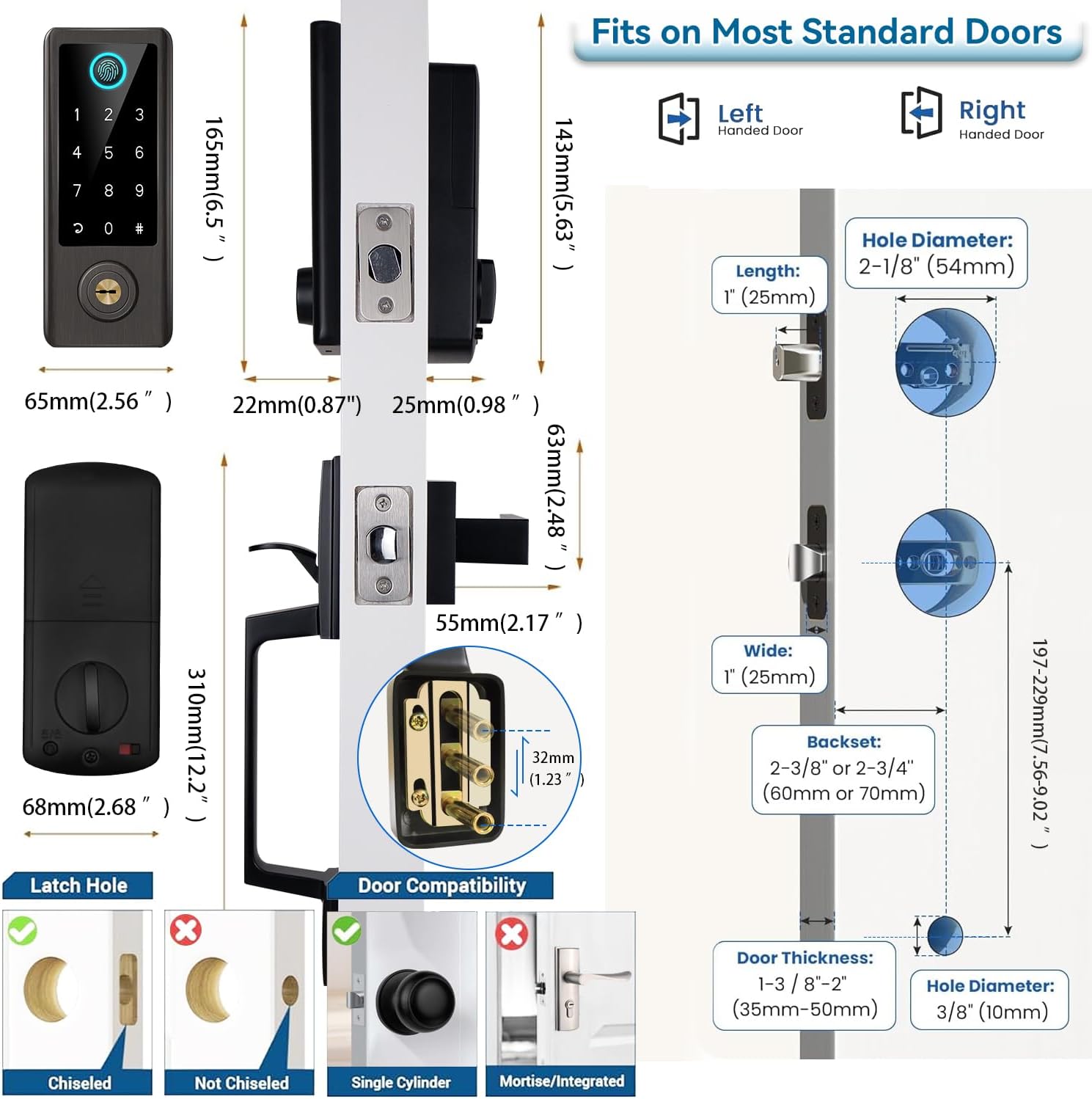
Image 5.2: Remote access and passcode sharing via the app.

Image 5.3: Smart home integration with Google Assistant and Alexa (gateway required).
6. Maintenance
6.1 Battery Replacement
The lock operates on 4 AA batteries (not included). Replace them when the low battery indicator appears on the lock or in the mobile app. Battery life is typically several months, depending on usage frequency and environmental conditions.
6.2 Cleaning
Wipe the keypad and fingerprint sensor with a soft, dry cloth. Avoid using abrasive cleaners, solvents, or excessive moisture, as these can damage the electronic components and finish.
7. Troubleshooting
- Lockout after multiple incorrect entries: If 5 incorrect passcodes or fingerprints are entered consecutively, the system will lock for 2 minutes as a security measure. Wait for the lockout period to expire before attempting access again.
- Fingerprint recognition issues: Ensure your finger is clean and dry. Try re-registering your fingerprint if issues persist, ensuring proper finger placement on the sensor for optimal recognition.
- App connectivity problems: Verify Bluetooth is enabled on your smartphone. If using a gateway for remote access, ensure it is properly connected to your home Wi-Fi network and within effective range of the smart lock.
- Physical key not working: Ensure the key is fully inserted into the keyhole and turned correctly. Check for any obstructions or debris in the keyhole that might prevent proper key insertion.
- Lock not responding: Check the battery level. If batteries are low or depleted, replace them with new ones.
8. Product Specifications
| Feature | Specification |
|---|---|
| Brand | BEBASIA |
| Model Number | BA2H-AG |
| Material | Zinc |
| Lock Type | Biometric, Combination Lock, Deadbolt, Keypad |
| Special Features | Anti-Peeping Password, Auto-Lock, Fingerprint, One-Touch Lock, Passcode Unlock |
| Item Dimensions (L x W x H) | 13 x 8 x 3 inches |
| Item Weight | 2.15 Kilograms |
| Recommended Uses | Family, Hotel, School, Apartment |
| Door Thickness Compatibility | 1.38 inch to 1.97 inch (35mm-50mm) |
| Controller Type | Amazon Alexa, Google Assistant (requires gateway) |
| Control Method | App, Touch |
| Connectivity Protocol | Bluetooth |
| Smart Home Compatibility | Smart Home Compatible (requires gateway for full remote features) |
| Color | Aged Bronze |
9. Warranty and Support
For warranty information, technical assistance, or customer support, please refer to the contact details provided in your product packaging or visit the official BEBASIA website. Our customer service team is available to assist you with any questions or concerns regarding your smart door lock.