
Introduction
Thank you for choosing the COMLIFE K50 10000mAh Portable Waist Fan. This manual provides essential information for the safe and efficient operation of your device. Please read it thoroughly before use and retain it for future reference.
Product Overview
The COMLIFE K50 is a versatile 5-in-1 portable fan designed for personal cooling in various environments. It features a powerful 10000mAh rechargeable battery, 5 adjustable wind speeds, and multiple wearing options, including waist clip, neck fan, and desktop use. Additionally, it integrates an LED light, SOS function, and can serve as an emergency power bank.
Package Contents
- 1 x COMLIFE K50 Portable Waist Fan
- 1 x Lanyard
- 1 x USB-C Charging Cable
- 1 x User Manual
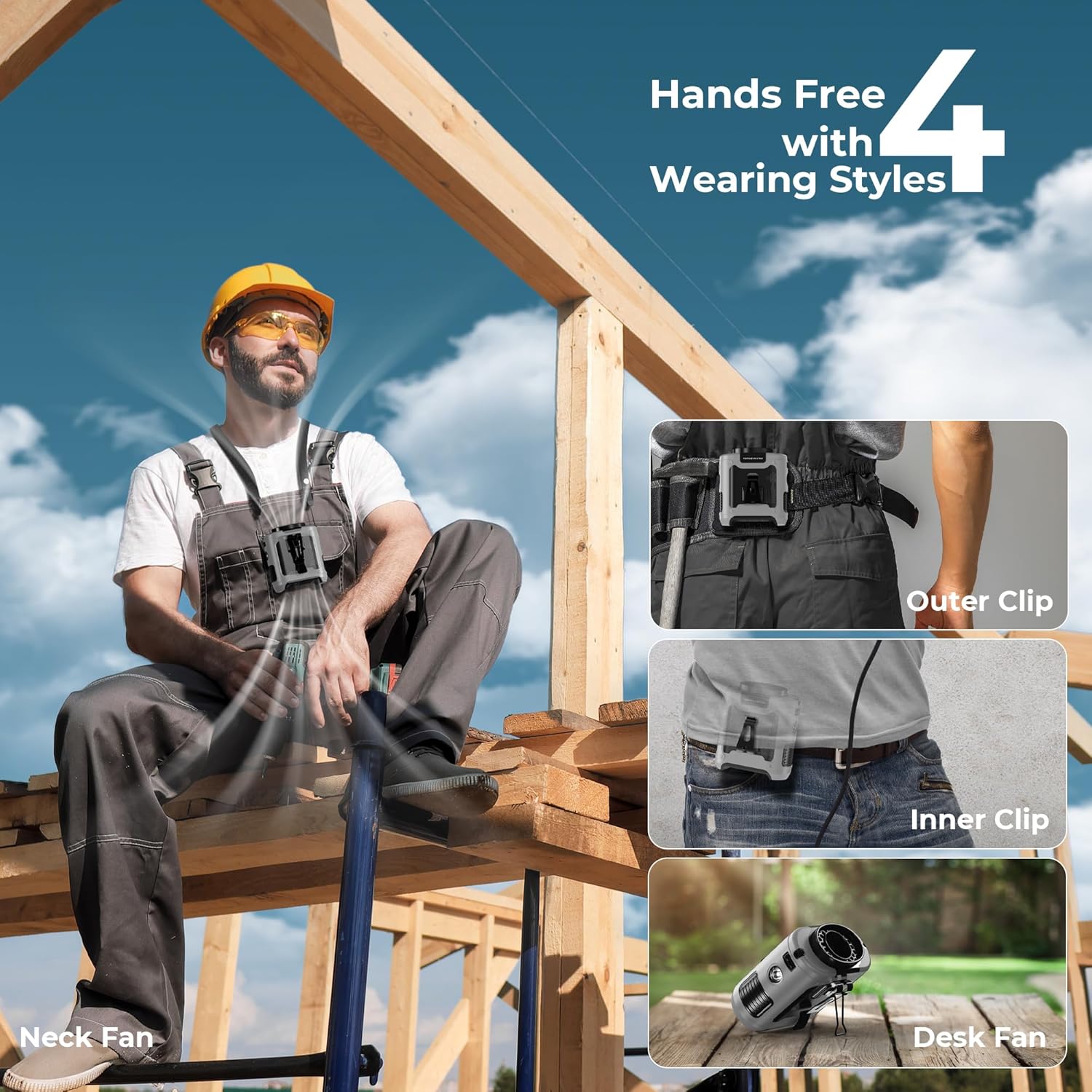
Image: The COMLIFE K50 Portable Waist Fan shown with its included lanyard and charging cable.
Key Features
- 4 Hands-Free Wearing Styles: Utilizes outer and inner clips for belt or undershirt wear, includes a lanyard for neck hanging, and features a stand for desktop use.
- Long-Lasting Battery: Built-in 10000mAh rechargeable battery provides up to 40 hours of cooling on the lowest speed after a 4-5 hour charge.
- 5 Adjustable Wind Speeds: High-speed brushless motor delivers up to 16000RPM and 18ft/s strong airflow for rapid cooling.
- 5-in-1 Multifunctionality: Functions as a waist fan, neck fan, desktop fan, LED & SOS light, and an emergency power bank.
- Durable Design: Features a silicone protective cover for drop resistance and an upgraded manganese steel clamp for a stronger grip.

Image: Demonstrates the four versatile wearing styles of the COMLIFE K50 fan.
Image: Highlights the 10000mAh rechargeable battery and internal airflow design.

Image: Illustrates the powerful 5-speed adjustable airflow for rapid cooling.

Image: Shows the fan's multifunctional capabilities as a power bank and LED light.
Setup
Attaching the Lanyard
To use the fan as a neck fan, attach the provided lanyard to the designated lanyard holes on the top sides of the fan. Ensure both clips of the lanyard are securely fastened.
Charging the Fan
Before first use, fully charge the fan. Connect the USB-C charging cable to the fan's charging port and the other end to a compatible USB power source (e.g., wall adapter, computer USB port). The display will show the battery percentage. A full charge typically takes 4-5 hours.
Operating Instructions
Power On/Off and Speed Adjustment
- Power On: Press the power button once to turn on the fan at speed 1.
- Adjust Speed: Each subsequent short press of the power button will cycle through speeds 1 to 5. The current speed level will be displayed.
- Power Off: After speed 5, pressing the button again will turn the fan off. Alternatively, long-press the power button to turn off the fan from any speed setting.
Video: Demonstrates how to power on the fan and adjust through its 5 speed settings, reaching up to 16000RPM.
Flashlight and SOS Mode
- Activate Flashlight: When the fan is off, long-press the power button to turn on the LED flashlight.
- Activate SOS Mode: While the flashlight is on, short-press the power button to switch to SOS flashing mode.
- Turn Off Light: Short-press the power button again to turn off the light, or long-press to turn off from any light mode.
Power Bank Function
To use the fan as an emergency power bank, connect your device's charging cable to the USB-A output port on the side of the fan. The fan's internal battery will then charge your external device.
Wearing Styles
The COMLIFE K50 offers multiple ways to keep you cool and hands-free:
- Waist Clip (Outer): Use the outer clip to attach the fan to your belt or waistband, directing airflow upwards.
- Waist Clip (Inner/Under-shirt): Use the inner clip to secure the fan inside your clothing, providing direct cooling to your body.
- Neck Fan: Attach the lanyard and wear the fan around your neck for continuous airflow to your face and upper body.
- Desktop Fan: Utilize the integrated stand to place the fan on any flat surface, directing airflow as needed.

Image: Examples of the fan being used in different outdoor activities and wearing configurations.
Maintenance
- Cleaning: Use a soft, dry cloth to wipe the fan's exterior. Do not use harsh chemicals or immerse the fan in water. Ensure the air inlet and outlet are free from dust and debris.
- Storage: Store the fan in a cool, dry place away from direct sunlight when not in use.
- Battery Care: To prolong battery life, charge the fan at least once every three months if not used regularly.
Troubleshooting
| Issue | Possible Cause | Solution |
|---|---|---|
| Fan does not turn on | Low battery; Power button not pressed correctly | Charge the fan; Press and hold the power button for 3 seconds |
| Weak airflow | Low speed setting; Blocked air inlet/outlet | Increase speed setting; Clear any obstructions from air vents |
| Fan not charging | Loose cable connection; Faulty cable/adapter | Ensure cable is securely connected; Try a different USB-C cable or power adapter |
| LED light not working | Low battery; Incorrect operation | Charge the fan; Long-press the power button when the fan is off to activate the light |
Specifications
| Feature | Detail |
|---|---|
| Brand | COMLIFE |
| Model Name | K50 Waist Fan |
| Battery Capacity | 10000mAh |
| Max Cooling Time | Up to 40 hours (lowest speed) |
| Wind Speeds | 5 levels |
| Max Speed | 16000 RPM |
| Max Airflow Speed | 18 ft/s |
| Product Dimensions | 3.39"D x 3.86"W x 1.81"H |
| Item Weight | 10.24 Ounces (0.64 lbs) |
| Power Source | Battery Powered (Rechargeable) |
| Special Features | Lightweight, Portable, Long battery life, LED Light, Emergency Power Supply |
| Control Method | Touch |
| Mounting Type | Waist Clip, Hanging Neck, Freestanding, Tabletop |
Warranty and Support
For warranty information or technical support, please refer to the contact details provided on the product packaging or visit the official COMLIFE website. Keep your purchase receipt as proof of purchase for any warranty claims.