
MLOVE S1
MLOVE Karaoke Machine S1 User Manual
Model: S1
Brand: MLOVE
Introduction
The MLOVE Karaoke Machine S1 is an all-in-one portable PA speaker system designed for various uses, including karaoke, parties, public speaking, and musical performances. It features Bluetooth 5.4 connectivity, dual wireless microphones, instrument input, and a long-lasting battery, making it ideal for both indoor and outdoor events.
Safety Information
- Do not expose the device to water or excessive moisture.
- Avoid extreme temperatures.
- Use only the provided charging cable and adapter.
- Keep out of reach of children.
- Do not attempt to disassemble or repair the device yourself. Contact qualified service personnel.
- Ensure proper ventilation during use.
What's in the Box
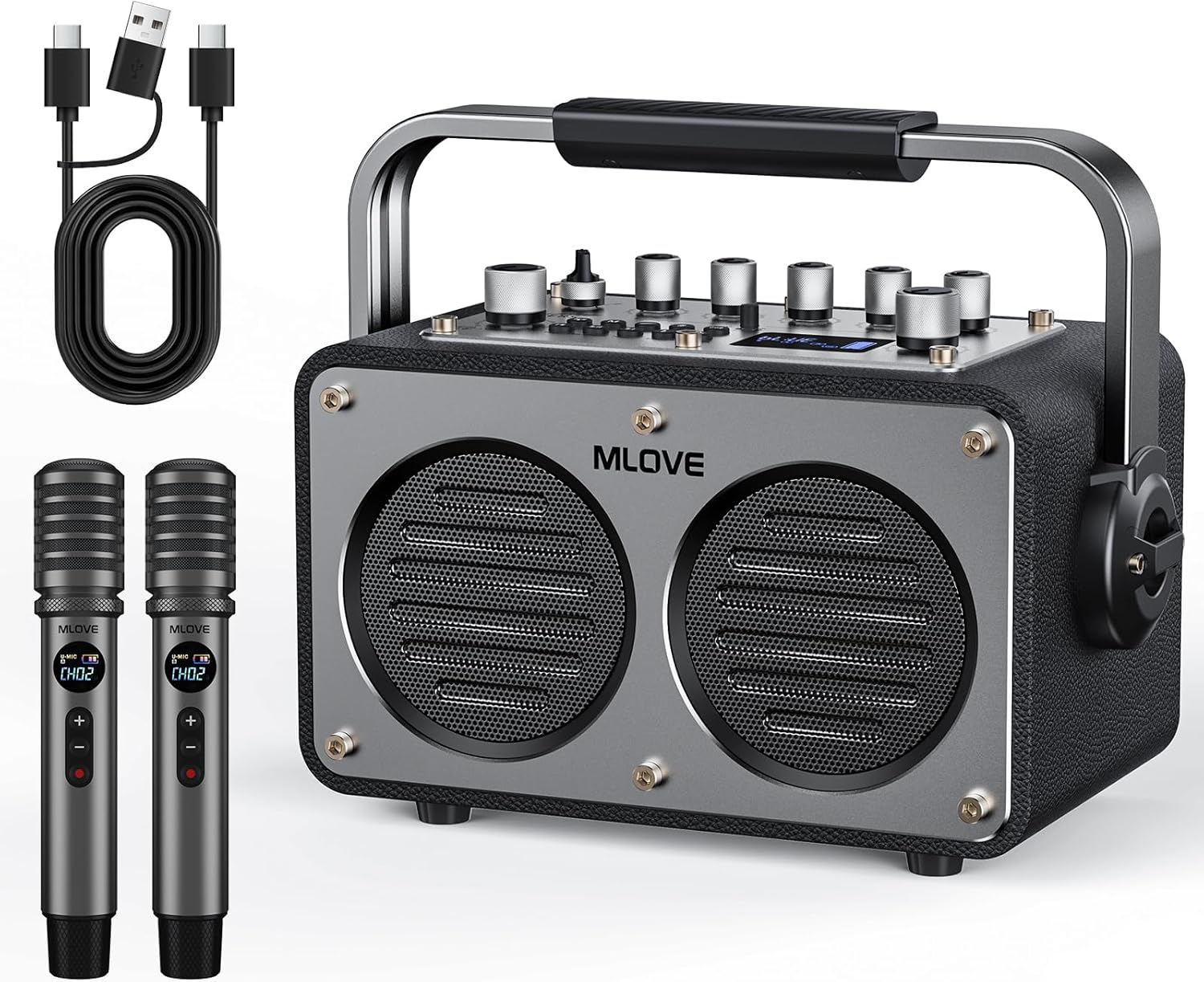
This image displays the complete package contents, including the MLOVE Karaoke Machine S1, two wireless microphones, a Type-C & USB cable, and an auxiliary cable. These are the essential items you will find upon unboxing your new karaoke system.
- MLOVE Karaoke Machine S1 (Main Unit)
- 2 x Wireless Microphones
- 1 x Type-C & USB Cable
- 1 x Auxiliary Cable
- User Manual (this document)
Product Overview
The MLOVE S1 features a robust design with intuitive controls and multiple connectivity options. Its compact size and integrated handle make it highly portable.

This image provides a detailed view of the control panel, highlighting the various knobs for volume, bass, treble, mic gain, and reverb, along with buttons for mode selection and vocal effects. The panel also features an aluminum alloy finish and a metal toggle switch for power.
Main Unit Features:
- Control Panel: Analog-style knobs for precise audio adjustments (Volume, Bass, Treble, Mic Gain, Reverb).
- Display: Blue LED dial for settings and channel information.
- Connectivity: Bluetooth 5.4, USB, AUX input, 6.35mm inputs for wired mic/instrument, USB-C OTG for streaming/recording, USB-C charging.
- Design: Premium leather-wrapped body, wooden cabinet, aluminum alloy panel, and a sturdy metal handle for portability.
- Power: 9000mAh battery for extended playtime.
Wireless Microphones:

This image focuses on the two wireless microphones, highlighting their HD display screens for channel and power status, and the convenient Type-C charging port. These microphones are designed for clear audio capture and long battery life.
- Battery Life: Over 30 hours of continuous use per charge.
- Features: Crystal-clear sound, EQ adjustment, mic volume control, gain control, vocal mode switching, mute function.
- Charging: Type-C charging port.
Setup Guide
Initial Charging:
- Connect the provided Type-C cable to the "USB-C Charging" port on the main unit and to a suitable USB power adapter (not included).
- Charge the unit fully before first use. The battery indicator will show charging status.
- Charge the wireless microphones using their respective Type-C ports.
Powering On/Off:
- To power on, flip the metal toggle switch on the control panel to the ON position.
- To power off, flip the metal toggle switch to the OFF position.
Pairing Wireless Microphones:
- Ensure the main unit is powered on.
- Power on each wireless microphone. They should automatically pair with the main unit.
- If pairing fails, refer to the microphone's individual instructions for manual pairing or channel selection.
Operating Instructions
Bluetooth Connection:
- Turn on the MLOVE S1.
- Press the 'M' (Mode) button on the control panel until "Bluetooth" mode is selected.
- On your smart device (phone, tablet, laptop), enable Bluetooth and search for "MLOVE S1".
- Select "MLOVE S1" to pair. A confirmation sound will indicate successful pairing.

This image illustrates the Bluetooth 5.4 connectivity of the MLOVE S1, showing it wirelessly connected to various devices like smartphones, tablets, and laptops, enabling seamless audio streaming for karaoke or music playback.
Using Microphones:
- Once paired, speak or sing into the wireless microphones.
- Adjust microphone volume using the dedicated knob on the main unit or the controls on the microphone itself.
- Use the EQ and vocal effect controls on the main unit to customize your sound.
- The DKA button can be used to attempt to remove vocals from songs, though effectiveness may vary by track.
Instrument Input:

This detailed diagram illustrates all available interface ports on the MLOVE S1, including 6.35mm inputs for microphones or instruments (CH1, CH2), USB Flash Drive port, 3.5mm Aux Input, USB-C OTG for streaming/recording, and USB-C Charging port. It shows how various devices like guitars, electronic organs, and headphones can be connected.
- Connect a wired microphone or musical instrument (e.g., guitar, keyboard) to the 6.35mm CH1 or CH2 input jacks.
- Adjust the gain and volume for the connected instrument using the corresponding knobs.
- Utilize the built-in EQ presets or manual sharp/flat tuning for optimal sound.
Recording Function:
- The unit supports recording performances. Connect a USB flash drive to the USB Disk port.
- Follow the specific recording instructions in the full manual (if available) or experiment with the control panel buttons for recording initiation.
Video Demonstration:
This video demonstrates the MLOVE S1 Karaoke speaker with microphone in use, showcasing its portability and sound capabilities in an outdoor setting. It highlights the ease of setup and operation for various activities.
Maintenance
- Clean the unit and microphones with a soft, dry cloth. Do not use abrasive cleaners or solvents.
- Store the device in a cool, dry place away from direct sunlight and extreme temperatures.
- Ensure all ports are free of dust and debris.
- Regularly charge the battery to maintain its health, even if not in frequent use.
Troubleshooting
| Problem | Possible Cause | Solution |
|---|---|---|
| No power | Battery drained; Power switch off | Charge the unit; Ensure power switch is ON. |
| No sound from speaker | Volume too low; Incorrect input mode; Device not paired (Bluetooth) | Increase volume; Select correct input mode (Bluetooth/AUX/USB); Re-pair Bluetooth device. |
| Microphone not working | Microphone battery low; Microphone not paired; Mic volume low | Charge microphone; Re-pair microphone; Increase mic volume on unit and mic. |
| Distorted sound | Volume too high; EQ settings incorrect | Lower volume; Adjust Bass/Treble/Gain settings. |
| Bluetooth disconnection | Device too far; Interference | Move device closer to the unit; Avoid obstacles or other wireless devices. |
Specifications
- Model: S1
- Brand: MLOVE
- Output Wattage: 200 Watts (Peak Power)
- Battery Capacity: 9000mAh (Main Unit)
- Playtime: Over 12 hours (Main Unit), Over 30 hours (Microphones)
- Bluetooth Version: 5.4
- Speaker Count: 2
- Product Dimensions: 2 x 10 x 2.7 inches
- Item Weight: 10.56 pounds
- Material Type: Aluminum (panel), Leather (body)
- Connector Types: USB Type C, 3.5 mm Jack, 6.35mm (for Mic/Instrument)
- Power Source: Battery Powered
- Voltage: 5 Volts
- Included Components: User Manual, Type-C & USB Cable, Microphones, Auxiliary Cable
Warranty and Support
For warranty information and technical support, please refer to the contact details provided on the product packaging or visit the official MLOVE website. Keep your purchase receipt as proof of purchase for any warranty claims.
MLOVE Store: Visit the MLOVE Store on Amazon
Related documentsS1


Ask a question about this manual
Ask about setup, troubleshooting, compatibility, parts, safety, or missing instructions. Manuals+ will review the question and use this page’s manual context to help answer it.