
1. Important Pre-Purchase Notice
This RainPoint 3-in-1 WiFi Soil Meter (SM-021-2024) is a sensor unit only and CANNOT be used alone. It requires a compatible RainPoint hub (models: HWG023, HWG023WBRF, or HWG040), which is sold separately. Additionally, a 2.4GHz Wi-Fi network and the RAINPOINT Home app are necessary for full remote monitoring functionality. This sensor is not compatible with the RainPoint Tuya app.

Figure 1.1: The RainPoint Soil Meter requires a compatible hub and 2.4GHz Wi-Fi network for operation.

Figure 1.2: Compatibility chart for the RainPoint Soil Meter, showing required app and compatible hubs.
2. Product Overview
The RainPoint 3-in-1 WiFi Soil Meter is designed to provide accurate, real-time data on critical plant growth factors. This wireless sensor monitors soil moisture, ambient air temperature, and light intensity, allowing you to optimize care for both indoor and outdoor plants.

Figure 2.1: Overview of the RainPoint 3-in-1 Smart Soil Meter's capabilities.
3. Setup Instructions
3.1 Unboxing and Initial Inspection
Carefully remove the soil meter from its packaging. Inspect the device for any visible damage. Ensure all components are present.
3.2 Installing the RAINPOINT Home App
- Download the RAINPOINT Home app from your smartphone's app store (iOS or Android).
- Register for a new account or log in if you already have one.
3.3 Pairing with a RainPoint Hub
The soil meter communicates wirelessly with a compatible RainPoint hub. Follow the instructions provided with your RainPoint hub (models HWG023, HWG023WBRF, or HWG040) to connect it to your 2.4GHz Wi-Fi network and then pair the soil meter sensor with the hub via the RAINPOINT Home app.
3.4 Sensor Placement
Insert the smooth, corrosion-resistant probe of the soil meter into the soil near your plant. Ensure the sensor is placed at a depth that accurately reflects the root zone moisture. The device is designed for both indoor and outdoor use, with an IP66 waterproof rating.

Figure 3.1: The sensor can be used for both indoor potted plants and outdoor garden areas.
4. Operating Instructions
4.1 Real-Time Monitoring
Once connected, open the RAINPOINT Home app to view real-time data for soil moisture, air temperature, and light intensity. The app provides an intuitive interface to monitor your plants' conditions from anywhere.

Figure 4.1: Access real-time plant data via the RAINPOINT Home app.
4.2 Setting Custom Smart Alerts
You can set personalized thresholds for moisture, temperature, and light within the app. The system will send instant notifications to your phone when these thresholds are met, helping you maintain optimal growing conditions.

Figure 4.2: Customize alerts for various plant conditions.

Figure 4.3: Step-by-step guide to setting up alerts in the app.
4.3 Historical Data Trends
The app provides visual charts of historical data for soil moisture, air temperature, and light levels. This allows you to monitor trends, adjust plant placement, and refine your watering routine over time.

Figure 4.4: Monitor soil moisture trends to prevent over or under-watering.

Figure 4.5: Monitor ambient temperature trends to protect plants from extreme conditions.

Figure 4.6: Monitor light intensity trends to ensure optimal plant placement.
4.4 Smart Auto-Watering Eco-System Integration
The soil meter can be paired with compatible RainPoint WiFi water timers (sold separately) to create an intelligent watering system. This system can automatically adjust watering based on real-time soil conditions, preventing overwatering.
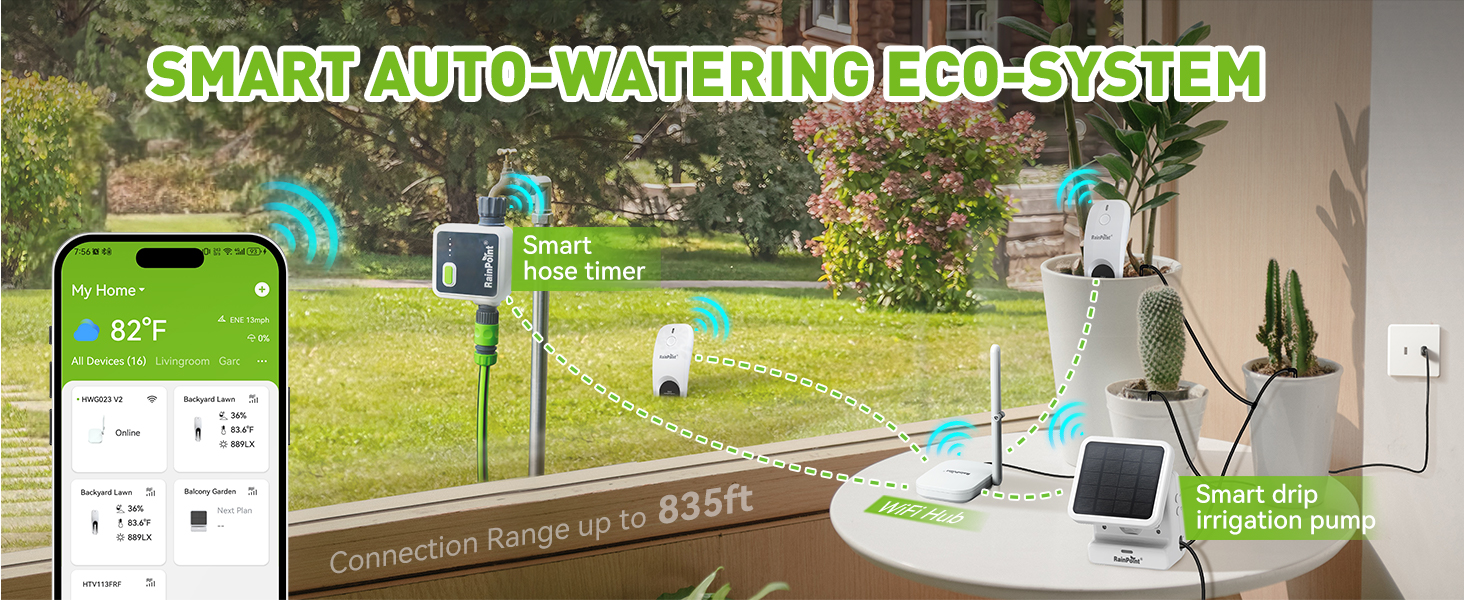
Figure 4.7: Integrate with other RainPoint devices for an automated watering system.
4.5 Monitoring Multiple Sensors
A single RainPoint hub can support up to 39 soil meter sensors, allowing you to monitor a large garden or multiple plants simultaneously. The transmission range is up to 853 feet (260m).

Figure 4.8: Monitor multiple soil meters with one hub.
4.6 Sharing Access
The RAINPOINT Home app allows you to share access to your device data with family and friends, enabling collaborative plant care.

Figure 4.9: Share device access with others.
5. Maintenance
5.1 Cleaning the Probe
To ensure accurate readings, periodically clean the sensor probe. Gently wipe off any soil residue or mineral buildup with a soft, damp cloth. Avoid using abrasive materials or harsh chemicals.
5.2 Battery Replacement
The device operates on batteries. When the battery level is low, you will receive an alert via the RAINPOINT Home app. Refer to the device's battery compartment for specific battery type and replacement instructions.
5.3 Environmental Considerations
The sensor is IP66 waterproof, making it suitable for outdoor use. However, ensure the top part of the device, where the electronics are housed, is not submerged for extended periods. Protect the device from extreme physical impact.
6. Troubleshooting
6.1 Sensor Not Connecting to Hub/App
- Check Hub Connection: Ensure your RainPoint hub is properly connected to power and your 2.4GHz Wi-Fi network. The hub should have a stable internet connection.
- Hub Compatibility: Verify that your hub model (HWG023, HWG023WBRF, HWG040) is compatible with this sensor.
- App Version: Ensure you are using the RAINPOINT Home app, not the RainPoint Tuya app. Update the app to the latest version.
- Proximity: Place the sensor closer to the hub during the pairing process.
- Reset: Try resetting both the sensor and the hub according to their respective manuals, then attempt pairing again.
6.2 Inaccurate Readings
- Clean Probe: Ensure the sensor probe is clean and free of dirt or mineral buildup.
- Proper Insertion: Make sure the probe is fully inserted into the soil at the appropriate depth for accurate moisture readings.
- Soil Type: Different soil types can affect readings. Ensure the sensor is calibrated or interpreted correctly for your specific soil.
- Obstructions: Ensure there are no physical obstructions or strong electromagnetic interference near the sensor or hub.
6.3 Alerts Not Working
- App Notifications: Check your phone's notification settings to ensure the RAINPOINT Home app has permission to send notifications.
- Alert Thresholds: Verify that your custom alert thresholds are set correctly within the app.
- Battery Level: Ensure the sensor has sufficient battery power.
- Hub Connection: Confirm the hub has a stable internet connection to send alerts.
7. Specifications
| Model Number | SM-021-2024 |
| Functions | Soil Moisture, Air Temperature, Light Intensity Monitoring |
| Connectivity | Requires RainPoint Hub (HWG023/HWG023WBRF/HWG040) and 2.4GHz Wi-Fi |
| App Compatibility | RAINPOINT Home App (Not compatible with RainPoint Tuya app) |
| Waterproof Rating | IP66 |
| Product Dimensions | 2.95 x 1.81 x 9.33 inches |
| Item Weight | 6.4 ounces |
| Manufacturer | RAINPOINT |

Figure 7.1: Dimensions and curved design of the soil meter.
8. Warranty and Support
RAINPOINT is committed to providing quality products and customer satisfaction. While specific warranty details are not provided in this manual, customer support is available 365 days a year for assistance with your product.
For technical support, troubleshooting, or warranty inquiries, please visit the official RAINPOINT website or contact their customer service directly. Refer to the product packaging or the RAINPOINT Home app for contact information.


