
1. Introduction
This manual provides detailed instructions for the setup, operation, and maintenance of your Haroar SAM-917 Universal Replacement Remote Control. This remote is designed to function as a direct replacement for various Samsung LCD TV models, offering enhanced features such as backlighting, dedicated NETFLIX access, and 3D functionality control.
Please read this manual thoroughly before using the remote control to ensure proper functionality and to maximize your viewing experience.
2. Safety Information
- Do not expose the remote control to direct sunlight, heat sources, or extreme temperatures.
- Avoid dropping the remote control or subjecting it to strong impacts.
- Do not immerse the remote control in water or any other liquid.
- Keep batteries out of reach of children. If swallowed, seek immediate medical attention.
- Dispose of used batteries according to local regulations. Do not dispose of batteries in fire.
- Do not mix old and new batteries, or different types of batteries.
3. Setup
3.1. Battery Installation
- Locate the battery compartment cover on the back of the remote control.
- Slide the cover downwards or press the latch and lift to open the compartment.
- Insert two AAA batteries (not included), ensuring the positive (+) and negative (-) terminals match the diagrams inside the compartment.
- Replace the battery compartment cover by sliding it back into place until it clicks securely.
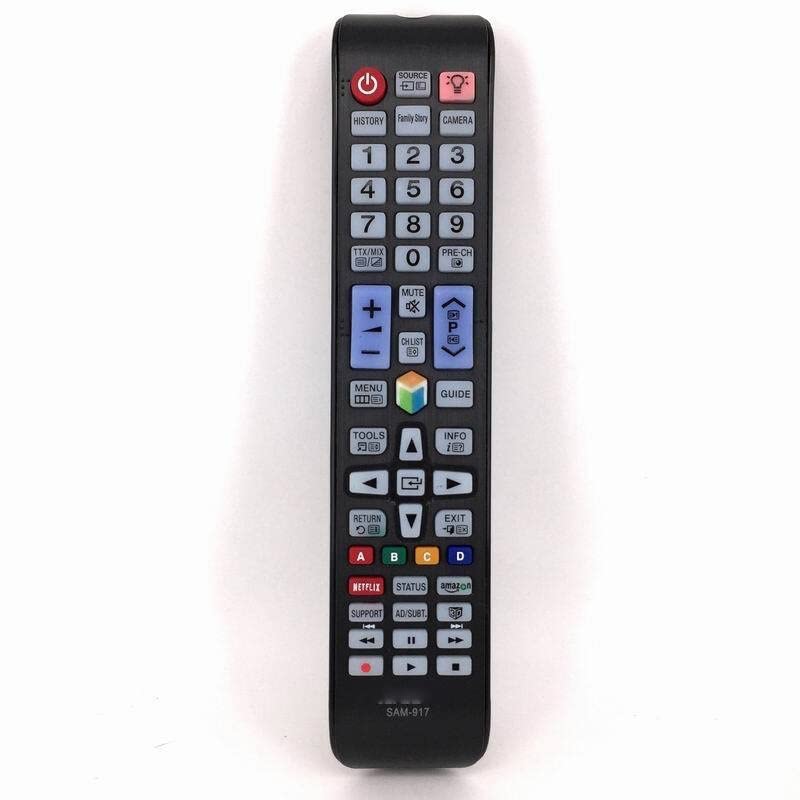
Image 1: Haroar SAM-917 remote control. The back of the remote shows the battery compartment, typically located at the bottom half, which slides open for battery insertion.
3.2. Initial Pairing/Configuration
The Haroar SAM-917 is a universal replacement remote control pre-programmed for Samsung LCD TVs. In most cases, it should work immediately after battery installation without any additional setup. Point the remote towards your Samsung TV and test basic functions like Power, Volume, and Channel.
If the remote does not respond, ensure there are no obstructions between the remote and the TV's infrared receiver. Verify that the batteries are correctly inserted and have sufficient charge.
4. Operating Instructions
This section outlines the primary functions of the buttons on your Haroar SAM-917 remote control.
4.1. Button Functions
- Power (●): Turns the TV on or off.
- Source: Selects input sources (HDMI, AV, Component, etc.).
- Volume Up/Down (VOL +/-): Adjusts the TV's volume level.
- Channel Up/Down (CH +/-): Changes TV channels.
- Mute: Mutes or unmutes the TV's audio.
- Number Pad (0-9): Directly enters channel numbers.
- Menu: Accesses the TV's main menu.
- Tools: Opens quick settings or context-sensitive menus.
- Info: Displays information about the current program or input.
- Navigation Pad (Up, Down, Left, Right, Enter): Navigates through menus and confirms selections.
- Return/Exit: Goes back to the previous menu or exits the current menu.
- Smart Hub/Home: Accesses the TV's Smart Hub or home screen.
- NETFLIX: Direct access button for the Netflix application.
- 3D: Activates or deactivates 3D mode (if supported by your TV and content).
- Backlight Button: Activates the remote control's backlight for use in low-light conditions. Press once to turn on, press again to turn off.
- Color Buttons (Red, Green, Yellow, Blue): Functionality varies depending on the TV model and current application (e.g., teletext, interactive services).
5. Maintenance
5.1. Cleaning the Remote Control
To clean the remote control, gently wipe its surface with a soft, dry cloth. For stubborn dirt, slightly dampen the cloth with water or a mild, non-abrasive cleaner. Do not use harsh chemicals, alcohol, or abrasive pads, as these can damage the remote's finish or internal components.
5.2. Battery Replacement
Replace the batteries when the remote control's performance degrades, or if the backlight becomes dim. Refer to section 3.1 for detailed battery installation instructions. Always replace both batteries simultaneously with new AAA batteries of the same type.
6. Troubleshooting
| Problem | Possible Cause | Solution |
|---|---|---|
| Remote control does not work. |
|
|
| Some buttons are unresponsive. |
|
|
| Backlight is dim or not working. |
|
|
7. Specifications
- Model: SAM-917
- Brand: Haroar
- Compatibility: Universal replacement for Samsung LCD TVs
- Power Source: 2 x AAA Batteries (not included)
- Dimensions (L x W x H): 1 x 1 x 1 cm (approximate, based on product data)
- Weight: 50 Grams (without batteries)
- Special Features: Backlight, NETFLIX direct access, 3D function control
- Country of Origin: China
8. Media Information
No official product videos are available for embedding in this manual.